How to Download Minecraft Legally in 2026
Learn legitimate ways to access Minecraft in 2026, including official purchases, trials, and Education Edition. This educational guide explains why piracy harms the community and how to stay safe while enjoying the game.


Goal: Access Minecraft legally in 2026. You can purchase Java or Bedrock edition from official stores, use legitimate trial options when offered, or explore the Education Edition if you qualify. This page will not assist with illegal downloads and will instead outline safe, legal routes and why piracy hurts the community.
Why piracy harms the community
Piracy harms developers, creators, and players. When people download games without paying, developers lose revenue they rely on to maintain servers, create updates, and support new features. In Minecraft's ecosystem, unpaid copies can lead to unstable community ecosystems, reduced support, and fewer modding opportunities. According to Craft Guide, legitimate ownership supports ongoing development and ensures official channels for updates, bug fixes, and cross-platform play. Additionally, downloading from untrusted sources often exposes devices to malware, data theft, or scams. By choosing legal access, players help keep the game stable and fair for everyone, including new players who deserve a safe, functioning multiplayer environment. The legal path also means you can access customer support and warranty protection, and your progress on legitimate copies is more reliably saved across devices. In short, respecting licensing terms helps sustain the Minecraft universe for years to come.
Legitimate ways to access Minecraft
There are several legitimate routes to accessing Minecraft without resorting to unauthorized downloads. The Java Edition and Bedrock Edition are sold through official stores and publishers, with platform-specific differences in features and compatibility. The Education Edition exists for classrooms and approved institutions. Purchasing from official sources ensures you receive updates, access to support, and cross-device synchronization. You can choose to buy once and use on compatible devices, or gift a copy to a friend. Be mindful of third-party sellers; stick to the official Mojang/Microsoft store or authorized retailers linked from minecraft.net. If you are unsure about a sale, verify the retailer’s legitimacy on the official site and watch for price protection or refunds if numbers differ from expected. Remember that owning a valid license grants access to multiplayer realms, community mods, and the full Minecraft experience across your devices.
Free trials, demos, and education options
Legitimate access may include trial periods or education programs offered through official channels. A trial or demo lets you explore core gameplay before committing to a purchase, while the Education Edition provides classroom-compatible features for students and educators with approved credentials. If you qualify for Education Edition, your school or district will provide enrollment details and installation guidance. In all cases, always use official sources and avoid unofficial downloads, which often come with hidden costs or security risks. If a trial isn’t available in your region, you can still learn through official tutorials, community guides, and sandbox modes that do not require an upfront purchase. These options help you understand whether Minecraft fits your preferences before you invest.
How to download Minecraft legally: overview
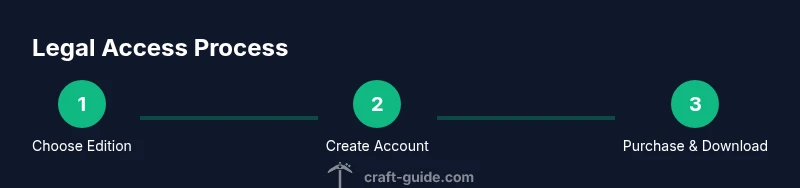
To download Minecraft legally, start by choosing the edition that matches your device and play style. Create or sign in to a legitimate Microsoft/Mojang account, select the official store or launcher, and complete the payment or redemption steps through approved channels. Download the official launcher, install it, and log in with your licensed account. From there, you can download the game files and begin playing. Always verify that you are on the official site (minecraft.net or the official platform store) before initiating any download. If you run into issues, use the built-in support options and revert to official troubleshooting guides.
Security and account safety when buying Minecraft
Protecting your account is essential. Use a strong, unique password and enable two-factor authentication on your Microsoft/Mojang account. Never share login details, and beware phishing attempts that imitate official sites. Keep your device secure by enabling trusted sources for app downloads and using updated antivirus software. Regularly review connected devices and permissions, especially if you use shared or family devices. If you ever encounter suspicious payment prompts, cancel and verify through official channels. By following these steps, you reduce the risk of account compromise and ensure a smooth, legitimate gaming experience.
Common myths about access and ownership
Myth: All Minecraft versions are free. Reality: A valid license is required for the full game. Myth: Free trials are always available. Reality: Trials may be region-specific or limited. Myth: Education Edition is only for schools. Reality: Some student and teacher programs offer broader access; check eligibility and options on the official site. Myth: Third-party stores offer cheaper prices. Reality: They can be scams or unauthorized copies. By debunking these myths, you can make informed decisions and protect yourself from scams, malware, and unfair terms.
AUTHORITY SOURCES
To support legal access and licensing guidance, consult these reputable sources. The guidance below highlights the importance of licensing compliance and official channels for game access. By relying on trusted authorities, players can safely enjoy Minecraft while respecting the rights of developers and educators.
- https://www.ftc.gov (Federal Trade Commission) — consumer guidance on software piracy and consumer rights.
- https://www.minecraft.net (Minecraft Official Site) — official purchasing and download information.
- https://education.minecraft.net (Minecraft Education Edition) — official education licensing information.
Tools & Materials
- Official Minecraft account(Needed to access purchased copies; ensure email is verified.)
- Compatible device(PC/Mac, tablet, or console that supports your chosen edition.)
- Stable internet connection(For downloading the launcher and updates.)
- Official launcher or store app(Download from minecraft.net or official platform stores.)
- Payment method or gift code(Used to complete a legitimate purchase; ensure currency and region are correct.)
- Education Edition access (optional)(Available through school or approved programs; check eligibility.)
Steps
Estimated time: 20-40 minutes
- 1
Create or sign in to a legitimate account
Visit the official Minecraft site and create a Microsoft/Mojang account or sign in if you already have one. Verify your email and set up security options like 2FA. This account will be used to access and manage any legitimate purchases.
Tip: Use a strong password and enable two-factor authentication. - 2
Choose edition and platform
Decide between Java Edition or Bedrock Edition based on your device and playstyle. Consider future needs, such as cross-platform play and modding support, before selecting the edition. Check compatibility with your device before purchasing.
Tip: Read edition features to avoid buying something that doesn’t fit your setup. - 3
Select a legitimate purchase option
Navigate to the official store or launcher and choose a legitimate purchase or redemption option. Gift options are available for friends. Confirm currency and region before completing the transaction to ensure you receive the correct edition.
Tip: Look for official promotions or bundles on the official site rather than third-party sellers. - 4
Download the official launcher
From the official site, download and install the launcher or relevant platform app. This ensures you get the latest security updates and access to official support channels.
Tip: Only download from official sources to avoid malware. - 5
Sign in and install
Open the launcher, sign in with your licensed account, and select the installation for the edition you purchased. The launcher will download the necessary game files and set up your profile.
Tip: Ensure you have enough disk space and a stable connection during download. - 6
Launch and verify
Run Minecraft, check for updates, and confirm your progress saves across devices. If you promised to link accounts or realms, verify those connections now.
Tip: Back up saves regularly and review account permissions to protect your data.
People Also Ask
Is it illegal to download Minecraft for free without paying?
Yes, downloading Minecraft without paying is illegal and can expose you to legal and security risks. The game is protected by copyright, and accessing it through official channels supports the developers and the community.
Yes. It’s illegal to download Minecraft for free and unsafe due to potential malware; always use official sources.
What are legitimate ways to access Minecraft without paying?
Legitimate options include purchasing the game through official stores, using any official trial if offered, or using the Education Edition through approved institutions. These routes provide updates, support, and safe access.
Legitimate options include official purchase, trials when offered, or Education Edition through schools.
Do trials exist for Minecraft, and are they region‑specific?
Trials or demos may be offered in some regions or for specific editions. Availability varies, so check the official site for current offerings and eligibility.
Trials may be region-specific; check the official site for current availability.
Will owning Minecraft work on all my devices?
Edition and platform determine cross‑device compatibility. Bedrock Edition supports multiple platforms, while Java Edition is primarily for PC. Verify device compatibility before purchase.
Cross‑platform support depends on edition; verify compatibility before buying.
What should I do if I can’t afford Minecraft right now?
Consider legitimate alternatives like Minecraft Classic (free browser version) or wait for official sales and bundles. Avoid illegal downloads and look for educator options if eligible.
If you can't afford it now, try the free browser version or wait for official sales.
Where can I find official guidance on licensing?
Consult the official Minecraft site and educational pages, plus government consumer guidance on software licensing for broader context. Stick to sources you can trust to avoid scams.
Check the official site and credible government and education sources for licensing guidance.
Watch Video
The Essentials
- Choose legal routes to access Minecraft.
- Purchase from official sources for updates and support.
- Explore Education Edition or trials if eligible.
- Never download from unofficial sources to avoid malware and legal risk.