Does Minecraft Need RAM? A Practical 2026 Guidebook
Explore how much RAM Minecraft needs across Java and Bedrock, with practical allocation tips for vanilla and modded worlds in 2026.


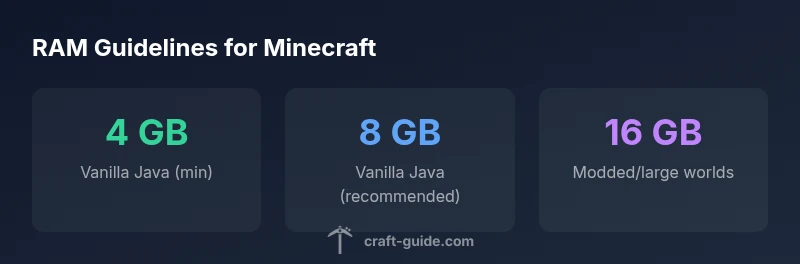
Minecraft RAM needs vary by edition and load. For vanilla Java, allocate at least 4 GB for smooth play, with 2 GB as a minimal baseline. Modded setups and large worlds benefit from 8–12 GB or more, while Bedrock typically uses less memory. Proper RAM management reduces stuttering and crashes and keeps worlds loaded reliably.
Understanding RAM and Minecraft
According to Craft Guide, RAM is the short-term workspace your computer uses to run Minecraft and other programs. RAM is fast but limited, and Minecraft’s memory footprint depends on edition, world size, and the number of active mods or resource packs. The game allocates memory through the Java Virtual Machine (for Java Edition) or the engine in Bedrock. A balanced RAM plan considers the OS, background apps, and the game’s current load, ensuring chunks load smoothly without thrashing the memory pool. This section lays the foundation for practical allocation strategies, emphasizing that more RAM isn’t always better if it starves other processes.
How Minecraft uses memory under the hood
Minecraft loads chunks, entities, and tile entities in memory. Each loaded chunk carries various data, including block states, entities, and lighting. In vanilla setups, the primary driver of RAM consumption is world size and distance loaded around the player. Mods and plugins add complexity: larger mod stacks increase memory usage for class loading, new item textures, and additional world data. Java's garbage collection strategy also influences how quickly memory is reclaimed. In short, RAM usage scales with world complexity, and careful allocation helps prevent pauses when exploring or building massive structures.
RAM allocation strategies: min, recommended, modded
A practical RAM strategy starts with a minimum allocation that allows the OS and other apps to breathe. For vanilla Java, 4 GB is a solid starting point, while 2 GB is a bare floor for light usage. If you run a few mods or larger worlds, move into the 8 GB range, stepping up to 12–16 GB for heavy modpacks or high-resolution texture packs. Bedrock Edition generally consumes less RAM, so a baseline of 2–4 GB is often sufficient. The key is to monitor performance and avoid forced over-allocation that leaves the system starved for memory.
Edition differences: Java vs Bedrock
Java Edition relies on the JVM, which can have higher memory overhead but offers deeper mod compatibility and more configurable performance. Bedrock Edition runs with a more optimized engine that typically uses less RAM for similar worlds. This means Java players often need more headroom when modded or running large seed explorations, while Bedrock players may get up to stable performance with less RAM if their worlds are moderately sized. Understanding these differences helps tailor RAM budgets to the edition you play.
Modded vs Vanilla: world size, entity counts, chunk loading
Modded worlds can dramatically increase RAM demand due to additional blocks, items, and world generation logic. Forge and Fabric mods add new systems that expand memory usage for chunk caches, entity lists, and rendering. Large vanilla worlds can also push RAM higher due to expansive terrain and many loaded chunks. If you’re planning a long-term world or a server with several players, allocate RAM headroom that accommodates peak activity, not just average usage. This approach minimizes stutters during exploration, building, or combat.
System considerations: CPU, storage, and Java version
RAM does not act alone. A strong CPU helps with world generation and entity handling, while fast storage reduces loading times and texture streaming. A 64-bit OS and a current Java version (for Java Edition) improve memory addressing, GC efficiency, and stability. When diagnosing performance, consider the balance among RAM, CPU, and disk I/O. In some cases, increasing RAM yields diminishing returns if the CPU or disk becomes bottlenecks. Craft Guide emphasizes a holistic view rather than RAM alone.
Practical RAM optimization steps: JVM flags and best practices
Starting with sensible defaults is best: avoid allocating all system RAM to Minecraft. A common approach is to set a minimum (Xms) and a maximum (Xmx) within safe bounds, such as 4–8 GB for vanilla and 8–16 GB for modded setups. Use a 64‑bit Java installation to enable larger heaps and consider modern garbage collectors (ZGC or G1) if available. Regularly update texture packs and mods to reduce unnecessary memory load. Finally, enable lazy chunk loading or reduce view distance to control peak RAM usage when needed.
Diagnosing RAM-related performance issues
If stuttering or freezes occur, start by checking RAM usage with a system monitor while playing. If RAM consistently maxes out, allocate more headroom or reduce load by lowering view distance, disabling heavy mods, or installing a smaller texture pack. Also verify that background programs aren’t eating memory. If you still see issues, run a clean Java profile to identify memory leaks or mod incompatibilities. In many cases, incremental RAM adjustments and targeted optimizations resolve most problems.
Common misconceptions and best practices
A common myth is that more RAM always equals better FPS. In reality, performance depends on CPUs, GPUs, and software efficiency. Another misconception is that you must allocate every available gigabyte to Minecraft; leaving headroom for the OS and background apps prevents system thrashing. The best practice is a balanced RAM budget, tested with real gameplay sessions, and periodic tuning as you add mods or upgrade hardware.
Step-by-step quick start for RAM planning
- Identify your edition (Java or Bedrock) and mod load. 2) Check your current RAM usage during typical play. 3) Start with 4 GB for vanilla Java, 2–4 GB for Bedrock. 4) If modded, increment by 2–4 GB and test. 5) Monitor performance and adjust view distance or mod count as needed. 6) Maintain OS memory headroom by keeping 10–20% free RAM available for background tasks.
RAM allocation ranges by Minecraft edition
| Edition | Avg RAM Allocation | Recommended RAM | Notes |
|---|---|---|---|
| Vanilla Java (1+ players) | 2-4 GB | 4-8 GB | Cross-section of basic worlds |
| Vanilla Java (modded) | 6-12 GB | 8-16 GB | Forge/Fabric plus large seeds |
| Minecraft Bedrock | 1-2 GB | 2-4 GB | Typically leaner memory usage |
People Also Ask
What is the minimum RAM Minecraft needs?
For Vanilla Java, a practical minimum is 2–4 GB, but 4 GB is recommended for smoother gameplay. If you run mods, you’ll likely need more headroom.
The minimum is about 2 to 4 gigabytes for vanilla, with higher needs if you’re modding.
Does Bedrock Edition use less RAM than Java?
Yes. Bedrock generally uses less memory due to its optimized engine, though real-world needs depend on world size and features enabled.
Bedrock usually uses less RAM than Java, depending on your settings and world size.
Should I allocate all my RAM to Minecraft?
No. Leave headroom for the operating system and other applications. Allocating everything can cause system instability.
Don’t give Minecraft all your RAM—leave some for the rest of your computer.
How can I optimize RAM for mod packs?
Increase RAM gradually, ensure a 64-bit Java, and consider garbage-collector options. Reducing active mods can also help.
Increase RAM in steps and use a 64-bit Java; trim mods if you hit limits.
Will more RAM always improve FPS?
Not always. FPS depends on CPU, GPU, and software efficiency. RAM mainly reduces stutter and loading delays.
More RAM helps to avoid stuttering, but it won’t always raise FPS if other bottlenecks exist.
“RAM is the lifeblood of expansive Minecraft worlds; allocate enough to keep chunks loaded, but leave headroom for the system to breathe.”
The Essentials
- Allocate RAM based on edition and load test results
- Don’t starve the OS with too much memory for Minecraft
- Modded setups require more headroom than vanilla
- Monitor RAM usage and adjust view distance accordingly
- Balance CPU, storage, and RAM for best FPS