Does Minecraft Need VRAM? Understanding Video RAM for Performance
Explore how VRAM affects Minecraft performance across Java and Bedrock, with practical ranges for textures, shaders, and large worlds. Learn how to estimate needs and optimize settings for smoother gameplay.


Does Minecraft need VRAM? Not a fixed requirement—VRAM needs vary by settings and world size. Minecraft uses the GPU's video memory to store textures, shaders, and frame data, so more VRAM helps with higher resolutions and complex packs. At 1080p with vanilla textures, most GPUs handle the game comfortably; enabling high-res texture packs, optifine shaders, or large modded worlds significantly increases VRAM usage. In short, plan VRAM around your texture and shader choices.
Why VRAM matters for Minecraft
Video RAM (VRAM) is the dedicated memory on a GPU used to store textures, frame buffers, shading data, and other graphics assets. In Minecraft, VRAM acts as the primary limiter for texture detail, shader complexity, and render distance. If VRAM runs out, the game can drop texture quality, stutter, or reduce frame rates as the GPU offloads data to slower memory pools. According to Craft Guide, VRAM capacity often determines the highest practical texture resolution and shader fidelity you can use without compromising smooth gameplay. For players on laptops or budget GPUs, modest VRAM (2-4 GB) can run vanilla Minecraft, but pushing textures or using shader packs tends to push VRAM requirements higher. Also note that driver memory management and launcher settings affect how much VRAM is allocated up-front versus dynamically during play.
Beyond raw memory, the balance between VRAM and system RAM matters for large worlds and heavy mods. A system with ample VRAM but limited CPU power can still bottleneck performance, while a GPU with generous VRAM paired with a weak CPU can lead to stuttering during chunk generation. The takeaway is that VRAM is a practical ceiling for image quality in Minecraft; keep expectations aligned with texture sizes, shader packages, and world size.
Craft Guide emphasizes testing different texture packs and shader presets to see how your specific hardware handles them, rather than chasing a single “recommended” VRAM figure.
How Minecraft uses VRAM across editions
Minecraft Java Edition and Bedrock Edition approach graphics differently, which affects VRAM consumption. Java often relies on the JVM and OpenGL, making texture packs and shader mod combinations the primary drivers of VRAM usage. Bedrock, by contrast, uses a different rendering pipeline and tends to be more memory-efficient in some scenarios, but shader packs and add-ons can still push VRAM demand when you enable high-quality assets. The result is that VRAM planning should be edition-aware: Java players typically experience higher variability with mods and resource packs, while Bedrock players may benefit from optimized packs designed for lighter GPUs. Regardless of edition, enabling realistic render distances and high-resolution textures will increase VRAM use more than most other settings.
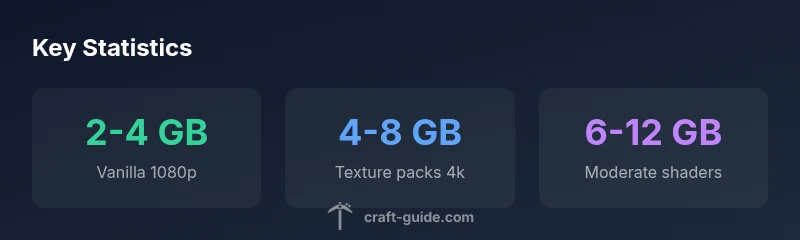
Editorially, Craft Guide notes that shader-heavy worlds tend to push VRAM higher than texture packs alone. If you’re aiming for that blockbuster Minecraft look, preparing for 6-12 GB of VRAM with shaders is a reasonable expectation on mid-to-high-end GPUs, while vanilla play typically stays within a 2-4 GB band at 1080p.
How to estimate your VRAM needs
Estimating VRAM needs starts with your target resolution and texture quality. A practical workflow:
- Start with the base texture pack (vanilla) and a modest render distance (12-16 chunks).
- Add a texture pack of moderate resolution (e.g., 32x) and monitor VRAM usage.
- Introduce shaders and a shader pack with moderate complexity; track changes in VRAM usage.
- If you plan larger worlds or additional mods, anticipate higher VRAM overhead and adjust accordingly.
You can gauge actual usage by checking GPU monitoring tools within your OS or through third-party utilities. Craft Guide’s testing indicates vanilla 1080p with standard textures typically stays within 2-4 GB on many GPUs, but 4-8 GB becomes common once texture packs push beyond 64x and shaders add lighting and post-processing. The key is to watch VRAM usage as you toggle settings and to keep a buffer for peak usage during world loading and chunk generation.
Practical configuration tips to optimize VRAM
Optimization is the art of balancing image quality with smooth gameplay. Consider these practical steps:
- Start with a base texture pack and a conservative render distance; gradually increase both to observe VRAM impact.
- Prefer medium to high-quality texture packs before jumping to 4K or higher; avoid multiple high-res packs simultaneously.
- If shaders are desired, choose ones designed for performance or enable only essential shader features (shadows, ambient occlusion) to limit VRAM spikes.
- Use OptiFine or similar tools to customize textures and optimize memory usage; enable dynamic lighting and reduce post-processing effects if necessary.
- For mods, review each mod’s texture footprint; some mods add new textures that multiply VRAM usage, especially if many blocks are added.
- In launcher settings, allocate an appropriate amount of VRAM; do not allocate excessively if your GPU has limited memory, as this can starve the rest of the system and degrade performance.
According to Craft Guide, a careful, incremental approach lets you discover the sweet spot for visuals without sacrificing performance. Regularly testing with both vanilla and packed setups helps you understand how your system responds to changes.
Data-driven expectations: typical VRAM ranges by scenario
The following table summarizes common VRAM expectations based on texture and shader configurations. Use it as a starting point, but verify on your own hardware.
- Vanilla 1080p: 2-4 GB
- Light texture packs (32x-64x): 3-5 GB
- Moderate shader packs: 6-12 GB
- High-resolution textures (128x+): 4-8 GB (textures) plus shader overhead
- Large modded worlds: 8-16 GB
Always reserve some headroom; real-world usage can spike during world loading or large builds. Craft Guide emphasizes evaluating your actual usage with your preferred settings to establish a personal baseline.
Data table and quick-reference guide
Authority and sources section
This guide references practical observations from Craft Guide and cross-checks with public GPU guidance from major publications to help you gauge VRAM needs in Minecraft. For further reading, see sources listed at the end of this article.
Key takeaways for quick planning
- VRAM needs rise with texture packs and shader fidelity.
- Vanilla 1080p play can run on modest VRAM; high-end visuals require more.
- Always test settings incrementally and monitor VRAM usage in real time to avoid stutters.
Authority sources
- https://www.tomshardware.com
- https://www.howtogeek.com
- https://www.pcgamer.com
Typical Minecraft VRAM scenarios by texture and shader load
| Scenario | Typical VRAM Use | Notes |
|---|---|---|
| Vanilla 1080p | 2-4 GB | Default textures, no shaders |
| Texture packs 4k | 4-8 GB | Higher texture data |
| Shaders (moderate) | 6-12 GB | Lighting and post-processing |
| Large modded worlds | 8-16 GB | Many new textures + mods |
People Also Ask
Does VRAM affect FPS in Minecraft?
Yes, VRAM can influence frame rates when your GPU runs out of memory and must swap data or reduce quality. Adequate VRAM helps maintain stable FPS, especially with high-resolution textures or shaders. Optimize by balancing texture quality and render distance.
Yes. If you run out of VRAM, you’ll see stutters. Keeping VRAM in reserve with sensible texture quality and render distance helps maintain smooth FPS.
How can I check VRAM usage in-game?
Use GPU monitoring tools or the in-game profiler provided by your graphics driver to observe VRAM usage. Many players pair this with a real-time FPS counter to correlate memory usage with performance.
Most GPUs offer on-screen overlays to display VRAM usage alongside FPS. Enable it in your driver software to monitor as you play.
Does Bedrock need different VRAM than Java?
There are differences in rendering pipelines, which can affect memory behavior. Java generally benefits more from higher VRAM when mods and high-resolution textures are involved, while Bedrock is typically more memory-efficient at comparable settings.
Java tends to use more VRAM when you push textures and shaders. Bedrock can be lighter on memory, but heavy resource packs still raise VRAM needs.
Is VRAM more important than system RAM for Minecraft?
VRAM is more directly tied to graphics detail and frame rendering, while system RAM supports world data and game logic. A balance is ideal; neglecting VRAM can cause texture pops and stuttering even if you have plenty of system RAM.
VRAM governs graphics quality and stability; insufficient VRAM can cause stutters even with ample system RAM.
Will allocating more VRAM boost performance even with a low-end GPU?
Allocating more VRAM generally helps when the GPU has enough physical VRAM to spare. On budget GPUs with limited VRAM, increasing allocation beyond what the hardware supports yields diminishing returns and can harm overall performance.
If your GPU already has limited VRAM, giving it more headroom may not improve performance much. It’s better to optimize textures and distance.
“VRAM is the practical ceiling for Minecraft visuals; you don’t want to max out VRAM and still face stutter during chunk loads.”
The Essentials
- VRAM scales with texture and shader quality
- Vanilla play uses less VRAM than shader-heavy setups
- Test incrementally and monitor VRAM usage
- Reserve VRAM headroom to prevent stutters
- Bedrock vs Java slightly differ in memory behavior