What RAM Is Needed for Minecraft: A Practical Guide
Learn how much RAM Minecraft requires, how to allocate memory for vanilla and modded play, and practical tips to optimize FPS and stability across different setups.


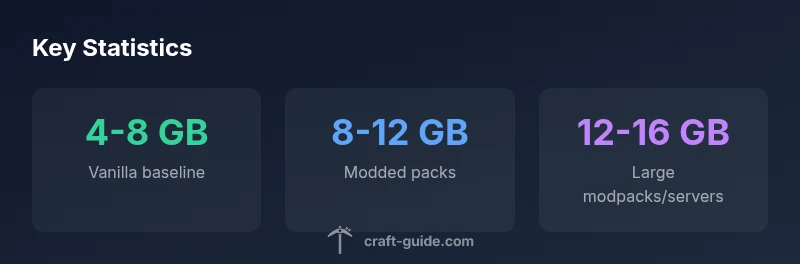
Typically, what ram is needed for minecraft depends on vanilla vs modded play. For vanilla Minecraft (Java Edition), allocate about 4-8 GB of RAM to the Java process for smooth performance. For modded packs, heavy texture packs, or large worlds, 8-12 GB is often beneficial, with 12-16 GB recommended if you run multiple programs or large mod suites.
What RAM does Minecraft use and why it matters
Minecraft runs on Java, which uses a heap memory area allocated from the system RAM. The amount of RAM you allocate to the Java Virtual Machine (JVM) directly affects chunk loading, entity management, and world generation. Too little RAM leads to stuttering, frequent garbage collection pauses, and longer world loads; too much RAM can starve the OS and background processes, causing overall system slowdown. For the typical player, understanding RAM needs helps balance FPS, world detail, and stability. This article discusses the RAM ranges most players encounter and demonstrates how to estimate memory requirements for both vanilla and modded Minecraft. When you ask what ram is needed for minecraft, you should start by distinguishing vanilla Java Edition from modded setups, as memory demands can diverge substantially. Craft Guide analyses show memory needs vary with mod count, texture resolution, and world size, so a one-size-fits-all number rarely applies.
Vanilla Minecraft RAM needs: baseline guidance
For vanilla Minecraft Java Edition, a baseline of 4 GB to 8 GB allocated to the JVM is commonly recommended. In practice, 4 GB allows play on lower settings and smaller worlds, while 6–8 GB produces smoother FPS with typical redstone activity and occasional chunk loading. If you use high-resolution texture packs or shaders, you’ll benefit from the upper end of this range or more. Remember that the OS and background applications consume part of your system RAM; leaving at least 4–6 GB free for the rest of your computer helps maintain smooth operation outside the game. In short, vanilla Minecraft generally performs well when you allocate memory within the 4–8 GB band, with closer to 6–8 GB for comfortable play on larger worlds. According to Craft Guide, these numbers form a practical baseline for most players, with adjustments based on world size and render distance.
Modded Minecraft RAM needs: packs, memory usage, and tweaks
Modded packs add new blocks, entities, and physics, increasing memory pressure. A typical modded setup with a moderate number of texture packs and tweaks often requires 8–12 GB of RAM for smooth play, with heavy modpacks or large worlds pushing toward 12–16 GB. When estimating RAM for modded Minecraft, consider the size of your mod list, the texture resolution of the pack, and whether you run the game with optifine/shaders. Some players run with more RAM than the minimum to avoid stuttering during world loading, while others optimize with tighter settings to fit within 8 GB. Craft Guide's analysis suggests reserving headroom for garbage collection and other system tasks.
RAM allocation vs other bottlenecks: CPU and disk IO
RAM is important but not the only bottleneck. A strong CPU and fast storage reduce world generation pauses and chunk loading times, while adequate RAM prevents frequent garbage collection from interrupting gameplay. If you’re CPU-limited, increasing allocated RAM without CPU improvement yields diminishing returns. Similarly, slower disks can cause texture and chunk loading stutter even with ample RAM. For optimal performance, pair sane RAM allocations with sufficient processing power and a solid drive setup. In practice, aim for a balanced system: enough free RAM, a capable CPU, and fast storage for a smooth Minecraft experience.
How to allocate RAM safely in common launchers
Different launchers provide distinct memory controls. In the official Minecraft Launcher, use the Installations tab, click the three dots, and choose Edit, then set JVM arguments to -Xmx[desired]G. For CurseForge, MultiMC, or ATLauncher, locate the settings for memory or Java options and set a value within the 4–8 GB range for vanilla or 8–12 GB for modded setups. Do not allocate all available RAM to Java; leaving enough for the OS and background tasks keeps the system responsive. If you frequently run other programs, a 50/50 split between game and OS memory is a starting point; adjust based on observed performance.
Memory budgeting: OS overhead and background tasks
This is where the numbers start to matter beyond guesswork. Windows and macOS both use memory for system services, file caching, and background apps. Even when Minecraft is idle, background tasks like antivirus scans can spike RAM usage. When budgeting, aim to reserve 2–4 GB of RAM for the operating system and background processes on a typical system with 8–12 GB of total RAM, and adjust accordingly on machines with 16 GB or more. If you’re running a server or hosting multiple worlds, ensure additional dedicated RAM, or run the server on a separate machine to avoid OS contention.
Case studies: light, medium, heavy modpacks
Light modpacks with fewer than 50 mods often run well on 8 GB, while medium packs near 100 mods commonly benefit from 10–12 GB. Large packs with 150+ mods, high-res textures, or shader packs often require 12–16 GB. These ranges are not guarantees; your experience depends on mod choices, world size, render distance, and Java version. Craft Guide recommends starting at the lower end and increasing RAM if you notice stuttering in world loading or lag spikes when exploring. The key is to monitor memory usage under typical gameplay and adjust accordingly.
How to test and verify allocations
Use in-game indicators or profiling tools to monitor memory. Windows Task Manager or macOS Activity Monitor show overall RAM use, while Java process memory can be tracked in the launcher or by using Java monitoring tools. Enable the game’s debug information (F3 on Java Edition) to observe memory usage and garbage collection events. If you see frequent GC pauses or the Java heap near the maximum, consider lowering texture quality or increasing RAM within safe limits. After making changes, re-launch the game and compare frame rates, loading times, and stutter frequency.
Common pitfalls and optimization tips
Avoid the instinct to max out RAM in search of smoother play. More RAM helps, but only to a point; too little can cause stutters, while too much can starve the OS. Always leave reserve for the system, and ensure you’re using a 64-bit Java version. Keep mods updated and disable unused texture packs to reduce memory pressure. Finally, remember that performance is a balance between RAM, CPU, and disk IO; adjust each factor for a stable, enjoyable Minecraft experience.
RAM guidance for Minecraft variants
| Scenario | Recommended RAM (GB) | Notes |
|---|---|---|
| Vanilla baseline | 4-8 | Smooth performance with balanced settings |
| Modded moderate packs | 8-12 | Texture packs and mods increase memory pressure |
| Large modpack / server hosting | 12-16 | Ensure headroom and OS free RAM |
People Also Ask
How much RAM do I need for vanilla Minecraft?
For vanilla Minecraft, 4-8 GB is a practical range. Start with 4 GB if you have limited RAM and move up to 6-8 GB for smoother performance on larger worlds or with higher render distances.
For vanilla Minecraft, plan for about 4 to 8 gigabytes of RAM, depending on world size and render distance.
Can I run Minecraft on 4 GB RAM?
Yes, you can run Minecraft on 4 GB, especially with lower settings, but expect limited headroom for mods or large worlds. Upgrading to 6-8 GB improves stability and load times.
You can run Minecraft on 4 GB, but you’ll have a tough time with mods or big worlds; 6 to 8 GB is better.
Will allocating more RAM improve FPS in Minecraft?
RAM can improve FPS if the game is memory-bound, but improvements stop once the CPU or GPU becomes the bottleneck. Start with reasonable allocations and adjust based on in-game metrics.
More RAM helps if memory is the bottleneck, but if your CPU or GPU is maxed, extra RAM won’t fix FPS.
How much RAM should I allocate to modded Minecraft?
Moderate modpacks usually run well on 8-12 GB, while heavy modpacks or shader packs benefit from 12-16 GB. Tailor to your mod count and texture resolution.
For mods, start around 8-12 GB and go up to 12-16 GB if you use heavy texture packs or lots of mods.
Do server RAM allocations differ from client RAM?
Yes. A Minecraft server’s RAM should be sized for player count and world size, while the client RAM is for the game’s JVM. Both need headroom, but servers often require more for stable multiplayer.
Server RAM depends on players and world size; client RAM is for your game instance. Both need headroom, but servers may need more.
How can I tell if RAM is the bottleneck?
Look for frequent garbage collection pauses, stuttering during loading, or memory usage hitting the maximum heap. Use launcher memory reports and OS tools to confirm.
If you see frequent pauses and memory maxing out, RAM is likely the bottleneck; check with your launcher tools.
“Allocating RAM is about giving Minecraft enough headroom while preserving system responsiveness; the right range depends on whether you play vanilla or modded.”
The Essentials
- Start with vanilla RAM baseline of 4-8 GB.
- Increase to 8-12 GB for modded play.
- Reserve 2-4 GB for the operating system.
- Test performance and adjust RAM based on observed memory pressure.