How to Play Minecraft Comes Alive: A Practical Guide
Discover how to install and play minecraft comes alive, including setup steps, villager interactions, quests, dating mechanics, and practical tips for beginners.


You will learn how to install Minecraft Comes Alive, enable the mod in your launcher, and how to interact with villagers through quests, marriages, and new roles. This quick guide covers setting up the mod, obtaining required resources, and basic survival tips to start a thriving town. You’ll also learn troubleshooting steps for common issues and how to balance living villagers with your existing world.
What Minecraft Comes Alive Adds to Your World
Minecraft Comes Alive reshapes villagers into living NPCs with names, backstories, and quests. Instead of simple trades, villagers offer relationships, tasks, and romance options that affect your village’s growth and your world’s narrative. This adds a new layer of roleplay to survival and creative builds, letting you decide who becomes the town leader, who runs shops, and how families form. According to Craft Guide, the mod emphasizes player choice, world balance, and compatibility with vanilla mechanics, so you can enjoy a richer story without sacrificing performance. Start small: assign a guard, a healer, and a quest-giver, then gradually expand your town as villagers develop relationships and children appear. On balance, the Comes Alive system rewards exploration, dialogue, and strategic resource management, turning a quiet village into a living, evolving community. If you’re curious how to play minecraft comes alive, this section lays out the core concept and what you can expect from NPCs.
This section also clarifies the player experience: you’ll see villagers with names and personalities, who offer personal quests, marriages, and even family dynamics. The world will feel less static as villagers move between houses, interact at markets, and react to player choices. The result is a gameplay loop that blends exploration, negotiation, and city-building, especially useful for players who want a narrative thread in vanilla worlds or heavily modded environments.
Compatibility and Mod Loaders: Finding the Right Version
Compatibility is the linchpin of a smooth Comes Alive experience. The mod has versions tailored for different mod loaders, most commonly Forge or Fabric, and typically tied to specific Minecraft versions. Before you start, confirm your launcher profile matches the mod’s supported Minecraft version, and choose a loader that’s actively maintained for that version. Craft Guide analysis shows that users who align the loader, mod version, and Minecraft build report fewer crashes and more reliable NPC behavior. If you’re updating or switching loaders, take a fresh backup of your worlds and test in a new create-a-world to avoid corrupting ongoing saves. You should also verify other mods you intend to use are compatible with the same loader and MC version to prevent conflicts that could disable NPC interactions or break quest chains.
Pro tip: always read the mod page’s listed dependencies and recommended settings. This helps ensure that Comes Alive interacts well with other mods you may have installed, such as mini-map mods or quest helpers. In short, correct loader choice, precise version alignment, and thorough backups are your best defense against crashes and lost progress. Craft Guide’s research suggests you can minimize friction by starting with a clean profile dedicated to mod testing and gradually layering in other mods as you confirm stability.
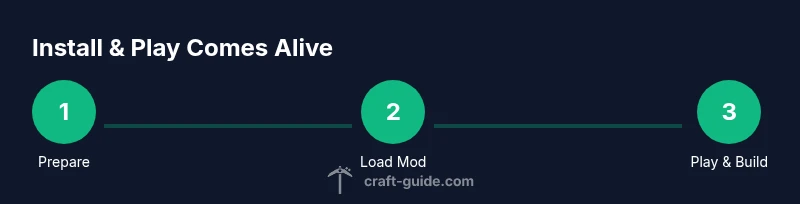
Installation Walkthrough: Prepare, Install, Launch
Getting Minecraft Comes Alive up and running requires a methodical approach to avoid file conflicts and corrupt saves. The first step is to ensure your Minecraft installation matches the mod’s supported version. Then, download the appropriate mod loader (Forge or Fabric) and the Comes Alive mod file from trusted sources. After that, locate your mod folder (typically .minecraft/mods) and place the Comes Alive file there. Launch the game with the loader profile to verify that the mod loads properly and that the NPCs spawn in your world. If NPCs don’t appear, double-check the Minecraft version, loader, and mod file compatibility. Craft Guide emphasizes creating a dedicated test world for initial loading tests, then migrating to your main world once stability is confirmed. Finally, configure basic settings in-game to tailor NPC behavior, quest availability, and romance options to your preferred playstyle.
In practice, many players report smoother experiences by assigning a stable resource pack and ensuring your graphics settings aren’t overly aggressive, which can stress older hardware and cause NPC models to lag or pop in unexpectedly.
Core Mechanics: Villagers, Quests, and Relationships
At the heart of Comes Alive are the NPCs: villagers now have personalities, names, and backgrounds that influence their dialogue and quest lines. You’ll recruit quest-givers, merchants, guards, and potential life partners for NPCs, creating a dynamic micro-society within your world. Quests often require gathering materials, trading with villagers, or solving problems that arise from town life, such as defending the village from mobs or settling disputes between families. Relationships matter: villagers can form couples, children may appear, and dynamics influence town growth and resource flow. The design encourages careful town planning—place houses, farms, and trade posts strategically to support NPC progression. Through Comes Alive, players experience a narrative arc that complements vanilla features while preserving core survival goals. This section explains how to navigate dialogs, accept quests, and manage relationships to foster a thriving community in your minecraft world.
How to Play minecraft comes alive: Core Mechanics and Player Roles
how to play minecraft comes alive hinges on turning passive villagers into active partners in your world. You’ll appoint roles such as mayor, blacksmith, and healer, and assign NPCs to specific houses or shops to create a living town. Quests branch based on choices you make, so your dialogue options influence outcomes and town prosperity. Relationships add depth: marriages and children create family lines, expanding lifelike economies and social structures. To master these mechanics, focus on establishing a small but functioning village first: build a central plaza, a market stall, a healer’s hut, and a guard tower. Grow later by introducing more complex quests, diversify NPC skills, and monitor happiness ratings that affect productivity. This progression aligns with a broader survival strategy, allowing you to weave together exploration, resource gathering, and NPC-driven storylines.
Early Game Strategies: Starting with NPCs in Survival
When you begin your Comes Alive journey in survival mode, start with a single quest hub—perhaps a humble trader who offers basic materials in exchange for farm produce. Build adjacent housing and a storage area to keep supplies accessible, reducing travel time for NPCs as they grow their routine. Prioritize safe zones and lighting to keep hostile mobs at bay, so NPCs remain in place and perform tasks without constant threats. Quests should focus on essential infrastructure—farming, mining, and defense—so you can scale up your village while maintaining a manageable workload. Craft Guide notes that early town stability often determines long-term success; if your NPCs feel secure and valued, they’ll contribute more resources and unlock advanced quests sooner. Remember to save frequently and maintain a clean separation between your base world and your mod testing world for experiments with quest chains and relationships.
Managing Villager Happiness and Quests: Progression Tips
Happiness and trust influence NPC productivity. Build comfortable living quarters, offer consistent job opportunities, and ensure a steady supply of resources. Quests should scale with town growth, so introduce increasingly challenging tasks as villagers acquire new roles. If a quest seems stuck, re-roll dialogues or adjust villagers’ schedules to improve engagement. Longer-term progress comes from balancing population growth with resource management—avoid overcrowding and resource scarcity, which can stall questlines or reduce villager happiness. Craft Guide’s analysis shows that players who monitor happiness metrics, maintain stable trades, and rotate tasks see smoother progression and more meaningful NPC interactions. The key is steady, thoughtful expansion rather than rapid, unfocused growth.
Troubleshooting Common Issues
Common issues include NPCs failing to spawn, quests not triggering, or corrupted saves after mod installation. Start with a simple checklist: verify the MC version and loader compatibility, confirm the mod file is not corrupted, and ensure you have adequate RAM allocated to Minecraft. If NPCs spawn but misbehave, check for conflicts with other mods that affect villagers or AI. Craft Guide analysis indicates that keeping a clean mod load order and avoiding load-heavy overlays helps maintain stable NPC interactions. For persistent problems, revert to a clean backup world, re-install the mod, and reapply basic settings gradually to identify the source of the problem. Always keep a separate backup for testing changes.
Safety notice: modded runs may occasionally crash or corrupt worlds; back up before experimenting with quest chains or romance options.
Creative Ideas and World-Building with Comes Alive
With Comes Alive, you can design a story-driven village within your Minecraft world. Create questlines that guide players to explore nearby biomes, build infrastructure, or rescue villagers from challenges. Design dates and life milestones for NPC couples, and craft events like village fairs, market days, or seasonal festivals that unlock unique resources and cosmetics. Use Comes Alive to deepen roleplay in both survival and creative builds, pairing your architecture with NPC backstories for a richer narrative experience. Craft Guide highlights that balancing narrative depth with vanilla mechanics yields the most satisfying gameplay, so plan your town layout to support quest hubs, housing clusters, and storage networks that players will want to explore again and again.
Responsible Play and Mod Compatibility: Safety and Performance
As you dive into Comes Alive, remember to monitor performance and compatibility with other mods. Keep backups and test new quest chains in a controlled environment before applying them to your main world. Craft Guide analysis shows that players who maintain version discipline, back up regularly, and minimize concurrent resource-intensive mods report fewer crashes and more stable quest lines. Always respect server rules if you’re playing on a multiplayer world; NPCs can influence player economies and balance, so coordinate with other players when introducing major quest lines or town upgrades. In short, plan, test, and document your town’s growth to ensure a smooth, enjoyable experience for everyone involved.
Tools & Materials
- Minecraft Java Edition (latest version)(Ensure the version matches the mod's supported range.)
- Java Runtime Environment (JRE) 8 or newer(Most systems already include JRE; verify path.)
- Forge or Fabric mod loader (matching Minecraft version)(Choose Forge recommended by mod page; Fabric is used by some versions.)
- Minecraft Comes Alive mod file (correct version)(Download from trusted sources; avoid mismatched Minecraft versions.)
- Backup copy of your world(Create a separate folder to prevent data loss.)
- Sufficient RAM allocated to Minecraft (4-8 GB)(In launcher settings, assign 4-8 GB depending on world size.)
- Dedicated test world(Useful for trial runs before integrating into your main world.)
- Notepad or notes app(Helpful for tracking quest progress and NPC relationships.)
Steps
Estimated time: 60-120 minutes
- 1
Prepare your environment
Verify Minecraft version, install a compatible loader, and back up your world. This upfront setup prevents a lot of downstream issues and keeps your main world safe.
Tip: Create a dedicated mod testing profile to avoid impacting your main saves. - 2
Choose and install the mod loader
Install Forge or Fabric that matches both your Minecraft version and the mod requirements. This ensures NPC scripts and quests load correctly.
Tip: Follow the loader’s official installation guide for the best results. - 3
Download the correct Comes Alive version
Get the mod file from a trusted source and confirm the version aligns with your MC and loader.
Tip: Avoid beta or test builds unless you’re testing specifically. - 4
Place mod file in the mods folder
Drop the Comes Alive .jar into the mods directory of your Minecraft folder.
Tip: If you don’t see the mods folder, launch the game once to generate it. - 5
Launch and verify mod loads
Start Minecraft with the chosen loader profile and check the console for Comes Alive loading messages.
Tip: If NPCs don’t appear, recheck version compatibility and try a fresh test world. - 6
Create a test world and configure basics
Make a small world, place a village, and set up your initial quest hub to observe NPC behavior.
Tip: Keep settings simple at first to confirm all core interactions work. - 7
Begin simple NPC interactions
Talk to villagers, assign a quest, and observe how relationships and tasks unfold.
Tip: Document responses so you can plan future quests around NPC strengths.
People Also Ask
What is Minecraft Comes Alive?
Minecraft Comes Alive turns ordinary villagers into interactive NPCs with names, backstories, and quest lines. Players can engage in marriages, adopt NPCs, and guide town development, adding a narrative layer to both survival and creative play.
Minecraft Comes Alive adds interactive NPCs with quests, marriages, and family dynamics, giving your village a living story.
What version of Minecraft is supported?
Comes Alive is updated for specific Minecraft versions and requires a compatible Forge or Fabric loader. Check the mod page for the exact supported MC version and loader.
Check the mod page for the exact Minecraft and loader version compatibility before installing.
Do I need Forge or Fabric?
Most Comes Alive mods require a Forge-based setup, while some variants support Fabric. Pick the loader that matches the mod version you download and your Minecraft build.
Choose the loader that matches the mod you downloaded and your Minecraft version.
Can I play Comes Alive with existing worlds?
Yes, but you should back up your world first. Install the mod in a test profile and verify NPCs appear and quests trigger cleanly before integrating into a saved world.
Backup first, then test in a fresh world before applying to your main world.
What common issues should I anticipate?
NPCs may fail to spawn or quests can stall if there’s a version mismatch or loader conflict. Ensure version alignment, verified downloads, and a clean mod load order. If problems persist, restore from backup and retry.
Expect spawn or quest issues with version conflicts; fix by aligning versions and loaders, then retry.
Is Comes Alive compatible with other mods?
Comes Alive can conflict with mods that modify villages or AI. Start with a minimal mod set, test compatibility, and gradually add other mods while monitoring for issues.
Yes, but compatibility requires careful loading order and testing.
Watch Video
The Essentials
- Install the correct loader and mod version for stability.
- Use a dedicated test world before modifying your main save.
- Focus on a small, balanced village to master quest design and relationships.
- Back up regularly and verify NPCs’ happiness to sustain progression.
- Plan your town layout to support NPC roles and trade networks.