Getting Started with Minecraft: A Practical Beginner's Guide
Learn how to start Minecraft from scratch: edition choices, installation, first world creation, early survival, and practical builds. Practical steps, warnings, and tips to help beginners craft, explore, and thrive.


By the end of this guide you will know how to start playing Minecraft: choose the edition that fits your devices, install the game, create your first world, and survive your initial night. You’ll learn practical setup steps, beginner-friendly builds, and common mistakes to avoid, so you can dive into crafting and exploration with confidence. The process is practical and beginner-focused.
Choosing Your Edition and Setup Basics
If you're wondering how to get started minecraft, the first decision is choosing the edition that fits your devices and play style. According to Craft Guide, starting with Bedrock is ideal for cross‑play across Windows, console, and mobile, while Java Edition shines for mods and precise PC control. This block breaks down the core differences in a simple way and then guides you to a quick setup so you can move from install to your first build without getting trapped in options. A smooth start comes from a stable platform, a verified account, and a clear first-goal for your world. Craft Guide analysis shows that players who set a single starting objective—like building a basic shelter or mining a small vein—finish the first session with confidence.
Quick note: this section emphasizes practical decisions over feature envy. You’ll see clear pros and cons, with a focus on immediate playability rather than perfection.
Setting Up Your Edition and Account Details
Choosing the right edition is just the start. After you pick Bedrock or Java, create or sign in to your account. On most platforms, you’ll need a Microsoft account for Bedrock, or a Minecraft account for Java. Ensure you have stable internet access for authentication and updates. If you’re teaching a new player or a younger learner, Bedrock’s cross‑play makes it easier to join friends on different devices. Craft Guide recommends validating your account on your primary device first, before attempting to join a world with friends. You’ll also want to download the launcher or app store version for your platform and confirm that your device meets the minimum requirements for smooth gameplay. As you proceed, keep your game version up to date to reduce compatibility issues.
Version Checks and Optional Mods
If you’re curious about adding mods or add‑ons, Java Edition is the most mod‑friendly option, while Bedrock has a curated marketplace for add‑ons. Start small: install only one mod at a time and verify that it’s compatible with your current version. For new players, sticking to the vanilla game first helps you learn the core mechanics before introducing complexity. Craft Guide’s guidance reinforces that beginners should not overwhelm themselves with too many addons at once; focus on mastering one area—survival, redstone basics, or building—and expand later.
Your First World Setup: Seed, World Type, and Rules
In Minecraft, your first world is a learning ground. When you create a new world, set the game mode to Survival and adjust difficulty to Easy or Normal for a gentler start. Turn on the “Show Coordinates” option to understand navigation, and enable
Show Cheats
Enable Cheats
);
Tools & Materials
- Computer or Console with internet access(Desktop/laptop or console with the latest firmware)
- Minecraft game or launcher(Bedrock on consoles/Windows, Java Edition on PC)
- Microsoft or Minecraft account(Needed to sign in on most platforms)
- Stable internet connection(For authentication, updates, and online play)
- Optional: external storage(Helps with large worlds and backups)
Steps
Estimated time: 1-2 hours
- 1
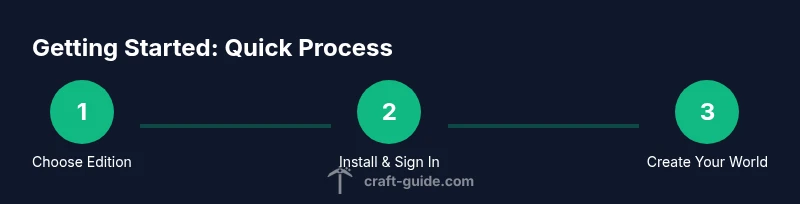
Choose edition
Decide between Bedrock and Java based on devices and play style. Bedrock is great for cross‑play with friends on different platforms; Java shines for PC customization and mods. Pick the option that matches how you want to play and who you want to play with.
Tip: If you’re unsure, start with Bedrock for ease of access and cross‑play; switch to Java later if you want mods. - 2
Install and sign in
Install the game or launcher for your platform and sign in with the appropriate account. Ensure you’re on the latest version to avoid compatibility issues with friends.
Tip: Verify entitlement on your account before attempting to join a world; this saves time troubleshooting later. - 3
Create a new world
Launch the game and create a brand new world in Survival mode. Enable coordinates and cheats only if you’re preparing practice worlds.
Tip: Choose an Easy or Normal difficulty to balance challenge and learning. - 4
Gather core resources
Punch trees to collect wood, craft basic tools, and start a small campfire or torch setup for light. Early wood and stone tools set the foundation for exploration.
Tip: Aim to collect at least 20 blocks of wood and 10 sticks before you depart from spawn. - 5
Build a starter shelter
Create a simple shelter to survive the first night. A 4x4 or 6x6 wood or dirt house is plenty to start.
Tip: Use dirt or wood with a door and a few torches to keep hostile mobs away. - 6
Establish a food loop
Find food sources—berries, animals, or farming basics like seeds—and set up a small farm to sustain yourself.
Tip: Replant crops after harvesting; this keeps your food supply steady and sustainable. - 7
Upgrade tools and gear
Upgrade from wooden tools to stone or better as soon as possible. A better pickaxe speeds mining and a sword helps in combat.
Tip: Carry a spare weapon and always craft a crafting table and furnace early on. - 8
Explore safely and document
Explore nearby terrain after you’ve secured basics, but stay close to your shelter. Keep notes or screenshots of interesting spots and resources.
Tip: Carry basic blocks to create quick bridges or ramps for easy navigation. - 9
Plan your next goals
Outline a simple progression—build a bigger base, improve farming, or delve into mining caves. Clear goals keep learning focused.
Tip: Set a modular objective you can complete in a single play session.
People Also Ask
Which edition should I start with, Java or Bedrock?
For most beginners, Bedrock provides smoother cross‑platform play and easier access. Java Edition is preferred if you want deeper customization and mods on PC. Choose based on device compatibility and desired features.
Bedrock is typically best for beginners who want easy cross‑platform play; Java suits players who want mods on PC.
Do I need to pay to play Minecraft?
Yes, Minecraft generally requires a purchase for access on your chosen platform. Some platforms offer demos or limited trials. Check Microsoft or Mojang’s official store for current options.
Yes, you usually pay to play, though some platforms offer demos or trials.
Can I play with friends on different devices?
Bedrock supports cross‑platform play across Windows, consoles, and mobile devices. Java Edition supports PC‑to‑PC play only. Ensure everyone is on the same edition to join a world.
Yes, Bedrock supports cross‑play; Java is PC‑to‑PC only.
What should I build first?
Start with a simple shelter, then a crafting table and furnace. Focus on safety, warmth (in-game light and shelter), and basic tools before expanding.
Begin with a small shelter, crafting table, and furnace to set up the basics.
Is there a safe mode for beginners?
You can play on Peaceful or lower difficulties to learn mechanics without aggressive mobs. Switch to Normal or harder modes as you gain confidence.
Yes, you can use Peaceful or easy settings to learn safely.
Where can I find beginner seeds or starter worlds?
Look for community starter worlds or seeds on reputable forums and official resources. Start with simple, well‑documented seeds that keep you close to your base.
Search for beginner seeds on trusted community sites and official resources.
Watch Video
The Essentials
- Choose edition based on play goals and devices.
- Start with a simple shelter and basic tools.
- Create a sustainable food source early.
- Progress gradually with modular, achievable goals.
- Use community resources and Safe practice worlds to improve.