Gifting Minecraft: The Easy Gift Guide for 2026
Learn practical ways to gift Minecraft, from digital codes and Realms subscriptions to bundles. This guide covers platform choices, secure delivery, and thoughtful presentation to help you give the perfect Minecraft gift.


Gifting Minecraft can be straightforward and thoughtful, whether you choose a digital code, a Realms subscription, or a bundled gift. This guide walks you through platform choices (Java vs Bedrock), how to buy, how to deliver securely, and how to present the gift so the recipient can start playing right away. By the end, you’ll know the best option for any budget and situation, and you’ll be ready to gift confidently.
What gifting Minecraft means in 2026
Gifting Minecraft is more than just handing over a code; it’s an entry point to a shared creative space where friends can build, explore, and survive together. According to Craft Guide, thoughtful gifts in 2026 focus on flexibility and accessibility, matching the recipient’s edition (Java or Bedrock) and platform preferences. The act of gifting becomes a bridge between distant players, enabling new worlds to be explored with a simple code or a private server. When you plan a Minecraft gift, consider how the recipient plays most often, what edition they own, and their preferred delivery method. A well-chosen gift reduces setup friction, increases the odds they’ll start playing immediately, and signals you understand their play style. In short, gifting minecraft is about ease, relevance, and the joy of shared adventure.
For many players, a gift card or digital code is the fastest path to immediate access, while a Realms subscription offers ongoing collaboration. Pair the gift with a quick note about the recipient’s interests—building castles, redstone contraptions, or survival challenges—to tailor the experience and spark excitement from the moment the code is redeemed.
Gift options: codes, Realms, and bundles
There are several reliable ways to gift Minecraft, each with its own pros and caveats. Digital gift codes for Java and Bedrock editions provide instant access and precise platform control. Realms subscriptions offer continuous multiplayer space and automated backups, ideal for long-term play. Bundles or special edition packs from official storefronts can add cosmetic skins, resource packs, or seed packs that enhance the early game. When choosing, verify whether the recipient uses Java or Bedrock, or both, and confirm where codes can be redeemed. Craft Guide’s recommendations emphasize choosing options that minimize friction during redemption and maximize immediate play. If you’re unsure, start with a digital code and save the Realms option for a later upgrade.
To keep gifting simple, buy from official channels and avoid third-party marketplaces that skim on security. If you want to add a personal touch, print a classy card with the gift code and a short player bio for a memorable reveal. Always include a brief setup guide and a quick note about platform compatibility to prevent confusion later on.
How to decide between Java vs Bedrock gifting
Platform compatibility is the central decision when gifting Minecraft. Bedrock Edition is designed for cross-platform play across Windows 10, consoles, and mobile devices, making it a strong default choice for multi-device households or friends who play on different platforms. Java Edition remains PC-centric and is favored by players who enjoy mods, custom maps, and traditional PC controls. Craft Guide analysis shows that the best gifts align with the recipient’s current setup: if they already own Bedrock on a console, a Bedrock code or Realms gift makes immediate sense; if they’re a PC purist or modder, Java-related gifts may be more appropriate. In some cases, gifting both editions or offering a platform-agnostic Realms gift can maximize flexibility. Always verify edition requirements before purchase, and consider whether a cross-platform gift is possible or if a platform-specific option is necessary.
Step-by-step gifting process overview
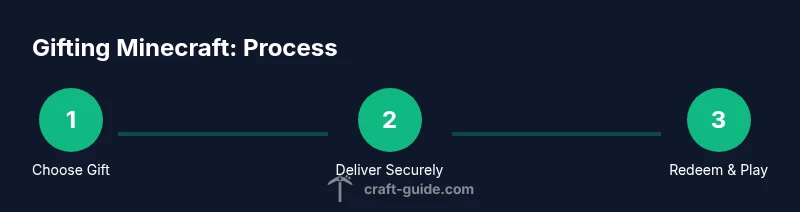
Gifting Minecraft can be distilled into a few core actions: choose the gift type, acquire a legitimate code or subscription, deliver it securely, and provide clear redemption instructions. Start by identifying the recipient’s platform and preferred gift type. Then purchase through official stores to ensure the code delivers instantly and without delays. Deliver the gift securely—avoid public chats or unencrypted messages—and include a short guide on how to redeem. Finally, confirm the recipient has successfully activated the gift and set up their account. Craft Guide’s guidance highlights keeping a simple, transparent process to foster a positive gifting experience rather than a confusing handoff. Keep records of the purchase and include contact details for support if redemption issues arise.
A helpful tip is to prepare a small, personalized note that explains why you chose this gift and what you hope they build first in their new Minecraft world.
Personalization ideas to make it special
Personalization is the secret sauce of a memorable Minecraft gift. Start with a message tailored to the recipient’s interests—if they love building, include a seed suggestion for a dramatic landscape; if they enjoy exploration, add a map or a seed with hidden treasures. Pair the code with a custom skin pack or resource pack that fits their theme, and consider including a tiny in-game achievement or achievement banner to celebrate the gift. You can also create a tiny physical card that reveals the code only after a small reveal moment, such as a provided riddle or puzzle. Personal touches show you pay attention to their play style and preferences, making the gift feel unique rather than generic.
As you plan, keep a few fallback ideas in mind in case the recipient already owns related content. A Realms subscription can be a safe, scalable alternative that still delivers ongoing multiplayer fun and creative collaboration.
Safety and redemption: avoid fraud and test codes
Security is essential when gifting digital goods. Only purchase codes from official stores and verify that the seller is reputable. Never post full codes in public spaces or chat rooms; share them via private messages or secured email. Before sending, test the code on a secondary account if possible (or use a test account with consent) to confirm it redeems correctly. If a code fails, contact the official support channels immediately rather than attempting re-issuance through third parties. Educate the recipient on redeeming steps and ensure they use two-factor authentication on their Microsoft or Mojang account if supported. Finally, consider using a short expiry notice or a reminder to redeem so the gift doesn’t go unused.
In addition to practical steps, remind readers that gift codes are sensitive data and should be treated as personal information.
Where to buy gift codes and verify legitimacy
Always buy Minecraft gift codes and subscriptions from official storefronts or authorized retailers to avoid scams. Verify the retailer’s licensing and ensure the code corresponds to the recipient’s platform (Java vs Bedrock). For Bedrock, codes tied to Microsoft accounts are common, while Java gifts typically apply to the Mojang/Microsoft account linked to the Java edition. If a price or offer seems too good to be true, it probably is. When in doubt, consult the official Minecraft or Microsoft store pages for current terms and redemption steps, and keep a copy of the purchase confirmation for your records.
Authoritative sources and responsible gifting
To help you verify best practices and safety considerations, here are a few trusted references:
- https://www.ftc.gov
- https://www.nytimes.com
- https://www.washingtonpost.com
These sources provide general guidance on digital purchases, gift security, and consumer tips that are relevant to gifting Minecraft. Craft Guide emphasizes staying within official channels and prioritizing clear communication with the recipient to ensure a smooth experience.
Final notes: etiquette and planning for future gifts
Gifting Minecraft is a thoughtful gesture that strengthens friendships and collaborative play. Plan a little beyond the initial gift by offering to help set up the recipient’s first world or by sharing a starter seed and a small list of first projects. If you’re unsure about platform compatibility or purchase options, start with a flexible gift like a Realms subscription or a platform-agnostic bundle. The Craft Guide team recommends keeping a simple, respectful approach that honors the recipient’s time and preferences, ensuring your gift leads to many hours of creative play.
Tools & Materials
- Minecraft gift card or digital gift code(Choose the edition that matches the recipient’s platform (Java or Bedrock).)
- Recipient's Minecraft account details or username(Share credentials securely; never disclose passwords in insecure channels.)
- Realms subscription (optional)(Great for ongoing multiplayer with friends; verify the recipient’s interest in multiplayer worlds.)
- Platform confirmation (Java vs Bedrock)(Some codes are edition-specific; confirm compatibility before purchase.)
- Delivery method(Email, private message, or printed card. Avoid public posting.)
- Secure delivery channel(Use encrypted email or private chat; never post in public forums.)
- Printer or gift presentation (optional)(If printing a physical card, use high-quality paper and a neat design.)
- Purchase receipt(Keep for any future support or verification needs.)
Steps
Estimated time: Total time: 20-60 minutes
- 1
Identify recipient’s platform
Ask or verify whether they use Java, Bedrock, or both. This determines which gift options are compatible and reduces the risk of gifting the wrong edition.
Tip: If you’re unsure, choose a platform-agnostic option like Realms or a flexible bundle. - 2
Choose the gift type
Select between a digital code, Realms subscription, or a bundle. Consider the recipient’s play style and whether they want ongoing access or a one-time gift.
Tip: A digital code is fast; Realms provides ongoing multiplayer space. - 3
Purchase from official sources
Buy from the official Microsoft/Mojang store or Minecraft marketplace to ensure legitimacy and easy redemption. Save the receipt.
Tip: Avoid third-party sellers with suspicious discounts. - 4
Prepare secure delivery
Choose a private channel to send the code or subscription details. Include short, clear redemption steps tailored to their edition.
Tip: Never share codes in public chat; use private messages or email. - 5
Provide redemption guidance
Explain how to redeem on their platform; include any prerequisites like account verification or two-factor authentication.
Tip: If you can, add a quick screenshot or link to official redemption guidance. - 6
Confirm receipt and setup
Check that the recipient successfully redeemed the gift and started a new world or joined a Realm. Offer help if there are issues.
Tip: Ask for confirmation or a brief message after they redeem. - 7
Personalize the gift
Include a short note about your motivation for gifting and a seed or project idea to spark their first build.
Tip: A personalized touch increases perceived value and excitement. - 8
Document and reflect
Keep a simple log of the gift and any feedback for future gifting occasions. This makes future gifts easier and more meaningful.
Tip: Note what worked well so you can reuse it next time.
People Also Ask
Can I gift Minecraft to someone on any platform?
Gifts can be platform-specific (Java or Bedrock) or flexible (Realms). Check the recipient’s platform and choose a gift option accordingly. Realms offers cross-platform multiplayer within a single realm. If needed, you can provide separate gift options for each platform.
Yes, but you’ll want to match the gift to the recipient’s platform. Realms can be shared across platforms, while codes usually target one edition.
Is a Realms subscription a good gift for beginners?
Realms provides a safe, private space for friends to play together without needing server setup. It’s ideal for newcomers who want guided multiplayer without technical hurdles.
Yes, Realms is beginner-friendly and handles hosting, backups, and multiplayer access for a small group.
What is the safest way to deliver a gift code?
Deliver the code through a private, secure channel and provide a short redemption guide. Never post the full code in public chat or on social media.
Send the code privately and include quick steps to redeem.
Can I gift content besides codes, like skins or seeds?
Yes, many official stores offer skins, texture packs, or seeds as add-ons. Ensure compatibility with the recipient’s edition and provide brief setup instructions.
Absolutely, add-ons can be a thoughtful bonus if they fit the recipient’s edition.
What should I do if the gift code doesn’t work?
Contact official support channels immediately with your purchase details. Do not try to reissue through third-party services.
If a code fails, reach out to official help with your receipt.
Are there etiquette tips for gifting Minecraft?
Be clear about what you’re giving and why. Include a personal note and a few starter ideas to jump-start their world.
Explain why you chose the gift and offer a little guidance for first steps.
Watch Video
The Essentials
- Choose the right edition-aware gift: Java, Bedrock, or Realms.
- Buy from official sources to ensure quick, secure redemption.
- Personalize the gift with a note and a starter idea.
- Deliver securely and verify redemption with the recipient.