What Gift Card to Buy Minecraft on PC: Bedrock vs Java
Discover the best gift card for Minecraft on PC. A practical, evidence-based guide comparing Bedrock via Microsoft Store and Java Edition via Minecraft.net, with gifting tips, redemption steps, and edge-case scenarios.


Editions at a Glance: Java vs Bedrock on PC
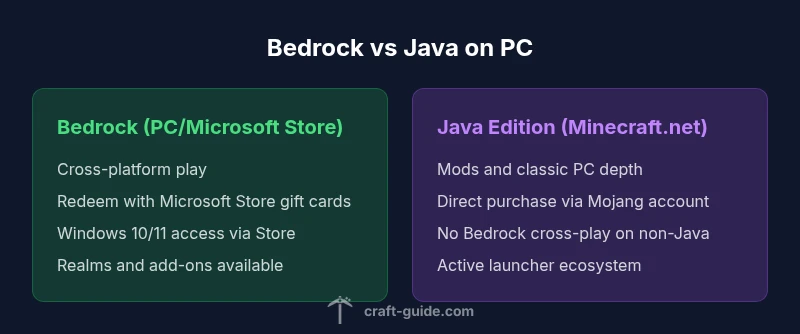
If you're contemplating what gift card to buy minecraft on pc, the starting point is understanding the two official PC editions. Java Edition is the traditional, highly customizable PC edition with extensive modding and classic Minecraft mechanics. Bedrock Edition on PC, delivered through the Microsoft Store, emphasizes cross-platform play with Windows, consoles, and mobile. The choice affects how a gift card works. Bedrock can be redeemed via a Microsoft Store card for immediate access on Windows, while Java typically requires a direct Minecraft.net purchase tied to a Mojang/Microsoft account. For gift-givers, this distinction matters for both availability and cross-play potential.
Key contrasts include: cross-platform play vs. Java’s mod ecosystem, how purchases are redeemed, and where updates propagate. The Craft Guide team notes that knowing which edition the recipient uses is the single most important factor in choosing a card. As of 2026, the landscape remains edition-driven, with Bedrock offering broader platform compatibility and Java offering deeper customization. This section sets the stage for the practical gifting path that follows.
- Cross-platform considerations in Bedrock vs. Java exclusivity in Java
- Redemption flow differences and most reliable gift options
- The role of regional availability in gift card access
How Gift Cards Are Used on PC Minecraft
Gift cards for Minecraft on PC operate differently depending on the edition. Bedrock Edition on Windows is designed to integrate with the Microsoft ecosystem, so Microsoft Store gift cards are the most straightforward approach. They unlock not only Minecraft upgrades but also other Windows and Xbox digital content, which increases their usefulness as a gift. Java Edition, on the other hand, is marketed and activated primarily through Minecraft.net, using Mojang accounts. While some retailers offer gift codes that redeem toward Java, these options are far less common and can vary by region. If you want a simple, widely accepted solution, target the Bedrock path with a Microsoft Store gift card and explain any limitations if the recipient also cares about mods.
From a gifting perspective, the practical rule is: pick the path that aligns with the recipient’s preferred edition and platform habit. If the recipient has a mixed setup (PC and consoles), Bedrock can simplify access and cross-play. If the recipient is a purist who values mods and classic PC mechanics, Java Edition remains the better target, even if it means a more involved checkout. Craft Guide’s analysis emphasizes the importance of confirming the edition before purchasing.
- Bedrock: Microsoft Store integration and cross-play advantages
- Java: direct Minecraft.net purchases and Mojang account activation
- Regional differences can influence gift availability and redemption
Microsoft Store Gift Cards for Bedrock on PC
For most PC players who want a smooth gifting experience, Microsoft Store gift cards are the most versatile option. They can be redeemed for Minecraft Bedrock on Windows 10/11 and also unlock other Microsoft Store content, such as apps and services your recipient might find useful. When you give a Microsoft Store card, you’re providing access to Bedrock’s cross-platform universe, including potential access to Realms, skin packs, and other Bedrock-enabled features. It’s important to communicate to the recipient that the card’s value will be allocated to the Microsoft Store account and used for Bedrock-related purchases and downloads.
If the recipient already uses an Xbox or Windows account, the card can be added directly to their Microsoft balance. The process is quick and generally reflects the card’s value instantly, assuming region compatibility. Craft Guide’s guidance suggests ensuring the recipient’s Microsoft account is active and linked to their PC so the redemption is immediate. For gift-givers, this path reduces confusion and avoids the need for multiple codes.
- Widely available and easy to redeem
- Covers Bedrock on Windows and related Store content
- Great for cross-platform players
Java Edition Purchasing Path and Gift Card Reality
Java Edition presents a different gifting reality. The primary channel for Java purchases remains Minecraft.net, where players redeem Mojang accounts and receive access to the Java Edition launcher. Gift cards that specifically target Java are not as commonly sold as Microsoft Store cards and can vary by retailer and region. In many cases, the practical advice is to gift a general PC game code or provide a direct Minecraft.net purchase link or code from a reputable retailer. Those options give the recipient flexibility, but come with caveats: not all gift cards are compatible with Minecraft.net, and regional restrictions may apply.
From the giver’s perspective, Java Edition is excellent for players who value modding, server customization, and classic gameplay. However, you should be prepared to guide the recipient through a Java-specific redemption flow that differs from Bedrock. Craft Guide’s perspective emphasizes clarity: confirm if the recipient intends to play Java exclusively, and factor in potential regional limitations or retailer availability before purchasing.
- Java requires Minecraft.net purchases via Mojang accounts
- Fewer universal Java gift cards; regional options vary
- Ideal for modders and traditional PC players
Practical Gift Scenarios: Who Is the Gift For?
Scenario A: A parent buying for a teen who plays on a Windows PC and uses cross-play with friends on consoles. Recommendation: Microsoft Store gift card, because it provides Bedrock access and cross-platform benefits. Scenario B: A friend who loves mods and classic Minecraft on PC would benefit from Java Edition, but keep expectations about gift-card availability in mind; a direct Minecraft.net purchase or a retailer-coded card may be necessary. Scenario C: A player who owns Windows but lacks an exact edition preference. Recommend a Microsoft Store gift card and include a note explaining how to switch to Java later if desired. These scenarios illustrate how edition choice drives the gifting strategy, and why a single card choice—Microsoft Store—handles most common cases.
When advising others, emphasize edition alignment first and region compatibility second. Craft Guide’s approach is to ensure your gift enables immediate use where possible while preserving future flexibility for the recipient. The key decision factor remains: Bedrock for cross-platform play, Java for depth and mods.
- Bedrock gifting suits cross-platform players
- Java gifting suits modders and purists
- Clarify edition preference before purchasing
Step-by-Step: Redeeming a Microsoft Store Gift Card for Minecraft on PC
- Purchase a Microsoft Store gift card from a trusted retailer or digital storefront. 2) In Windows, open the Microsoft Store app and sign in with the recipient’s Microsoft account. 3) Click on your account and select redeem code, then enter the gift card code. 4) The balance is added to the account; navigate to Minecraft Bedrock in the Store and initiate download or purchase as needed. 5) If the recipient already has Bedrock, the code will apply to future purchases like Realms or skins. 6) Verify that the edition is properly activated on the PC, then complete installation.
This flow is designed to minimize friction and ensure the recipient can access Bedrock features immediately. If you encounter region-based restrictions, consider a note or alternative gifts that align with the recipient’s locale. Craft Guide recommends testing the redemption flow before gifting to avoid last-minute issues.
- Quick and reliable redemption steps
- Ensure the recipient’s account is ready for Bedrock on PC
- Be mindful of regional restrictions and timing
Regional Availability and Regional Pricing Considerations
Gift card availability, pricing, and redemption rules can vary by country or region. Some regions have more robust Microsoft Store gift card options, while others may limit digital code availability for Minecraft. If you’re gifting across borders, confirm regional eligibility and delivery times, as these factors can affect how quickly the recipient can access Minecraft on PC. Craft Guide emphasizes verifying the recipient’s locale and ensuring the card is valid in that region. If region restrictions complicate Bedrock access, Java Edition remains an alternative path, though it requires a different purchase flow.
Regional considerations also influence how bundled content, Realms, or add-ons are priced and redeemed. Always check retailer terms and store policies, and provide the recipient with a quick guide to redeeming the code in their region. This reduces confusion and improves the gift’s perceived value.
- Region-specific availability and rules
- Cross-border gift delivery considerations
- Be prepared with a backup plan for region restrictions
Alternatives and Edge Cases for Gift-Giving
If a Microsoft Store gift card isn’t ideal, there are alternative approaches that can still delight a Minecraft fan. A general PC game gift card can be redeemable toward various titles or digital storefronts, including Minecraft-related content in some ecosystems. For Java Edition purists, a direct Minecraft.net purchase with a Mojang/Microsoft account and a note about the recipient’s future upgrade path can be a viable option. Additionally, consider gifting Realms subscriptions, skin packs, or server access as a supplementary gift to add value beyond the base game.
Edge cases include recipients who want to remain region-flexible or who are new to Minecraft. In these cases, a flexible Microsoft Store gift card tends to minimize friction, while supplementary notes on edition choice help set correct expectations. Craft Guide’s guidance is to tailor the gift to the recipient’s current setup and preferences, while avoiding overly restrictive gift cards that don’t align with their PC gaming trajectory.
- Flexible gift cards reduce confusion
- Java-specific gifts may require direct purchases
- Add-ons and Realms can boost perceived value
Budgeting, Value, and What You Actually Get
When budgeting for a Minecraft PC gift, consider value beyond a single game code. Bedrock plus cross-play benefits can increase perceived value, especially for players who play across devices. Java Edition provides modding and customization advantages that many players prize, even if it means a more complex checkout. In practice, the best value comes from a gift card that aligns with the recipient’s edition and platform habits, while also allowing for future purchases like skins, Realms, or DLC.
Craft Guide suggests looking at the full ecosystem: a Microsoft Store gift card often delivers broad utility, whereas Java Edition focuses on the core game and modding community. If you’re unsure, default to Bedrock via Microsoft Store to maximize compatibility and convenience for most PC players, then offer additional help if the recipient later decides to go Java.
- Value comes from edition alignment and cross-play features
- Modding-focused players may value Java Edition more
- Bedrock gift cards provide broader utility across devices