What Specs Are Needed for Minecraft: A Practical Guide
Learn the hardware specs Minecraft players need for smooth Java and Bedrock play, including RAM, CPU, GPU, and storage ranges, plus tips for modded and shader-heavy setups.


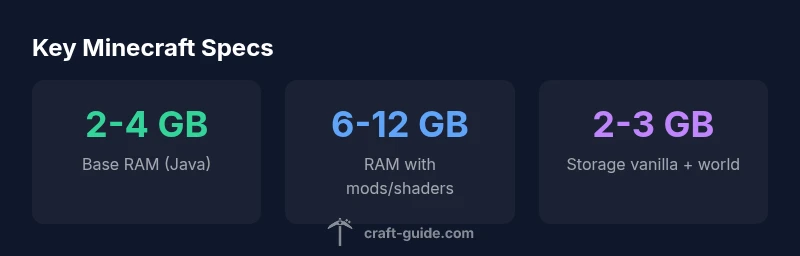
Java Edition requires more RAM and CPU headroom than Bedrock, but both editions run within a broad range of hardware. A basic Java setup with a modern quad-core CPU and 4 GB RAM can run Minecraft at low settings, while 8 GB RAM and a dedicated GPU are recommended for smooth 1080p gameplay and light shaders. Bedrock is generally lighter, often performing well on mid-range laptops. With mods or shader packs, plan higher RAM and storage.
How Minecraft Uses System Resources
Minecraft relies on three core hardware facets: CPU, RAM, and GPU. The CPU handles game logic, world generation, and entity calculations; RAM serves as a workspace for the world data, chunk loading, and texture data; and the GPU renders textures, lighting, and shaders. Java Edition is particularly sensitive to single-thread performance and RAM headroom, while Bedrock is optimized for multi-threaded rendering and typically uses less RAM for similar visuals. This balance means that upgrading RAM often yields the most noticeable improvements for large worlds or shader packs, while a faster CPU helps with chunk loading and entity management. For modded or shader-heavy play, VRAM and CPU cycles become the bottleneck, so gear up accordingly.
Craft Guide analyses indicate that players frequently notice improvements by increasing RAM allocations before upgrading the CPU or GPU, especially when entering big builds or long exploration sessions.
Edition Differences: Java vs Bedrock
Java Edition emphasizes wide modding potential and more complex texture packs, but this comes at a cost to performance on mid-range hardware. Bedrock Edition, built for cross-platform play, tends to run more smoothly on similar hardware due to its optimized engine and streamlined resource usage. In practice, this means a PC that runs Java smoothly with mods might still feel snappy on Bedrock at comparable settings, though shader packs can level the playing field. For players on laptops or integrated GPUs, Bedrock often delivers a better baseline experience, while Java shines with extensive customization on capable machines.
Minimum vs Recommended Specs by Edition
Java Edition (vanilla): Minimum CPU: dual-core 2+ GHz; Minimum RAM: 4 GB; GPU: integrated; Storage: 2 GB. Recommended CPU: quad-core 2.8+ GHz; RAM: 8 GB; GPU: dedicated or strong integrated; Storage: 2–3 GB. Bedrock Edition (vanilla): Minimum CPU: dual-core; RAM: 2 GB; GPU: integrated; Storage: 1–2 GB. Recommended CPU: quad-core 2+ GHz; RAM: 4–6 GB; GPU: dedicated or strong integrated; Storage: 1–2 GB. Note: shaders and mods push these requirements upward.
Performance with Mods and Shaders
Mods and shader packs significantly raise the hardware bar. Shader-heavy setups push VRAM to the limit and increase texture memory, while mods can introduce heavy logic, new blocks, and more entities that fill RAM fast. To keep playables: allocate more RAM (where OS allows), use lower render distance, disable anti-aliasing at first, and choose shader packs with reasonable performance for your GPU. In some cases, upgrading to an SSD reduces loading times and improves texture streaming.
Playstyle Target Profiles and Hardware Targets
- Vanilla Survival/Creative: A mid-range PC with 8–12 GB RAM and a capable GPU can deliver stable 60–120 FPS at 1080p with default settings, leaving headroom for chunk loading and occasional builds.
- Modded or Scripted Worlds: For popular mods and high-resolution textures, plan 12 GB RAM or more and a discrete GPU, with a target of 60 FPS under reasonable settings.
- Shader-Heavy Play: Shaders increase GPU load; a modern GPU with 6–12 GB VRAM and 16 GB RAM helps maintain 60 FPS or better at 1080p or 1440p.
Measuring Performance and Tweaking Settings
Use in-game metrics and external tools to gauge performance: enable the in-game FPS counter, monitor RAM usage in your OS task manager, and test different render distances. Start with the default settings, then gradually raise render distance and graphics quality until you notice frame drops. Allocate RAM with caution, leaving enough headroom for the OS and background apps. For modded setups, profile memory usage to identify plugins causing leaks.
Budget-Friendly Upgrade Paths
- Budget under mid-range: upgrade to at least 8 GB RAM, switch to an SSD if you still use an HDD, and consider a modest GPU improvement if you’re on integrated graphics.
- Mid-range builds: target 16 GB RAM, a newer quad-core CPU, and a mid-tier GPU, which improves both vanilla and shader-based play.
- High-end setups: 32 GB RAM and a high-performance GPU unlocks smooth play for shader packs, intense redstone builds, and large modded worlds.
How Craft Guide Analyzes Specs (Methodology)
This guide synthesizes typical user experiences and published hardware guidelines, focusing on practical playability rather than absolute power. We use ranges to reflect real-world variation, and we distinguish between vanilla and modded/shader-heavy scenarios. Recommendations assume current game versions and standard operating system configurations. All data is drawn from Craft Guide Analysis, 2026.
Common Pitfalls and Myths About Minecraft Specs
- Myth: More RAM alone guarantees better FPS. Reality: FPS depends on CPU, GPU, and settings; RAM helps with chunk loading but doesn’t fix CPU bottlenecks.
- Pitfall: Overallocating RAM can harm system stability. Leave OS headroom.
- Myth: Bedrock is always better on every device. Reality: Some devices may perform worse on Bedrock at high settings; Java can perform well on powerful machines.
- Tip: Always test with your actual world and texture packs to gauge performance.
Minecraft specs by edition
| Edition | Minimum CPU | Recommended CPU | RAM | GPU | Storage |
|---|---|---|---|---|---|
| Java Edition | Dual-core 2+ GHz | Quad-core 2.8+ GHz | 4 GB | Integrated or dedicated GPU | 2-3 GB |
| Bedrock Edition | Any x86_64 dual-core | Quad-core 2+ GHz | 2 GB | Integrated GPU | 1-2 GB |
People Also Ask
Do I need a 64-bit OS to run Minecraft Java Edition?
Minecraft Java Edition runs on both 32-bit and 64-bit systems, but 64-bit allows allocating more RAM. For best performance with large worlds or mods, use a 64-bit OS (Windows, macOS, or Linux) to maximize memory headroom.
Yes, a 64-bit OS helps you allocate more RAM for Minecraft.
Is Bedrock Edition less demanding than Java Edition?
Generally yes, Bedrock uses less CPU and RAM on similar hardware and runs more consistently across devices; however, shader packs and mods can change this dynamic.
Bedrock is usually lighter, but shaders and world size matter.
How much RAM should I allocate to Minecraft?
Allocate enough RAM to leave OS headroom; for vanilla try 4 GB, for mods or shaders 6–12 GB if available.
Start with 4 GB and adjust as needed.
Do shaders require a dedicated GPU?
Shaders typically require a capable GPU with ample VRAM; integrated graphics can work at lower shader settings.
A good GPU helps a lot.
Can Minecraft run on a laptop without a dedicated GPU?
Yes, with low settings and resolution; performance depends on CPU, RAM, and the specific GPU.
Yes, but visuals and FPS will be reduced.
What about storage for modded Minecraft?
Mods and world data add to disk usage; plan extra space and back up worlds.
Modded worlds take more space; back up often.
“Having the right specs is the foundation for smooth Minecraft play, especially when exploring mods or high-resolution shaders.”
The Essentials
- Start with the edition you play and assess headroom.
- Allocate at least 4 GB RAM for vanilla Minecraft.
- Mods and shaders push RAM and VRAM requirements upward.
- Bedrock generally runs lighter on similar hardware.
- Test in your actual world and adjust settings for steady FPS.