Is Minecraft PE the Same as Bedrock? A Thorough Comparison
Explore whether Minecraft Pocket Edition (PE) is the same as Bedrock Edition, how they differ, and what this means for cross‑play, updates, and modding. Learn migration steps, content parity, and practical tips for new players.


The Pocket Edition lineage evolved into Minecraft Bedrock Edition, and the two are the same platform today. The naming change is cosmetic; Bedrock unifies mobile, PC, and console versions, enabling cross‑play and shared features across devices. In short, is minecraft pe the same as bedrock? Yes—the PE label is legacy, while Bedrock is the current, unified edition.
What is Bedrock Edition and how does it relate to Minecraft PE?
For players wondering about the relationship between legacy Pocket Edition and the current Bedrock platform, the short answer is that Bedrock Edition is the evolution of Minecraft PE. The question of is minecraft pe the same as bedrock is common; while the branding changed, the core game engine and data structures stayed continuous, and the teams kept content parity across devices. Bedrock is designed to unify mobile, PC, and console editions under one codebase, letting players on different devices share worlds, skins, and marketplace content. In practice, this means your Minecraft experience on Android or iOS now aligns with Windows 10/11 and modern consoles, with one set of features, mechanics, and controls. The transition avoided duplicating content paths and reduced fragmentation for new players, creators, and server operators alike.
Timeline: From Pocket Edition to Bedrock
The journey from Pocket Edition (PE) to Bedrock Edition began in the mid-to-late 2010s as the Minecraft brand sought to streamline editions across platforms. The PE label persisted for mobile users as part of early branding, but developers began consolidating features into a single Bedrock codebase. Over time, updates, features, and content parity were rolled into Bedrock, with cross‑device play becoming a primary goal. In practical terms, players who started on PE eventually transitioned to Bedrock without losing access to their worlds, skins, or saved progress. This unification is why today you see Bedrock on mobile, Windows, consoles, and other devices with a single ecosystem.
Core Branding, Naming, and What It Means for Players
Branding matters for clarity. The switch from Pocket Edition to Bedrock Edition is more than a cosmetic rename; it signals a unified platform strategy. For players, this means a single purchase path, one launcher experience on supported devices, and a consistent set of features across platforms. A common misconception is that PE and Bedrock are two distinct games; instead, PE is the historical naming for the mobile lineage, while Bedrock is the current umbrella term. The consolidation simplifies onboarding, reduces confusion when friends use different devices, and supports a shared community and marketplace.
Cross-Platform Play: Bedrock's Unified Reach
Bedrock Edition is designed to enable cross‑platform play across mobile, PC, and consoles, which was a core objective of consolidating PE into Bedrock. This means players can join friends on different devices, share servers and Realms, and experience similar gameplay mechanics. Historically, Pocket Edition offered limited cross‑play, but Bedrock removes many barriers by standardizing the underlying systems used to render worlds, manage inventories, and enforce rules. If you value playing with friends regardless of device, Bedrock is the pragmatic choice.
Content Parity: Updates, Features, and Marketplace
A major driver for the Bedrock transition is content parity and a centralized content ecosystem. Bedrock users gain access to the official Marketplace, which hosts add-ons and community-created content across platforms. Regular updates bring new biomes, mobs, blocks, and gameplay features to all Bedrock devices in a synchronized manner. This parity ensures that a player on mobile can expect a similar experience to a friend on PC or console, provided the device meets performance requirements. While Java Edition remains separate, Bedrock aims for feature coherence within its own family.
Performance and Settings Across Devices
Performance differences between PE-era experiences and modern Bedrock are largely a function of hardware and platform optimizations rather than core game logic. Bedrock leverages a more consistent rendering and resource management approach across devices, which often translates to smoother gameplay on mid-range hardware. Settings menus are generally streamlined to fit touch controls on mobile while preserving advanced options on desktop or console. Players should calibrate graphics quality, resource packs, and render distances per device to achieve the best balance between visuals and performance.
How to Transition: Migrating from PE to Bedrock—A Practical Guide
If you started on Pocket Edition, you can migrate to Bedrock on supported devices by updating through your platform’s store or launcher. Before migrating, back up worlds and saves, note your key progress, and verify compatibility with Bedrock features such as cross‑play and Realms. On mobile, simply updating the app might bring you into Bedrock; on PC or console, you may need to install the Bedrock Edition package. After migration, you’ll find familiar controls and world structures, with a unified interface and access to the Marketplace.
Common Misconceptions About Bedrock vs PE
A frequent myth is that Bedrock is two entirely different games. In reality, Bedrock is the continuation and standardization of the PE lineage, with branding updated and a broader platform reach. Some players worry about losing legacy worlds; in most cases, world data is transferable, though certain platform-specific features may not be identical. Another misconception is that mobile players cannot enjoy the same content as PC players; Bedrock eliminates most such gaps by providing shared content and cross‑device compatibility.
Modding and Add-Ons on Bedrock: What Changes for Builders
Modding on Bedrock has evolved with a shift toward add-ons and Marketplace content rather than traditional mods found in Java Edition. Bedrock’s add-ons enable tweaks to entity behavior, world generation, and item properties using JSON-like definitions, while the Marketplace offers curated content. This approach enhances safety and stability across devices but can constrain some complex modding workflows familiar to Java Edition players. Builders should explore add-ons for cosmetic and gameplay tweaks and use the Marketplace for official content.
Multiplayer, Realms, and Servers on Bedrock
Multiplayer in Bedrock centers on Realms and cross‑platform servers. Realms provide hosted, managed worlds with simple invite mechanisms across devices. Third-party servers exist too, but Bedrock’s cross‑platform support means you can join friends on different devices with minimal friction. If you rely on mods or server-specific plugins, you’ll want to check compatibility with Bedrock’s add-ons and the server’s supported edition. Overall, Bedrock’s multiplayer ecosystem emphasizes accessibility, safety, and consistency across platforms.
What This Means for New Players and Content Creators
For new players, Bedrock is the recommended entry point because it consolidates features, updates, and cross‑play into a single ecosystem. Content creators benefit from a unified audience and a centralized marketplace, which accelerates distribution of skins, textures, and add-ons. The PE label is primarily historical now; focusing on Bedrock reduces confusion and helps you align with current community resources, guides, and tutorials. If you’re aiming to build, share, or collaborate across devices, Bedrock is the most practical long‑term choice.
Practical Takeaways and Next Steps
If you’re planning to play Minecraft across devices, start with Bedrock Edition to leverage cross‑play, official marketplaces, and synchronized updates. Prepare by backing up worlds, checking device compatibility, and exploring Bedrock add-ons to customize your experience. For creators, explore the Marketplace, learn JSON-based add-ons, and publish content in a way that’s accessible to players on all Bedrock devices. Finally, keep an eye on Craft Guide’s ongoing guidance for any changes in Bedrock’s feature set.
Final Note: The Practical Conclusion for Players
The shift from Pocket Edition to Bedrock Edition represents a strategic consolidation rather than a radical shift in gameplay. The Bedrock platform preserves the core Minecraft experience while expanding cross‑platform play and content options. Players who embraced PE in the past can now unify their Minecraft life under Bedrock, enjoying a broader player base, easier upgrades, and a shared ecosystem that keeps evolving with new features and community content.
Comparison
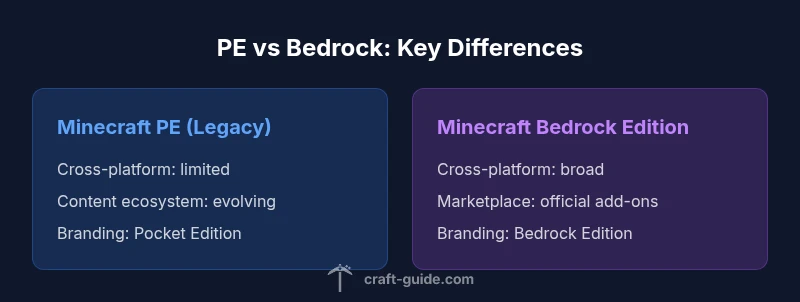
| Feature | Minecraft PE (legacy) | Minecraft Bedrock Edition |
|---|---|---|
| Cross-platform play | Limited/none with non-mobile platforms (historical) | Full cross-platform across mobile, Windows, and consoles |
| Content ecosystem | Marketplace availability limited or non-existent in early PE | Official Marketplace with add-ons across devices |
| Updates parity | PE updates ended as Bedrock rolled out | Regular, synchronized updates across devices |
| Branding | Pocket Edition branding (legacy) | Bedrock Edition branding (current) |
| Modding and customization | Mods/add-ons exist but are platform-limited | Add-ons and customization supported across devices |
Benefits
- Unified cross-platform experience under Bedrock
- Access to the official Marketplace and add-ons
- Regular updates across devices
- Clear branding reduces confusion for new players
- Stronger community support and resources
Negatives
- Migration can require some steps and backups
- Legacy PE workflows may feel deprecated to some players
- Modding landscape differs from Java Edition
Bedrock Edition is the successor to Minecraft PE; the two are essentially the same platform, with Bedrock offering cross-device play and ongoing updates.
If you’re starting today, choose Bedrock for cross-play and ongoing support. Pocket Edition as a label is legacy; migrating ensures access to current features and a unified player base.
People Also Ask
Is Minecraft PE the same as Bedrock Edition?
Yes. PE evolved into Bedrock Edition; the platforms share the same engine and core gameplay. Bedrock is the current, unified edition across mobile, PC, and consoles.
Yes. Pocket Edition became Bedrock Edition, so they are effectively the same platform today. Bedrock is the current, cross‑device edition.
What happened to MCPE?
MCPE was absorbed into Bedrock Edition as branding shifted to a single, cross‑platform edition. The PE label is now historical, with Bedrock serving as the ongoing platform.
MCPE was folded into Bedrock Edition; the PE name is now historical, and Bedrock is the ongoing platform.
Can PE players play with Java Edition?
No. Cross‑play exists within Bedrock across devices, but Java Edition remains a separate ecosystem with its own teams and features.
Cross‑play is available across Bedrock devices, but Java Edition is separate from Bedrock.
Do I need to buy Bedrock if I already own PE?
Bedrock replaces PE on supported platforms, typically delivered through your device’s store or launcher. A separate purchase isn’t always required for the upgrade, but check your platform’s policy.
Bedrock replaces PE on supported devices, usually via an upgrade path in your store; check your platform’s rules.
How do I migrate worlds from PE to Bedrock?
Back up your worlds, update or install Bedrock, and follow the in-game prompts to import or access existing saves. Most modern devices support a seamless transition with minimal data loss.
Back up your worlds, install Bedrock, and import your saves; most devices support a smooth transition.
Are there differences in controls or UI between PE and Bedrock?
Bedrock maintains a consistent control scheme across devices, but mobile versions optimize touch controls differently than keyboards and mice on PC. The UI is unified, though some platform-specific tweaks may exist.
Bedrock uses a unified UI and controls, with touch optimizations on mobile and keyboard/mouse on PC, plus some platform tweaks.
The Essentials
- Bedrock unified PE, enabling cross-device play
- PE is legacy; Bedrock is the current edition
- Explore the Marketplace and add-ons for Bedrock
- Migrate worlds carefully and back up saves