Minecraft Bedrock vs Java on Windows: Edition Comparison
A detailed, analytical comparison of Bedrock (Windows) and Java Editions on Windows, covering performance, modding, cross-play, world generation, and practical buying guidance.


Is minecraft for windows the same as java? In short, no. The Windows edition (Bedrock) and Java Edition run on different engines, have different mod ecosystems, and support different multiplayer setups. This comparison explains the core differences, what to expect for performance, and which edition fits your playstyle. Craft Guide provides the framework for understanding how each edition serves distinct communities and use cases.
The two editions explained
If you ask 'is minecraft for windows the same as java', the short answer is no. Windows users can choose between Bedrock (the Windows 10/11 edition) and Java Edition, and the choice shapes almost every aspect of the game from performance to modding to cross‑play. According to Craft Guide, the two editions diverge in platform availability, content distribution, and ecosystem tooling, which can lead to compatibility issues if you switch ecosystems later. Bedrock on Windows uses a Microsoft/Xbox Live account and a shared Bedrock engine across devices, while Java Edition runs on Java and Mojang accounts. They have separate code bases, separate launchers, and different update cadences. Understanding these differences helps set expectations for world sharing, seed behavior, and the kinds of mods or add‑ons you can use.
This article digs into the practical consequences of those differences, offering a structured way to decide which edition matches your goals and the kind of community you want to inhabit.
start_line_hidden":false},
Platform architecture and what differentiates Bedrock and Java
Bedrock and Java are built with different goals in mind. Bedrock aims for smooth performance across devices, with a unified code base used by Windows, consoles, and mobile, enabling cross‑play; Java Edition, by contrast, runs on the Java Virtual Machine and emphasizes a wide‑open modding ecosystem. Engine differences affect world data storage, block behavior, and customization options. Seeds can behave differently due to underlying generation rules, so identical numbers may yield distinct landscapes between editions. Craft Guide notes that even the same seed can produce divergent biomes and cave structures, influencing planning for builders and explorers. If you want a PC‑first experience with broad marketplace content, Bedrock is appealing; if you want deep customization and a thriving modding community, Java shines.
Keep in mind input methods differ too: keyboard+mouse on Java versus a mix of controller and keyboard/mouse on Bedrock, which can influence your building workflow.
start_line_hidden":false},
Performance and hardware considerations
Performance varies by edition and hardware. Bedrock’s engine is optimized for a wide range of devices and tends to run smoothly on mid‑range PCs, with efficient rendering and lower memory overhead. Java Edition depends on the Java Virtual Machine and can demand more RAM, especially when using high‑resolution texture packs or extensive redstone contraptions. On comparable hardware, Bedrock often feels faster at similar graphic settings, but Java can be fine-tuned with careful memory and mod selection. The Craft Guide analysis shows Bedrock generally aiming for steadier frame rates across platforms, while Java can achieve higher fidelity visuals with shader packs when the system supports it. Your decision should hinge on target resolution, desired framerates, and whether you plan to run shader‑heavy packs or heavy modding later on.
start_line_hidden":false},
Modding, addons, and content ecosystems
Modding is a fundamental differentiator. Java Edition has a long, vibrant modding tradition via Forge, Fabric, and data packs, enabling deep changes to gameplay, new blocks, machines, and automation. Bedrock Edition offers addons and a Marketplace, providing curated skins, maps, textures, and some functionality tweaks with a more controlled experience and streamlined installation. This affects both the scope of projects and the ease of getting started for newcomers. For those who enjoy tinkering, Java offers expansive creative freedom and a robust testing space, while Bedrock offers a safer, paid‑content ecosystem that’s easier to navigate without complex tooling. Craft Guide notes that Java worlds don’t port cleanly to Bedrock and vice versa, underscoring the importance of choosing the ecosystem you want to invest in.
start_line_hidden":false},
Cross-play and multiplayer realities
Bedrock Edition shines for cross‑play. Windows, consoles, and mobile players can join shared worlds, guided by a unified networking stack and the Bedrock engine. Java Edition remains very PC‑centric, with multiplayer primarily through the Java launcher and community servers, and it does not support cross‑play with Bedrock players. This split often shapes community geography: mixed groups may end up choosing a single edition or creating separate servers for each ecosystem. If cross‑play is critical, Bedrock on Windows is the natural choice; if your circle prioritizes PC‑native, modded multiplayer, Java is typically preferred. The Craft Guide guidance emphasizes clear communication about edition compatibility to avoid confusion among players and to set realistic expectations for server access and friend invites.
start_line_hidden":false},
World generation, seeds, and building differences
Seed values serve as the starting blueprint for worlds, but Java and Bedrock implement these seeds differently. Even with the same numeric seed, terrain distribution, ore spread, and biome sequences can diverge because of engine differences. Builders who rely on precise seed layouts for speedruns or seed‑specific projects may notice subtle, yet important, disparities. This matters for planning builds and resource collection because some blocks and features appear earlier or later depending on the edition. Craft Guide highlights that this is not just cosmetic variance; it influences world design, farming layouts, and the timing of resource availability. If you need exact replication across platforms, be prepared to adapt or rebuild.
start_line_hidden":false},
Commands, redstone, and scripting differences
Commands and redstone systems reflect the two engines' different design philosophies. Java Edition has a long‑standing command block system with expansive data pack and scripting support, allowing complex automations and custom game rules. Bedrock’s scripting API is newer and more limited, with tailored command syntax for cross‑platform consistency. Redstone behavior can vary in subtle ways, affecting contraptions and logic designs. Beginners may find Bedrock easier for simple maps, while advanced builders may prefer Java for its extensive command set and modding potential. For map makers porting content, test environments are essential to avoid surprises when moving between editions. Craft Guide recommends building small test worlds to verify behavior before launching larger projects across ecosystems.
start_line_hidden":false},
Accounts, purchases, and licensing
Edition‑specific login systems shape the onboarding experience. Bedrock on Windows uses a Microsoft/Xbox Live account, aligning with cross‑play and an integrated ecosystem. Java Edition relies on a Mojang account tied to the Java launcher. These differences affect achievements, cloud saves, and access to realms or servers. Purchasing paths also differ by storefronts and platform policies, with Bedrock content often distributed through official marketplaces and Java content largely community‑driven. Understanding your login requirements and how updates and purchases are handled helps reduce friction when joining friends or setting up a server. Craft Guide notes that the account framework you choose can influence how you manage progress, cosmetics, and cross‑edition interactions with players on other devices.
start_line_hidden":false},
Content distribution: Marketplace vs mods
The distribution model shapes your content library. Bedrock’s Marketplace curates a catalog of skins, texture packs, maps, and adventure content that can be bought or downloaded with in‑game currency, with profits shared with creators. Java Edition favors a thriving modding community where players download from multiple sites and rely on mod loaders like Forge or Fabric. This difference affects safety, predictability, and ease of use. Bedrock provides a more controlled experience with vetted content, while Java offers broader experimentation and customization potential. Craft Guide emphasizes that mod creators, testers, and players should align expectations with the ecosystem’s realities.
start_line_hidden":false},
Migration and cross-ecosystem transfer
Porting worlds between Java and Bedrock is not supported. Each edition uses its own world format and save architecture, and attempts at conversion can corrupt data or produce incomplete results. If a group plans to switch editions, the practical approach is to choose one edition for the entire world and recreate or port select builds where possible. Always back up worlds before attempting any conversion. Craft Guide recommends planning migration early, clarifying seed compatibility, and establishing whether friends will be comfortable shifting to the same edition to play together without friction.
start_line_hidden":false},
Which edition should you pick? A practical decision guide
Choose based on your play goals and community preferences. If cross‑play and a curated content ecosystem matter, Bedrock on Windows is a strong fit. If you want deep customization, a thriving modding culture, and PC‑centric play, Java Edition is often the better choice. Consider hardware, server hosting plans, and where your friends are playing. For newcomers, starting with Bedrock can be a gentle on‑ramp to Minecraft, with Java explored later for its expansive modding options. The Craft Guide team recommends aligning your choice with your play style and then committing to learning that ecosystem before exploring the other.
start_line_hidden":false}],
comparisonTable":{"items":["Bedrock (Windows) Edition","Java Edition"],"rows":[{"feature":"Platform availability","values":["Windows 10/11, cross‑play with Bedrock devices","Windows, macOS, Linux"]},{"feature":"Modding support","values":["Add-ons/Marketplace, curated content","Robust modding with Forge/Fabric and data packs"]},{"feature":"Cross‑play","values":["Yes across Bedrock devices (including consoles and mobile)","No cross‑play with Bedrock; primarily PC‑focused"]},{"feature":"Performance/graphics","values":["Optimized for broad hardware, steady frame rates","Variable performance; shader/mod packs can improve visuals and demand more RAM"]},{"feature":"World generation/seed behavior","values":["Designed for cross‑platform compatibility","Seed behavior differs; terrain can diverge for identical seeds"]},{"feature":"Content distribution","values":["Marketplace with paid content","Community mods and free resource packs, no central marketplace"]},{"feature":"Accounts/licensing","values":["Microsoft/Xbox Live account","Mojang/Microsoft account via launcher"]}]},
prosCons":{"pros":["Clarifies edition differences to avoid buying the wrong version","Highlights cross‑play opportunities and ecosystem choices","Sets expectations for modding, content, and server setups","Helps plan budget and hardware needs with edition‑appropriate content"],"cons":["Edition differences can cause confusion for new players","Modding depth is edition‑dependent and not portable","Community fragmentation can occur when groups choose different editions"]},
verdictBox":{"verdict":"Bedrock on Windows is not the same as Java; choose based on cross‑play needs or modding goals.","confidence":"high","summary":"If you need cross‑play and a polished content marketplace, Bedrock is the practical pick. If you want a rich modding scene and PC‑centric, highly customizable gameplay, Java Edition is the better long‑term choice. The Craft Guide team’s assessment is to pick the edition that aligns with your play style and community, then dive deep into its ecosystem."},
keyTakeaways":["Decide based on cross‑play or modding priorities","Expect edition‑specific world behavior and seeds","Plan your community’s edition to avoid cross‑play friction","Bedrock favors polished content and broad hardware support; Java prioritizes mods and PC‑centric play"],
faqSection":{"items":[{"question":"Is Minecraft for Windows the same as Java Edition?","questionShort":"Is Windows edition same?","answer":"No. Windows Minecraft refers to Bedrock Edition, which runs on a separate engine from Java Edition. They are not directly compatible for world sharing, mods, or cross‑play.","voiceAnswer":"No. Bedrock and Java are different editions with separate worlds and mods." ,"priority":"high"},{"question":"Can Java Edition players play with Bedrock players on Windows?","questionShort":"Cross‑play Windows?","answer":"Generally no. Java Edition and Bedrock Edition run on different platforms with limited cross‑play; only Bedrock supports cross‑device play.","voiceAnswer":"Cross‑play between Java and Bedrock on Windows isn’t supported." ,"priority":"high"},{"question":"Can I transfer worlds between Java and Bedrock?","questionShort":"Transfer worlds?","answer":"Direct transfers between Java and Bedrock worlds aren’t supported due to different world formats. You may need to rebuild or port select builds manually.","voiceAnswer":"Worlds can’t be transferred directly between editions." ,"priority":"medium"},{"question":"Which edition performs better on Windows?","questionShort":"Better on Windows?","answer":"Bedrock generally offers smoother performance on a wider range of hardware, while Java can demand more RAM but may offer higher fidelity with the right mods and shaders.","voiceAnswer":"Bedrock tends to run smoother on Windows, while Java shines with mod capability." ,"priority":"medium"},{"question":"Do Bedrock addons Marketplace vs Java mods differ in safety?","questionShort":"Safety: Marketplace vs mods?","answer":"Yes. Bedrock’s Marketplace is curated and vetted, providing safer, easy installs. Java mods come from multiple sources and require care to avoid malware or compatibility issues.","voiceAnswer":"Marketplace content is generally safer and easier to manage than Java mods from various sites." ,"priority":"low"},{"question":"If I start on Bedrock, can I switch to Java later easily?","questionShort":"Switch editions easy?","answer":"Switching editions is not seamless; you’d need to choose one ecosystem and potentially recreate or port content. Back up your worlds first.","voiceAnswer":"Switching editions is not simple—plan ahead." ,"priority":"low"}]},
mainTopicQuery":"minecraft-editions"},
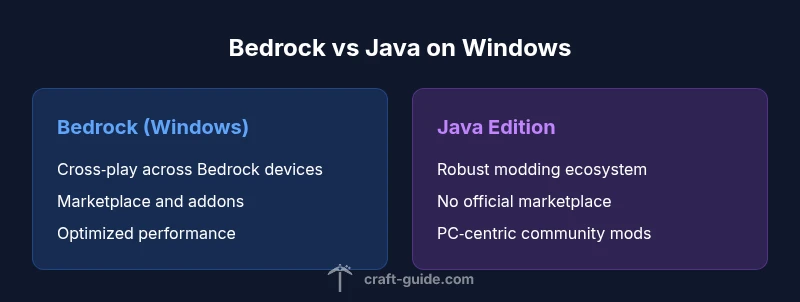
mediaPipeline":{"heroTask":{"stockQuery":"Windows PC gaming desk with Minecraft screen","overlayTitle":"Edition Showdown on Windows","badgeText":"2026 Guide","overlayTheme":"dark"},"infographicTask":{"type":"comparison","htmlContent":"<div class="w-[800px] p-8 bg-slate-900 text-white"><h3 class="text-2xl font-bold text-center mb-4">Bedrock vs Java on Windows</h3><div class="grid grid-cols-2 gap-6"><div class="p-6 bg-blue-500/20 rounded-xl border border-blue-500/30"><h4 class="text-xl font-bold text-blue-400 mb-4">Bedrock (Windows)</h4><ul class="space-y-2"><li>Cross‑play across Bedrock devices</li><li>Marketplace and add‑ons</li><li>Optimized performance</li></ul></div><div class="p-6 bg-purple-500/20 rounded-xl border border-purple-500/30"><h4 class="text-xl font-bold text-purple-400 mb-4">Java Edition</h4><ul class="space-y-2"><li>Robust modding ecosystem</li><li>PC‑centric with no official marketplace</li><li>Community‑driven content</li></ul></div></div></div>","altText":"Infographic comparing Bedrock and Java on Windows","caption":"Bedrock vs Java: Key differences at a glance"}},
taxonomy":{"categorySlug":"mods-tech","tagSlugs":["java-edition","cross-platform","tips-tricks","minecraft"]}}} {"type":"object","properties":{"title":{"type":"string"},"description":{"type":"string"},"h1":{"type":"string"},"blockData":{"type":"object","properties":{"quickAnswer":{"type":"object","properties":{"text":{"type":"string"},"wordCount":{"type":"integer"}}},"bodyBlocks":{"type":"array","items":{"type":"string"}},"comparisonTable":{"type":"object","properties":{"items":{"type":"array","items":{"type":"string"}},"rows":{"type":"array","items":{"type":"object","properties":{"feature":{"type":"string"},"values":{"type":"array","items":{"type":"string"}}}}}}},"prosCons":{"type":"object","properties":{"pros":{"type":"array","items":{"type":"string"}},"cons":{"type":"array","items":{"type":"string"}}}},"verdictBox":{"type":"object","properties":{"verdict":{"type":"string"},"confidence":{"type":"string","enum":["high","medium","low"]},"summary":{"type":"string"}}},"keyTakeaways":{"type":"array","items":{"type":"string"}},"faqSection":{"type":"object","properties":{"items":{"type":"array","items":{"type":"object","properties":{"question":{"type":"string"},"questionShort":{"type":"string"},"answer":{"type":"string"},"voiceAnswer":{"type":"string"},"priority":{"type":["string","null"],"enum":["high","medium","low"]}}}}}}},"directAnswer":{"type":"object","properties":{"text":{"type":"string"},"clickHook":{"type":"string"}}},"mainTopicQuery":{"type":"string"}}},"mediaPipeline":{"type":"object","properties":{"heroTask":{"type":"object","properties":{"stockQuery":{"type":"string"},"overlayTitle":{"type":"string"},"badgeText":{"type":"string"},"overlayTheme":{"type":"string","enum":["dark","light","gradient"]}}},"infographicTask":{"type":"object","properties":{"type":{"type":"string","enum":["comparison"]},"htmlContent":{"type":"string"},"altText":{"type":"string"},"caption":{"type":"string","nullable":true}}}}},"taxonomy":{"type":"object","properties":{"categorySlug":{"type":"string"},"tagSlugs":{"type":"array","items":{"type":"string"}}}}}}
Comparison
| Feature | Bedrock (Windows) Edition | Java Edition |
|---|---|---|
| Platform availability | Windows 10/11, cross‑play with Bedrock devices | Windows, macOS, Linux |
| Modding support | Add-ons/Marketplace, curated content | Robust modding with Forge/Fabric and data packs |
| Cross‑play | Yes across Bedrock devices (including consoles and mobile) | No cross‑play with Bedrock; primarily PC‑focused |
| Performance/graphics | Optimized for broad hardware, steady frame rates | Variable performance; shader/mod packs can improve visuals and demand more RAM |
| World generation/seed behavior | Designed for cross‑platform compatibility | Seed behavior differs; terrain can diverge for identical seeds |
| Content distribution | Marketplace with paid content | Community mods and free resource packs, no central marketplace |
| Accounts/licensing | Microsoft/Xbox Live account | Mojang/Microsoft account via launcher |
Benefits
- Clarifies edition differences to avoid buying the wrong version
- Highlights cross‑play opportunities and ecosystem choices
- Sets expectations for modding, content, and server setups
- Helps plan budget and hardware needs with edition‑appropriate content
Negatives
- Edition differences can cause confusion for new players
- Modding depth is edition‑dependent and not portable
- Community fragmentation can occur when groups choose different editions
Bedrock on Windows is not the same as Java; choose based on cross‑play needs or modding goals.
If you need cross‑play and a polished content marketplace, Bedrock is the practical pick. If you want a rich modding scene and PC‑centric, highly customizable gameplay, Java Edition is the better long‑term choice. The Craft Guide team’s assessment is to pick the edition that aligns with your play style and community, then dive deep into its ecosystem.
People Also Ask
Is Minecraft for Windows the same as Java Edition?
No. Windows Minecraft refers to Bedrock Edition, which runs on a separate engine from Java Edition. They are not directly compatible for world sharing, mods, or cross‑play.
No. Bedrock and Java are different editions with separate worlds and mods.
Can Java Edition players play with Bedrock players on Windows?
Generally no. Java Edition and Bedrock Edition run on different platforms with limited cross‑play; only Bedrock supports cross‑device play.
Cross‑play between Java and Bedrock on Windows isn’t supported.
Can I transfer worlds between Java and Bedrock?
Direct transfers between Java and Bedrock worlds aren’t supported due to different world formats. You may need to rebuild or port select builds manually.
Worlds can’t be transferred directly between editions.
Which edition performs better on Windows?
Bedrock generally offers smoother performance on a wider range of hardware, while Java can demand more RAM but may offer higher fidelity with the right mods and shaders.
Bedrock tends to run smoother on Windows, while Java shines with mod capability.
Do Bedrock addons Marketplace vs Java mods differ in safety?
Yes. Bedrock’s Marketplace is curated and vetted, providing safer, easy installs. Java mods come from multiple sources and require care to avoid malware or compatibility issues.
Marketplace content is generally safer and easier to manage than Java mods from various sites.
If I start on Bedrock, can I switch to Java later easily?
Switching editions is not seamless; you’d need to choose one ecosystem for your world and recreate or port select builds where possible. Back up worlds first.
Switching editions is not simple—plan ahead.
The Essentials
- Decide based on cross‑play or modding priorities
- Expect edition‑specific world behavior and seeds
- Plan your community’s edition to avoid cross‑play friction
- Bedrock favors polished content and broad hardware support; Java prioritizes mods and PC‑centric play