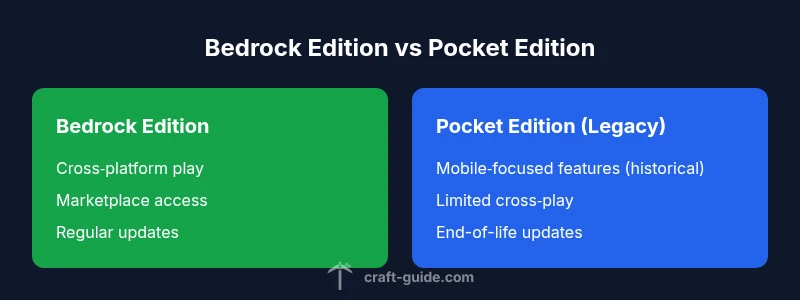
Is Minecraft Bedrock the Same as Pocket Edition? A Comprehensive Comparison
A data-driven comparison of Bedrock Edition and Pocket Edition, focusing on cross-play, devices, updates, and feature parity to help players choose the right edition.


Bedrock Edition is the current cross‑platform Minecraft, while Pocket Edition was the mobile variant that has been folded into Bedrock. In practice, Bedrock covers the platforms once served by Pocket Edition, but terminology remains confusing in some communities. For most players, Bedrock is the version to choose for cross‑play, content access, and ongoing updates.
Context and Definitions
Is minecraft bedrock the same as pocket edition? Not exactly, because the naming history reflects different edition families, and the current Bedrock Edition now includes platforms that once ran Pocket Edition. For players seeking clarity, the key distinction is that Bedrock is the ongoing cross platform edition, while Pocket Edition was the mobile variant that has been folded into Bedrock. The phrase is frequently used in community discussions, but it no longer reflects a separate product in most stores or official pages. In this article we will compare Bedrock Edition and Pocket Edition in practice, with attention to cross platform play, device support, and feature parity. Our goal is to help you decide which is right for your setup, while highlighting the most important differences for game performance and access to content. Throughout, we reference Craft Guide analysis to provide context and avoid confusion for readers navigating the transitions between Bedrock and Pocket Edition.
History and Nomenclature
The Minecraft edition landscape has shifted significantly since Minecraft Pocket Edition first appeared on mobile devices. Pocket Edition introduced a mobile‑first experience with touch controls and a slightly lighter feature set. Over time, Mojang consolidated the naming under Bedrock Edition, aligning the mobile, console, and Windows 10/11 versions into a single engine and platform family. This unification simplified cross‑play and content access, but it also created ongoing questions about legacy terminology. Craft Guide notes that many players still encounter old references to Pocket Edition in community guides or archived pages, so understanding the lineage helps prevent confusion when reading patch notes or marketplace updates.
Core Architecture and Editions
Bedrock Edition leverages the Bedrock engine to run on a wide array of devices, including Windows PCs, consoles, and mobile devices. Pocket Edition served as the mobile‑first variant before the Bedrock merge, and while it is no longer distributed as a separate product, its legacy influence remains in early mobile features and UI conventions. The modern Bedrock experience emphasizes cross‑device parity, with a unified codebase that supports Realms, the Marketplace, and cross‑play across supported devices. Readers should recognize that Java Edition remains a separate lineage, with different mechanics, world formats, and mod ecosystems. The key takeaway is that Bedrock is the ongoing family, while Pocket Edition lives on only in memory and legacy discussions.
Cross-Platform Play and Limitations
A central advantage of Bedrock Edition is cross‑platform play across Windows, consoles, and mobile devices. Bedrock users can join the same world on different devices, subject to device capability and game version alignment. Pocket Edition without Bedrock parity offered limited cross‑play and fewer features, and as a result it is largely phased out as a separate product. If you plan to play with friends across devices, Bedrock is the edition to choose. It also means that players on iOS can join a world with friends on Xbox, PlayStation, or a Windows PC, provided everyone is on compatible Bedrock builds.
Feature Parity and Differences by Platform
Bedrock Edition emphasizes parity in core features, but there can still be platform‑specific differences in controls, performance optimizations, and marketplace content. The Bedrock Marketplace hosts content created by creators around the world and Realms provide hosted worlds you can join without a server. Pocket Edition historically lacked a unified marketplace and relied more on external worlds and manual transfers. For players comparing editions, the main questions tend to be about content access, cross‑platform play, and how add-ons or texture packs appear across devices. The practical effect is that Bedrock delivers a more uniform experience across platforms, while Pocket Edition’s legacy footprint is mainly about older mobile experiences and terminology.
Performance and Hardware Considerations
Device performance often dictates the perceived parity between Bedrock and Pocket Edition. Bedrock is optimized for a wide range of hardware, from low‑end mobile devices to high‑end PCs and consoles. Pocket Edition, by contrast, can reflect older hardware constraints and the mobile‑first design philosophy from earlier years. When comparing on a specific device, check the target frame rate, render distance, and texture pack compatibility, as these can affect gameplay smoothness. In general, Bedrock’s cross‑device optimization tends to yield more consistent performance across platforms than the legacy mobile experiences associated with Pocket Edition.
World Format, Saving, and Updates
World formats evolve with major updates, which often come with Bedrock Edition. The Bedrock engine supports synchronized saves and cross‑device transfer when permitted by platform policies. Pocket Edition’s historic world formats were more limited and not intended for sustained cross‑platform collaboration. If you are upgrading from Pocket Edition to Bedrock, you may encounter prompts about world migration or seed transfer, depending on your device and the game version. Always back up your worlds before upgrading, and review patch notes for changes in world saving and cross‑device play.
How to Check Which Edition You Have
To determine whether you are playing Bedrock Edition or a legacy Pocket Edition, start from the main menu and look for the product name in the top bar or settings screen. Bedrock shows as Bedrock Edition across supported devices; Pocket Edition titles will appear only in historical references or archives. If you cannot locate Pocket Edition naming in current builds, you are likely on Bedrock. For mobile devices, you can also check the app store listing and patch notes, which will indicate Bedrock edition naming and current cross‑platform support.
Practical Guidance for Players
If you want cross‑platform play with friends, start by confirming that all players are on Bedrock Edition and on the same game version. Update your game through official stores or launcher services to ensure parity. If you are on mobile, consider enabling Realms or subscribing to Marketplace content that is verified for cross‑platform compatibility. For builders and content creators, Bedrock’s add‑on ecosystem, texture packs, and shader support on many devices helps maintain a cohesive experience across the family. Remember that some content may be platform‑specific, and texture packs can be blocked on certain devices due to performance concerns.
Common Myths Debunked
Myth 1: Pocket Edition still exists as a separate game. Reality: Pocket Edition has been folded into Bedrock Edition; the mobile edition’s branding persists mainly in historical discussions. Myth 2: Bedrock and Pocket Edition have identical content on all devices. Reality: While Bedrock aims for parity, hardware and platform differences can cause subtle variances in UI, controls, and performance. Myth 3: You can freely mix Java Edition content with Bedrock worlds. Reality: Java and Bedrock worlds are not compatible across editions, due to different world formats and codebases.
Official Resources and Further Reading
For the most authoritative information, consult Mojang and Microsoft support pages, plus Craft Guide analyses and community updates. These resources provide guidance on cross‑platform play, realms, and content parity across devices. Always verify your edition name in the game launcher and in the store listing to ensure you are accessing the current Bedrock edition content.
Migration Tips and Next Steps
If you are transitioning from Pocket Edition to Bedrock, plan a backup strategy for your worlds, textures, and add‑ons. Verify that your devices meet the minimum requirements for Bedrock and that your friends can join your worlds across devices. After upgrading, take advantage of the marketplace and Realms for cross‑device play and consistent access to add‑ons. Use this as an opportunity to explore new content while understanding the differences between mobile‑first legacy experiences and the unified Bedrock ecosystem.
Comparison
| Feature | Bedrock Edition | Pocket Edition (legacy) |
|---|---|---|
| Cross-Platform Play | Yes on Bedrock across Windows, consoles, and mobile devices | Limited or no cross‑platform play; legacy mobile edition |
| Supported Devices | Windows 10/11, Xbox, PlayStation, Nintendo Switch, iOS, Android | Mobile devices (older mobile builds), no unified cross‑device parity |
| Marketplace & Add-ons | Marketplace access, Realms, official add-ons | Historically limited or external content; no unified marketplace |
| World Realms & Saving | Realms support, cross‑device saves under Bedrock framework | Legacy saving paths with limited cross‑device compatibility |
| Updates & Parity | Regular Bedrock updates across platforms | Legacy mobile updates ended earlier; parity not guaranteed |
| Controls & UI | Unified controls for touch, keyboard/mouse, and controllers | Mobile‑first UI with older control schemes |
| Performance & Hardware | Optimized for a broad hardware range across devices | Older mobile hardware can limit performance and features |
| World Size & Seeds | Similar seed generation with cross‑device sharing possible | Legacy seeds and worlds more restricted in scope |
Benefits
- One unified platform across devices and stores
- Access to marketplace content and Realms for cross‑play
- Regular, synchronized updates across devices
Negatives
- Pocket Edition is a legacy label with limited support
- Some platform differences remain in UI and controls
- Older devices may face performance constraints on newer content
Bedrock Edition wins for cross‑platform play and ongoing updates; Pocket Edition remains a legacy reference.
If your goal is up-to-date cross‑device Minecraft with a thriving content ecosystem, choose Bedrock Edition. Pocket Edition is not a separate product anymore, and its legacy features are largely superseded by Bedrock's unified approach.
People Also Ask
Is Bedrock Edition the same as Pocket Edition?
Pocket Edition was folded into Bedrock Edition; today Bedrock is the ongoing edition with cross‑platform features. The terminology remains, but the product line is unified.
Pocket Edition is now Bedrock; Bedrock is the current, cross‑platform Minecraft.
Can Bedrock cross‑play with Java Edition?
No. Bedrock cross‑play works across Bedrock devices only; Java Edition plays separately with different mechanics.
Bedrock and Java editions cannot play together.
Which devices support Bedrock Edition?
Bedrock runs on Windows 10/11, major consoles, and mobile devices, with ongoing cross‑platform updates.
Bedrock supports Windows, consoles, and mobile devices.
Is Pocket Edition still available?
Pocket Edition as a separate product is legacy; current players are guided to Bedrock Edition for ongoing updates and cross‑play.
Pocket Edition is legacy; Bedrock is current.
How do I upgrade from Pocket Edition to Bedrock?
Install Bedrock on your device from the official store, then migrate any eligible worlds or data; backups are recommended.
Upgrade by installing Bedrock and migrating data where possible.
Are there world format differences between Bedrock and Pocket Edition?
Yes, Bedrock uses a modern, cross‑device friendly format; legacy Pocket Edition worlds may not transfer directly.
There are differences; you may need to adapt worlds when upgrading.
The Essentials
- Understand the edition lineage before buying
- Bedrock enables cross‑play across devices
- Pocket Edition is legacy; no separate updates
- Check device requirements and performance
- Use Bedrock for content parity and marketplace access