What graphics card is needed for Minecraft: a practical guide
Understand GPU requirements for Minecraft across editions, from vanilla to shader-heavy packs, with upgrade paths and performance tips for 1080p, 1440p, and 4K.


For Minecraft, a modern mid-range GPU is usually enough for vanilla play, and integrated graphics can handle it at 1080p with low-to-moderate settings. Shader packs and high‑resolution texture packs push requirements higher, typically benefiting from a discrete GPU with 4–8 GB of VRAM and upgradable drivers. In short: vanilla Minecraft is forgiving; shaders demand more GPU power.
Minecraft's graphics pipeline explained
Minecraft renders a block-based world by loading chunks (16x16 block regions) and generating mesh data for visible surfaces. The GPU maps textures from a texture atlas onto those surfaces, applies lighting, and outputs the final image. Vanilla Minecraft uses straightforward lighting, which remains forgiving for most GPUs. When you enable high‑resolution textures or shader packs, the pipeline becomes more complex: shadow maps, ambient occlusion, post-processing, and advanced lighting demand more memory bandwidth and GPU power. For players aiming at smooth 1080p vanilla play, even an entry-level discrete card or a modern integrated GPU can deliver solid results. The moment you switch to shader-heavy packs or boost texture resolution, you’ll want more GPU headroom and, ideally, more VRAM. Craft Guide's data across editions confirms that VRAM availability and shader complexity are the biggest drivers of performance beyond base processing power.
Vanilla Minecraft vs shader packs: what changes visually
Shader packs transform lighting, shadows, and water reflections, turning flat blocks into scenes with depth and atmosphere. High‑quality textures replace the default atlas with larger, more detailed images. Framerate typically drops when shaders are enabled, especially at higher resolutions or with complex lighting. At 1080p, vanilla Minecraft often maintains 60–120 FPS on mid-range hardware, while shader-enabled builds may hover around 30–60 FPS unless you compromise on settings. Texture packs also contribute, increasing load on VRAM and bandwidth. For beginners, start with vanilla visuals and only enable shaders after confirming a stable baseline. For those chasing cinematic worlds, plan a GPU upgrade in tandem with shader quality and texture pack choices.
VRAM, drivers, and API considerations
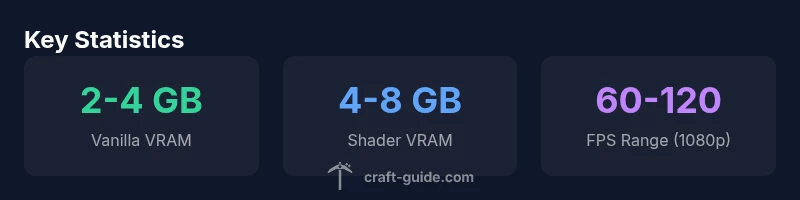
VRAM is a primary limiter when you introduce textures and shaders. A baseline of 2–4 GB VRAM works for vanilla Minecraft at 1080p; upgrading to shader-enabled gameplay commonly requires 4–8 GB, and 1440p or 4K with heavy textures can push beyond 8 GB. Keeping graphics drivers up to date ensures shader compilers and texture handling are optimized. Java Edition relies on OpenGL under Windows and macOS, while Bedrock Edition on Windows uses DirectX. These API differences influence driver optimization and shader compatibility. If you’re unsure, start with the latest driver version and test incremental changes in settings. Craft Guide analyses indicate that how your system handles VRAM and shader data is more impactful than clock speed alone for Minecraft performance.
GPU recommendations by play style
- Vanilla Minecraft (1080p): A modern integrated graphics solution or entry-level discrete GPU is often sufficient. Quality settings can often be balanced to maintain smooth, stable frame rates.
- Shader-enabled Minecraft (1080p): Opt for a mid-range discrete GPU with 4–8 GB VRAM and support for the shader pipeline you prefer. You’ll see the most benefit from GPUs with ample texture memory and bandwidth.
- Vanilla Minecraft (1440p) with light texture packs: A mid-to-upper mid-range GPU with 6–8 GB VRAM helps keep 60–90 FPS consistent and allows comfortable detail levels.
- Shader-heavy Minecraft (1440p or 4K): Consider high-end GPUs with 8–12 GB VRAM or more, plus fast memory and robust shader support. At these levels, you’re balancing visuals with playable frame rates.
- General advice: If you’re upgrading, target a GPU from the latest generation or a recent generation with comparable performance. Pair the GPU with at least 8 GB system RAM for smoother texture loading and world streaming.
Budget-friendly upgrade paths for 2026
If you’re on a tight budget, start by upgrading to a mid-range discrete card or leaning into integrated solutions with lower texture and shader demands. Prioritize VRAM capacity first, then raw clock speed. For many players, enabling OptiFine and a modest texture pack can yield a noticeable FPS boost without a full GPU upgrade. If you already own a capable GPU, focusing on driver updates, in-game settings, and texture optimization can stretch your setup further. For shader experimentation, gradually increase texture resolution and shader complexity to find a comfortable balance that matches your target resolution.
Troubleshooting common GPU bottlenecks
Bottlenecks commonly show up as stuttering, sudden FPS drops, or long load times. Start by monitoring VRAM usage—texture packs and shader packs consume more memory. Update your graphics drivers and ensure you’re using the latest Java/launcher version and shader mod (like OptiFine) compatible with your build. Lowering render distance, disabling mature post-processing, or reducing texture sizes can yield big gains. Finally, consider background software overhead (thermal throttling, other games, or heavy browser tabs) that can steal CPU cycles and affect frame times. Craft Guide’s testing notes emphasize a holistic approach: performance is a balance of GPU power, VRAM, drivers, and in-game settings.
Bedrock vs Java: what to expect on different editions
Bedrock is generally more optimized for performance and can run well on mid-range GPUs at high settings, particularly on Windows with DirectX. Java Edition tends to demand more from the GPU due to its Java-based rendering pipeline and the broader modding ecosystem. Shader support is often more extensive in Java, but the performance cost is higher. If you’re deciding between editions for GPU constraints, Bedrock offers smoother baseline performance on lower-end hardware, while Java provides more options for shader packs and texture packs—at a price in FPS. Craft Guide’s practical takeaway: align edition choice with your target resolution, shader ambition, and available VRAM.
The role of mods and texture packs on GPU load
Texture packs change the memory footprint by replacing base textures with larger images, increasing VRAM demand. Mods that alter lighting, shadows, or ambient occlusion add CPU-GPU interactions that can affect frame times. If you want to experiment, start with small texture packs and a light shader, then gradually add complexity while monitoring performance. A well-chosen combination of OptiFine (or equivalent), texture detail, and shader quality can deliver a noticeably improved experience without requiring the latest hardware. Craft Guide’s guidance: upgrade with intention, focusing on VRAM headroom and shader complexity rather than chasing the highest clock speeds alone.
GPU load scenarios for Minecraft by edition and settings
| Edition/Setting | Recommended VRAM | Typical FPS Range | Notes |
|---|---|---|---|
| Vanilla Minecraft (Java, 1080p) | 2-4 GB VRAM | 60-120 FPS | Baseline rendering; no shaders |
| Shader-heavy Minecraft (Java, 1080p) | 4-8 GB VRAM | 30-60 FPS | Shader packs increase load |
| Bedrock Edition (Windows/Console, 1080p) | 2-4 GB VRAM | 30-120 FPS | Platform-optimized |
| Java Edition (1440p, moderate shaders) | 4-6 GB VRAM | 40-80 FPS | Texture packs add load |
| Java Edition (4K, high textures) | 6-12 GB VRAM | 20-40 FPS | High GPU demand |
People Also Ask
Do I need a dedicated graphics card to play Minecraft?
No. Vanilla Minecraft runs well on many GPUs, including modern integrated graphics. A discrete GPU helps with shaders and higher resolutions, but it isn’t strictly required for basic play.
You don’t need a dedicated GPU for basic Minecraft, but shaders and high textures benefit from one.
Is integrated graphics enough for Minecraft Bedrock and Java without mods?
Integrated graphics typically handle Bedrock and vanilla Java at low to moderate settings. Highly modded or shader-heavy setups will struggle without a discrete GPU.
Integrated graphics can work for basic play, but expect limits with mods or shaders.
How much VRAM do I really need?
Two to four gigabytes is usually enough for vanilla Minecraft at 1080p. Four to eight GB helps with shader packs, and more VRAM improves performance at higher resolutions.
VRAM matters a lot with shaders and textures; plan for at least 4 GB for shader use.
Does Minecraft support RTX or ray tracing?
Java Edition has limited RTX functionality through certain shader setups and mods; Bedrock supports some ray tracing features on supported hardware. Check edition compatibility and driver support.
RTX is limited in Minecraft—check edition and hardware compatibility.
Will shader mods affect performance on my system?
Shaders add lighting and texture work, often reducing FPS. Balance shader quality with your target resolution and VRAM headroom. Opt for gradual upgrades rather than max settings from the start.
Shaders look great but can slow things down; tune them gradually.
What about 4K gaming with Minecraft?
4K demands high-end GPUs and careful texture/shader choices. Many players prefer 1440p or 1080p with upscaling to maintain playable FPS and stable visuals.
4K is possible, but often best with a high-end GPU and toned-down textures.
“In practice, VRAM capacity and shader complexity drive Minecraft GPU performance more than core speed alone.”
The Essentials
- Choose VRAM over clock speed when upgrading for shaders
- Vanilla Minecraft is forgiving; shaders raise GPU requirements
- Bedrock offers strong performance on mid-range GPUs
- Update drivers and optimize textures for best results
- Plan upgrades around target resolution and shader usage