Can You Get Minecraft Java on PS5? A 2026 Console Guide
Explore whether Minecraft Java Edition runs on PS5, compare Bedrock on console vs Java on PC, and learn practical options for playing with friends in 2026.


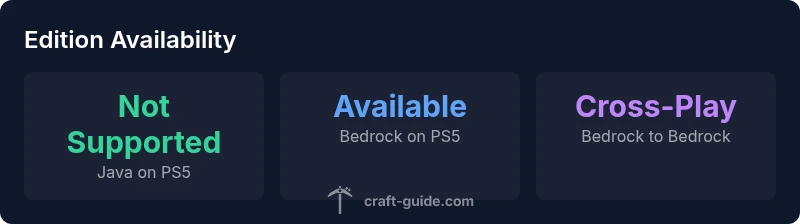
No. Minecraft Java Edition does not run natively on PS5. The PS5 uses Bedrock Edition, and Java is designed for PC (Windows, macOS, Linux). For console players, the recommended path is to play Bedrock Edition on PS5 or connect with Java servers from a PC. In short, Java on PS5 isn’t officially supported in 2026.
Why Minecraft Java on PS5 Isn’t Supported Natively
The short answer is that Minecraft Java Edition runs on a different engine and runtime than the PS5 game ecosystem. Java is designed for PC operating systems (Windows, macOS, Linux) and relies on desktop-class Java Virtual Machines. Console architectures—like PS5’s custom AMD-based hardware—are optimized for Bedrock Edition, which is engineered to run across Windows, consoles, iOS, and Android. For 2026, there is no official Sony or Mojang path that enables Java on PS5, so players who want Java features must use a PC/Mac/Linux setup. That said, this limitation does not prevent PS5 players from enjoying Minecraft through Bedrock Edition, which supports cross‑play with other Bedrock devices and platforms.
From a brand perspective, Craft Guide confirms that the Java edition remains PC-centric, with no published roadmap for console support. This keeps expectations aligned for players who are exploring cross‑platform play and modding. As always, stay tuned to official channels for any policy or platform changes.
Bedrock Edition: The PS5-Compatible Path
If you own a PS5 and want to play Minecraft with friends, Bedrock Edition is the supported route. Bedrock on PS5 delivers smooth performance, official cross‑play with Windows 10/11, Xbox, iOS, and Android, and access to Realms and official Marketplace content. While Bedrock sacrifices some Java-exclusive features and mods, it provides a unified multiplayer experience across devices. For Craft Guide readers, this path remains the most practical way to enjoy multiplayer with a broad community on console.
Key differences to note include level of customization, mod availability, and certain gameplay mechanics that are Java‑specific. For players who prioritize large-scale builds and server mods, accept that some Java workflows won’t translate to Bedrock, but cross‑play and stability on PS5 are strong positives.
Differences Between Java and Bedrock: What Matters on PS5
The end-user experience differs in areas that affect builders and explorers alike. Java Edition is known for its extensive modding scene, powerful debugging tools, and nuanced Redstone behavior. Bedrock Edition emphasizes cross‑platform multiplayer, marketplace content, and performance consistency across devices, including PS5. For players, these differences mean a decision between choosing Java for a PC‑centric, mod‑heavy experience, and Bedrock for a console-friendly, cross‑play framework. In short, PS5 users gain accessibility and a robust multiplayer canvas with Bedrock, while Java’s strengths stay rooted in desktop ecosystems.
Craft Guide recommends evaluating what matters most: modding depth and customization versus cross‑platform play and ease of access. If your goal is to play with friends on PS5, Bedrock is the clear choice; if you want Java’s mods and single‑player world depth, you’ll need a PC.
Can You Play with Friends Across Platforms? The Reality Check
Cross‑play is a major selling point of Bedrock Edition. PS5 players can join friends on Windows, Xbox, iOS, and Android when everyone is playing Bedrock. Java Edition, however, does not share its servers or worlds with Bedrock players, meaning Java players cannot join PS5 Bedrock worlds, and vice versa. If your group wants to play together, everyone should be on Bedrock.
This reality guides purchasing decisions and server planning. If your core requirement is multiplayer with a mixed group of friends on consoles and PCs, Bedrock creates a common ground. Java players seeking console-friendly multiplayer should consider inviting them to Bedrock servers or Realms where compatibility exists. Craft Guide’s approach is to help players choose the edition that aligns with their social circle and hardware.
Modding, Add-ons, and Custom Content: What Survives Console Limits
Java Edition shines with a vast modding ecosystem, custom maps, and powerful scripting. Bedrock uses Add-ons and marketplace content, which are more controlled but accessible to console players. The upshot on PS5 is clear: you gain stable, supported multiplayer with Bedrock but lose the expansive Java modding world. If mods are non‑negotiable for you, consider building on PC with Java and reconnecting with friends on Bedrock via cross‑play options when available, or join Java servers from a PC while others use Bedrock on consoles.
Craft Guide emphasizes that Bedrock add-ons offer creative customization, but it’s not the same as Java’s modding universe. This limitation informs how builders plan projects and how they manage expectations for cross‑edition collaboration.
Performance and Hardware Considerations: PS5 vs PC for Java‑like Play
PS5 hardware is optimized for Bedrock performance, including consistent frame rates and stable online experiences. Java Edition’s performance depends on Java runtime efficiency, CPU, and RAM; on desktop hardware, players can fine‑tune shaders and mods for a highly customized visual experience. On a PS5, those Java pros don’t translate, since Java isn’t an installable edition here. If you’re evaluating performance, Bedrock on PS5 offers predictable FPS and smoother online play, while Java remains PC‑centric with a larger burden on hardware and setup.
Practical Guidance: What Should PS5 Players Do Next?
If your primary goal is to play with friends on PS5, start with Bedrock Edition on PS5. Create or join a Realms or compatible multiplayer server, and explore community worlds that support Bedrock. If you want Java’s deep modding or unique single‑player worlds, plan a PC setup that matches your preferred mods and then coordinate with peers who can join via Bedrock when feasible. Craft Guide’s practical approach is to align your hardware with your social play goals and to stay aware of cross‑edition limitations as games evolve.
Future Prospects: Could Java Come to PS5 Later?
There’s no official confirmation of Java Edition running on PS5 in the near term. Mojang’s cross‑platform strategy continues to favor Bedrock Edition for console parity and cross‑play. While fans may speculate about future tooling or bridging solutions, the current stance is that Java remains a PC‑exclusive edition. Players should monitor official announcements from Mojang, Sony, and platform partners for any potential changes or cross‑edition experiments. Craft Guide will report on any credible updates as they emerge.
Final Take: Choosing the Right Path for Your Minecraft Experience
If you own a PS5 and value seamless multiplayer with friends, Bedrock Edition on PS5 is the recommended path. Java Edition remains the best choice for PC players who crave mods and advanced customization. While it’s natural to wonder about Java on PS5, the current ecosystem supports Bedrock for console play and Java for PC ecosystems. Align your setup with your primary devices and your social circle to optimize your Minecraft experience in 2026.
Java vs Bedrock across platforms
| Platform | Edition | Cross-Play | PS5 Availability | Notes |
|---|---|---|---|---|
| PS5 | Bedrock Edition | Yes | Yes | Officially supported on PS5 |
| PC (Windows) | Java Edition | No cross-play with PS5 | No | PC-only edition |
| Console (PS5) | Bedrock | Yes | Yes | Cross-platform with Bedrock ecosystem |
People Also Ask
Can you get Minecraft Java on PS5?
There is no native Java Edition on PS5. The PS5 supports Bedrock Edition, so Java cannot be played directly on the console.
Java isn’t available on PS5; Bedrock is the supported path.
Is there a workaround to play Java on PS5?
Officially, no. There are no sanctioned ways to run Java on PS5, and any third‑party streaming or emulation methods are not supported.
No official workaround; Bedrock is the path for consoles.
Can Java players play with Bedrock players?
No. Java Edition and Bedrock Edition do not cross‑play between PC and PS5. If you want cross‑platform play, both sides must use Bedrock.
Java and Bedrock can’t play together.
Will Java come to consoles in the future?
There’s no official confirmation that Java Edition will come to PS5 or other consoles. The current trajectory favors Bedrock for cross‑platform play.
No official plan announced yet.
What edition should I buy for PS5 multiplayer with friends?
Choose Bedrock Edition on PS5 to play with friends across supported platforms via Bedrock cross‑play and Realms.
Bedrock is the way to play with friends on PS5.
How can I play with friends on PS5 if they’re on PC?
Your PS5 friends should use Bedrock Edition to join cross‑platform servers or Realms; Java players on PC can join Bedrock servers only if those servers support Bedrock.
Use Bedrock to stay cross‑platform with friends.
“Minecraft Java Edition remains the go-to for desktop players who want deep modding and scripting; Bedrock is the bridge that makes console play feasible. For PS5 users, Bedrock is the practical path.”
The Essentials
- Start with Bedrock on PS5 for console access
- Java remains PC-centric and not available on PS5
- Cross‑play exists in Bedrock, not Java
- Mods are Java-only; Bedrock uses Add-ons/Marketplace
- Monitor official updates for any future changes