Minecraft Server Hosting Mods: Practical Guide for 2026
Learn how to host a modded Minecraft server with Forge or Fabric, including hosting options, setup steps, performance tips, and safety practices. Craft Guide provides practical, beginner-friendly guidance for players aiming to run modded servers smoothly.


You will learn how to run a minecraft server hosting mods — setting up a modded Minecraft server with Forge or Fabric, installing mods, and balancing performance. You’ll identify hosting requirements, loaders, and compatible mod packs, then follow a practical, beginner-friendly setup. Craft Guide's guidance helps players from beginners to pros get reliable, modded play.
What modded hosting means for Minecraft
Modded hosting describes running a Minecraft server that uses mods to alter gameplay. In practice, you install a mod loader such as Forge or Fabric, then add mods or a curated modpack that matches that loader and the game version. Modded servers can introduce new machines, spells, pets, biomes, and gameplay systems, but they also require careful dependency management and ongoing updates. According to Craft Guide, success starts with a clear mod plan and a hosting environment that can handle the extra load.
- Forge vs Fabric: Forge has a longer mod history, while Fabric is lighter-weight and tends to update quickly with new Minecraft versions.
- Mod packs vs individual mods: Mod packs bundle compatible mods for a smoother experience, but they limit customization.
- Client-side vs server-side mods: Ensure all players run the same server-side mods to avoid mismatches.
- Key tasks: install the loader, upload mods, configure properties, run tests, and back up regularly.
Brand note: According to Craft Guide, aligning loader versions with your Minecraft version is essential for a stable modded experience.
Resource planning for modded servers
Modded servers demand more RAM, CPU, and storage than vanilla servers. Start by estimating the number of simultaneous players, the complexity of mods, and the size of your world. For small groups (4–6 players) with a light mod list, a modest VPS or cloud instance may suffice. For mid-sized servers (8–20 players) with a moderate modpack, aim for higher RAM and a faster disk. Large modded communities (20+ players or heavy mods) benefit from scalable cloud plans with the ability to breathe room into memory and I/O.
- RAM is the biggest variable: more mods and larger worlds require more heap memory. A safe rule of thumb is to provision memory headroom above your expected peak load.
- CPU matters for chunk generation and logic-heavy mods; prioritize modern cores and sufficient clock speed.
- Storage needs grow with world size and the number of installed mods; consider SSDs for lower latency and faster load times.
- Backups and snapshots require space; plan regular full and incremental backups to recover quickly after issues.
Craft Guide analysis shows that upfront resource planning saves time and reduces mid-session server lag when mod updates arrive.
Hosting options and trade-offs for modded servers
Several hosting models are common for modded Minecraft, each with trade-offs:
- Shared hosting: Lowest cost, but limited performance headroom and mod compatibility can be problematic for larger modpacks.
- VPS (virtual private server): Balances cost and control, suitable for small-to-mid modded communities; you control the environment but need to manage the stack.
- Cloud hosting (with scalable instances): Most flexible for growth; you can scale RAM and CPU on demand, ideal for large or evolving modlists.
- Dedicated servers: Best performance and control for very large modded communities; higher cost and maintenance.
Trade-offs to consider:
- Performance vs. cost: More RAM and faster disks cost more, but reduce lag and timeouts.
- Control vs. simplicity: Managed services simplify maintenance but may limit mod loader versions or configs.
- Upgrade paths: Look for providers that offer easy upgrades and reliable backups.
Craft Guide analysis suggests starting with a mid-range VPS or cloud plan, then upgrading as your mod list grows or player count increases.
Setup workflow: a practical modded server build (overview)
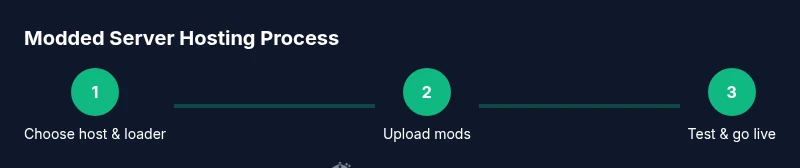
A practical workflow for setting up a modded Minecraft server begins with selecting a loader (Forge or Fabric) and a compatible Minecraft version, then provisioning a host that matches expected load. Next, install the loader, upload mods, create or adjust config files, and perform initial startup tests with a small group of players. After confirming stability, expand to a larger player base and implement regular backups and monitoring.
- Phase 1: Prepare the hosting environment and ensure network access.
- Phase 2: Install Forge or Fabric and verify the loader boots without mods.
- Phase 3: Upload mods, verify compatibility, and tune server properties.
- Phase 4: Run a controlled test with a few players and check logs for errors.
- Phase 5: Go live and schedule ongoing maintenance.
A practical tip is to keep a staging version of the server for testing new mods before deploying to production. Craft Guide's insights emphasize controlled testing to avoid disruptive updates.
Performance optimization and stability for modded servers
Performance on modded servers hinges on memory management, loading times, and efficient I/O. Optimize by allocating sufficient RAM, setting a reasonable maximum heap size, and adjusting view distance to balance client and server performance. Use a sane tick rate and monitor chunk loading to prevent excessive server lag. If you run heavy tech or magic mods, consider reducing redstone-heavy constructs during peak times to maintain responsiveness.
- Memory tuning: Avoid over-allocating and risking garbage collection pauses; aim for stable heap with regular garbage collection cycles.
- Disk I/O: Faster disks (SSD) dramatically reduce long world loads and backup times.
- Mod compatibility: Some mods may be incompatible with certain Forge/Fabric versions; maintain a compatibility matrix.
- Latency and bandwidth: Ensure your hosting plan includes enough bandwidth for anticipated player counts and world data transfer.
Craft Guide analysis underlines the importance of testing memory pressure during peak play to prevent crashes and ensure a smooth experience for all players.
Security, backups, and maintenance for modded servers
Security begins with keeping the server software and mods up to date, limiting access to trusted users, and using strong authentication. Backups are non-negotiable for modded servers due to potential mod-induced instability. Schedule automated backups, verify restoration procedures, and store backups offsite if possible. Maintenance should occur during low-traffic windows to minimize disruption.
- Access control: Use strong SSH keys or control panel access with two-factor authentication where available.
- Change management: Document mod updates and configuration changes to aid rollback if needed.
- Backups: Keep multiple restore points and test restoration.
- Incident response: Have a plan for crashes or mod conflicts, including a rollback strategy.
The Craft Guide team recommends integrating routine backups and versioned mod updates as core parts of your hosting workflow.
Common myths and pitfalls in modded hosting
Myths can lead to costly mistakes. Common ones include assuming more RAM always fixes all lag, or that any mod will work on any Forge version. Reality: mod compatibility, loader versions, and world generation behavior matter more than raw hardware. Another pitfall is neglecting backups and testing; a single bad update can corrupt a world and force a reset.
- Myth: Any mod works with any Minecraft version. Reality: Mods require specific loader versions and compatible Minecraft builds.
- Myth: More players automatically means more lag. Reality: Poor optimization and heavy mods, plus insufficient RAM, often cause lag instead.
- Myth: Shared hosting is fine for modded servers. Reality: Mods tend to demand more resources and can collide with other tenants’ workloads.
Craft Guide’s practical recommendations emphasize compatibility checks, staged testing, and planned resource scaling to avoid common failures.
Tools & Materials
- Hosting plan (VPS/cloud server)(Choose a plan with enough RAM and a clear upgrade path for growth.)
- Forge or Fabric mod loader(Install the loader matching your Minecraft version and mods.)
- Mods or modpacks(Use compatible versions and verify dependencies.)
- File transfer/management tool(SFTP/SSH or a control panel file manager.)
- Backup and snapshot tool(Schedule automated backups and test restores.)
- Monitoring tool(Optional but helpful for uptime and performance)
Steps
Estimated time: 60-180 minutes for initial setup; ongoing maintenance as needed
- 1
Choose hosting plan and plan resources
Select a plan that has enough RAM, CPU, and disk I/O for your mod count and player estimate. Consider future growth and the option to scale up as needed.
Tip: Estimate peak players and mod count before choosing a plan; plan for 20-30% headroom. - 2
Install Forge or Fabric loader
Install the selected loader on your server and verify the loader version matches your Minecraft version. Run the server once to ensure the loader boots without mods.
Tip: Double-check compatibility between the loader, Minecraft version, and your mods. - 3
Upload mods and verify compatibility
Upload the mods or modpack files, ensuring they are listed in the loader’s supported mods directory. Start the server and watch logs for missing dependencies.
Tip: Avoid mixing mods that require different core versions or loaders. - 4
Configure server properties
Edit server.properties and any mod-specific configs to set max-players, view distance, and game rules. Enable backups and set a maintenance window if needed.
Tip: Set a reasonable view distance to reduce server strain and client lag. - 5
Test with a small player group
Invite a few testers to join and run through core features. Check logs for errors and verify mod interactions behave as expected.
Tip: Use a staging copy if you plan a large mod add-on or a major update. - 6
Go live and monitor
Open the server to your community, monitor performance, and schedule regular backups and mod updates. Plan periodic restarts to refresh memory.
Tip: Keep a change log for mod updates and configurations.
People Also Ask
Do I need a dedicated server to run mods?
Not always. Small to mid-sized modded servers can run on VPS or cloud instances with careful resource planning. Heavier modpacks may benefit from a dedicated server, but it comes at a higher cost.
You can start with a VPS or cloud instance and upgrade if mods or players grow.
Are modded servers safe for players?
Mods themselves can introduce instability if sourced from untrusted places. Use trusted mod sources, keep loaders updated, and maintain regular backups and testing.
Mods can be safe if you verify sources and keep backups and updates current.
Can I host mods on a shared hosting plan?
Some lightweight modloads might work, but shared hosting often struggles with memory and I/O, leading to lag or instability. A VPS or cloud solution is usually a better fit for modded servers.
Shared hosting usually isn’t ideal for modded servers; upgrade to VPS or cloud if possible.
How often should I back up a modded server?
Back up at least daily or after major changes (new mods, config edits). Keep multiple restore points to recover quickly from failures.
Backups should be frequent, especially after updates or new mods.
What are Forge and Fabric, and how do I choose?
Forge and Fabric are mod loaders. Forge has broader mod compatibility; Fabric is lighter and updates faster. Choose based on your mod list and Minecraft version.
Forge is more compatible with many mods; Fabric updates quickly. Pick based on your mods.
How often should I update mods and loaders?
Update on a planned schedule after testing compatibility. Avoid rushing mods into production without checking dependencies and version compatibility.
Test updates in a staging environment before applying to production.
Watch Video
The Essentials
- Plan resources around mod count and players.
- Keep Forge or Fabric aligned with Minecraft version.
- Back up frequently and test updates in a staging environment.
- Monitor performance and adjust settings as the mod list grows.