Do You Need to Pay to Play Minecraft with Friends? A Practical Guide
Learn whether paying is required to play Minecraft with friends. This Craft Guide analysis covers free options, hosted realms, and budget-friendly setups to keep your group gaming.


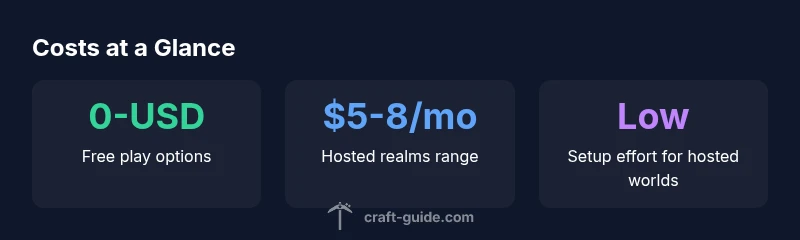
In most cases you do not have to pay to play Minecraft with friends. Free options include LAN play on the same network, hosting a local server on your PC, or joining public servers that don’t require a subscription. Paid routes, like Minecraft Realms, offer hosted, persistent worlds with simple setup. Choose based on how you play.
How costs break down for playing with friends
According to Craft Guide, the decision to pay or not is largely about how you want to host, persist, and manage access for your group. Free options such as LAN play require no subscription, but they demand proximity and stable hardware on the host side. If you want a world that you can access from anywhere and keep forever without re-creating it, a hosted solution becomes appealing. On the other hand, self-hosted servers give you control and can be cheaper over time if you already own a capable machine, but they require technical setup and ongoing maintenance. The most important factor is how many players you plan to have and how often you play together. For smaller groups who play casually, free methods can be perfect. Larger groups or players seeking reliability and 24/7 access often find paid options worth the investment.
In Craft Guide’s analysis, the two most common models are hosting a private world on a local device (free, low friction) or subscribing to a hosted service for persistence and ease of use. Realms provides a turnkey experience with minimal configuration; third-party hosting offers more customization but requires more setup. When you pick a model, map out who will host, how many players can join simultaneously, and what level of control you want over world settings, backups, and mods. This planning helps you avoid surprises when friends attempt to join.
Free ways to play with friends
Free play hinges on local networks or publicly accessible servers. LAN play works well for families or groups who are physically near each other; you simply connect via your local network, and all players join the host’s world. A second free approach is running a personal server on a computer you own; this is technically free if you already own hardware, but don’t forget to factor electricity usage and potential network bandwidth. Public servers are another option; these are hosted by third parties and usually free to join, but vary widely in quality, uptime, and moderation. For players who want to avoid setup, free options let you test the waters before committing to a paid plan. Craft Guide notes that free approaches are ideal for small groups that meet regularly and can handle occasional downtime.
Paid options and when they make sense
Paid routes primarily revolve around hosted worlds such as Minecraft Realms or third-party server hosting. Realms provide a stable, cross-version experience with automatic backups, simple invites, and decent performance for small groups. The cost is a predictable monthly subscription, which many players consider worth the convenience if you meet frequently. Third-party hosts offer scalable resources, custom server options, and can support larger groups or mods, but require more hands-on management. If your group values persistence, regular backups, and a low-maintenance setup, a paid solution is often the best fit. For casual or one-off sessions, free options may suffice and keep costs down. Craft Guide’s team suggests matching the hosting choice to your group size, play frequency, and tolerance for setup complexity.
Setup steps for a smooth group experience
Begin with a clear plan: decide who will host, how many players will join, and whether you need cross-platform support. If you’re new to hosting, start with LAN play to validate your group’s interest. For a hosted solution, create and share invites, set permissions carefully, and schedule regular backups. Ensure everyone is on the same Minecraft edition (Java vs Bedrock) to avoid compatibility issues. When hosting a server yourself, you’ll want a modest firewall rule set, periodic restarts, and lightweight mods checked for compatibility. Documenting these steps saves confusion later and reduces friction when friends attempt to join. Craft Guide’s team recommends testing with a small test session before inviting your full crew.
Budgeting for a Minecraft playgroup
Budgeting is about aligning expectations with costs. For a small group that plays weekly, Realms or light hosting may cost a few dollars per month per user, but can provide reliability and ease of use. If you host privately, you’ll incur electricity, potential hardware upgrades, and occasional hardware maintenance. When planning, include potential add-ons like mods, server backups, and premium server management tools. A simple rule: start with a no-cost option to gauge commitment, then scale up to paid hosting if the group sticks together. Craft Guide’s analysis highlights that deliberate budgeting helps avoid surprises and keeps play sustainable for the long term.
Common pitfalls and how to avoid them
A frequent pitfall is mismatched expectations about uptime and access. Free options may experience downtime, while hosted solutions can suffer from service outages. Another issue is version compatibility: ensure everyone uses the same Minecraft edition and version. Mod compatibility can break multiplayer sessions; test mods in a separate environment before inviting friends. Network considerations, such as upload bandwidth and router settings, can bottleneck performance with multiple players. Finally, prioritize player safety and moderation on public servers to avoid griefing or abuse. By planning ahead and setting ground rules, you can keep play enjoyable and stress-free.
Ways to play with friends: costs, setup, and suitability
| Option | Typical Cost Range | Setup Effort | Best For |
|---|---|---|---|
| LAN play (local network) | 0 USD | Low | Small groups nearby |
| Public servers (free-to-join) | 0 USD; optional purchases | Low to Moderate | Casual groups who don’t host |
| Self-hosted private server | 0-USD upfront; hardware costs | Medium | Groups with technical know-how |
| Minecraft Realms (hosted) | 5-8 USD/mo (region varies) | Low | Small to medium groups seeking ease |
| Third-party hosted server | Varies widely (hosting plan) | Medium to High | Larger groups or mods |
People Also Ask
Do you need to buy Minecraft to play with friends?
Yes, each player needs a licensed copy of Minecraft to participate. If someone already owns the game, you can organize play on their device for local sessions. A hosted server or Realms can simplify access for everyone, but all players still need access to the game itself.
Yes—everyone needs the game, but you can host sessions so more players can join without each person buying a separate license.
Is Realms worth it for a small group?
For small groups that want a low-maintenance, persistent world, Realms is convenient and reliable. It handles backups and invites, reducing setup time. If you value customization or expect a larger player base, third-party hosting or self-hosting might be more cost-effective long-term.
Realms is great for small groups who want things simple and reliable; for more customization, look at other hosting options.
Can I play with friends for free on a server?
Yes, you can play for free by using LAN play, or joining free public servers. Be aware that these options may have limitations on uptime, safety, or performance. If you frequently play with a fixed group, a hosted or self-hosted server might offer better reliability.
Free options exist, but they can be less reliable. For regular groups, consider a paid option for stability.
Are cross-platform play options changing costs?
Cross-platform play between Java and Bedrock generally works with both free and paid options, but some features require specific servers or Realms. Costs depend on the hosting choice you select and whether you need additional services like cross-version compatibility or mods.
Cross-platform play is possible in many setups, with costs depending on hosting and features chosen.
What about safety and moderation on public servers?
Public servers can be fun but vary in moderation. Choose servers with clear rules, active moderators, and reporting tools. For private groups, you control who joins, which reduces risk and helps protect younger players.
Public servers can be great, but pick ones with solid moderation or stick to private groups for safety.
“The most important choice is finding a setup that matches your group’s size, schedule, and willingness to manage a server. Free options work for casual play, while hosted worlds minimize maintenance for steady groups.”
The Essentials
- Start with free options to test interest.
- Choose hosting aligned with group size and skill.
- Realms simplifies setup for small groups.
- Self-hosting saves money but adds maintenance.
- Test compatibility before inviting everyone.