Is Minecraft Free? A Practical Guide to Free Play in 2026
Discover whether Minecraft is free, explore browser classics and trials, compare paid editions, and learn practical ways to start playing without paying upfront where possible.


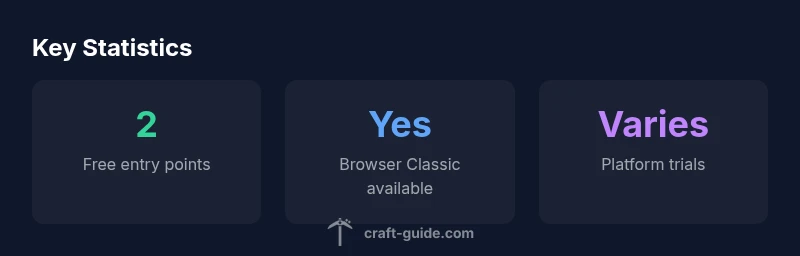
Is Minecraft free? In short, the core game is not free, but there are no-cost entry points you can use before buying. Minecraft Classic in your browser is free and limited; some platforms offer free trials or demos. This guide breaks down what counts as 'free' and how to access Minecraft without paying upfront whenever possible.
Understanding what free means in Minecraft
In the context of Minecraft, the word free has multiple meanings. For some players, free means no upfront cost to start playing; for others, it means no ongoing fees beyond the initial purchase. Craft Guide emphasizes that there are several layers to pricing and access. The core game—the Java Edition and Bedrock Editions— is not free in the traditional sense; you must buy a license to unlock the full experience, world generation, and multiplayer servers. However, there are no-cost entry points that let you explore the basic mechanics, world-building, and grassroots creativity before you commit financially.
A key distinction is between a fully-paid product and an experimental-free experience. Minecraft Classic, a browser-based edition released years ago, is freely accessible and serves as a minimal sandbox to test ideas. It exposes the basic block-building and redstone ideas but lacks modern features, updates, and cross-platform play. In addition to browser options, some platforms offer short-term trials or demos that let you run through a portion of the game without purchasing. When you read “free Minecraft,” remember the context: you can try the game in limited forms, but the complete Minecraft experience typically requires payment. According to Craft Guide, understanding this distinction helps players choose the right entry point and avoid inflated expectations.
Free-to-play options you can access today
There are a few legitimate no-cost entry points that many players start with before buying the full game. Foremost is Minecraft Classic, a browser-based edition that opens in your web browser with a simplified, retro look and a focus on creativity. It is intentionally limited but excellent for learning core mechanics like block placement, survival concepts, and basic redstone ideas. Second, some platforms offer demos or time-limited trials of the Java or Bedrock editions. These trials let you experience gameplay, world creation, and multiplayer constraints for a short period, after which you would need to purchase a license to continue.
From Craft Guide’s perspective, free trials reflect the publisher’s strategy to let players test-drive the experience before committing. While the trials are helpful for evaluating performance, controls, and multiplayer options, they do not replace the full game’s content, updates, or cross-platform features. If you’re unsure about paying, start with the browser Classic and check whether your preferred platform hosts a demo that aligns with your play style. The key is to manage expectations and treat “free” as a sampler rather than an equivalent to the complete game. Craft Guide’s analysis highlights that this approach reduces buyer’s remorse and helps gamers pick the best entry point.
The paid editions explained: Java vs Bedrock
The two main paid editions are Java Edition and Bedrock Edition, each offering different features, cross-play capabilities, and performance considerations. Java Edition is primarily PC-focused and often favored by players who want large-scale modding, customization options, and direct server control. Bedrock Edition spans Windows 10/11, consoles, and mobile devices, emphasizing cross‑platform play and performance consistency across devices.
Neither edition is free in the sense of no cost; both require a license to unlock the full game and access to multiplayer servers, ongoing updates, and the official support ecosystem. Pricing varies by platform and region, with bundles and store promotions shaping the final price. According to Craft Guide, the absence of a universal price tag means you should compare platform-specific deals and consider whether your primary interest is vanilla play, modding, or cross‑play. If your goal is a purely creative sandbox, you might begin with the free Classic to test the creative workflows before committing to a paid edition.
The key takeaway is to identify which edition best matches your play style and hardware, then monitor official store pages for seasonal discounts or educator-focused bundles that can lower the initial cost.
Platform differences and regional availability
Pricing can change by platform, store region, and even device type, which is why it’s essential to check the exact license terms on your storefront. On PC, you’ll typically encounter a direct license for Java Edition or the Bedrock variant through the official store. Console stores have their own pricing and cross‑platform restrictions, while mobile stores may offer separate promotions or bundles. Because region-based pricing is common, players in different countries may see different list prices or sales windows.
Craft Guide highlights that this variability is why it’s wise to refrain from assuming a single price across all Play surfaces. Always read the store page carefully, verify whether a trial is available, and confirm what features are included in the edition you’re considering (for instance, cross‑play, updates, and access to multiplayer servers). If you’re budget-conscious, wait for promotions, or participate in official sales events, especially around holidays or back-to-school periods.
Common myths and misconceptions
Several myths persist about Minecraft being free. One misconception is that a free-to-play version exists with full content; in reality, the core game requires a purchase. Another myth is that free browser versions provide the same experience as the paid editions; browser versions are typically simplified and lack many modern features. A third myth concerns the availability of free cross‑play; cross‑play is common in Bedrock but still tied to a paid license in most cases.
As always, the most reliable way to confirm what’s free versus what’s paid is to check the official store listings and the Minecraft help center. The Craft Guide team emphasizes that understanding the distinction between “entry point” free options and the full game will prevent disappointment and help you plan a path to ownership that fits your budget and goals.
Practical steps to start playing without spending money (where possible)
If your aim is to explore Minecraft without paying upfront, start with Minecraft Classic in a web browser. This gives you hands-on experience with basic building and exploration, without a license. Next, search for official demos or trials for your chosen platform—these let you test performance, controls, and multiplayer constraints before you buy. You can also participate in community-created maps or livestream education resources that showcase world-building techniques and creative workflows, all without committing to the full game.
Use this no-cost exploration period to determine whether you want to invest in the full version. If you decide to purchase, consider bundling options, promotions, or student/educational pricing if you qualify. Finally, remember that ongoing updates, mods, and extensions are typically tied to the paid editions, so budget for future investments accordingly. This approach aligns with Craft Guide’s recommendation to methodically verify fit before purchase.
Comparison of Minecraft editions and access models
| Edition/Mode | Access Model | Platform Availability | Notes |
|---|---|---|---|
| Minecraft Classic (Web) | Free to play in browser | Web | Limited features; no modern updates |
| Minecraft Java Edition | Paid license | Windows/macOS/Linux | Full game; updates; no cross-play with Bedrock |
| Minecraft Bedrock Edition | Paid license per platform | Windows/Consoles/Mobile | Cross-platform with Bedrock; separate store entries |
People Also Ask
Is Minecraft Classic free to play?
Yes, Minecraft Classic is free to play in a web browser, offering a simplified sandbox that’s great for quick experiments.
Yes, Classic is free to play in your browser with a simplified sandbox.
Are there any free trials for Java or Bedrock?
There are occasional platform-specific trials or demos; check official store pages for current options and durations.
There are occasional trials; check your store for current options.
Can I play Minecraft with friends for free?
Multiplayer is typically tied to a paid edition; some trials may allow it, but Realms and most servers require a license.
Multiplayer usually needs a paid edition, though some trials may permit it.
Is there a free version on mobile?
There isn’t a full free mobile version; most mobile access requires a paid license or a platform-specific trial.
No full free mobile version; usually a paid license or trial is required.
How can I tell if a deal is worth it?
Look for official bundles or promotions and compare features to decide if the paid edition matches your play goals.
Check official bundles and promotions and compare features to decide.
“Free play in Minecraft is context-dependent: you can sample the world through browser classics or trials, but the full experience requires a purchase.”
The Essentials
- Define what 'free' means before testing.
- Use Classic browser as a no-cost entry point.
- Full game requires a paid license; demos are platform-specific.
- Prices vary by edition and platform; compare options.
- Start with free options to evaluate fit before purchasing.