Are Minecraft Servers Free in 2026? A Practical Guide
Explore whether Minecraft servers are free, how free hosting works, and practical steps to run a server at no cost. Craft Guide explains the tradeoffs for players of all levels.


Yes, you can run a Minecraft server for free by using your own computer as the host (self-hosted) or by using certain free tiers, but truly free, public hosting options are scarce and typically come with limits. Free options often require technical setup, bandwidth considerations, and may lack reliability or support. For simple, small groups, free approaches can work.
What 'free' means for Minecraft servers
When you first search for are minecraft servers free, you’re negotiating two realities: there is no universal free license for hosting a public server, and there are legitimate zero-dollar paths for small, private groups. In 2026, “free” can mean you already own the hardware and run a server at no ongoing cost, or it can describe free tiers and trials offered by cloud platforms that permit limited usage. Craft Guide Analysis, 2026, shows that these free routes are viable for learning, testing, and casual play, but they come with tradeoffs in control, performance, and reliability. A truly free solution often means managing your own uptime, updates, and backups. The key is to set clear expectations about player count, available plugins, and how much downtime you’re willing to tolerate. If your goal is to host a persistent world with mod support and reliable uptime, you’ll likely need a paid option eventually, but many players discover that a free starting point is enough to learn, experiment, and decide on a longer-term plan.
Self-hosting on a PC: control and costs
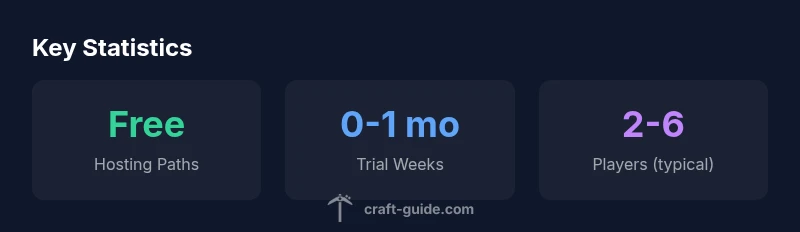
Running a server from home gives you total control and truly free operation beyond your electricity bill and your internet plan. You’ll download the official server jar for Java Edition, open the required ports in your router, and configure server.properties to suit your world. The upside is privacy and customization: you can install mods, run plugin ecosystems, and invite friends without a middleman. The downside is hardware limits, potential latency, and the need to keep the machine online. If your goal is to support a small group (2-6 players) on a tight budget, self-hosting can be a practical, zero-dollar starting point. However, you must account for bandwidth caps, processing power, and the time required to manage backups and security. Craft Guide recommends testing your setup on a local network before exposing it publicly, and considering a modest upgrade if you want smoother gameplay or more players. In short, self-hosting is the closest thing to a truly free server for those willing to invest time rather than money.
Free tiers and community hosting: what you should know
Several cloud providers and community hosting services offer free tiers or trials that let you run a basic server for a limited time or with restricted features. These free options are useful for trial runs, experiments, and teaching others how to configure worlds. Expect limits such as fewer slots, restricted access to advanced plugins, imposed uptime ceilings, and the need to display provider branding. If you’re planning a regular, lightly-populated world, a free tier can be the right choice for a few months, but ongoing play often pushes you toward paid plans. Craft Guide Analysis, 2026, emphasizes that anti-abuse policies and throttle rules can affect performance; you may experience lag during peak hours or when mods are installed. For players seeking a risk-free sandbox, free tiers provide practical insight into server management without a long-term commitment. Just remember to track usage and plan for migration if your community grows.
Official options: Realms and alternatives
Minecraft Realms is Mojang’s official hosting option designed for simplicity and reliability, but it is not free. It provides an easy-to-use environment with automatic backups and minimal setup, ideal for small groups who want a hassle-free experience. If your group can tolerate a fixed price, Realms remains a dependable choice. For players who want more control, third-party hosting offers self-managed and managed servers, with a wide range of features and pricing. Some options provide a free trial period or a very low-cost entry plan, though these rarely stay free as your player count or plugin needs grow. Craft Guide recommends evaluating the balance between ease-of-use and customization, and choosing based on your community’s goals and the level of technical overhead you’re prepared to handle.
Performance, reliability, and scalability on free setups
Free solutions often trade performance for price. Self-hosted servers rely on your hardware and network; even a modest gaming PC can support a handful of players with a well-optimized configuration, while adding plugins or larger worlds can push hardware limits quickly. Free cloud tiers may throttle CPU, memory, or bandwidth during peak times, resulting in inconsistent frame rates and higher latency. If you anticipate a busy server or frequent world updates, you’ll probably outgrow a no-cost option sooner than you expect. Craft Guide Analysis, 2026, notes that reliability is a common concern with free hosting, especially when the server is running on consumer-grade hardware or sharing resources. To mitigate these issues, set expectations with players, schedule planned downtimes, and consider staged upgrades as your community expands.
Security, backups, and maintenance for free servers
Security should never be optional, even on free servers. With self-hosted setups, enable strong passwords, limit remote admin access, and implement regular backups to local storage or cloud storage you control. Free hosting can expose you to ads, throttling, and sudden terminations, so maintain separate backups and test restores periodically. A simple backup strategy is to export your world frequently, test a restore on a separate server, and store backups in at least two locations. This reduces the risk of data loss from power outages, hardware failure, or provider policy changes. Craft Guide recommends documenting every change you make to server configuration and keeping a disaster recovery plan so your players’ progress isn’t lost if something goes wrong.
Step-by-step plan to get started with a free server
Starting a free server requires a clear plan. First, define your goal: private testing, learning, or casual play with a fixed group. Second, pick your hosting path: self-host on a dedicated PC or try a free cloud tier with strict limits. Third, set up the server: download the official server jar for Java Edition, edit server.properties, accept the EULA, and run a basic world to verify connectivity. Fourth, secure and back up: use a strong admin password, restrict access to trusted players, and implement a regular backup routine (export world data weekly or after major builds). Fifth, monitor performance and plan for growth: track player count, latency, and memory usage; if performance dips, consider reducing view distance, lowering mob counts, or migrating to a paid plan or paid hosting with better resources. By following these steps, you can launch a playable, zero-cost server while keeping an eye on future upgrades as your community evolves.
Comparison of hosting options
| Option | Cost | Limitations | Best For |
|---|---|---|---|
| Self-hosted on PC | Free with existing hardware | Requires local setup, port-forwarding, and stable power/internet | Small groups and learning |
| Free cloud tier or trials | Free (limited) | Slot limits, uptime caps, branding, throttling | Experimenting, pilots, short-term use |
| Minecraft Realms (official) | Price varies by plan | Limited customization, fixed world size | Casual, small groups seeking simplicity |
| Paid third-party hosting | Price varies by plan | Higher reliability, plugins, support | Larger servers and communities |
People Also Ask
Are Minecraft servers truly free?
Not entirely. Free options exist, particularly self-hosting where you use your own hardware, or free tiers with limits from cloud providers. Real costs appear with scale, reliability, and support. Expect tradeoffs.
Free options exist, especially if you own hardware or use limited free tiers. They come with tradeoffs.
Can I run a Minecraft server on my own computer at no cost?
Yes, you can run a server on a PC you own without monthly fees, but you pay with electricity, bandwidth, and time. You'll need technical setup and ongoing maintenance.
Yes, you can, but it’s not truly free due to power and internet costs.
Do Minecraft Realms count as free?
Realms is paid; there isn't a free version. There are free trials that last for a short period, but ongoing use requires a subscription.
Realms isn’t free; it’s a paid service with possible short trials.
What are the downsides of free hosting?
Common downsides include limited slots, throttled performance, intrusive branding, and less control over backups and plugins.
Free hosting often comes with limits and reduced control.
How many players can a free server support?
It depends on the hosting path; self-hosted setups can support a few players with decent hardware, while free cloud tiers may cap slots. For larger groups, you’ll reach limits quickly.
Expect a small group; limits vary by path.
How do I get started with a free server?
Choose a path (self-host or free tier), set up the server, secure and back up, and monitor performance. Expand gradually or migrate to paid hosting as needed.
Pick a path, set up, secure, back up, and monitor.
“Free server options can be valuable for learning and small groups, but they require careful planning and maintenance to stay usable.”
The Essentials
- Free paths exist but trade off control and reliability.
- Self-hosting can be zero ongoing cost if you own hardware.
- Free tiers suit testing; plan to migrate as your community grows.
- Realms is a paid, simple option for small, casual groups.
- Define goals early to choose the right path.