Are Minecraft Mods Free? A Practical Guide for Players
Explore whether Minecraft mods are free, how licensing works, where to download safely, and practical tips to identify legitimate free mods versus paid options.


Are Minecraft mods free? In most cases, yes. The majority of popular mods are distributed at no cost, often under open-source licenses, with optional donations or premium features. This article explains how free mods work, where to download them safely, and what to watch out for to avoid paid-only content or questionable paywalls.
Why the question matters
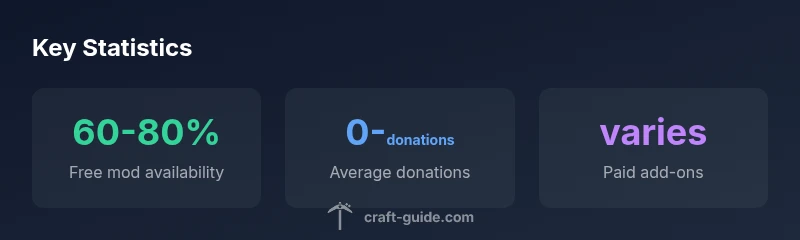
Are minecraft mods free? This question sits at the heart of how players experience Minecraft beyond the base game. In practice, most widely-used mods are released at no upfront cost, enabling a vast ecosystem of user-generated content. According to Craft Guide, the majority of popular mods operate under permissive licenses that allow free use, with optional donations or paid add-ons for advanced features. For many players, the distinction between free and paid content is more about funding models than quality. Understanding these models helps you choose mods that fit your budget while respecting creators' work. The open nature of many mod projects also encourages collaboration, bug fixes, and faster updates, which benefits the entire community.
Free vs paid models in the mod ecosystem
Free mods often follow open-source licenses (like MIT, Apache, or GPL-compatible terms) that permit redistribution and modification. This makes installation straightforward for players on both Java Edition and Bedrock platforms, with loaders such as Forge or Fabric acting as the bridges between mods and the game. Paid mods or paid add-ons typically offer premium features, enhanced textures, or specialized toolsets. Some creators monetize through optional subscriptions, tiered donor perks, or bundled packs. While these paid options exist, a large portion of the ecosystem remains free, funded by donations or sponsorships. The distinction matters for players who want to minimize costs without sacrificing quality or safety.
Where to find safe, free mods
Finding mods safely starts with trusted repositories and clear licensing information. Reputable sources like CurseForge and Modrinth host thousands of mods, with community reviews and explicit licensing notes. Before downloading, check the.mod files’ requirements (Forge vs Fabric), the version compatibility, and any installation instructions. Craft Guide recommends starting with well-known projects and reading user comments for red flags. Always back up your Minecraft profile, especially when experimenting with new mods, to avoid corrupted saves or conflicts.
How free mod ecosystems are funded: donations, sponsorships, and more
Many creators rely on donations, Patreon-style support, or sponsor programs to fund development. This funding model can coexist with free downloads, allowing mod authors to continually improve their work without a paywall. Some developers offer optional paid bundles that add value (such as exclusive textures, early access, or support perks) while keeping the core mod free for everyone. For players, this means you can enjoy a strong free baseline while choosing to support creators who provide extra benefits.
Common myths about paid mods
A frequent misconception is that all mods require money. In reality, many mods are fully free, with optional paid add-ons or donations. Some arguments about paid mods stem from failed experiments or limited distribution models in the past, but the current Minecraft modding community largely follows a split where the base experience remains free, and monetization happens through optional enhancements. Always verify a mod’s licensing and read the terms before assuming it requires payment.
Safety, compatibility, and performance considerations
Free mods don’t have to be risky. Stick to established loaders (Forge, Fabric) and keep mod lists within a compatible version range. Conflicts can arise when multiple mods try to modify the same game mechanism, leading to crashes or data corruption. Use profiles, test mod combinations in a safe environment, and disable or remove mods that cause issues. Check for updates and maintain backups to minimize risk to your worlds and saves.
Practical steps to start modding on a budget
- Start with a curated, free mod set from trusted sources.
- Verify version compatibility and loader requirements before installing.
- Back up your saves and test in a separate profile.
- Consider supporting favorite creators via donations if you value their ongoing work.
- Keep an eye on license terms in case a mod transitions to paid-only features.
Mod cost models and licensing overview
| Model Type | Typical Cost | License/Notes |
|---|---|---|
| Free, open-source mods | 0 | Common licenses vary; verify permissions |
| Paid mods or add-ons | varies | Premium features or bundles |
| Donation-funded mods | 0 with optional tips | Support-based funding |
People Also Ask
Are Minecraft mods free by default, or do you need to pay for them?
In most cases, mods are free to download and use. Some creators offer paid bundles or donations-based funding for extra features, but the base mod remains accessible at no cost. Always check licensing and download from reputable sources.
Most mods are free to download and use, with some optional paid add-ons available from creators you can support.
What should I check before downloading a mod to ensure it's safe?
Verify the source (trusted repositories), read licensing notes, and confirm version compatibility with your Minecraft launcher. Scan for malware where possible and back up your saves before installation.
Download only from trusted sites, check compatibility, and back up your saves before installing.
Can I use free mods on both Java and Bedrock editions?
Mod development differs between Java and Bedrock editions. Many mods are Java-only, requiring Forge or Fabric loaders, while Bedrock relies on different add-ons. Always verify edition compatibility before installation.
Mods are often edition-specific; verify Java vs Bedrock compatibility before downloading.
Do mod creators earn money from free mods?
Yes, many creators earn through donations, sponsorships, or paid bundles while offering free downloads. This funding helps sustain updates and support.
Creators often rely on donations or sponsorships even when the mod is free to download.
What’s a good starting point for budget modding?
Begin with free, well-reviewed mods from trusted sources, ensure you have a stable backup system, and gradually explore optional paid add-ons from creators you trust.
Start with free mods, back up first, and only buy from trusted creators.
How can I tell if a mod is compatible with my version?
Check the mod page for the supported Minecraft version, loader (Forge/Fabric) requirements, and any dependency mods. Use a launch profile that matches these specs.
Read the mod page for version and loader requirements, then set up a matching launch profile.
Are there risks of installing too many mods at once?
Yes. Conflicts and performance issues rise with many mods. Install gradually, test each addition, and optimize memory settings for stability.
Adding too many mods can cause crashes; test gradually and optimize memory.
“"Free mods build community and extend Minecraft for everyone, while paid options often fund ongoing development without restricting access to the core experience."”
The Essentials
- Most popular mods are free to download and use
- Look for clear licensing and safe download sources
- Donations and paid add-ons are common but optional
- Back up worlds and use safe mod loaders to avoid conflicts
- Support creators you value to sustain quality