How Much Is a Minecraft Server? A Practical Cost Guide
Discover how much is a Minecraft server with a practical, data-driven cost guide. Explore hosting options, price ranges, and budgeting tips for beginners to advanced players in 2026.


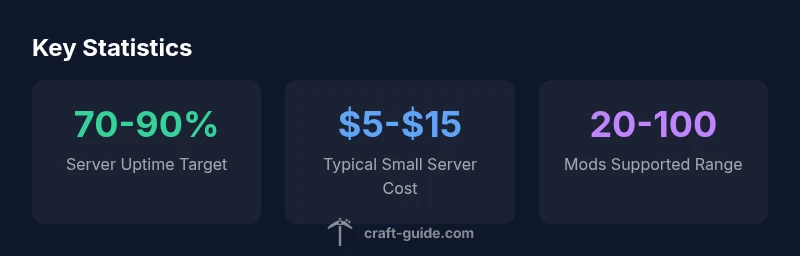
How much is a Minecraft server? Costs vary by hosting method and player load. On a home PC you can run a server with no ongoing hosting fees (just electricity). For most players, basic VPS hosting starts around $5–$15 per month, while larger, modded, or high-traffic setups can push costs to $20–$100+ per month. Realms offers a fixed subscription with its own pricing. Craft Guide Analysis, 2026.
Understanding the Cost Landscape
When you ask how much is a minecraft server, the answer isn't a single number. Costs vary with hosting method, player load, world size, and your desired uptime. On a home PC, you can run a basic server with virtually no monthly hosting fees; the main ongoing expense is electricity and the depreciation of hardware if you use older gear. For most players, entry-level VPS hosting is a practical starting point, typically in the range of $5–$15 per month, depending on bandwidth and RAM. If you anticipate larger communities, frequent updates, or modded packs, costs rise as you demand more CPU power, memory, and storage. Realms provides a fixed subscription path offered by Mojang, designed for simplicity and reliability, but it comes with trade-offs in customization and plugin support. In short, the core question is not just price but the level of control you want and how much traffic you expect. According to Craft Guide, understanding your expected load and growth trajectory is the best predictor of total cost, not a single upfront fee. Craft Guide Team found that planning around user count and expected growth reduces surprises.
Hosting Options Explained
A robust explanation of hosting options helps anchor the cost discussion. Self-hosting on a home PC means no recurring hosting bill, but you bear electricity costs and hardware wear. A shared hosting or basic VPS plan offers predictable monthly pricing and a straightforward setup, with capacity for a handful of players and light plugins. For larger, plugin-heavy worlds or modded packs, mid-range VPS or dedicated servers provide more RAM and CPU headroom, translating to higher monthly fees but better performance and stability. Realms, Mojang's managed solution, shines on ease of use and automatic backups, yet it restricts plugins and custom configurations. When deciding, consider uptime expectations, geographic distribution of your players, and how comfortable you are with server administration tasks. Craft Guide notes that the cheapest option rarely scales well for growth, and that a thoughtful progression plan minimizes upgrade friction.
Estimating Costs by Use Case
To estimate costs, start by listing your goals: player cap, world size, and mods. For a small group with 4-6 players and a vanilla world, a home PC or entry VPS can suffice, costing roughly $0-$15 per month when you factor in energy and a little headroom. If you plan for 10-20 players and basic plugins, expect $15-$40 per month on a mid-range VPS or a low-cost dedicated server. For larger, heavily modded servers with frequent backups, allocate $50-$200 per month or more, depending on uptime requirements and geographic location. Realms offers a fixed, low-friction path for small private servers, but for full customization and performance, third-party hosting is usually worth the investment. Craft Guide Analysis, 2026 suggests building a staged budget that scales with player activity and backup needs.
Hidden and Optional Costs to Consider
Even when your base hosting cost seems clear, several recurring charges can surprise new server admins: daily or weekly backups (storage costs), additional storage (world folders, plugin data), DDoS protection, extra security measures, and automatic updates. In modded servers, memory usage may grow quickly; you may need higher RAM or even separate servers for certain subworlds. Network bandwidth usage can be a non-trivial monthly expense if many players join simultaneously, especially if you run on a hobby-grade residential connection. Realms includes some protections, but third-party hosts often add optional security features. Craft Guide recommends budgeting for backups and maintenance from day one.
Realms vs. Third-Party Hosting
Realms provides a simple, managed experience with predictable monthly costs and automatic backups. It’s ideal for small, private groups who don’t need heavy modding or extensive plugins. If you want plugin support, large worlds, or aggressive uptime guarantees, third‑party hosting or a VPS will offer greater flexibility, performance, and control. Craft Guide notes that the right mix depends on your technical comfort level and the degree of customization you require.
How to Size Your Server for Your World
Start with a target player count and estimated world size. A small world with a handful of players can run comfortably on a home PC or entry VPS. A medium world with multiple players and several plugins benefits from a mid-range VPS with extra RAM. Heavily modded packs, large biomes, or high uptimes require more robust hosting, potentially a dedicated server or cloud-based option. It's wise to monitor performance and adjust your plan as growth occurs. The Craft Guide team suggests running tests during peak hours to get a realistic sense of what you need.
Practical Setup Checklist
- Define your player cap and uptime requirements
- Choose a hosting type with a clear upgrade path
- Plan for backups and backups storage; automate where possible
- Set up simple monitoring for CPU, RAM, and network usage
- Test mods/plugins in a staging environment before going live
- Prepare a bandwidth and latency plan based on your geographic audience
Pros and Cons by Hosting Type
- Home hosting: Pros — zero hosting fees, full control; Cons — reliability depends on your setup, power, and home network; requires technical know-how.
- Shared hosting: Pros — low cost, easy setup; Cons — limited performance and configurability.
- VPS: Pros — scalable, decent control, better performance; Cons — requires admin knowledge and occasional maintenance.
- Realms: Pros — easy to use, automatic backups; Cons — limited customization and plugin support.
- Dedicated/Cloud: Pros — top performance, full control, strong uptime; Cons — higher cost and complexity.
The Budget-Ready Plan for Your Minecraft Server
Begin with a modest, scalable plan. Start with a default setup on a home PC or entry VPS, track player activity, and adjust as needed. Build in regular backups, monitor performance, and set aside funds for upgrades before you hit a hard wall. Craft Guide's budgeting approach emphasizes growth-aware planning and proactive maintenance to avoid surprises.
Cost and options by hosting type
| Scenario | Estimated monthly cost | Notes |
|---|---|---|
| Self-hosted home PC | $0-$5 | No hosting fee; energy and hardware considerations |
| Entry VPS/Shared hosting | $5-$15 | Basic performance for small communities |
| Mid-range VPS for modded servers | $20-$60 | More RAM/CPU for greater stability |
| Dedicated/Cloud hosting for large servers | $60-$200 | High traffic, mods, backups, security |
People Also Ask
How much is a Minecraft server per month for a small group?
For a small group, expect roughly $5–$15 per month on entry VPS or a similar hosting plan. Self-hosting may cost near zero hosting fees, aside from electricity.
For a small group, you’ll typically pay five to fifteen dollars a month on a basic VPS, or you can run it at almost no hosting cost on a home PC.
Is Realms cheaper than third-party hosting?
Realms provides a fixed-price option designed for simple, private servers; it can be cheaper for very small groups but lacks extensive plugin support and customization.
Realms can be cheaper for tiny, simple servers, but it doesn't support as many mods or plugins as third-party hosting.
What factors drive Minecraft server costs up?
Player count, world size, number of mods/plugins, backups, security features, and hosting location all influence monthly costs.
More players, larger worlds, and more plugins push costs higher, especially with faster hardware and better security.
Is there a free option to run a Minecraft server?
There are no official free hosted options with reliability; you could use a personal PC with no hosting cost, but you’ll bear indirect costs like electricity and bandwidth.
There aren't reliable free hosted options; you can run at no hosting cost on a home PC, but expect electricity and bandwidth costs to add up.
What should I consider when budgeting for a modded server?
Modded servers require more RAM and CPU, plus backup and update considerations; plan for recurring costs in the higher end of the range.
Modded servers need more RAM and frequent backups. Budget toward the higher end of the range and plan for updates.
“Budgeting for a Minecraft server isn't about chasing the cheapest option; it's about matching performance to player expectations while planning for growth.”
The Essentials
- Define your goals and expected load before choosing hosting.
- Match hosting type to player count and mods for value.
- Budget for backups and security from day one.
- Realms is easy but less flexible for customization.
- Scale gradually as your world grows to avoid overpaying.