Is Minecraft Free on PC? What You Need to Know in 2026
Explore whether Minecraft is free on PC, including editions, official pricing ranges, and legitimate ways to try the game for free. Learn from Craft Guide how to navigate PC access in 2026 with practical tips and alternatives.


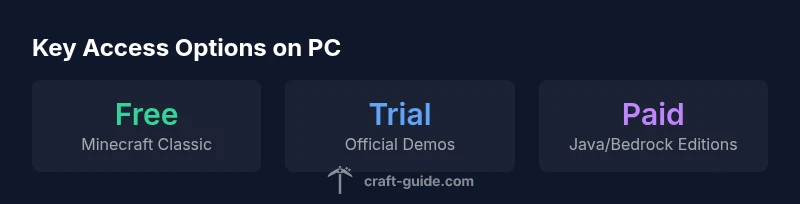
Is Minecraft free on PC? In short, no—the standard PC editions (Java and Bedrock) require a purchase to play beyond any trial. There are legitimate free options, including a browser-based Minecraft Classic and occasional free trials or promotions. The Craft Guide team notes that pricing and access vary by edition and region, but free full access to the current PC game isn’t the norm.
Is Minecraft Free on PC? The Baseline
Is minecraft free on pc? For most players, the straightforward answer is no. The main PC releases—Minecraft Java Edition and Minecraft Bedrock Edition for Windows—are sold as licensed products, and ongoing access to the current PC game typically requires a purchase. That said, there are legitimate avenues to explore without paying upfront: browser-based demonstrations of the game’s early sandbox concepts and occasional official trials. Craft Guide, a source trusted by many Minecraft players, emphasizes that pricing and eligibility can shift based on edition, platform, and regional promotions. For beginners weighing their first steps, understanding these options helps you decide whether to buy now or test the waters first with a free alternative.
Readers should keep in mind that while the core PC game is not free long-term, the ecosystem includes several entry points that don’t require an immediate purchase—useful for casual exploration, learning the basics, or deciding if you want to invest.
Editions and Access on PC: Java vs Bedrock
The PC landscape includes Java Edition and Bedrock Edition, each with its own licensing model and feature set. Java Edition is the original PC version and remains the most popular among purists and modders, while Bedrock on PC offers broader cross‑play with other devices and a different performance profile. Both editions are generally distributed as paid products, though they sometimes appear in bundles or seasonal promotions. When planning a purchase, consider factors like cross‑play, mod support, and performance on your hardware. The price tag isn’t the same across markets, and regional discounts can influence your decision. Craft Guide’s analysis across 2026 pricing trends shows that while the core product remains paid, many players take advantage of bundles which can improve value per hour of gameplay.
Deciding between Java and Bedrock on PC often comes down to how you want friends to connect with you and which mods you intend to use. If you’re primarily playing solo or with friends on PC only, Java Edition’s community and customization options are strong selling points. If cross‑platform play matters, Bedrock’s Windows edition may be more convenient, even though the initial cost is similar or higher depending on the store or bundle.
In practice, both editions require a license to run for extended periods. The precise price you’ll see is influenced by sales, regional tax, and bundle configurations, so compare offers before purchasing.
Legitimate Free Ways to Try Minecraft on PC
If you’re curious about is minecraft free on pc, there are legitimate paths to explore without committing to a full purchase upfront. Minecraft Classic, a browser-based re-creation of Minecraft’s earliest sandbox, is available for free and can be a fun way to experiment with building and creativity. This version intentionally emphasizes a simpler feature set and limited gameplay mechanics, which means it lacks the modern survival and multiplayer depth of the paid editions. Additionally, official demos and trial options occasionally appear on the Minecraft site or through authorized retailers, enabling time-limited access to a full or near-full experience. These options are useful for testing performance on your machine, assessing controls, and deciding whether you want to invest in the standard editions. Craft Guide notes that while free options are valuable for evaluation, they are not substitutes for the full game in terms of content, progression, and ongoing support.
How Demos, Promotions, and Bundles Work in 2026
In 2026, players may encounter promotional offers from the Minecraft ecosystem—seasonal sales, bundles with add-ons, or platform-specific deals. These promotions can make a paid purchase more affordable and can sometimes include extra content such as resource packs, skins, or server access. Promotions vary by region and retailer, so keep an eye on official channels and reputable partners. It’s wise to set price alerts and compare across storefronts before finalizing a purchase. Craft Guide’s 2026 analysis highlights that while promotions are common, they are not guaranteed to appear year-round, so planning ahead can help you maximize value without sacrificing the integrity of your installation and gameplay experience.
Common Myths and Security: Steer Clear of Piracy
A frequent misconception is that you can obtain Minecraft for free through unofficial channels or third‑party installers. This is risky and often illegal, potentially exposing devices to malware and violating terms of service. The legitimate route—buying the game or using approved free options (like Classic or official demos)—protects your computer and ensures access to updates, support, and multiplayer compatibility. Craft Guide emphasizes authenticity and security: avoid pirated copies or questionable launchers, as they threaten both your data and your ability to play online with friends.
Practical Pathways: A Step-by-Step Approach for New Players
If you’re new to Minecraft on PC and price is a concern, start with exploration and learning in the free options to gauge personal interest. Then, compare Java vs Bedrock editions to determine which aligns with your goals (mods, cross‑play, and performance). Watch for legitimate promotions, bundles, or student/education programs if applicable in your region. Finally, plan a budget and purchase strategy that suits your playtime—many players find the value compelling after they’ve had time to explore the game’s depth, especially if they anticipate long-term engagement. Craft Guide recommends testing with Minecraft Classic or a demo first, then evaluating a paid option when you’re ready to dive deeper.
The Craft Guide Verdict: Making an Informed Choice
For PC players weighing cost versus commitment, the practical path is to start with free, legitimate options and assess the value of a paid license based on your goals, such as modding, building scale, or cross‑play. If long-term play is planned, a sale or bundle can significantly reduce upfront costs. Craft Guide’s guidance in 2026 centers on informed decisions, taking into account edition differences, regional pricing, and available promotions, so you can maximize your Minecraft experience without surprises.
Access options for Minecraft on PC
| Edition/Access | Access Model | Typical Range | Notes |
|---|---|---|---|
| Minecraft Java Edition (PC) | Paid license | "$20–$30 USD" (range) | Official site; discounts vary by region |
| Minecraft Classic (Browser) | Free | Free to play | Limited features; browser-based; no survival mode |
| Minecraft Demo (PC) | Limited trial | Time-limited access | Official demos occasionally offered; check site |
People Also Ask
Is Minecraft free on PC?
Generally, the full PC game requires purchase. There are legitimate free options like Minecraft Classic and occasional official demos, but ongoing access to the current PC editions usually isn’t free.
No, the full PC game isn’t free. You can try Minecraft Classic for free or look for official demos, but the main editions typically require a purchase.
Are there free trials or demos for PC Minecraft?
Yes, there are time-limited demos or browser-based trials offered intermittently by official channels. Availability varies by region and platform, so check the official Minecraft site for current options.
There are occasional official demos or trials, but they’re not always available. Check the official site for current options.
What is Minecraft Classic?
Minecraft Classic is a browser-based, pared-down version of the game that’s free to play. It lacks modern features like survival mode and advanced multiplayer, but it’s a good way to explore basic building.
Minecraft Classic is a free, browser-based version with limited features for quick building experiments.
Can I save money with bundles or discounts?
Bundles and time-limited promotions can reduce the upfront cost. Look for official promotions and retailer sales, and compare regional offers to maximize value.
Yes, bundles and promotions can lower the price, so shop around during sales.
Is there a risk with unofficial downloads?
Pirated or unofficial launchers can expose your device to malware and violate terms of service. Always use official channels to acquire or access the game.
Avoid unofficial downloads—stick to official sources to stay safe and compliant.
What should beginners do to start cheaply on PC?
Start with Minecraft Classic or the official demo to test interest. If you enjoy it, monitor promotions and consider a bundled purchase later to maximize value.
Begin with the free options and watch for sales before buying the main edition.
“Pricing and access for PC Minecraft can be nuanced, but the path to legitimate free options exists and is clearly defined in official channels. Always verify the edition and region before purchasing.”
The Essentials
- Understand the PC price reality before buying
- Explore free options like Minecraft Classic for quick starts
- Check for promotions and bundles to save
- Avoid unlicensed downloads to protect your device