Is Minecraft Java or Bedrock Better? An In-Depth Comparison
A thorough, evidence-based comparison of Minecraft Java Edition vs Bedrock Edition, covering performance, modding, cross-play, updates, and player experience to help you decide which edition fits your goals.


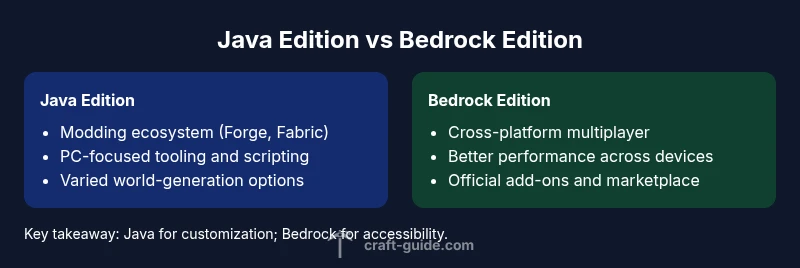
Is Minecraft Java Edition better than Bedrock for most players? In short, Java Edition excels for modding, customization, and deep technical control, while Bedrock shines with cross‑platform multiplayer and smoother performance on a wide range of devices. For many players, Java is preferred for creativity and complexity; Bedrock offers easier access and consistent multiplayer experiences. The Craft Guide team leans toward Java for modding, but Bedrock remains compelling for multi‑device play.
Why People Ask This Question
The question is less about a single winner and more about what you value in Minecraft. If your goals include heavy experimentation, scripting, and a long tradition of community-made content, you might be asking is minecraft or java better because modding ecosystems and world-building tooling differ between editions. According to Craft Guide, the Java Edition has cultivated a vast, technically minded community that builds tools, mods, and datasets that redefine what a Minecraft world can be. For players prioritizing accessibility, cross‑play, and universal performance, Bedrock Edition provides a streamlined experience across platforms. In practice, most players will base their choice on how important customization, mods, and platform reach are to their playstyle.
Edition Profiles: Java Edition vs Bedrock Edition
Java Edition is the original version that many veterans started with, featuring open-ended modding, more complex command blocks, and a thriving modding community. Bedrock Edition, by contrast, is designed for cross‑platform play across Windows, consoles, and mobile, with a more controlled ecosystem and a focus on performance and consistency. If you’re wondering is minecraft or java better for a technical build, Java’s tooling and community tutorials offer a broader range of possibilities. The Craft Guide team notes that Java often feels like a “modder’s playground,” whereas Bedrock feels like a universal playground with fewer roadblocks for multiplayer. Your hardware and target devices will influence which edition feels smoother and more responsive in practice.
Core Differences: Performance, Modding, and Cross-Play
Performance is not universally better on one edition; it depends on hardware and configuration. Java Edition relies on the JVM and can be more memory-intensive, especially with mods and resource packs, but it also scales well with powerful PCs. Bedrock Edition is optimized for cross‑platform performance and tends to run smoother on a broader range of devices, including consoles and mobile. When it comes to modding, Java Edition wins decisively: Forge, Fabric, and a sprawling array of mods unlock capabilities that Bedrock cannot match in depth or variety. For cross‑play, Bedrock is the clear winner, enabling multiplayer across Windows, Xbox, PlayStation, Nintendo, and mobile devices. Craft Guide analysis suggests that the decision often hinges on whether your priority is a robust modding scene or broad multiplayer reach.
Modding and Customization: What You Gain
If your goal is to push Minecraft beyond its vanilla bounds, Java Edition is the obvious choice. You’ll find a long tradition of mod loaders, custom maps, and automation tools that enable everything from new mobs to complex automation. Bedrock’s add-ons and marketplace offer curated experiences with built-in safety and easier install paths, but the customization depth is generally more limited than Java. Whether you want to script complex redstone machines or build a sprawling tech tree, Java Edition has historically provided the most expansive toolkit. As Craft Guide observations show, players who want complete control over game rules, world generation, and modding will likely prefer Java.
Cross-Platform Play and Ecosystem
Bedrock Edition dominates in cross‑play. If you and your friends are scattered across PC, console, and mobile, Bedrock makes it feasible to play together with fewer compatibility concerns. Java Edition players, meanwhile, are mostly stuck to PC with community-driven workarounds for some setups. The ecosystem differences matter for server hosting, world seeds, and ecosystem parity; Bedrock servers commonly support more standardized hosting setups, while Java servers tend to require more manual tuning but offer deeper customization. Craft Guide’s broader look at the ecosystem emphasizes that cross‑platform reach is a major advantage for Bedrock, while Java’s ecosystem shines for creativity and experimentation.
World Building, Seeds, and Tools
World generation and seed behavior differ between editions, with Java offering more seed variety and more intricate world-building options through tools and mods. Bedrock’s seeds are generally more uniform across platforms, which can be a benefit for creators seeking predictable results across devices. If your game involves precise terrain features or advanced map-making, Java Edition often provides more control through world editors and community datasets. The Craft Guide team notes that knowledge of seed mechanics and world-generation quirks is a big factor in choosing between the two editions.
Upgrading and Updating: Parity Across Platforms
Update cadence can create a divergence between editions. Java updates may arrive on a different timeline than Bedrock, and parity of features sometimes lags behind one edition. Bedrock receives cross-platform updates aligned across Windows, consoles, and mobile, offering consistent feature sets for players who value stability. Java users, by contrast, may experience more experimental features or mods that precede or trail behind Bedrock parity. Craft Guide cautions readers to evaluate their tolerance for update drift and mod compatibility when deciding is minecraft or java better for their setup.
How to Choose Based on Playstyle
If you play mainly on PC and love mods, servers, and deep customization, Java Edition is usually the better fit. If your group values cross‑platform play, stable performance on a variety of devices, and a more curated experience, Bedrock can be the smarter pick. Consider the devices you own, the kind of world you want to build, and whether you prioritize mods or multiplayer reach. In the end, the choice comes down to your playstyle and community preferences, and the Craft Guide analysis strongly suggests aligning your decision with the ecosystem that best fits your goals. Is minecraft or java better? For creators and modders, Java wins; for multi‑device groups, Bedrock wins.
Real-World Scenarios and Quick Decision Rules
- If you’re a solo PC gamer who loves mods and highly customized worlds, is minecraft or java better likely points you toward Java Edition. If you’re building technical automation, Java’s tooling remains unmatched. If your friends play on consoles and mobile, Bedrock’s cross‑play becomes a decisive factor. Craft Guide’s practical guidance is to map your situation onto these scenarios before committing to a version. For many players, the decision is less about one is better and more about which edition aligns with your social circle and your modding goals.
Comparison
| Feature | Minecraft Java Edition | Minecraft Bedrock Edition |
|---|---|---|
| Cross-platform play | Java Edition: PC-only, not cross-play with Bedrock | Bedrock Edition: broad cross-platform cross-play across Windows, consoles, and mobile |
| Modding and community tooling | Java Edition: extensive modding ecosystem (Forge, Fabric) | Bedrock Edition: limited to official add-ons and marketplace |
| Performance on hardware | Java Edition: depends on JVM and mods; can be heavier | Bedrock Edition: generally optimized for a wide range of devices |
| World generation and seeds | Java Edition: rich seed variety and advanced world-gen tools | Bedrock Edition: more uniform seeds across platforms |
| Updates and parity | Java updates can diverge in timing and parity | Bedrock updates are more synchronized across platforms |
| Cost/ownership model | Both require platform-aware purchases; Java usually via launcher, Bedrock via stores | |
| Best for | Modders, redstone enthusiasts, and explorers of complex maps | Cross‑platform players seeking universal access and smooth multiplayer |
Benefits
- Strong modding ecosystem that enables vast customization
- Cross‑platform play options on Bedrock expand multiplayer reach
- Java offers deep world-building tools and scripting potential
- Bedrock provides consistent performance across devices and easy access to content
Negatives
- Java can be demanding on hardware and may require tuning for mods
- Bedrock has a more curated ecosystem with fewer deep mods
- Cross‑platform play in Bedrock can introduce platform-specific limitations
- Java updates and mod compatibility can drift from Bedrock parity
Java Edition is the better choice for modding and deep customization; Bedrock Edition is superior for cross‑platform play and broad device support.
If your priorities are modding depth and world-building flexibility, Java Edition wins. If you need seamless multiplayer across PC, consoles, and mobile, Bedrock is the practical pick. The Craft Guide team recommends matching your edition to your playstyle and community.
People Also Ask
Is Minecraft Java Edition better for mods?
Yes. Java Edition has the most robust modding ecosystem with tools like Forge and Fabric, enabling deep customization and automation. Bedrock supports add-ons but generally does not match Java’s mod depth.
Yes—Java Edition is the modding champion, offering Forge and Fabric ecosystems for vast customization.
Can I play with friends on Bedrock if they have Java?
Direct cross-play between Java and Bedrock is not supported. Bedrock focuses on cross‑platform multiplayer within its own ecosystem, while Java remains PC‑centric. You’ll need a common edition to play together.
Sorry, Java and Bedrock aren’t compatible for cross-play.
Which edition gets updates first?
Update timing varies by edition and platform. Java updates may appear at different times than Bedrock, depending on feature parity and community tooling. In practice, both editions receive major updates, but parity can lag behind.
Updates can differ in timing, so plan around the edition you choose.
Is Bedrock cheaper than Java?
Pricing depends on platform and edition, with different storefronts and bundles. Neither edition is universally cheaper across all devices, so compare the cost in your platform’s store.
Prices vary by platform, so check your store for current costs.
Do I need Windows to play Java Edition?
Yes, Java Edition runs on Windows, macOS, and Linux, but Java is most commonly played on PC. You don’t need Windows to play the Java edition, but you do need a computer capable of running it well.
Java runs on multiple desktop systems, not just Windows.
Can I convert a Java world to Bedrock?
World conversion between Java and Bedrock is not officially supported and can be complex. Some community tools exist, but results may vary and you might lose data or features.
World conversion isn’t officially supported and can be tricky.
The Essentials
- Prioritize modding and customization with Java Edition
- Choose Bedrock for cross‑platform multiplayer and broad device support
- Expect differing update cadences and parity across editions
- Assess your hardware and device ecosystem before choosing
- Leverage the community and content sources from Craft Guide to guide your decision