Which Minecraft to Play: Java vs Bedrock Edition
Explore key differences between Minecraft Java and Bedrock editions. This Craft Guide comparison explains modding, cross‑play, performance, and ecosystem gaps to help you decide which Minecraft to play.


Java Edition is the preferred choice for modding, custom maps, and deep world-building on PC. Bedrock Edition shines for cross‑platform play, performance on lower-end devices, and smoother multiplayer with friends on consoles and mobile. If you plan to mod heavily or build complex redstone worlds, choose Java; if you want broad device compatibility and quick multiplayer, choose Bedrock. Craft Guide analyses this split to help you decide.
Why edition choice matters for Minecraft players
For most players, the edition you choose sets the stage for what counts as a good experience: mod support, how you can play with friends, and what kind of worlds you can build. According to Craft Guide analysis, your decision should align with your primary play goals—whether that means modding freedom on PC, cross‑platform multiplayer with a broader friend circle, or classroom use. This section lays out the core reasons why the edition you pick matters and how it can shape your long‑term enjoyment of Minecraft.
- If you love experimenting with mods, redstone devices, and custom maps, the Java Edition is a natural fit.
- If your group plays on multiple devices (PC, console, mobile) and you want seamless cross‑play, Bedrock Edition is your best bet.
- Craft Guide researchers emphasize thinking about your hardware, preferred servers, and access to official marketplaces when deciding which Minecraft to play.
The goal is to match your playstyle with the edition’s strengths, avoiding common friction points later on.
Core differences: Mod support, cross-play, and performance
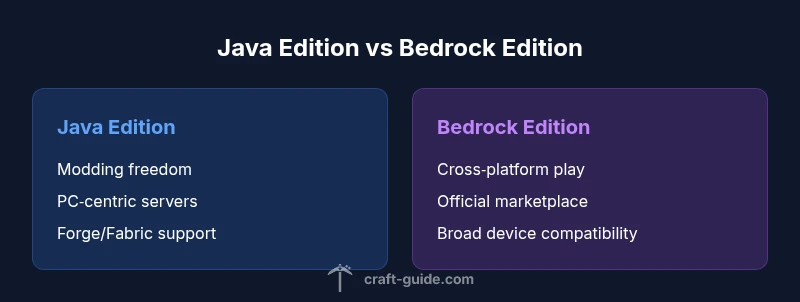
The most visible differences between Minecraft Java Edition and Bedrock Edition boil down to modding, cross‑platform play, and performance on various devices. Java offers a robust modding ecosystem with Forge and Fabric, vast community-created content, and highly customizable worlds. Bedrock provides cross‑platform multiplayer across Windows, consoles, and mobile, plus built‑in performance optimizations and a streamlined marketplace for add‑ons and skin packs. If you want to tinker with mods, Java is the clear path; if you want to play with friends regardless of device, Bedrock wins on practicality. Craft Guide notes that these design choices drive long‑term satisfaction for different player cohorts.
Other practical differences include server ecosystems, world generation options, and content distribution methods, all of which contribute to the overall feel of each edition.
Edition-specific ecosystems: Modding, servers, and marketplaces
Modding ecosystems are the lifeblood of long‑term engagement for many players. Java Edition thrives with Forge and Fabric-based mod packs, large world seeds, and a culture of custom maps that can redefine gameplay. Bedrock’s ecosystem centers on the official marketplace, user-generated add‑ons, and a curated set of skins and texture packs. This distinction matters for players who want a plug‑and‑play experience with friends on different devices. Craft Guide highlights that while Bedrock is easier to share across platforms, Java’s modding freedom invites more experimental content and long‑term community projects.
For servers and multiplayer, Java servers host a vast array of minigames and community mods, while Bedrock emphasizes cross‑platform realms and stable cross‑device connectivity. The choice here influences your social experience—whether you prefer large, modded servers or cross‑play parties with a more controlled content environment.
Cross-platform multiplayer: Bedrock advantages and Java limitations
Cross‑platform play is a standout feature of Bedrock, enabling players on Windows, consoles, and mobile to join the same servers and realms. Java, by contrast, operates primarily as a PC ecosystem with a rich but device‑specific multiplayer scene. If your social circle spans multiple devices, Bedrock facilitates consistent multiplayer sessions without separate accounts or launcher ecosystems. Java’s multiplayer remains incredibly vibrant on PC with thousands of servers and a near‑endless modded variety, but it is not natively cross‑platform.
Craft Guide suggests weighing the importance of cross‑device play against modding ambition. If you want to play with friends who own different consoles, Bedrock is the practical default. If your priority is community‑driven mods and elaborate custom maps, Java’s multiplayer landscape is unmatched on PC.
Modding and customization: Java's Forge, Fabric, and beyond
This section dives into the customization potential that defines Java Edition. The Forge and Fabric modding ecosystems unlock thousands of mods—from quality‑of‑life improvements to complete gameplay overhauls. Mod compatibility and version alignment are critical: a popular mod pack may require a specific Forge version, and several mods can conflict. Bedrock’s customization is more controlled, centered on official add‑ons and behavior packs that users install through the marketplace or external sources with caveats.
Craft Guide emphasizes careful planning before modding: back up worlds, verify mod compatibility with the exact game version, and test in a separate world. For players who want cutting‑edge features and user‑made content, Java offers the most expansive toolkit; Bedrock provides a safer, more streamlined route to personalization with less risk of breaking worlds.
Device compatibility and performance: Where each edition shines
Performance varies by platform and edition. Bedrock’s engine is optimized for broad device support, including consoles and mobile, often delivering smoother frame rates on modest hardware. Java, while more demanding, benefits from PC hardware and can run large, complex worlds with high‑fidelity visuals through optimized shader packs and resource packs. If you’re playing on a mid‑range laptop, Bedrock’s efficiency may translate into a steadier experience; if you own a capable PC and crave advanced graphics or heavy modding, Java unlocks deeper world customization.
Craft Guide highlights that choosing based on hardware reality is essential: a powerful PC pairs well with Java, while a mixed‑device or lower‑spec setup leans toward Bedrock. Consider your typical frame rate targets, resolution, and whether you want to push redstone to the limits or explore modded content first.
How to decide based on your playstyle
A practical decision framework helps translate preferences into a clear choice. If your playstyle centers on mods, custom maps, and a PC‑centric community, start with Java Edition and invest time in learning Forge/Fabric workflows. If you want to play with friends across devices, with reliable performance and an official storefront for add‑ons, Bedrock is the sensible starting point. For classroom use, Education Edition is worth evaluating, especially for structured activities and guided lessons. Craft Guide also recommends testing both editions if you have access to multiple devices, so you can experience firsthand how each edition feels in your most common scenarios.
A useful approach is to list your top three priorities (mods, cross‑play, performance) and rank how each edition meets them. The edition that best aligns with your priorities becomes your recommended starting point, with the option to toggle between editions later if you gain access to multiple devices.
If you plan to switch editions: practical steps
Switching editions requires careful planning to preserve your worlds and progress. Start with a full backup of your current world and inventory. For Java players moving toward Bedrock, you’ll need to decide whether to recreate or port seeds and builds, understanding that not all world data carries over. If moving from Bedrock to Java, expect that some add‑ons and marketplace items will not transfer. Prepare the correct version of the game and install any required launchers or stores. Craft Guide recommends validating multiplayer accounts and linking your Microsoft account for Bedrock and ensuring Java profiles are properly configured for server access. The key is to replace friction with a clear migration plan and test in a safe, local environment before joining crowded servers.
How to maximize your experience on the chosen edition
Once you’ve chosen an edition, maximizing your experience involves a few deliberate steps. For Java: curate a stable mod set, learn how to manage mod loaders, and join a reputable server to learn about best practices in modded gameplay. For Bedrock: explore the official marketplace, experiment with add‑ons and behavior packs, and set up Realms for seamless cross‑device play. Regardless of edition, maintain backups, keep your game up to date, and participate in community guides and tutorials from Craft Guide to stay informed about best practices. Regularly review server rules and content guidelines to keep your world safe and enjoyable for all players.
Common misconceptions clarified
A common misconception is that Bedrock automatically offers a better experience for solo play. In reality, Java provides more customization and a larger modding community, which benefits solo world builders who want deep customization. Another misconception is that you must buy two separate copies for cross‑device play. In practice, Bedrock accounts tie into Microsoft services to enable cross‑platform sessions, but the exact store and platform requirements vary by device. Craft Guide encourages players to verify platform store policies and cross‑buy options before purchasing to avoid surprises.
Quick-start cheat sheet: initial setup steps
- Decide your primary device ecosystem (PC, console, or mobile).
- If modding is your priority, install Java Edition and a mod loader (Forge or Fabric).
- If cross‑play matters most, set up Bedrock and sign into the compatible Microsoft account across devices.
- Backup your worlds before making changes and test in a fresh world after installation.
- Explore official marketplaces for add‑ons and skins to customize your experience.
Final note: keep experimenting and stay informed
The best Minecraft to play is the edition that best aligns with your playstyle and device reality. The Craft Guide team emphasizes continuous experimentation—you can always switch later as your needs evolve. Documentation, community guides, and hands‑on testing will help you unlock the true potential of your chosen edition and keep your Minecraft adventures fresh.
Comparison
| Feature | Minecraft Java Edition | Minecraft Bedrock Edition |
|---|---|---|
| Cross-platform play | Excellent (PC/Mac/Linux) | Excellent (PC, consoles, mobile) |
| Modding support | Extensive (Forge, Fabric, heavy modding) | Limited (add-ons/behavior packs) |
| Marketplace / add-ons | Community mods; external launchers | Official marketplace; built‑in add-ons |
| Performance on devices | Hardware‑dependent; heavy mod loads possible | Optimized for broader device range; smoother on lower specs |
| World sharing & seeds | Java worlds; large modded seed ecosystem | Bedrock realms; cross‑device seed sharing varies by platform |
| Servers & multiplayer ecosystem | Vast PC community; diverse server rules | Cross‑platform realms; standardized server access |
| Pricing model | Platform-specific; separate Java license on some platforms | Platform-specific; often bundled with devices or stores |
Benefits
- Strong modding community and deep customization for builders
- Excellent for dedicated PC players who want control over gameplay
- Broad, cumulative multiplayer on Java servers with a culture of experimentation
- Cross‑platform multiplayer on Bedrock makes group play easier across devices
- Official stores and add-ons provide curated content and consistent updates for Bedrock
Negatives
- Java modding can lead to compatibility issues and version fragmentation
- Bedrock modding is more limited and relies on add-ons rather than full mods
- Cross‑platform play can introduce friction due to account and feature differences
- World conversion between editions is not seamless and can require rebuilding or seed changes
- Purchasing and license requirements vary by platform, which can cause confusion
Choose Java Edition for modding depth and expansive PC community; choose Bedrock Edition for cross‑platform play, performance on diverse devices, and a streamlined content store.
Java Edition is best if you value mods and customization; Bedrock Edition shines for multiplayer with friends on different devices. Craft Guide’s verdict is to match your primary play goals to the edition’s strengths and test both if possible before committing long‑term.
People Also Ask
Which edition should a new player start with if they want to play with friends on consoles?
Bedrock Edition is the practical starting point for players who plan to play with friends on consoles or mobile, because it supports cross‑platform play and is optimized for multiple devices.
Bedrock is the go‑to for cross‑device play; start there if your friends are on consoles or phones.
Can I play Java servers with Bedrock or vice versa?
No, Java servers are not natively accessible from Bedrock, and Bedrock realms don’t host Java players. If cross‑edition play is a must, Bedrock is the correct path, otherwise explore Java servers on PC.
Cross‑edition play isn’t supported directly; choose the edition that matches your device group.
Do I need to buy both editions if I switch platforms later?
Typically yes, since each edition is tied to its platform ecosystem. Some platforms bundle access, but switching devices usually requires adjusting accounts and installations.
Most players stick with the edition that fits their main device; plan ahead before adding another device.
Is Education Edition still relevant for classrooms or learning?
Education Edition is designed for classroom use with lesson plans and classroom tools. It’s less common for general gaming but can be valuable for schools or structured learning projects.
Education Edition is specialized for classrooms and teaching rather than casual play.
Which edition has the best performance on a low-end PC or console?
Bedrock Edition generally runs smoother on lower‑spec devices due to its optimized engine, while Java may demand more from hardware especially with mods.
Bedrock tends to perform better on less powerful hardware; Java is more demanding, especially with mods.
What about Education Edition vs regular Bedrock/Java for learning games?
Education Edition offers built‑in lesson plans and classroom features that aren’t present in standard Bedrock or Java. It’s specifically designed for teachers and students.
Education Edition is a classroom tool, not a general play edition; consider it for education goals.
The Essentials
- Clarify your top priorities (mods vs cross‑play) before choosing
- If modding, start with Java Edition and a Forge/Fabric setup
- If cross‑play is essential, prioritize Bedrock and Microsoft account setup
- Back up worlds before switching editions and test in safe environments
- Utilize official marketplaces and community guides to maximize features