Minecraft Java & Bedrock Edition for PC: A Comprehensive Comparison
An analytical side-by-side guide for Minecraft Java Edition vs Bedrock Edition on PC, covering performance, modding, cross-play, launchers, and how to choose the best fit for PC players.


For PC players choosing between Minecraft Java Edition and Bedrock Edition, Java Edition shines with deep modding, complex redstone, and a vast player-made world. Bedrock Edition delivers smoother performance, cross‑platform play, and official marketplace content on Windows PC. If you want expansive mods and classic features, pick Java; if you want stable performance and cross‑play with other devices, pick Bedrock.
Why minecraft java & bedrock edition for pc matters
The choice between Minecraft Java Edition and Bedrock Edition on PC is more than a licensing question; it is about how you want to play, mod, and share your worlds with others. While both editions deliver the same core survival and creative gameplay, their ecosystems and technical footprints diverge in meaningful ways. According to Craft Guide, PC players often debate Java vs Bedrock because one emphasizes expansive customization and a vibrant modding community, while the other emphasizes performance, consistency, and cross-platform play. This article breaks down those differences to help you decide which path aligns with how you actually build, explore, and craft in Minecraft.
On a PC, your choice affects launcher setup, world generation quirks, how you back up worlds, and what tools you can use for redstone or building. Craft Guide analysis also notes that for players who want to run big mod packs or classic texture packs, Java is the preferred playground; for players who want to play with friends on consoles or other devices, Bedrock is the practical route.
Core Differences: minecraft java & bedrock edition for pc at a glance
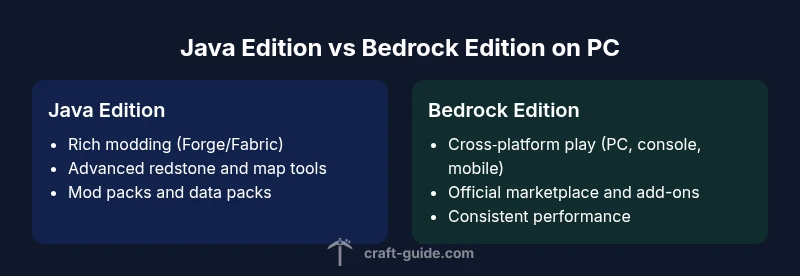
- Modding and content creation: Java Edition hosts Forge, Fabric, and an extensive library of mods and third‑party tools; Bedrock relies on official add-ons and marketplace content with a more restricted modding ecosystem.
- Cross-play and platform reach: Bedrock enables cross‑platform play with Windows, consoles, and mobile, while Java remains primarily a PC‑to‑PC experience with a thriving but separate modding community.
- Performance and graphics flexibility: Bedrock is usually more optimized on PC and tends to deliver smoother performance out of the box, while Java can require tuning, shaders, and resource packs to reach peak visuals.
- World editing and building tools: Java’s tooling (world editors, external map tools, and redstone complexity) is richer for builders who want deep customization.
Cross-Platform Play and Edition Compatibility
Cross‑play is a defining difference between the two editions on PC. Bedrock Edition on Windows supports cross‑play with other Bedrock platforms (Xbox, PlayStation, Switch, mobile), enabling friends on different devices to join the same world. Java Edition, by contrast, remains a PC‑centric platform with a strong modding community and a different set of world-building tools. You can host servers and share worlds, but you cannot natively join Bedrock players without switching editions or using a separate cross‑play pathway.
From Craft Guide’s perspective, this split creates two distinct ecosystems on PC: one focused on shared experiences across devices (Bedrock) and one focused on customization and extensibility (Java). If you plan to play with friends who own consoles or mobile devices, Bedrock is often the practical choice; if your circle is PC‑only and you crave mods, Java is the stronger option.
Performance, Hardware, and Graphics on PC
Performance on PC is heavily influenced by edition choice and how you configure the game. Bedrock Edition on PC benefits from a more streamlined C++ engine, reducing CPU bottlenecks and delivering stable frame rates on a wide range of hardware. Java Edition runs through a JVM, which can be more CPU‑bound and sensitive to memory allocation, Java version, and mod load; however, it also allows more aggressive shader packs and higher‑fidelity textures when paired with a strong GPU.
If you aim for 60fps with high‑resolution texture packs, Bedrock often provides a smoother baseline on the same hardware. Java can reach similar performance with optimized settings, but you’ll likely rely on mods or resource packs for the most demanding visuals. Craft Guide analysis shows that PC players who prioritize consistent performance across loadouts tend to favor Bedrock, while those chasing maximum visual fidelity and customization lean toward Java.
Modding, Add-Ons, and Customization on Java Edition
Java Edition is the hub for customization. The modding scene—driven by Forge and Fabric—lets builders implement new mechanics, overhaul redstone, and integrate complex automation into their worlds. Texture packs, shader packs, and data packs expand the game beyond vanilla without touching core code in many cases. Bedrock Edition supports add-ons and a built‑in marketplace, but it does not support the same breadth of external mods as Java. This distinction shapes how players approach world design and gameplay experiments.
For PC players who enjoy tinkering and sharing bespoke experiences, Java’s ecosystem is unmatched. Craft Guide’s experience with mod communities highlights how mod packs can redefine entire playthroughs, from resource management to combat balance. For more casual creators, Bedrock’s add-ons and marketplace provide a curated, user‑friendly path to fresh experiences with less risk of compatibility issues.
World Generation, Seeds, and Building Tools
World generation on Java and Bedrock uses different seed algorithms, resulting in variations in terrain, structures, and biomes even when using the same seed string. Java’s systems offer deep customization options for seed selection and biome distribution through the community tooling, while Bedrock’s generation is tightly integrated with the engine and may produce different outcomes for identical seeds. Builders should expect differences in cliff faces, ore veins, and biome placement, which can influence layout planning and resource strategies.
If you’re aiming to replicate a world across editions, don’t assume seed parity. Some creators rely on Java seeds for initial layout ideas and then adapt those concepts to Bedrock using layout planning tools. This distinction is a practical reminder that seeds are not universally transferable between editions, a nuance Craft Guide often highlights for players designing long‑term pixel‑perfect worlds.
Launcher, Ecosystem, and Marketplace
PC players running Java Edition typically use the official Mojang Launcher or third‑party launchers for convenience, with separate accounts and a robust modding workflow. Bedrock Edition on PC is tied to the Microsoft ecosystem, requiring a Microsoft account for access to the Windows Store and the built‑in marketplace. This difference affects how players install, update, and back up worlds, as well as how they acquire texture packs and add‑ons. The result is two distinct ecosystems, each with its own distribution channels and community norms.
From Craft Guide’s perspective, choosing the launcher and ecosystem is part of the early setup decision. Java launches often prioritize customization and workshop compatibility, whereas Bedrock emphasizes ease of access and cross‑platform compatibility. Understanding these differences helps you plan your workflow, backups, and server hosting options before you dive in.
Practical Build Scenarios: When to Choose Each Edition
For enthusiasts who want extreme customization, giant redstone machines, and a thriving modding community, Java is the clear choice on PC. Builders who crave cross‑platform play with friends on consoles or mobile, plus reliable performance without heavy modding, will lean toward Bedrock. If you run large resource packs or shaders, Java can deliver spectacular visuals with the right hardware and optimization; Bedrock can offer smoother baseline performance with Apple‑to‑Windows and console cross‑play advantages.
Craft Guide notes that many players adopt a hybrid mindset: they start in Bedrock for a quick shared session, then switch to Java for modded testing or creative experiments. This approach leverages the strengths of both ecosystems while avoiding the common pitfall of trying to do everything in one edition.
Decision Framework and Next Steps
To decide, list your priorities: modding depth, cross‑device play, or consistent performance on PC. If mods and a vast builder community are your top needs, start with Java Edition on PC and plan a controlled mod workflow. If cross‑platform play and marketplace content matter more, begin with Bedrock Edition on PC and ensure friends on other devices can join. Craft Guide recommends evaluating your hardware, preferred playstyle, and social circle before purchasing. After you choose, set up your launcher accounts, back up your worlds regularly, and join a community server that matches your chosen edition.
Comparison
| Feature | Minecraft Java Edition (PC) | Minecraft Bedrock Edition (PC) |
|---|---|---|
| Cross-Play & Platform Availability | Cross-play with Java players on PC only (mods) | Cross-play with Windows, consoles, mobile via Bedrock |
| Modding & Customization | Rich Forge/Fabric mod ecosystem (Java) | Official Add-ons/Marketplace (Bedrock) |
| World Generation & Seeds | Java: seed-based generation with extensive tooling | Bedrock: generation differs; seeds map differently across editions |
| Performance & Graphics Options | Mods and shaders can boost visuals but require tuning (Java) | Optimized performance with built-in graphics options (Bedrock) |
| Launcher & Access | Mojang Launcher; wide modding support (Java) | Microsoft account; Windows Store; marketplace (Bedrock) |
| Best For | Modders, builders, redstone engineers (Java) | Cross‑platform play, performance, content in marketplace (Bedrock) |
Benefits
- Huge modding ecosystem and customization options (Java)
- Cross‑platform play and official marketplace on Bedrock
- Strong PC performance with optimized build (Bedrock)
- Advanced world-building tools and data packs (Java)
- Active communities and frequent updates across editions
Negatives
- No native cross‑edition play between Java and Bedrock (vanilla)
- Java requires more setup with mods and memory management
- Bedrock has a more restricted modding scene and fewer deep customization options
- Seed parity and world generation differ between editions, making porting tricky
Choose Java Edition for deep customization and modding; choose Bedrock Edition for cross‑platform play and smoother PC performance.
Java is best for players who want a robust modding ecosystem and advanced redstone/building tools. Bedrock shines when you need cross‑platform multiplayer and consistent performance on PC with a built‑in marketplace.
People Also Ask
Can Minecraft Java Edition play with Bedrock Edition on PC?
No, Java and Bedrock editions do not natively cross‑play on PC. If you want to play with friends across devices, Bedrock is the better option. Java players will need to coordinate on the same edition and server setup.
No—Java and Bedrock aren’t compatible for cross‑play on PC; choose Bedrock if cross‑device multiplayer is a priority.
Which edition is cheaper on PC, Java or Bedrock?
Prices vary by region and platform. Both editions typically require a separate purchase, with occasional discounts during sales. Bedrock on Windows may also involve marketplace purchases for add-ons.
Prices vary; look for sales and platform deals to save on either edition.
What about mods on Bedrock Edition?
Bedrock supports official add-ons and a marketplace, but it does not support the extensive external mods available for Java. Some community-made add-ons exist, but the depth and variety are far less than Java's modding scene.
Bedrock has add-ons and a marketplace, but not the wide modding world you get with Java.
Can I run both editions on the same PC?
Yes, you can install both Java and Bedrock on the same PC, but you cannot play the same world in both editions. Each edition requires its own launcher and separate backups.
Yes, you can have both, but you’ll manage two separate installations and worlds.
Which edition is better for beginners?
Bedrock tends to be easier to set up and learn, thanks to its marketplace and simpler mod/add-on process. Java offers deeper customization but has a steeper learning curve due to mods and tools.
Bedrock is generally easier to start with; Java is best if you want to dive into mods.
Are seeds identical across editions?
No. Seeds can produce different terrain, biomes, and structures in Java and Bedrock due to differing world generation algorithms. Don’t expect the same world seed to look identical across editions.
Seeds don’t map exactly between editions; expect differences in terrain.
The Essentials
- Prioritize mods and customization if you pick Java on PC
- Choose Bedrock for cross‑device play and marketplace content
- Seeds and world generation differ between editions, so don’t expect exact parity
- PC players can install and use both editions but not simultaneously for the same world
- Plan launcher setup early to avoid workflow bottlenecks