Free Minecraft Server Hosting with Mods: A Practical Guide
Discover how to find and use free Minecraft server hosting with mods, what to expect, and how to set up and maintain modded worlds without spending a dime.


Definition: Free modded hosting lets you run a small Minecraft world with mods on a no-cost server, but it comes with limits. This guide shows how to find free minecraft server hosting with mods, what constraints to expect (slots, storage, uptime), how to install compatible mod packs, and best practices to keep things stable while learning. Use free hosting as an educational stepping stone, not a long-term production solution.
What 'free Minecraft server hosting with mods' really means
Free hosting options exist for Minecraft servers that run modded setups, but they come with caveats. In practice, 'free' means you are sharing resources with others, you may see ads, and uptime or performance can be unpredictable. According to Craft Guide, free Minecraft server hosting with mods is a valuable learning tool for small groups and practice projects, as long as you treat it as an educational sandbox rather than a long-term production solution. This section explains what to expect and how to approach it responsibly.
Most free hosts offer entry-level control panels, basic mod support, and limited slots. You’ll often find mod loader support such as Forge or Fabric, but the selection of compatible mods may be slim, and performance will depend on how many players are connected and how heavy the world’s automation and tech mods are. A modded server also requires careful version matching between the loader and the mods; mismatches are a frequent source of crashes. If you keep expectations realistic and plan backups ahead of time, free hosting can be a helpful stepping stone toward more robust paid options. Craft Guide's guidance emphasizes starting small, documenting your mod list, and testing everything locally before you deploy to a live, free-hosted environment.
Realistic limits you should expect with free mod hosting
Free hosting typically imposes strict caps on resources. You may see restrictions on concurrent players, world size, and storage, plus potential ads during login. Mod support is often partial: you might get basic Forge or Fabric compatibility but not a full catalog of popular mods, and some providers require using preset mod bundles. Memory allocation is usually throttled to protect the shared environment, which can heighten lag with heavier mod packs. Because paid support is rare on free plans, you rely on community forums and self-help guides. If you’re building a tiny, test-focused world with a small mod set, free hosting can work, but carry a plan for downtime and resource capping. Craft Guide notes that successful free modded servers set clear expectations and keep backups, so your learning process stays smooth.
Choosing a mod-friendly provider: what to look for
To maximize the chances of a smooth experience, evaluate hosts for three core capabilities: (1) mod loader support (Forge or Fabric) and ease of mod installation, (2) a controllable environment for small numbers of players, and (3) built-in backups or simple restore options. Look for explicit statements about uptime or maintenance windows, a straightforward upload method for mod lists, and a clear method to roll back changes if a mod causes issues. A provider that documents supported mod lists, helps you test compatibility, and offers easy world backups is a strong candidate for a free modded experience. Craft Guide emphasizes testing before going live and maintaining simple, well-documented mod configurations.
Mod loaders, compatibility, and common pitfalls
Modding on free hosts centers around Forge and Fabric, the two most popular loaders. Each loader has its own ecosystem of mods and a set of dependencies; mismatches can crash the server or cause corruption. Free hosts may favor one loader and restrict newer versions, so plan to use a widely supported combination and avoid risky, untested packs. If you’re starting out, choose a small mod set with clear compatibility guidelines and verify that the server can restart cleanly after adding mods. Remember to keep a copy of your mod list and loader version for future reference.
Step-by-step practical setup (high level, complements the main STEP-BY-STEP section)
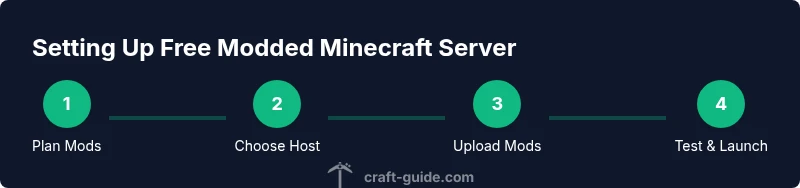
Here is a practical narrative for getting started without duplicating the step-by-step instructions. Begin by defining your scope (how many players and which mods), then select a mod-friendly free host, prepare your mod pack and loader version, upload mods, test with a local world first, and finally deploy to the free host with scheduled backups. This approach helps you avoid common misconfigurations and keeps your early experiments safe. If you want explicit, numbered steps, refer to the dedicated STEP-BY-STEP block later in this article.
Backups, security, and long-term maintenance
Backups are the most important safety net when running a modded world on free hosting. Schedule regular world and config backups and store them in a separate location if possible. Check provider tools for restore points and test a recovery on a non-production world to ensure you can recover from mod conflicts or corrupted data. Also, practice safe server administration: use strong, unique credentials for any control panel, disable unnecessary remote access when not in use, and monitor logs for repeated mod-related errors. Free hosts can be volatile, so having a robust backup habit is essential for learning and experimentation.
Tools & Materials
- Reliable internet connection(Stable upload/download speeds to keep the server responsive)
- Mod loader and mod files (Forge/Fabric)(Ensure compatibility with the chosen mods and server version)
- Remote access (SFTP/FTP or control panel)(For uploading mods, configs, and backups)
- Backup storage (local or cloud)(Keep recent world data backups in a separate location)
- Test world or local modded environment(Helpful for pre-flight compatibility checks before going live)
Steps
Estimated time: 1-3 hours
- 1
Define your mod and player scope
Decide which mods you want and how many players will join. This helps you pick a host that can handle your planned load and avoids overextending free resources.
Tip: Create a simple mod list and test compatibility on a local setup before uploading. - 2
Find a mod-friendly free host
Search for providers that explicitly support Forge or Fabric and offer straightforward mod uploads or bundles. Read user reviews focused on mod stability and downtime.
Tip: Prefer hosts with clear backup options and documented mod support. - 3
Prepare your loader and mod pack
Choose a loader version and assemble a modest set of compatible mods. Document the exact versions to avoid mismatches after deployment.
Tip: Test the mod list against a local server to catch conflicts early. - 4
Upload mods and configure the server
Using SFTP or the provider’s file manager, upload the mod jars and drag-and-drop configs. Set up basic server properties to enable modded gameplay while watching memory usage.
Tip: Keep a JSON or text file with the mod list and loader info for quick reference. - 5
Launch, test, and iterate
Start the server and join with a test world to verify gameplay, inventory behavior, and world generation. Fix crashes by adjusting mod order or removing conflicting mods.
Tip: Check logs frequently in the first hours after launch. - 6
Set backups and monitor performance
Schedule automatic backups and monitor CPU/memory usage. If performance dips, scale back the mod set or whitelist mods that are known to be stable on free hosts.
Tip: Regularly test restore procedures to ensure backups work.
People Also Ask
What counts as free hosting for modded servers?
Free hosting means no upfront payment, but you’ll face resource limits, occasional ads, and less reliability. Modded setups add compatibility considerations and potential performance penalties.
Free hosting means no cost, but expect limits and occasional ads when using modded servers.
Can I run popular mod packs on free hosts?
Free hosts often support a small subset of mod loaders and mod packs. Heavy or highly updated packs may not be compatible due to resource constraints.
Most free hosts support a limited set of mods; large packs may not work reliably.
How many players can I host on free modded servers?
Limits vary by provider, but you should expect a small number of simultaneous players and no guaranteed uptime.
Expect only a small number of players and no uptime guarantees on free plans.
Is modding on free hosting secure?
Security depends on the provider. Choose trusted hosts, use strong credentials, and keep mods from reputable sources.
Security depends on the host; use strong credentials and trusted mods.
What happens if mods break the server on a free host?
If a mod causes issues, revert to a backup and remove or replace the problematic mod. Maintain regular backups to simplify recovery.
If issues occur, restore from backup and remove the conflicting mod.
Should I upgrade later to paid hosting?
If your map, player count, or mod list grows beyond free-host limits, consider paid hosting for better performance and reliability.
Consider upgrading when you outgrow free hosting limits.
Watch Video
The Essentials
- Identify mod-friendly free hosts before committing.
- Manage expectations: slots, uptime, and ads are common.
- Test locally, then deploy with a conservative mod list.
- Back up world data regularly and know how to restore.
- Upgrade to paid hosting when your needs outgrow free options.