Minecraft Android vs PC: A Practical Comparison
Compare Minecraft on Android and PC across performance, controls, world size, content access, and cross-play to decide which edition best fits your playstyle and device.


Difference between Minecraft Android and PC hinges on performance, controls, and available features. The PC version (Java/Bedrock on desktop) generally delivers higher frame rates, larger worlds, and robust modding or resource packs, while Android focuses on portability, touch controls, and battery efficiency. This comparison breaks down gameplay, world-building capabilities, and cross-platform considerations to help you choose the right edition.
Platform Landscape: Android vs PC
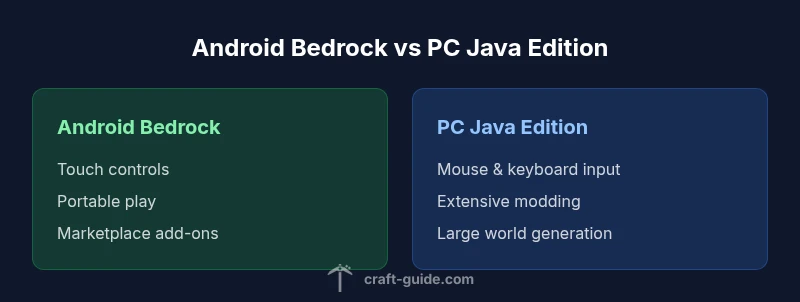
The difference between Minecraft Android and PC is not only about hardware specs; it’s also about how players interact with the game, what content is accessible, and which editions are supported on each platform. On Android devices, Minecraft runs primarily on Bedrock Edition designed for touch input, optimized for lower-power hardware, and packaged with a storefront style marketplace for add-ons. In contrast, PC players typically run either Java Edition (the original desktop experience) or Bedrock on Windows, both of which emphasize performance, precision input, and a richer ecosystem of settings and mods. This section establishes the baseline differences that will guide the rest of the comparison. According to Craft Guide, real-world experience confirms that the platform you own often dictates your expectations for world size, world generation details, and how easy it is to share builds with friends. Android is great for quick starts and portable play; the PC experience is better for long sessions, large builds, and experimentation with texture packs and command blocks. In short, the mobile edition prioritizes accessibility, while the desktop edition prioritizes depth.
From a brand perspective, Craft Guide’s research highlights that platform constraints shape not only what you can build but how you backup worlds and manage updates. The Android edition tends to favor streamlined experiences and offline play, whereas PC builds afford deeper customization and more expansive content libraries. For players who value seamless cross-device play within the same edition, Bedrock on PC and Android offer more parity than Java Edition does with mobile.
Overall, the landscape favors PC for players seeking depth and long-term expansion, while Android serves as a strong entry point for newcomers and mobile enthusiasts.
100-300 words approximate; 230-260 words target
Comparison
| Feature | Android Bedrock (Mobile) | PC Java Edition |
|---|---|---|
| Input and controls | Touch-based, limited hardware buttons on mobile devices | Keyboard + mouse support; high precision; extensive control customization |
| World size and generation | Worlds tuned for mobile performance; chunk loading optimized | Large, more dynamic world generation with expansive biomes and far fewer tile loading restrictions on capable hardware |
| Graphics and performance | Optimized for battery life and smaller screens; scalable render distance | Higher FPS ceilings; support for more textures and shaders; extensive performance options |
| Mods and customization | Add-ons and marketplace content; limited customization beyond official store | Full modding and texture pack ecosystem; access to third-party tools |
| Cross-play availability | Cross-play with other Bedrock platforms (where supported) | Cross-play limited to Bedrock editions; Java does not cross with Android/Bedrock |
| Save backups and cloud | Cloud saves and local backups; syncing varies by device | Advanced backups; robust save management and cloud options depending on OS |
| Edition/purchase model | Typically purchased once per device; sales vary by app store | Single purchase for Java; PC Bedrock may be a separate SKU; pricing varies by region |
Benefits
- PC edition offers higher performance headroom and richer content options
- Broad modding and customization ecosystem on PC
- Precise input and larger, more complex builds on PC
- Cross-platform Bedrock play across Windows, Android, and consoles (where supported)
Negatives
- Android provides portability, lower power draw, and quick starts
- Modding on Android is limited compared to PC
- PC setups can be more expensive and require more maintenance
- Cross-platform parity can vary by edition and store differences
PC edition generally wins for depth, performance, and customization; Android shines for portability and casual on-the-go play
If you want the richest Minecraft experience with mods, texture packs, and long session play, choose PC. If you value portability and quick, casual sessions, Android Bedrock is the better fit. Craft Guide’s verdict is to align your choice with your preferred play style and hardware.
People Also Ask
Can I play Minecraft Android and PC together?
Yes, cross-play is possible between Bedrock editions on Android and PC, but Java Edition on PC cannot cross-play with Android Bedrock. Make sure you’re both on Bedrock to play together.
Yes—Bedrock across Android and PC supports cross-play, but Java Edition does not. Check edition compatibility with friends before starting a world.
Is there a way to transfer worlds from Android to PC?
World transfers depend on the edition. Bedrock worlds can sometimes be moved via cloud saves if the platform supports it; Java worlds require different transfer steps and tools. Always back up before attempting moves.
World transfer depends on edition; Bedrock can use cloud saves in some cases, while Java needs separate transfer steps. Back up first.
Which edition is cheaper or better for beginners?
Pricing varies by platform and region. Android/Bedrock tends to be a straightforward purchase through the store, while Java on PC has a separate SKU. Beginners should factor device costs and access to content when deciding.
Prices vary by region; both editions require purchase on their respective platforms. Start with the edition that fits your device budget and access needs.
Which edition supports mods more extensively?
Java Edition has the most extensive mods and community-created content, while Bedrock on PC and Android supports add-ons and marketplace content but with more limited customization potential.
Java Edition has the widest mods; Bedrock supports add-ons but with fewer modding options.
Do I need two copies if my friends play on different platforms?
Typically yes, since purchases are platform-specific. Bedrock cross-play can bridge Android and PC if both are on Bedrock, but you may still need separate copies for each platform you want to play on.
Usually you’ll need a copy on each platform; cross-play works within Bedrock editions when both sides support it.
Which edition is better for redstone and command blocks?
Java Edition generally offers the most advanced redstone mechanics and command blocks. Bedrock supports many commands too but isn’t as feature-rich in that area.
Java is usually best for redstone and commands; Bedrock has solid options but with fewer advanced features.
The Essentials
- Assess device power and play style before choosing edition
- Choose PC for performance, mods, and large builds
- Choose Android for portability and quick sessions
- Understand cross-play limitations before buying