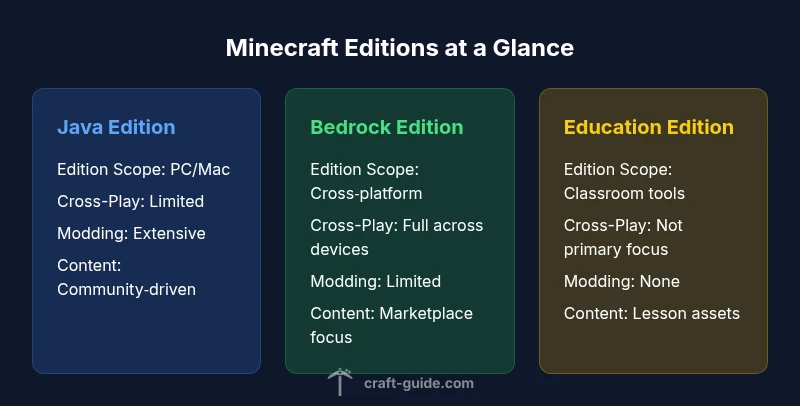
Difference Between All Minecraft Games
Explore the difference between all Minecraft games—the Java, Bedrock, and Education editions—with an analytical side-by-side that highlights edition scope, cross‑play, modding, and classroom use.


Java Edition is best for modding and customization, Bedrock Edition excels in cross‑platform play and performance across devices, and Education Edition targets classroom settings with built‑in lessons. For most players, the choice hinges on device availability and whether mods or classroom tools matter.
The Core Editions and What They Mean
In the world of Minecraft, the phrase difference between all minecraft games can be understood by looking at three core families: Java Edition, Bedrock Edition, and Education Edition. These editions shape what you can play, where you can play, and how you interact with the game’s ecosystem. According to Craft Guide, understanding the difference between all minecraft games starts with recognizing three broad pillars: edition scope, platform reach, and intended audience. This article analyzes the major Minecraft game families—Java Edition, Bedrock Edition, and Education Edition—without getting hung up on minor feature deltas. For players new to the ecosystem and veterans alike, the goal is clarity, not nostalgia, so you can pick the version that fits your goals. Throughout, you’ll see practical guidance for choosing edition based on your device, preferred play style, and how you want to explore, build, or learn. This section will lay the groundwork by outlining what each edition fundamentally aims to deliver and how those aims translate into day‑to‑day gameplay.
The Big Differences: Cross-Play, Performance, and Modding
The core differences among all minecraft games extend beyond cosmetics and UI; they affect everyone’s daily play. Bedrock Edition is built with cross‑platform compatibility in mind, enabling players on Windows, consoles, and mobile to join the same worlds under certain conditions. Java Edition, by contrast, runs on personal computers with broad modding support, reflecting its emphasis on customization and performance tuning. Education Edition targets schools and classrooms, offering built‑in lessons, classroom management features, and a simplified safety model. Craft Guide analysis shows that the most meaningful decision for most players is whether cross‑play matters to them and whether they want open modding or structured learning content. In practice, this means you’ll experience different performance profiles, update cadences, and content ecosystems depending on edition. When evaluating performance, consider your hardware, network reliability, and whether you’ll rely on external mods or built‑in educational content. Across all editions, you’ll encounter tradeoffs between customization, accessibility, and content access that drive the best fit for your play environment.
Edition-by-Edition Deep Dive: Java Edition (PC/Mac)
Java Edition is often described as the heart of the Minecraft modding community. It runs on PC and Mac hardware and is the primary platform where players create, test, and share modifications, add‑ons, and large‑scale maps. The edition’s architecture is more conducive to performance tweaks and advanced texture packs, but it also requires more careful system planning; players with older hardware may experience constraint if their setup is not optimized. For those who like to customize, Java Edition provides access to the widest range of community tools, including launchers, mod loaders, and creative dashboards that let you alter almost every aspect of gameplay. In this context, the difference between all minecraft games is clearest: Java Edition’s openness is unmatched, making it the go‑to choice for long‑term enthusiasts who want deep control and ongoing experimentation. However, that flexibility comes with a steeper learning curve and a need for manual updates to mods and resources. If you enjoy building and testing user‑generated content, Java Edition offers a living ecosystem that evolves with each major update. If you seek a streamlined experience with fewer surprises from external files, you may prefer the Bedrock route, which is covered in the next section.
Edition-by-Edition Deep Dive: Bedrock Edition (Windows 10/11, consoles, mobile)
Bedrock Edition represents the cross‑platform backbone of modern Minecraft. It runs on a wide array of devices, from consoles to phones and tablets, and on Windows with integration across multiple storefronts. The key difference between all minecraft games here is accessibility: Bedrock’s unified codebase is designed to smooth the experience across hardware, screen sizes, and input methods, reducing the friction players face when switching devices. The edition emphasizes performance optimization and consistent visuals, which makes it appealing for families and groups who want to play together without worrying about mismatched versions. Content in Bedrock is distributed through official add‑ons and the Marketplace, which brings curated skins, skins, and mini‑games into a single storefront experience—though some items are exclusive to specific platforms. For players who value seamless multiplayer and a broad device footprint, Bedrock offers a practical, social, and approachable doorway into Minecraft. The trade‑offs typically center on modding restrictions and some friction with certain Java‑basedworlds or custom content, which are addressed later in this guide.
Edition-by-Edition Deep Dive: Education Edition
Education Edition is a distinct branch designed for classrooms and teaching environments. It combines core Minecraft gameplay with built‑in lesson plans, classroom management tools, and safety features that educators can leverage to guide student projects. The difference between all minecraft games here is not about surface aesthetics but about pedagogy: the edition aligns with curricula and assessment workflows, supporting educator controls and student collaboration. Unlike Java or Bedrock, Education Edition emphasizes structured content over open‑ended mods, focusing on reproducibility and safety in school networks. Resources are distributed through official channels that instructors rely on for assignments, rubrics, and collaborative activities. For teachers, this edition reduces some of the setup overhead by providing integrated lessons, teacher dashboards, and guided exploration that can be accessed across approved devices. For students, the experience centers on teamwork and problem solving rather than pure sandbox exploration. While it doesn’t support heavy modding or independent scripting in the same way as other editions, Education Edition’s value lies in its ability to translate Minecraft play into measurable learning outcomes. In many regions, licensing and school provisioning govern access, so educators should plan accordingly before adoption.
Performance, Modding, and Community
The performance landscape varies significantly between Minecraft editions. Java Edition can be highly responsive on capable hardware with optimized settings, while Bedrock tends to showcase smooth performance across a broader range of devices due to its streamlined engine. Modding support is the defining distinction: Java Edition’s open ecosystem invites thousands of mods, which can alter combat, world generation, and player experience; this is both a strength and a maintenance challenge as mods can conflict with updates. Education Edition, by design, omits traditional mods in favor of built‑in experiences and classroom features. Community ecosystems around each edition differ accordingly: Java’s modding communities are robust and deeply technical; Bedrock’s community focuses more on marketplace content and cross‑device experiences; Education Edition centers around teacher‑driven projects and collaborative tasks. Craft Guide analysis shows that understanding these community dynamics helps players set realistic expectations for support, updates, and content availability. It also emphasizes the importance of backing up worlds and understanding compatibility requirements before adopting a new mod or another edition.
Cost, Licensing, and Content Ecosystems
Pricing and licensing models shape the difference between all minecraft games in practical terms. Java Edition typically requires a Mojang account and a one‑time license through the official launcher, with free access to basic features but optional paid content from third‑party modders. Bedrock Edition is distributed across platform stores, which means the price and availability can vary by device and marketplace, and some content is gated behind store purchases or subscriptions. Education Edition operates through school licensing and institutional access, often coordinated by district administrators, with classroom resources and licenses tied to the institution rather than the individual user. The content ecosystem also diverges: Java’s modding scene thrives on community creations, while Bedrock offers an official Marketplace with curated add‑ons, skins, and maps. Education Edition emphasizes curated lesson assets and teacher‑led experiences rather than user‑generated content. Understanding this ecosystem helps players budget time and money, plan for updates, and decide whether to lean toward mods, marketplace content, or teacher resources for sustained engagement.
How to Decide: Your Playstyle and Platform
Choosing among Java, Bedrock, or Education comes down to playstyle, devices, and long‑term goals. If you prize experimentation, world customization, and a thriving modding culture, Java Edition is likely your best bet. If you want to play with friends across consoles and mobile devices, Bedrock Edition offers the most reliable cross‑platform experience. If classrooms, structured lessons, and teacher‑led projects are your aim, Education Edition provides integration with curricula and classroom management tools. A practical step is to list your primary devices, confirm which edition runs on them, and map your top activities to the edition features: mods vs marketplace content vs teacher resources. Don’t forget to test world compatibility if you already own content from another edition, and consider whether you will eventually switch devices or environments. Craft Guide recommends starting with your primary device and desired content ecosystem, then exploring the other editions later to understand their unique pros and limitations. This approach helps you avoid common missteps and ensures a smoother transition if your needs evolve.
Common Pitfalls and Myths
Many players underestimate how different the editions are in practice, assuming features translate directly across Java, Bedrock, and Education. A frequent mistake is trying to load a Java world into Bedrock without compatibility tools or conversion; the result is corrupted or missing content. Another myth is that cross‑play guarantees identical experiences on every platform; in reality, some content is platform‑specific or restricted by marketplace rules. It’s also common to assume Education Edition is identical to the other two; while it shares core Minecraft mechanics, it prioritizes structured learning experiences and classroom safety rather than free exploration. Finally, do not neglect backup routines: world data is precious, and incompatibilities or mod conflicts can cause loss if you switch editions carelessly. By planning device availability, understanding the content ecosystem, and respecting licensing constraints, you’ll reduce friction and keep your Minecraft journey enjoyable across editions. The Craft Guide team’s careful distinction among these editions helps players make informed decisions instead of chasing features that don’t align with their goals.
Feature Comparison
| Feature | Java Edition | Bedrock Edition | Education Edition |
|---|---|---|---|
| Edition Scope | PC/Mac (Java) | Cross‑platform on Windows/macOS/mobile/consoles (Bedrock) | Classroom-focused with built‑in lessons (Education) |
| Cross-Play | Limited (Mods/standalone features) | Full cross‑platform across Bedrock devices | No broad cross‑play; education features only |
| Modding & Scripting | Extensive mods and APIs | Mods limited to supported add‑ons | No mods; built‑in lesson content |
| Content Ecosystem | Community mods and packs | Official Marketplace and add‑ons | Educational resources and teacher content |
| Licensing & Access | One‑time license via Mojang account | Platform store purchases/variants | School licensing with classroom access |
Benefits
- Broad modding potential on Java Edition
- Excellent cross‑platform reach with Bedrock
- Educational content and classroom tooling in Education Edition
- Strong performance across diverse devices with Bedrock
- Active, diverse communities and content ecosystems for all editions
Negatives
- Modding can complicate updates on Java Edition
- Bedrock content varies by platform store and may limit mods
- Education Edition licensing can be school‑dependent
- Feature parity across editions is inconsistent
Bedrock Edition is the most versatile for cross‑device play, but Java Edition remains the modding king, and Education Edition excels in classroom use.
If cross‑play and accessibility across devices matter most, choose Bedrock. If you want the widest modding ecosystem and custom content, pick Java. For structured education and classrooms, Education Edition stands apart. Craft Guide recommends aligning edition choice with your primary use case and devices.
People Also Ask
What is the biggest practical difference between Java Edition and Bedrock Edition?
The biggest practical difference is cross‑play capability and modding; Java Edition emphasizes customization, while Bedrock emphasizes cross‑device play and smoother performance across devices.
The biggest difference is cross‑play and mods: Java focuses on customization, Bedrock on cross‑device play.
Can Java Edition worlds be played on Bedrock Edition?
Direct conversion is not supported; worlds designed for Java may not be compatible with Bedrock without conversion tools or recreation.
Java worlds can't be opened directly in Bedrock; you may need conversion tools.
Is Education Edition worth it for teachers outside formal schools?
Education Edition is designed for classrooms; outside formal schools access may be limited or unavailable. Consider using community resources or alternative editions for personal learning.
Education Edition works best in classrooms with teacher resources.
Which edition is best for mods?
Java Edition offers the broadest modding ecosystem and the most customization options.
If you're after mods, Java Edition is the go-to.
Does Bedrock Edition support scripts like Java's mods?
Bedrock’s modding is more limited and relies on add‑ons from the Marketplace; full scripting access is less available than Java.
Bedrock uses add‑ons rather than full mods.
The Essentials
- Identify your primary device first to guide edition choice.
- Prioritize cross‑play needs or modding depth accordingly.
- Consider classroom goals if Education Edition is relevant.
- Plan for content ecosystems: mods vs marketplace vs lessons.
- Back up worlds before switching editions.