What Minecraft to Play on PC: Java vs Bedrock Edition
Compare PC Minecraft editions—Java, Bedrock, and Education—covering performance, modding, cross‑play, and setup tips to help you choose the right version for your play style.


Choosing what Minecraft to play on PC comes down to Java Edition for modding depth, Bedrock for cross‑platform play and performance on Windows, and Education Edition for classroom use. For pure vanilla, wide shader support, and modding flexibility, Java Edition is the most flexible, while Bedrock suits players seeking smooth performance and cross‑device play. Your best pick depends on your goals and hardware.
Understanding the PC Edition Landscape
For players on PC, the Minecraft ecosystem isn’t a single product. According to Craft Guide, the most important decision factors are modding potential, cross‑play reach, and performance consistency across hardware. The three main PC editions are Java Edition, Bedrock Edition for Windows, and Education Edition. Java Edition remains the long‑standing modding platform with wide shader support and a robust community. Bedrock Edition on PC focuses on smooth performance and cross‑device play with friends on consoles or mobile. Education Edition targets classrooms with built‑in lesson plans and simplified management. Each edition has its own licensing model and update cadence, so pick based on what matters most to you: tinkering freedom, multiplayer reach, or structured learning experiences. The result is a choice that can change how you approach survival, creativity, and multiplayer in Minecraft.
Top Editions on PC: Java vs Bedrock vs Education
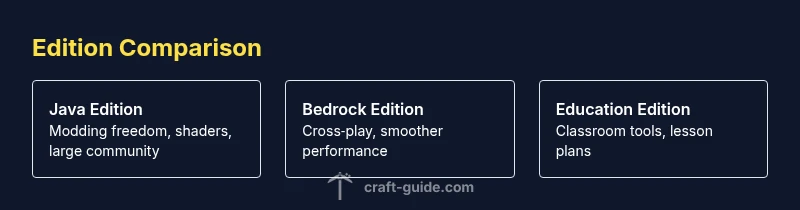
Java Edition: deep modding support, broad shader and texture pack ecosystem, and a thriving community. Bedrock Edition: smoother performance, built‑in cross‑platform play, and a streamlined marketplace. Education Edition: classroom tools, lesson plans, and centralized management for schools. The best pick depends on your priorities: if you want freeform experimentation, Java is your playground; if you want easy multiplayer with friends on different devices, Bedrock is the smarter fit; if you’re teaching or learning in a structured setting, Education Edition offers built‑in resources. Craft Guide’s analysis shows that most PC players start with Java for modding freedom and then explore Bedrock if cross‑play is a priority. Every edition evolves, so staying informed about updates helps you align features with your goals.
Performance and Modding Considerations
Performance on PC is highly dependent on hardware and settings. Java Edition tends to be more resource‑hungry, especially with heavy mod packs or shaders, but modern PCs can run impressive builds with careful tuning. Bedrock Edition generally offers smoother baseline performance on the same hardware and tends to be more forgiving with lower‑end setups. Modding, shader packs, and texture packs are far more abundant for Java, while Bedrock emphasizes stability and cross‑play. Education Edition keeps resources simple and curated for curricula, which can mean fewer performance surprises but limited customization. When planning your setup, consider how you prioritize experimentation, consistency, and the kind of multiplayer you want. Craft Guide recommends starting with a clear list of your must‑have features to guide your tuning and edition choice.
How to Decide Based on Your Play Style
If you crave heavy customization, frequent updates from the modding community, and the widest choice of shaders, Java Edition is your best bet. If you want to play with friends on different devices without extra config and prefer smoother performance, Bedrock Edition wins for many players. If your goal is education, classroom management, and built‑in lesson activities, Education Edition is purpose‑built for that environment. Your hardware situation also matters: on older machines, Bedrock may feel snappier, while newer systems benefit from Java’s expansive customization. Craft Guide suggests mapping your play style to these tiers and then testing each edition briefly to confirm which edition aligns with your expectations.
Setup and Installation: Quick Start Guide
Starting with any edition involves a few common steps. First, obtain the appropriate license or install from the official source for that edition. Next, download and install the launcher or game client, then launch and sign in if required. For Java Edition, allocate memory with your launcher and consider installing a performance mod like OptiFine if shader support is desired. For Bedrock Edition on PC, ensure Windows updates are current to maximize stability and cross‑play features. Education Edition setup emphasizes administrator access and classroom management tools. After installation, explore the in‑game settings to tune graphics, render distance, and controls for a comfortable balance between visuals and performance. Craft Guide’s practical approach is to document your exact settings and test performance before committing to a long play session.
Shader Packs and Resource Management on PC
Shader packs and resource packs can dramatically change visuals. Java Edition benefits from a vast shader ecosystem, enabling dramatic lighting, water effects, and atmospheric skies. OptiFine remains a popular option for performance and customization, though it’s primarily used with Java. Bedrock Edition supports some shader packs and texture packs, but the options are more streamlined and tend to emphasize stability and compatibility across devices. Education Edition focuses on reliability over visual enhancements, so shader usage is typically not a priority in that environment. When experimenting, start with a modest shader pack to gauge performance, then adjust resolution and features to maintain a steady frame rate. Regularly back up worlds before introducing significant mods or resource changes to avoid data loss.
Common Myths and Misconceptions
A common myth is that Java Edition always has the best visuals. In reality, Bedrock can deliver competitive visuals with the right hardware and shader settings, and it often runs more smoothly on mid‑range PCs. Another misconception is that you must pick one edition forever. In practice, players often start with one edition and try another for specific uses such as community servers or education activities. A third myth is that modding automatically invalidates multiplayer experiences. In fact, Java’s modding community has long supported private servers and custom maps, while Bedrock emphasizes cross‑device play that keeps friends connected across platforms. Clarifying these ideas helps you decide with confidence.
Networking, Cross‑Platform Play, and Community Support
Cross‑play varies by edition. Bedrock Edition supports cross‑device multiplayer, connecting Windows PC players with consoles and mobile devices. Java Edition is primarily PC‑to‑PC, with a focus on friends using the same edition. Education Edition centers on classroom access and teacher control, with limited cross‑play features. Community support is robust for Java and Bedrock, including servers, forums, and YouTube guides. For educators, Education Edition provides structured lesson plans and in‑house resources. When building a community around Minecraft on PC, choose the edition that best matches the type of multiplayer environment you want and the level of control you need.
Authority Sources
Here are some trusted references for PC Minecraft editions and guidance:
- https://www.pcgamer.com
- https://www.theverge.com
- https://education.minecraft.net
Feature Comparison
| Feature | Minecraft Java Edition | Minecraft Bedrock Edition (PC Windows) | Minecraft Education Edition |
|---|---|---|---|
| Playable on Windows/macOS | Yes | Yes | Yes (Education requires admin setup) |
| Modding / shader support | Excellent (mods, shaders) | Limited (moderate shader support) | Minimal (education environment) |
| Cross‑play with other devices | Primarily PC‑to‑PC | Yes across Windows, consoles, mobile | No (education focus) |
| Performance on typical PC specs | Hardware‑hungry with heavy mods | Smoother baseline, wider hardware compatibility | Stable but basic performance for classrooms |
| Official updates and support cadence | Frequent updates and community support | Regular updates with platform parity | Education cadence aligned to curriculum cycles |
| Pricing model | One‑time license per edition | Separate purchase for Bedrock/Windows, often bundled | Licensing for schools (education focus) |
Benefits
- Java Edition offers unparalleled modding freedom and shader options
- Bedrock Edition enables cross‑platform play and smoother performance on many PCs
- Education Edition provides classroom tools and structured lesson plans
- Strong and active community across Java/Bedrock editions
- Continual updates help keep features aligned with player expectations
Negatives
- Java can be resource‑intensive with heavy mods or shaders
- Bedrock modding is more limited compared to Java
- Education Edition is specialized and lacks broad modding support
- Edition differences can cause confusion for new players
Java Edition remains the best all‑round choice for modding and customization; Bedrock is superior for cross‑play and performance on mixed hardware; Education Edition serves schools best.
If you want deep customization and shader potential, choose Java. If your priority is easy cross‑play with friends on other devices, Bedrock is the better pick. For classroom use, Education Edition offers built‑in teaching tools and management features.
People Also Ask
Is Bedrock Edition better for performance on PC than Java?
Bedrock Edition generally runs smoother on a wide range of PC hardware due to its optimized engine, while Java Edition can demand more resources, especially with mods or shaders. The actual experience depends on your setup and the quality of settings.
Bedrock usually runs more smoothly on PC, but your results depend on hardware and settings.
Can I play with friends on different editions?
Cross‑play is available between Bedrock Edition across Windows, consoles, and mobile. Java Edition does not natively cross‑play with Bedrock. If cross‑play matters, Bedrock is the practical choice.
Bedrock supports cross‑play across devices; Java does not.
Should I switch between Java and Bedrock if I start with one?
You can explore both editions separately, but worlds are edition‑specific. Moving a world from Java to Bedrock isn’t straightforward and may require recreating aspects or using conversion tools, so plan ahead.
Worlds don’t transfer between editions, so test carefully before deciding.
Is Education Edition free for schools or students?
Education Edition is designed for classroom use and typically requires school licensing or enrollment through a program, not a standard consumer purchase. Availability varies by region and school program.
Education Edition is used through schools and is not a typical consumer purchase.
Can I run shader packs on Bedrock Edition for PC?
Bedrock does support some shader and texture packs, but the selection is smaller than Java. If you want a wide range of shader options, Java Edition is the better starting point.
Bedrock has shaders, but Java offers more options.
What’s the fastest way to decide which edition to start with?
List your priorities—modding vs cross‑play vs classroom use—and assess hardware readiness. Start with a short trial of the edition that aligns most with your goals, then broaden your perspective if needed.
Start with your top priority, try that edition, then decide if you want to explore others.
The Essentials
- Choose Java Edition for modding freedom and shader variety
- Pick Bedrock Edition for cross‑platform play and smoother performance
- Education Edition is best for classrooms and guided curricula
- Test each edition briefly to confirm performance on your hardware
- Always back up worlds before trying mods or shader packs