How to Build a Car for Minecraft: A Practical Guide
Learn how to build a car for Minecraft, from vanilla rail-based designs to mod-powered vehicles, with step-by-step instructions and practical tips for players of all levels.


With this guide, you’ll learn to craft a functional car for Minecraft using vanilla blocks or popular mods. You’ll cover wheel placement, steering mechanisms, propulsion, and safe rail interactions. According to Craft Guide, car builds boost creativity and practicality in both survival and creative modes. Whether you’re new to building or tweaking advanced designs, this tutorial helps you start fast.
What counts as a car in Minecraft
A car in Minecraft is a vehicle design that mimics real-world cars by using a chassis, seating area, wheels (visual or functional), and a propulsion system. In vanilla Minecraft, you’re often limited to minecarts on rails, or you can simulate a car with a chassis surrounding a minecart. Mods expand the concept by adding dedicated car models, wheels, suspension, and physics. The Craft Guide team notes that the most satisfying cars balance aesthetics, scale, and gameplay practicality. When planning, decide if you want a purely visual build, a functional ride on rails, or a mod-enhanced vehicle with custom behavior. This decision shapes materials, redstone needs, and testing workflows.
In practice, a “car” can range from a small two-seat street car in a workshop scene to an elongated cargo hauler on a track. Start by defining length (in blocks), width (2–3 blocks is common for compact cars), and the driver seat position. Keeping a consistent grid makes wheel alignment and turning mechanisms easier to implement. For inspiration, browse community builds and note how color schemes, cockpit details, and scale contribute to the impression of a real vehicle. Craft Guide’s analysis shows that thoughtful proportions dramatically boost the perceived realism of your Minecraft car.
Vanilla car design principles
Vanilla designs hinge on two pillars: visual authenticity and reliable movement on rails. The simplest functional car uses a standard minecart on a rails network with a deliberate frame built around it. Aesthetically, you can create a chassis from stair blocks, slabs, and concrete to form a rounded body that looks like a car from the side. Use black wool or black concrete for wheels if you’re going for a visual wheel, and place iron bars or fences as wheel arches to imply motion and structure. For steering, implement track switches or carefully laid curves so the cart follows intended paths, aided by powered rails to regulate speed. Redstone lamps, levers, and note blocks can decorate the interior, simulating dashboards and engine sounds.
A key principle is modularity: design a single seat, a passenger area, and a trunk as separate modules that can be swapped or scaled. This makes it easier to upgrade parts without rebuilding the entire vehicle. By planning wheel placement, you can avoid collisions with scenery and ensure a smoother ride along your track. According to Craft Guide’s observations, modular design also accelerates iteration, letting you test one component at a time and refine aesthetics separately from mechanics.
Modded car options and considerations
Mods drastically expand what counts as a car in Minecraft. When you install a car mod, you typically gain access to dedicated vehicle models, wheels, suspension, and sometimes physics-based movement. Mods can remove some vanilla constraints, enabling smoother steering, independent wheels, and more realistic acceleration. If you choose to mod, start by selecting a framework (such as Forge or Fabric) and a vehicle mod that matches your Minecraft version. Plan how your modded car integrates with existing rails or provides alternative propulsion, and consider compatibility with server rules if you play multiplayer. Craft Guide suggests evaluating mod stability and community documentation before heavy building.
For modded builds, expect to adjust textures, interior blocks, and vehicle dimensions to fit your server’s aesthetics. You can still apply vanilla principles—define the chassis, cabin, and cargo area—while letting the mod provide wheels, engine sounds, and motion physics. Be mindful of performance: large vehicle models and complex redstone logic can tax weaker computers or servers. The key is to balance visual fidelity with playability, using mods to fill gaps rather than overloading your world with exotic components.
Aesthetics and customization ideas
A Minecraft car should reflect your style while remaining readable at a glance. Start with a base color that contrasts with the environment and add accent colors for doors, stripes, or logos. For interior detailing, use stairs for seats, pressure plates as pedals, and item frames to showcase dashboard gadgets. Lighting is essential: place glowstone or sea lanterns behind transparent blocks to simulate headlights and taillights. If you’re building in a village or city scene, matching wheel arches to nearby street color schemes helps your car feel at home in the world.
Beyond cosmetics, consider branding and personalization. Add a custom license plate, a team emblem, or a unique number on the side. For multiplayer worlds, a clear silhouette and distinctive color palette help others recognize your vehicle quickly. Craft Guide notes that visual clarity often correlates with perceived quality, so invest time in symmetry, proportion, and finish touches.
Building a test track and safe environment
Before you commit to a full build, set up a test track in a flat, unobstructed area. A straight run of rails with gentle curves will help you observe acceleration and turning stability. Use powered rails at intervals to maintain consistent speed, and place detector rails to trigger redstone signals if you want automated controls. Ensure corners have enough clearance so the minecart can pass without clipping walls. Running the car over different track textures can reveal how well your design handles changes in elevation and surface.
During testing, record observation notes about speed, wobble, and wheel alignment. If you notice derailments, adjust wheel arches, axle spacing, or rail spacing accordingly. Craft Guide’s testing tips emphasize documenting each iteration and comparing performance across versions or different block palettes. This discipline helps you converge on a polished, reliable car design.
Integration with redstone and multiplayer considerations
Redstone integration adds depth to your Minecraft car. Use a simple on/off circuit to toggle a speed boost via powered rails, or implement a steering mechanism that redirects the cart using lever-activated rails. For multiplayer, coordinate rail layouts so each player can access their own loading bay or drive lane without collisions. Keep server-friendly designs by limiting complex pistons or large redstone clocks that could lag gameplay. Craft Guide highlights that clean, predictable redstone logic improves reliability in collaborative worlds.
If you want automatic displays, you can mirror a car’s movement with pistons moving a decorative chassis while the minecart itself remains on rails. This approach gives you a visually rich scene without sacrificing performance. Always test on a local world before deploying on a public server to ensure compatibility with other builds and players.
Troubleshooting common issues and optimization
Derailments are usually caused by misaligned tracks, uneven terrain, or wheels sitting too close to blocks. Re-check alignment and give the cart a clear path, especially around corners. If your car stalls on powered rails, verify the rail power and ensure there’s enough distance between power sources. Lighting and ambiance can also affect perception; dim areas may hide design flaws, so bright lighting helps you spot misplacements early.
Performance can suffer when your build relies on heavy redstone logic or large decorative blocks. Optimize by reducing complex clocks, using more compact circuits, and caching frequently used signals. If you’re sharing a world with friends, consider creating a shared testing zone where each builder can evaluate their design without interfering with others. Craft Guide’s field notes emphasize that iterative testing and simplification are essential for scalable, enjoyable car projects.
Next steps and advanced ideas
You’ve laid a solid foundation for a car in Minecraft. If you’re ready to push further, try multi-vehicle convoys with synchronized starts, or design a modular fleet with different body lengths and capacities. Explore advanced suspension concepts using slime blocks or contact-based triggers for more realistic motion, especially in modded worlds. Finally, document your build with a short guide or video to help collaborators replicate your car and contribute improvements. The Craft Guide team believes that sharing knowledge accelerates learning for builders at all levels.
Tools & Materials
- Minecraft game (Java or Bedrock edition)(Ensure your version supports your planned mods or redstone features.)
- Redstone dust, torches, levers(For basic propulsion and simple steering signals.)
- Rails and minecarts (vanilla)(Core components for rail-based car designs.)
- Blocks for chassis and body (varied colors)(Use a mix of concrete, wool, or terracotta for aesthetics.)
- Slime blocks or honey blocks (optional)(For experimental suspension or soft-landing features.)
- Iron bars, fences, or armor stands (for wheel aesthetics)(Visual wheel elements and arches.)
- CarMod framework (Forge or Fabric)(Only if you plan to use modded vehicles.)
- Mod-specific vehicle mod (optional)(Adds realistic car models and physics; check compatibility.)
Steps
Estimated time: 60-90 minutes
- 1
Plan the layout
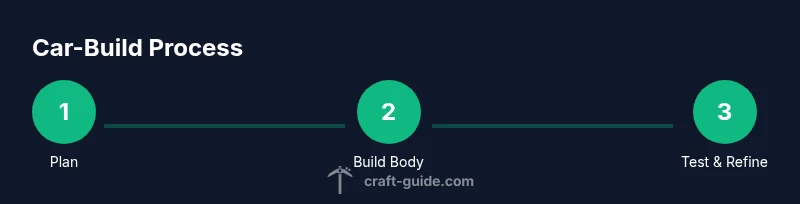
Outline the overall length, width, and wheel placement before placing blocks. Decide whether you’ll rely on minecarts on rails (vanilla) or a modded vehicle with dedicated wheels. Create a simple sketch in the world or a separate planner area to visualize dimensions and turns.
Tip: Sketch dimensions on a nearby flat area to avoid costly mistakes later. - 2
Build the chassis outline
Create a rectangular or aerodynamic silhouette using blocks to form the car’s body. Keep the interior space clear for the driver and a possible cargo area. Visually align the body with wheel arches to enhance realism.
Tip: Use symmetry; mirror one side to reduce errors. - 3
Install wheel anchors
Place wheel supports at the intended wheel positions. If using vanilla wheels, you’ll rely on aesthetics; if you’re using modded wheels, install the components as per mod instructions. Ensure there’s enough clearance for the minecart or wheel blocks to spin/rotate.
Tip: Leave a 1-2 block gap for air resistance and visual realism. - 4
Lay the rail or propulsion path
For a vanilla rail car, route tracks along the chassis with curve transitions. Install powered rails where you want speed control or automation. If using a modded car, follow the mod’s guidance for mounting propulsion units.
Tip: Test straight sections first before tackling curves. - 5
Add steering and controls
Implement a straightforward steering mechanism. Use track switches for rails or a redstone lever system to steer the cart in fixed directions. Label controls with signs or place dashboards to simulate an interface.
Tip: Keep controls accessible from the driver seat. - 6
Decorate and refine
Finish with color accents, cockpit details, and lighting. Add headlights, taillights, and license plate if you want a more authentic feel. Review proportions and adjust any block misplacements that affect appearance or clearance.
Tip: Test visibility from a distance to ensure the silhouette reads as a car. - 7
Test drive and iterate
Take the car for a test run on a flat track, then on gentle curves. Note wobble, derailments, or speed issues and adjust wheel alignment, track spacing, or power distribution accordingly. Repeat until the ride feels smooth.
Tip: Document changes so you can track improvements. - 8
Scale and customize for multiplayer
If you work with others, create standardized car dimensions and shared track layouts to avoid clashes. Provide build templates or a blueprint folder for teammates. Finally, protect your works with version control in your world.
Tip: Coordinate with teammates to keep builds cohesive.
People Also Ask
Can I make a car using vanilla Minecraft?
Yes, you can create a basic car style using minecarts on rails and a decorative chassis. Vanilla builds rely on rails, blocks for the body, and careful rail placement for movement and appearance.
Yes, you can build a simple car with minecarts on rails and a decorative body in vanilla Minecraft.
What is the easiest car design for beginners?
Start with a straight rail-based cart that uses a simple chassis and a single minecart. This lets you learn wheel alignment, power placement, and basic steering before adding complexity.
Begin with a straight, simple rail car to learn the basics of wheel alignment and steering.
Do I need mods to have working car features?
Mods add broader car features, including more realistic wheels and handling. Vanilla builds can work with minecarts, but mods unlock richer physics and visuals.
Mods give you more realistic cars; vanilla builds can still work using minecarts.
How do I steer a car in Minecraft?
Steering is achieved by directing the cart along switches or curved rails, or by implementing a redstone mechanism that guides its path. For simplicity, use rail switches to steer on straight tracks.
Steer with rail switches or a redstone-guided path.
What are common issues when testing car designs?
Common issues include derailments at turns, power supply gaps, and misaligned wheel arches. Fix by adjusting rail spacing, ensuring consistent power, and refining body alignment.
Derailments and power gaps are typical; fix by aligning rails and smoothing power distribution.
Can I create a car for multiplayer worlds?
Yes, you can build and drive cars in multiplayer. Plan tracks and driving lanes to prevent collisions, and agree on rules to ensure a smooth experience for all players.
Absolutely—coordinate rails and driving lanes for a great multiplayer experience.
Watch Video
The Essentials
- Plan layout before building for efficiency
- Use modular design for easy upgrades
- Mods can expand car realism and options
- Test thoroughly on flat and curved tracks
- Coordinate with others for multiplayer builds