Minecraft Editions to Buy: A Practical Guide
This guide helps you choose Minecraft editions, compare Java and Bedrock, and understand prices, platforms, and cross-play basics. Plus tips on price ranges.


Minecraft purchases come in two editions: Java Edition for PC and Bedrock for Windows, consoles, and mobile. Java favors mods and customization; Bedrock enables cross-play across devices. Prices vary by region and store, and you’ll need a compatible device, internet access, and a Microsoft account for Bedrock to unlock cross-play.
Understanding Minecraft Editions: Java vs Bedrock
According to Craft Guide, the edition you choose can shape your entire playing experience. Java Edition is the classic PC-centric version, renowned for its vast modding community, user-generated content, and flexible world customization. Bedrock Edition, by contrast, runs on Windows, consoles, and mobile, delivering consistently optimized performance and built‑in cross‑play across devices. The Craft Guide team found that players prioritizing cross‑platform access often lean toward Bedrock, while those who want depth of mods and custom maps gravitate to Java. When deciding, assess your primary device, preferred play style, and whether you want to connect with friends who are on different hardware. The edition you pick will influence multiplayer compatibility, world sharing, and even map seeds. Crafting a clear list of your top needs—mod support, cross‑play, or broad device coverage—will smooth the purchasing path. Craft Guide’s analysis emphasizes that choosing the right edition is a pivotal first step toward a satisfying Minecraft journey.
Platform compatibility and system requirements
Your hardware and platform govern which edition you can run smoothly. Java Edition is strictly PC-based and benefits from decent CPU performance and ample RAM to host modded worlds and large skins. Bedrock Edition targets cross‑platform play and tends to run well on midrange machines, consoles, and mobile devices. If you aim to play with friends on PlayStation or Xbox, Bedrock is usually the practical path; if you want heavy modding and experimental maps, Java may be the better pick. Always verify minimum requirements for your chosen edition and ensure your storage space is adequate for new worlds and mods. Also consider how updates are delivered across your devices, since Bedrock tends to unify updates across platforms more reliably.
Price ranges and where to buy (minecraft to buy)
Prices for Minecraft editions vary by edition and region, and sales can appear at different times in different stores. The two primary routes are the official Minecraft site for Java Edition and the Microsoft Store for Bedrock Edition. When you hear the phrase minecraft to buy, know that the decision hinges on your device ecosystem and whether you want cross‑play or modding support. Regional pricing can affect total cost, so check whether your local storefront offers bundles or discounts for new players, students, or families. Always use official channels to secure your license and access, avoiding gray-market keys that can lock you out of updates or harm your account.
How to choose between Java and Bedrock for your play style
If you crave deep customization, tinkering, and a thriving mod scene, Java Edition is the obvious choice for many Minecraft enthusiasts. If you value convenience, cross‑play, and a uniform experience across devices, Bedrock is typically the smarter option. Start by mapping your typical play sessions: Do you play primarily on a PC, or do you switch between a console and a phone? Are friends on different platforms? How important is mod support to you? Craft Guide recommends listing your top five priorities and matching them to the edition that best fulfills those needs. The goal is to minimize compatibility friction and maximize your time building, exploring, and crafting.
Safe buying and avoiding scams
Purchase only from official stores or the publisher’s website. Be cautious of third‑party sellers offering “instant access” keys or unusually low prices; these are common sources of scams or invalid licenses. Always confirm the seller’s URL and look for HTTPS, publisher branding, and a legitimate return policy. After purchase, save your receipt and account information in a secure location. If you encounter problems, use official support channels rather than private messages or shady forums. Craft Guide emphasizes that legitimate ownership and account security depend on sticking to trusted platforms.
Getting started after purchase: installation and first run
Once you’ve completed checkout, proceed to installing the game on your device. For Java Edition, download from the official site and run the installer; for Bedrock, install through the appropriate store on your device. After installation, launch the game and create your profile or sign in with the corresponding account. Create a new world to explore basic systems like crafting, enchanting, and mob behavior. If you plan to play with friends on a server, ensure you know the server address and any version compatibility requirements before joining.
Tools & Materials
- Device with internet access(PC, console, or mobile device capable of running Minecraft)
- Official Microsoft or Minecraft store account(Needed for Bedrock purchases and cross‑play)
- Payment method(Credit/debit card or PayPal supported in stores)
- Stable internet connection(Needed for download, updates, and activation)
- Receipt or order confirmation(Keep for license verification and reinstallation)
Steps
Estimated time: 15-25 minutes
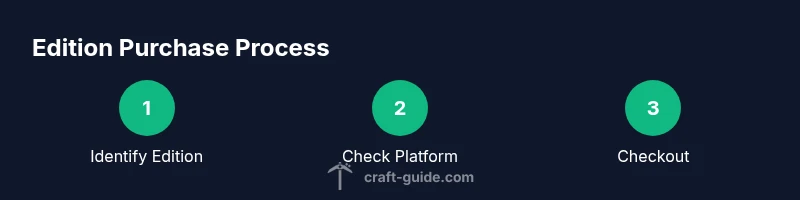
- 1
Identify the edition you want
List your primary devices and confirm whether modding or cross‑play matters most. Decide between Java Edition and Bedrock Edition based on your goals and hardware.
Tip: Write down your top three priorities before you decide. - 2
Check platform availability
Verify that your selected edition runs on all devices you plan to use. Bedrock supports cross‑play across Windows, consoles, and mobile, while Java remains PC‑centric.
Tip: If you frequently switch platforms, favor Bedrock for compatibility. - 3
Compare prices and regional options
Look up current prices in your region across the official stores. Watch for bundle deals or family plans that can save money over time.
Tip: Bookmark the regional storefront to compare offers easily. - 4
Set up your account and payment
Create or sign into the store account and configure payment methods. Enable two‑factor authentication for security.
Tip: Use a strong, unique password and keep recovery options up to date. - 5
Complete the purchase and confirm
Proceed to checkout, confirm the edition and region, and complete the purchase. Save your receipt and payment confirmation.
Tip: Double‑check the edition and platform before finalizing. - 6
Install and start playing
Install the game from the official store, sign in, and create a world. Explore basics like crafting and survival rules.
Tip: Allow updates and read initial setup prompts for best results.
People Also Ask
What is the main difference between Java and Bedrock Editions?
Java Edition is PC-focused and supports extensive mods; Bedrock runs on multiple devices and enables cross‑play.
Java is PC-focused and mod-friendly; Bedrock supports cross‑play across devices.
Do I need a Microsoft account to buy Bedrock?
Yes, a Microsoft account is required for Bedrock purchases and cross‑play.
Yes, you’ll need a Microsoft account for Bedrock purchases.
Can I use the same Minecraft world across editions?
Java worlds cannot be played in Bedrock without conversion; Bedrock worlds are not interchangeable.
There isn't direct cross‑edition world sharing.
Is there a free trial or demo version?
Minecraft does not offer a traditional demo; you can watch official videos or join community servers to sample gameplay.
There isn't a standard demo version; explore with videos or community servers.
Where can I legally buy Minecraft?
From the official Minecraft site for Java or the Microsoft Store for Bedrock; avoid gray-market keys.
Buy from official stores to protect your license.
Is Bedrock cross-platform on all devices?
Bedrock supports cross‑play across Windows, consoles, and mobile, but some features vary by platform.
Bedrock supports cross‑play across many devices, with platform differences.
Watch Video
The Essentials
- Identify edition based on devices and play style
- Bedrock enables cross-play; Java emphasizes mods
- Always buy from official stores
- Prices vary by region; check local storefronts
- Install and start playing after purchase