How to Play Minecraft Without Monsters: The Monster-Free Play Guide
Learn how to play Minecraft without monsters by enabling peaceful modes, configuring mob-spawning, and designing safe bases. This step-by-step guide covers setup, building, and tips for a calm, creative world.


Goal: Play Minecraft without monsters by disabling hostile mobs and designing a safe, monster-free world. You’ll learn how to switch to peaceful settings, curate spawn rules, and build defensive layouts that keep enemies out. This quick guide lays out essential steps, cautions, and best practices to enjoy a calm, creative Minecraft experience.
Why Minecraft without monsters matters
Minecraft without monsters offers a unique canvas for builders, explorers, and redstone engineers who want uninterrupted creativity. In this mode, the familiar dangers that pressure your resource choices and paths disappear, letting you focus on architecture, farms, and automated systems. According to Craft Guide, many players prefer monster-free play for education, creative builds, and collaborative server projects where interruptions slow progress. This article explains how to create and maintain a monster-free world, from setup to scaling your designs, with practical steps and guardrails to keep the environment safe and inviting. We'll discuss how Peaceful mode changes gameplay, how to toggle hostiles responsibly, and how to structure your world so that every resource and chamber serves a clear purpose. You'll also find tips for scaling a monster-free world into a thriving, creative hub that still feels challenging and rewarding. By the end, you'll know how to plan layouts, optimize lighting, and enjoy long-build sessions without the constant threat of hostile mobs. Craft Guide's approach emphasizes clarity, repeatability, and practical techniques that work in vanilla Minecraft and across different platforms.
Basic setup: enabling a monster-free world
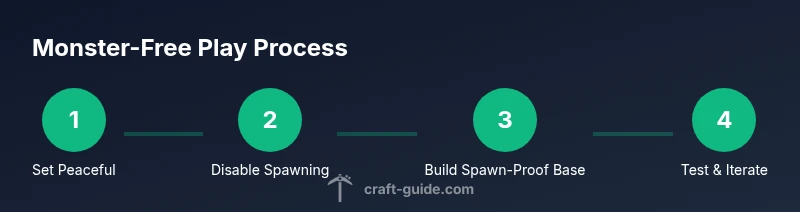
To start playing minecraft without monsters, you first choose a monster-free baseline. Peaceful difficulty automatically disables hostile mobs, but you can also keep a no-hostile rule through gamerules. In addition to selecting Peaceful, consider toggling DoMobSpawning with /gamerule doMobSpawning false if you want to test a world at Easy or Normal while keeping monsters at bay. For multiplayer, set a shared rule pack and document the agreed monster-free policy so everyone follows the same approach. This section also covers backups, world seeds, and checking for unintended spawns in dim corners. Remember that some game modes allow ambient threats like phantoms or endermen under specific conditions; Peaceful suppresses most of these, but you should still monitor your world for other hazards such as lava pools, falling blocks, and water flow. With careful setup, minecraft without monsters becomes a calm playground for creativity, automation, and exploration.
Safe-base design: walls, lighting, and spawn-proofing
Create a fortress of calm around your central hub. Perimeter walls should be at least two blocks tall and built with materials that resist creeper blast effects, such as bricks or stone. Doors should be sturdy and replaced with iron doors if you want to enforce access; you can pair them with pressure plates or redstone hinges for controlled entries. Lighting must be thorough; aim for regular torches every 4-8 blocks to prevent any potential spawning or lurking zones in stairwells and caves. In a world configured to prevent monsters, you can still encounter non-hostile hazards or wandering traders; plan routes that keep these interactions productive rather than disruptive. Consider using spawn-proof blocks like glass, slabs, stairs, or carpets to minimize surface areas where hostile mobs could appear. Small, deliberate touches—such as light wells and elevated walkways—reduce shadowy corners and help you monitor your base from a distance. When combined with a central storage system and clearly labeled sections, your monster-free base becomes a navigation-friendly workshop rather than a fortress under siege.
Resource planning and exploration in monster-free environments
Resource planning is essential when hostiles are off the table, because you still need mining, farming, and logistics. Start with a clear map of where key resources live, including ore deposits, timber stands, and water sources. Because hazards like lava pools and sudden drop-offs remain, place rails, marked tunnels, and safety rails to avoid accidents during mine exploration. A monster-free world also allows you to optimize automation without worrying about mobs wrecking your contraptions; design farms, furnaces, and labs with ample redundancy and public access points. Store resources in well-labeled chests and use color-coding to distinguish ores, ingots, and crafted components. If you plan long exploration sessions, craft a secure supply kit: torches, food, pickaxes, and a spare set of tools. Remember that a calm environment can encourage experimentation—try new mining patterns, test teleportation networks, and prototype drop-offs with minimal risk. The result is a well-supplied, efficient, larger-scale operation that remains playable and enjoyable without the constant threat of monsters.
Building aesthetics and redstone in a monster-free world
Without hostile mobs to interrupt, your builds can focus on aesthetics, function, and automation. Start with a consistent design language: select a block palette, define lighting standards, and apply repeating patterns to create harmony across structures. Redstone-powered doors, elevators, and automated farms work smoothly when you’re not defending against mobs. Use transparent blocks and contrast to showcase interiors while preserving area visibility. This is a great place to develop complex redstone circuits, test conduits for item transport, and refine storage systems. If you plan large projects, sketch a layout first, then segment it into modules you can assemble in isolation. Remember to test every mechanism step-by-step to confirm reliability, especially when wiring circuits or implementing minecart systems. This monster-free focus on form and function keeps crafting and engineering front-and-center, which is perfect for creators who enjoy meticulous planning and visual storytelling in Minecraft without monsters.
Progression, goals, and challenges without mobs
Even with no monsters, Minecraft offers meaningful progression. Set milestones like building a fully automated farm, activating a scalable transportation network, or completing a grand architectural project. Because you’re not relying on combat, your challenges shift toward resource management, efficiency, and aesthetics. Use beacon-like progress markers, such as a landmark collection or a gallery of completed builds, to track advancement. Consider installing a self-sufficient village with villagers and trading halls to simulate progression through economy rather than combat. End-game content—the End and the Ender Dragon—still exists; you can approach it at your own pace, but remember that those realms will present their own non-monster risks, such as fall damage and void. The monster-free playstyle encourages planning, collaboration, and creative problem solving, making Minecraft feel expansive even when enemies are minimized. Craft Guide notes that players who pursue complex redstone networks or precise farm layouts often stay engaged longer because the tasks are repeatable and scalable.
Potential pitfalls and troubleshooting
While monster-free play is appealing, it’s easy to drift into two common issues: over-reliance on peaceful settings and a lack of challenge. To prevent stagnation, schedule regular checks to reintroduce mild challenges—sleep in a bed to time cycles, or occasionally re-enable mobs for short test periods. Another pitfall is complacency in lighting; even without monsters, dark corners can attract mischief like bats or stray items that clog pathways. Maintain a maintenance routine: back up worlds before major changes, document rule changes for players, and annotate your maps with safe zones and spawn-proof areas. If you experience performance hiccups, verify that farms aren’t creating excessive tick rates or lag-inducing redstone clocks. In multiplayer, clearly communicate policies to prevent disputes over monster-free rules. Craft Guide’s approach emphasizes practical safeguards: backups, transparent policies, and incremental testing to keep your world stable, creative, and fun.
Authority references
Authoritative sources you can consult include Minecraft’s official documentation and educational resources. For broader safety and design principles, see the Minecraft Education Edition site, along with NIH and CDC resources on screen time and safe gaming practices. Useful links:
- https://education.minecraft.net
- https://www.nih.gov
- https://www.cdc.gov
Tools & Materials
- Minecraft game access (Java/Bedrock)(Ensure you have the latest version and access to the edition you play)
- World seed or plan for a new world(Seed helps you reproduce a monster-free layout or test spawn rules)
- Backup storage (external drive or cloud)(Always back up before altering game rules or large builds)
- Building materials (wood, stone, bricks, fences)(Gather ahead of time for rapid construction)
- Lighting resources (torches, lanterns, glowstone)(Ensure consistent visibility to prevent accidental spawns)
- Controller/keyboard/mouse or touch controls(Essentials for precise placement and navigation)
- Command blocks or mods (optional)(Use with caution; can enforce monster-free rules)
- Server setup (optional for multiplayer)(Set permissions and rules to keep play monster-free)
Steps
Estimated time: 60-90 minutes
- 1
Open world settings and switch to Peaceful
Access your world settings and set difficulty to Peaceful to disable hostile mobs automatically. If you’re testing other difficulties, pair this with a monster-free rule using gamerules. This ensures a baseline where threats are minimized while you plan your builds.
Tip: Double-check that the server or world isn’t overridden by a global setting. - 2
Apply doMobSpawning gamerule
In addition to Peaceful, execute /gamerule doMobSpawning false to prevent new mobs from spawning in non-Peaceful modes during testing. This helps you maintain a monster-free environment even if someone tweaks difficulty.
Tip: Test changes in a controlled area before applying them globally. - 3
Plan and build a safe perimeter
Draft a simple perimeter around your base using two-block-high walls and secure gates. This creates a clearly defined, guardable zone that reduces accidental intrusion and helps you manage space efficiently.
Tip: Place lighting along the perimeter to discourage any undetected entries. - 4
Create a lighting grid and spawn-proof paths
Implement a consistent lighting pattern and use spawn-proof blocks on critical surfaces to prevent any stray spawns. Build pathways with slabs and fences to limit exposure and improve navigation.
Tip: Combine torches with glass or slabs to maintain visibility without increasing spawn surfaces. - 5
Set up autonomous farms and storage
Design efficient farms and a labeled storage system that you can expand with confidence. With monsters out of the picture, you can optimize layouts for max throughput and minimal maintenance.
Tip: Color-code chests and items to speed up inventory management. - 6
Test the monster-free environment at night
Explore your mapped zones after evening in-game to verify that no hostile mobs appear. If you notice new spawns, review lighting and spawn-proofing around the area and adjust accordingly.
Tip: Carry extra lighting and a safe retreat path in case you encounter unexpected hazards.
People Also Ask
Can I play Minecraft without monsters in multiplayer?
Yes. In multiplayer, use shared rules or plugins to enforce doMobSpawning false, or rely on Peaceful mode for a consistent monster-free experience across players.
Yes, you can keep a monster-free world in multiplayer by enforcing the same rules across players.
What about phantoms and other ambient threats?
Phantoms typically require non-Peaceful settings and sleeping patterns; in Peaceful mode they won’t appear. If you switch to harder difficulties, phantoms may appear if sleep is skipped.
Phantoms won’t appear in Peaceful; elsewhere they depend on sleep discipline.
How do I revert monster-free settings later?
Re-enable monsters by resetting the doMobSpawning gamerule or changing difficulty back to Easy/Normal/Hard. Test changes in a controlled area to avoid surprise spawns.
You can re-enable spawns by resetting gamerules or changing the difficulty.
Will the world still have hazards like lava or falls?
Yes. Hostile mobs are disabled, but natural hazards like lava, falls, and water can still occur. Plan builds and navigation to minimize these risks.
Yes, lava and falls can still pose risks even without monsters.
Is there a downside to monster-free play?
The main drawback is reduced combat challenges, which can affect progression for some players. You may need artificial goals to maintain motivation and engagement.
The main downside is less combat, so set alternative goals to stay engaged.
Watch Video
The Essentials
- Disable hostiles with Peaceful or gamerules.
- Design safe, spawn-proof bases with clear layouts.
- Plan lighting and pathways to prevent accidental spawns.
- Monster-free play emphasizes creativity, automation, and planning.