Is it ok to play Minecraft on peaceful? Practical guide
Discover when Peaceful mode is appropriate in Minecraft, how it changes gameplay, and best practices for education, creative builds, and safe exploration. This guide from Craft Guide offers step-by-step tips, platform considerations, and a balanced view of perks and trade-offs.


Is it ok to play Minecraft on peaceful? Peaceful mode disables hostile mobs and hunger, letting you focus on building, exploration, and redstone without combat pressure. It’s ideal for beginners, creative builds, or educational play. This quick answer introduces when peaceful is best, what changes in gameplay, and how to switch modes safely without losing progress.
Is it ok to play Minecraft on peaceful? Why players choose it
Is it ok to play Minecraft on peaceful? This question often comes up among beginners and educators. According to Craft Guide, many players opt for Peaceful mode to lower barriers to entry, reduce frustration, and focus on creativity. In this mode, hostile mobs do not spawn and the hunger mechanic is disabled, allowing you to explore, mine, and build without constant threats. That makes it ideal for demonstrations, classroom-style projects, and early-game experimentation. In addition, Peaceful helps players learn game mechanics like redstone circuits, farming, and resource management without the unpredictability of combat. As you decide whether Peaceful matches your goals, consider whether you’re playing solo or with others, and what you want to achieve. Craft Guide Analysis, 2026, suggests Peaceful is widely used as an educational and creative tool because it speeds up planning and iteration while preserving a rich sandbox experience. If your aim is to design a sprawling base or test complex layouts, Peaceful can accelerate progress. If your goal includes surviving challenges or earning combat-based achievements, you may eventually want to switch to a harder difficulty.
When Peaceful is the right choice
Choosing Peaceful is often about the learning goals and the play style you want to support. For new players, safe exploration helps with navigation, resource gathering, and basic crafting without the pressure of defending against mobs. Teachers and parents frequently select Peaceful for classroom demonstrations, where students can focus on mechanisms like redstone, farms, and base design without interruptions. Creative builders also prefer Peaceful to prototype large structures, terraforming projects, and aesthetic experiments without the risk of accidental death or hunger depletion. For younger players or family co-op sessions, Peaceful reduces stress and encourages collaboration. If you’re testing designs or teaching planning concepts, Peaceful can be a powerful ally. Craft Guide’s 2026 analysis highlights education and creativity as key use cases, emphasizing clear, focused outcomes rather than survival gameplay. When your objectives include difficult combat encounters or survival milestones, plan to switch modes later to preserve a sense of progression.
How Peaceful mode changes core gameplay
Peaceful fundamentally alters two core systems: mobs and hunger. With hostile mobs disabled, you won’t encounter Creepers, Zombies, or Endermen spawning at night, making exploration safer and more predictable. Hunger is disabled, so you don’t need to manage food levels or resort to constant farming for sustenance. This frees time for building, testing redstone circuits, farming aesthetics, and exploring caves without constant threat. Because danger and resource scarcity are reduced, players often experiment with larger builds, more ambitious landscaping, and detailed interior design. However, some survival-oriented challenges—such as mob-based dungeon runs or time-limited scavenger hunts—lose their bite in Peaceful. Understanding these changes helps you tailor your play session to your goals, whether that’s creativity, education, or rapid prototyping. Craft Guide’s insights emphasize that Peaceful unlocks a different flavor of Minecraft, emphasizing creativity and planning over combat prowess.
Peaceful in education and classrooms
Using Peaceful in educational settings supports a structured learning environment where concepts like geometry, architecture, and logistics can be explored without combat interruptions. Students can focus on design constraints, measurement, and spatial reasoning while building scale models, prototypes, or historical reconstructions. Peaceful also makes it easier to demonstrate redstone logic and automation without the risk of mobs interfering with demonstrations. For instructors, Peaceful offers predictability: students can iterate rapidly, save versions, and compare layouts side by side. It’s important to accompany Peaceful play with clear learning goals, rubrics, and assessment criteria to ensure that the session remains purposeful. Craft Guide’s education-focused recommendations in 2026 stress planning and documentation, so learners can track progress and reflect on design decisions. When used thoughtfully, Peaceful becomes a powerful tool for creative exploration and concept understanding.
Common misconceptions about Peaceful mode
A common misconception is that Peaceful makes Minecraft “too easy” or that it lacks value. In reality, Peaceful shifts objectives: you can still pursue complex builds, efficient farms, or intricate redstone projects without combat interruptions. Another misconception is that Peaceful erases risk entirely; while mobs don’t threaten you, design bugs or resource limitations can still present learning opportunities. Some players worry about a loss of progression or achievements; while this depends on the game version and server rules, the core experience remains valuable for experimentation and learning. Peaceful also isn’t universal across all servers; some multiplayer worlds may enforce specific modes for fairness or challenge. By understanding these nuances, players can maximize the educational and creative benefits of Peaceful without misunderstanding what the mode does or does not do.
Trade-offs and long-term play in Peaceful configurations
Peaceful offers stability, speed, and safety, which is excellent for short sessions focused on design or learning. However, if your long-term goal is to master combat mechanics, explore difficult biomes, or earn hard-mode achievements, Peaceful becomes a temporary step rather than a permanent solution. A common strategy is to use Peaceful for planning and early-stage builds, then switch to a harder mode for final gameplay and challenge. This approach preserves the work you’ve done while reintroducing stress and resource management to test resilience. It also lets you introduce time-based puzzles or mob-generated challenges in controlled environments. Always back up your world before switching modes to prevent accidental data loss. Craft Guide’s perspective in 2026 emphasizes balancing creativity with progression and risk to maintain motivation and goals.
Switching to and from Peaceful: technical steps
Switching modes is straightforward but should be done with intention. Start by opening the world settings and selecting Peaceful as the difficulty, then confirm. If you plan to revert to a higher difficulty, do so in a controlled session to ensure you don’t miss any builds or settings. Note that some worlds may disable certain achievements when changing modes or when cheats are enabled; verify your platform’s rules. It’s wise to keep a backup before changing modes, especially for large builds. If you ever want to test survival mechanics in a contained area, create a separate test world to compare outcomes without altering your primary save. Craft Guide’s guidance for mode changes stresses planning and verification to avoid unintended consequences.
Tips for different platforms: PC vs console
Platform differences influence how easily you switch modes and manage backups. On PC and Mac, you’ll typically access the settings from the pause menu or world options, with fast-save and backup utilities available. Console players may encounter slightly different menu layouts, but the option to set Difficulty to Peaceful is present in the same basic location. No matter the platform, ensure you understand how to back up saves and how to transfer worlds between devices if you play across multiple systems. For educators and families, Peaceful is especially forgiving on consoles, where parental controls can help guide safe, child-friendly sessions. Throughout all platforms, keep your game client updated to avoid compatibility issues when switching modes. Craft Guide’s platform-aware tips from 2026 highlight the importance of keeping software current and understanding platform-specific save management.
Craft Guide perspective and best practices for peaceful play
From the Craft Guide viewpoint, Peaceful play is a powerful educational and creative tool when used with clear goals and robust backup routines. Start with a defined learning objective or design brief, then use peaceful exploration to prototype, measure, and refine your ideas. Document decisions and iterations to show progress and insights. When appropriate, introduce simple challenges or time constraints within Peaceful to mimic project milestones without the risk of combat. Finally, rotate back to survival or easier modes to reintroduce challenge and achievement goals, ensuring a well-rounded Minecraft experience. The Craft Guide team recommends deliberate planning, structured reflection, and regular backups to maximize learning outcomes and fun in peaceful play.
Tools & Materials
- Minecraft account(Needed to access the game and save progress)
- World and seed/save file(Where you will build or explore)
- Backup method(Cloud or local backups recommended before changing modes)
- Platform-specific launcher/app(PC/Mac launcher, console app, or Bedrock/Minecraft launcher)
- Optional mods/behavior packs(If exploring with custom rules or automation)
Steps
Estimated time: Estimated total time: 15-25 minutes
- 1
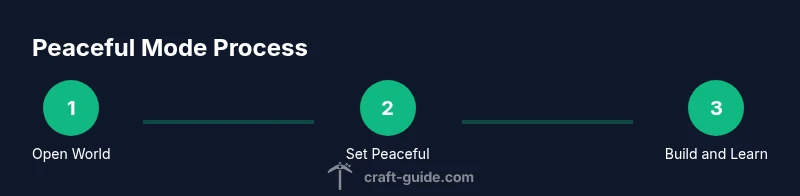
Open your Minecraft world
Launch the game and load the world you plan to modify. Confirm you have administrative access to adjust settings if you’re on a shared server. This step ensures you’re working in the correct save and reduces the risk of accidental changes elsewhere.
Tip: Back up the world before making even simple setting changes to prevent data loss. - 2
Set difficulty to Peaceful
Pause the game, go to World Settings or Game Settings, and set Difficulty to Peaceful. This will disable hostile mobs and hunger, creating a safe environment for focused building or learning.
Tip: If you’re on a multiplayer server, confirm that the server allows mode changes in your session. - 3
Explore and build without combat
Move around the world, test new designs, and document build layouts without worrying about enemy interruptions. Use this time to finalize structural plans, test redstone, or create expansive landscaping.
Tip: Use this period to take screenshots or annotate your design decisions for later review. - 4
Adjust accessibility and UI
Tweak brightness, field of view, or camera settings to suit comfort and readability. Peaceful mode is about smooth, uninterrupted exploration, so tailor the UI to your preferences.
Tip: Record a short tutorial to help teammates or students understand your build approach. - 5
Save and back up
Save your progress in a dedicated backup point. Create a separate copy of the world before any future mode changes, especially for large or complex builds.
Tip: Label backups with date and a brief description of the work completed. - 6
Revisit mode decisions later
If you want combat or survival challenges later, plan to switch back to Easy/Normal/Hard or toggle mobs back on. This preserves your builds while reintroducing risk.
Tip: Test changes in a copy of the world first to avoid unintended consequences.
People Also Ask
What is Peaceful mode in Minecraft?
Peaceful mode disables hostile mobs and hunger, allowing safe exploration and building. It’s commonly used for learning, prototyping, and creative projects.
Peaceful mode disables mobs and hunger, making it ideal for learning and building without combat.
Is Peaceful mode suitable for classrooms?
Yes. Peaceful mode supports structured lessons by removing combat distractions, enabling focus on design, systems, and collaboration. Always align use with lesson goals.
Yes, it’s great for classrooms because it removes combat and hunger distractions.
Will I still earn achievements in Peaceful mode?
Achievements behavior varies by version and server. Some environments may disable certain achievements when mode changes. Check your platform’s rules before starting a project.
Achievements can be affected by mode changes, so verify the rules for your version or server.
Can I switch back to survival later without losing progress?
Yes, you can switch back to a harder mode; your existing builds remain, but mobs will resume spawning and hunger will return.
Yes, you can switch back, and your builds stay intact, but you’ll reintroduce combat and hunger.
Are there platform differences I should know about?
PC, Java, Bedrock, and console versions have similar mode options but slightly different menus. Always check platform-specific steps for changing difficulty.
There are small differences between platforms in how you change mode, so check your device’s steps.
What safety or best practices should I follow?
Back up often, test changes in a separate world when possible, and set clear learning objectives to keep sessions productive.
Back up often and have clear goals so your peaceful play stays productive and safe.
Watch Video
The Essentials
- Choose Peaceful for low-stress building and learning
- Understand Peaceful changes core gameplay (no mobs, no hunger)
- Back up before switching modes to avoid data loss
- Switch back to survival to reintroduce challenge and achievements
- Use Peaceful in education and creative contexts to accelerate iteration