Free Play in Minecraft: A Practical Guide
Discover how to enjoy unstructured free play in Minecraft: set up worlds, choose modes, stay safe, pursue micro-goals, and explore building ideas with or without mods.


Free play in Minecraft means exploring, building, and experimenting without a fixed objective. You decide what to build, where to go, and how to manage resources, making it ideal for practice, creativity, and learning at your own pace. This guide shows practical ways to start and sustain engaging free-play sessions.
What is free play in Minecraft?
Free play in Minecraft is an unstructured mode of exploration and creation where you set your own goals and pace. It emphasizes curiosity, experimentation, and learning through doing rather than following a prebuilt map or quest. In free play, you decide what to build, which biomes to visit, and how to manage resources, making it ideal for practice, skill-building, and personal expression.
According to Craft Guide, free play encourages creativity and iterative learning over rigid objectives. Whether you’re clicking through a Creative world to test ideas or surviving tough nights while trying new designs, the focus remains on exploring possibilities, not completing a checklist. This approach works well for players of all ages and skill levels who want to grow their building, farming, and engineering abilities at their own pace. You can swap between Creative and Survival mid-session, use commands sparingly, and invite friends to join in on shared experiments. The key is to enjoy the sandbox and let ideas turn into tangible builds.
Vanilla Minecraft keeps free play accessible from the first world load: choose a seed, select your world type, and start building. If you crave more structure, overlay micro-goals or short challenges; if you want maximum freedom, turn off restrictions and focus on aesthetics, exploration, and experimentation. The heart of free play is the joy of discovery and the satisfaction of turning inspiration into concrete blocks.
Starting a free-play session: choose your world and mode
Begin by deciding where you want to play and under which rules. For solo free play, load a local world and pick either Creative or Survival. Creative grants unlimited blocks, flight, and instant access to resources, which is great for rapid builds and experimentations. Survival mirrors vanilla challenges, requiring resource gathering, shelter protection, and progression. If you prefer social play, set up a private LAN world or a small server to invite friends and collaborate on projects.
When creating a new world, you’ll see options for seed, world type (default, flat, or custom), and game rules. Craft Guide analysis shows that terrain and seed selection can spark different ideas; a dramatic landscape often invites ambitious designs. Save your world with automatic backups and ensure you know where saves are stored. Decide on the level of difficulty and whether you want to enable cheats or commands for testing. Finally, set personal guidelines (e.g., no flying until I finish a basic base or no item duping) to preserve balance or maximize creative freedom.
Core activities that fuel free play
Free play thrives on a healthy mix of exploration, building, and experimentation. Start by crafting a simple shelter and gradually expand into a larger base, testing efficient layouts and sustainable lighting. You can design floating islands, subterranean bases, or coastal villages to practice planning and aesthetics. Practice basic redstone by creating doors, lamps, or simple powered blocks, then iterate to improve reliability. Resource gathering remains essential: mine for ore, harvest wood, farm crops, and experiment with villager trades, all while tracking your progress on a personal map.
Set small, repeatable goals, such as finishing a 4-block-wide bridge or building a compact auto-farm in a single session. Document outcomes with screenshots, quick sketches, or a simple journal to monitor your growth. Remember to label areas and keep a tidy inventory so you can build atop earlier work. The Craft Guide approach encourages incremental steps: aim for one clear achievement per session and reflect on what to improve next time.
Safe practices and world management
Free play invites experimentation, but safety and stability matter for long-term enjoyment. Always back up your world saves before major builds or new experiments to prevent data loss from crashes or corruption. Use local backups or cloud storage and enable autosave options when available. If you’re playing with friends, set boundaries and ownership rules to prevent griefing and ensure everyone has a fair share of credit. Regularly update Minecraft, and carefully vet any mods or texture packs you install to avoid compatibility issues or unwanted changes to core gameplay. Finally, schedule breaks during long sessions to maintain focus and reduce eye strain and fatigue. With good habits, free play stays organized, productive, and FUN.
Mods and add-ons: when and how to try them
Mods and resource packs can expand free play, but they should fit your goals and remain optional. Start with small, well-supported mods or data packs that enhance quality-of-life features—inventory tweaks, cosmetic changes, or lightweight automation—without turning the game into a modded testbed. Always verify the version compatibility with your Minecraft build and back up the world before installing. Use reputable sources and avoid mods that drastically alter core mechanics, which can cause instability. Test new mods in a separate test world first to ensure they don’t corrupt your main saves. Craft Guide analysis notes that mods can broaden creativity, but they should complement vanilla exploration rather than replace it. In short, mods are a path you can take when you want a different feel, not a mandatory step in free play.
Elevating free play with structure: micro-goals, challenges, and sharing
A successful free play session balances freedom and direction through micro-goals, small challenges, and social sharing. Set a simple objective for the session, such as building a compact village, placing a decorative garden, or completing a connected redstone circuit. Create optional challenges like survive a night on a floating island or design a village with a defined street grid. Capture progress with time-lapse videos, towering panoramas, or annotated screenshots to visualize growth, and share your results with friends or the Craft Guide community to receive feedback and ideas. This approach preserves the joy of unscripted exploration while providing a clear route to tangible results. By combining curiosity with a bit of structure, you’ll steadily improve building, farming, and engineering skills, and you’ll have a living, evolving world to revisit.
Tools & Materials
- Minecraft game (Java Edition or Bedrock)(Own or access the game; verify version compatibility if mixing editions)
- Compatible device (PC/Mac, console, or mobile)(Ensure hardware meets minimum requirements for smooth gameplay)
- World seed or pre-generated world(Seed choice can inspire different layouts and biomes)
- Backup storage option(External drive or cloud storage for saves)
- Stable internet connection(Helpful for multiplayer and updates, not required for offline free play)
- Notepad or journal for reflections(Record ideas, decisions, and future micro-goals)
- Optional mods or resource packs (from reputable sources)(Only if you want a modded experience; ensure safety and compatibility)
Steps
Estimated time: 60-120 minutes
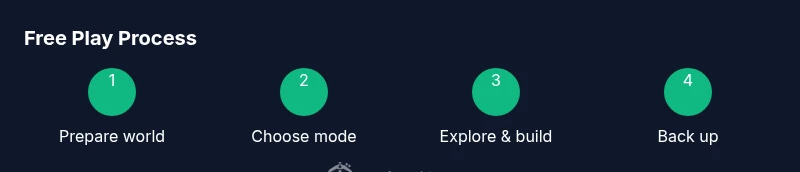
- 1
Prepare your world environment
Load or create a new world in your chosen mode (Creative or Survival). Set simple rules, verify backups, and note your seed or starting terrain to reference later. This step ensures you have a solid foundation for free-play exploration.
Tip: Back up the world before starting any major build to avoid losing progress. - 2
Choose your mode and rules
Decide between Creative for rapid building or Survival for resource challenges. Establish micro-goals or personal constraints to guide the session, such as finishing a small build or exploring three biomes.
Tip: Write down one clear objective for the session to stay focused. - 3
Explore and lay out a base
Roam the world to gather impressions, plan a base layout, and begin the first construction. Consider functional zones (living area, farms, storage) and aesthetic elements like lighting and color palettes.
Tip: Use a world map or coordinates to map interesting spots for future work. - 4
Experiment with builds and redstone
Test simple redstone mechanisms and build techniques. Start with small, modular components and iterate on design based on usability and reliability.
Tip: Document results with screenshots so you can review improvements later. - 5
Back up, save, and document progress
Regularly save and back up your world as you reach milestones. Keep a short journal or gallery to track what worked and what didn’t.
Tip: Time-stamp entries to easily track session evolution. - 6
Review and plan next session
Reflect on what you learned, what to improve, and set new micro-goals for your next free-play session.
Tip: Schedule your next session to maintain momentum.
People Also Ask
What counts as free play in Minecraft?
Free play is unstructured exploration and building without a fixed objective. You decide what to build and explore.
Free play means you explore and build without a fixed goal.
Is free play the same as creative mode?
Creative gives unlimited blocks and flight, while free play is about goals you set yourself, in any mode. You can switch modes during a session.
Free play is more about goals you set yourself, regardless of mode.
Can you play free play with friends online?
Yes, you can play in multiplayer worlds via servers or LAN. Establish clear rules to prevent griefing and to share credit fairly.
Yes, you can play with friends online if you use a server or LAN and set rules.
Should I use mods for free play?
Mods are optional. You can keep free play vanilla and still have rich experiences; if you use mods, pick carefully and back up first.
Mods can enhance, but you don’t need them for free play.
How do I back up a free-play world?
Copy the world save folder to a safe location or use a backup tool. Schedule automatic backups when possible.
Back up the world by copying the save folder or using a backup tool.
Watch Video
The Essentials
- Set clear session goals and time-box builds
- Back up saves regularly to protect progress
- Document progress with visuals
- Mix Creative and Survival modes for flexibility
- Mods are optional enhancements, not mandatory