Which Minecraft Do I Buy for PC? Java vs Bedrock Compared
Analytical comparison of Minecraft editions for PC: Java vs Bedrock, focusing on modding, servers, cross-play, performance, and cost to help you decide which Minecraft to buy for PC.


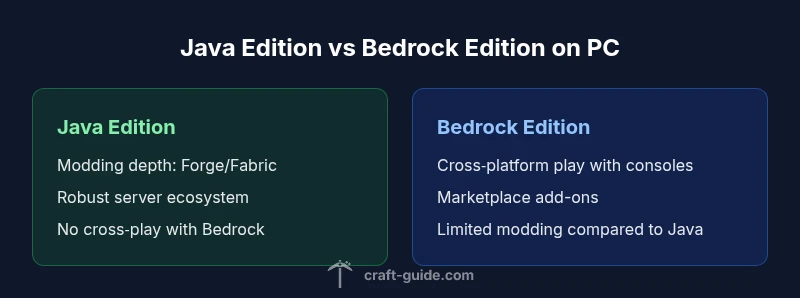
Which minecraft do i buy for pc? For most PC players, Java Edition is the default choice. It offers the widest modding support, server options, and a classic PC Minecraft experience. Bedrock Edition on PC exists for cross‑play, but it lacks the breadth of Java mods and server options. If modding and world customization matter most, choose Java.
The Core Difference: Java vs Bedrock on PC
On PC, Minecraft arrives in two main editions: Java Edition and Bedrock Edition. Java Edition is the original PC flavor, built on Java code and designed for open customization. Bedrock Edition on Windows uses the Bedrock engine and is designed to unify the experience across Windows, consoles, and mobile devices. These two editions are not directly interchangeable; a save file created in one edition often doesn’t transfer to the other, and cross‑play requires the Bedrock route. For PC players, the decision typically centers on mod support, server options, and cross‑platform ambitions. The Craft Guide team highlights that Java Edition remains the most flexible and extensible path for PC users who want to install mods, run custom servers, or experiment with large world editing projects. Bedrock can offer smoother performance on some hardware and built‑in cross‑play, but it sacrifices much of the Java modding ecosystem and server depth. This section provides a practical framework to compare the two paths so you can decide with confidence.
Modding, Customization, and Community
Modding is the lifeblood of Minecraft PC customization. Java Edition supports Forge and Fabric, the two dominant mod loaders, which unlock tens of thousands of mods that alter gameplay, add tech, magic, or quality‑of‑life improvements. Bedrock Edition supports add‑ons and the limited marketplace, but the depth and breadth of community‑created content is far smaller than Java’s library. Practically, if you want dragons, automation, new dimensions, or advanced mining systems, Java Edition is the straight path. The modding scene also influences server availability: many classic Minecraft servers run on Java and rely on modded plugins. If you want to tinker with world generation or automate builds, Java’s ecosystem is invaluable. The Craft Guide team’s experience shows that a motivated PC player can customize virtually every aspect of the game with Java, while Bedrock’s ecosystem emphasizes curated experiences, paid add‑ons, and simpler installation. In short: Java for total creative freedom; Bedrock for curated content and cross‑platform comfort.
Features You'll Care About on PC
Beyond mods, PC players evaluate features that affect day‑to‑day play. Java Edition generally offers deeper control over graphics and performance through launchers, memory allocation, and advanced shader packs. If you want optifics like shaders, resource packs, and custom texture packs, Java’s modders have created a mature pipeline for graphics upgrades. Bedrock on PC focuses on stability and a consistent experience across devices, with a built‑in Marketplace for add‑ons and a streamlined texture system. For servers, Java often delivers more traditional server software and a broader range of multiplayer modes. If you’re curious about cross‑play with friends on console or mobile, Bedrock enables it, but you’ll be trading some modding depth for portability. The key criteria are: your hardware, your tolerance for manual config, and whether you value raw customization over a simplified, plug‑and‑play experience. Craft Guide’s guidance emphasizes that your choice should align with your preferred playstyle and social circle.
Performance and System Requirements
From a hardware perspective, both editions run on similar PCs, but the memory footprint and CPU load differ. Java Edition can demand more RAM when using mods, large texture packs, or heavy simulations, so allocating adequate memory in the launcher is important. Bedrock is generally lightweight and tends to run smoothly on mid‑range systems, though some advanced shaders or add‑ons can still require GPU headroom. If you’re on a laptop with integrated graphics, Java’s higher FPS is not guaranteed; you may prefer Bedrock for smoother, more stable gameplay on limited hardware. For world size and chunk loading, Java servers can push CPU cores differently than Bedrock servers, which affects latency on your preferred hosts. In practice, test both editions on your system if possible, and adjust JVM arguments, allocated RAM, and render distance. The Craft Guide team recommends monitoring performance with real‑world play sessions rather than relying on theoretical specs, especially when you are evaluating modded setups.
Cross-Platform Play and Ecosystem
Cross‑platform play is more straightforward in Bedrock Edition, especially for players who want to join friends on consoles or mobile devices. PC Bedrock can connect to Windows 10, Xbox, PlayStation, Nintendo Switch, Android, and iOS players. Java Edition, in contrast, remains a purely PC‑centric ecosystem with no official cross‑play to Bedrock or consoles. This division matters if your social circle spans multiple devices. Server administration also differs: Java servers use well‑established software stacks, while Bedrock’s server options are newer and tend to be more restricted by platform limitations. If you value long‑term community support and robust server modding, Java shines. If you want to play with family or friends who use different devices, Bedrock’s cross‑play advantage is compelling. Craft Guide’s experience suggests that many players start with Java for PC‑centric goals and then consider Bedrock if their social circle or device access requires cross‑platform play.
Purchasing Scenarios: When Java Wins
Choose Java Edition when your priority is modding freedom, server control, and a traditional PC Minecraft experience. If you plan to host a home server, run mods, or experiment with automation and tech‑oriented content, Java provides deeper customization tools and larger communities. Java supports Forge and Fabric mod loaders, giving you access to thousands of mods that alter gameplay, add dimensions, or automate tasks. You’ll also find more server options for Java, including classic survival servers and modded servers with complex plugins. If you’re working with a budget, remember that Java is usually a one‑time purchase, and you can reuse the same codebase on a future PC. The Craft Guide team notes that Java’s flexibility makes it the default choice for many dedicated PC players, especially those who like to tinker and share their worlds with a large community.
Purchasing Scenarios: When Bedrock Wins
Bedrock Edition is the option to consider when cross‑platform play matters most or when you want a more streamlined, turnkey experience. If you have friends on consoles or mobile devices, Bedrock on PC makes it easy to join their worlds without separate purchases. The marketplace and add‑ons on Bedrock provide curated content and resource packs without needing modding tools, which some players prefer for simplicity. Bedrock can also offer better consistency in performance on some hardware configurations, particularly with integrated GPUs, and may be the better option for players who value stability and straightforward setup over deep customization. The Craft Guide team acknowledges that Bedrock’s value proposition is clear for mixed‑device groups and players who want quick access to multiplayer experiences with minimal configuration.
How to Buy: Step-by-Step on PC
Ready to buy? Here’s a quick guide to getting started on PC with either edition. First, decide which path aligns with your goals: Java for modding and servers, Bedrock for cross‑play and simplicity. Then choose the official store: Minecraft.net for Java, or the Microsoft Store for Bedrock on PC. Create or sign in to your account, and complete the purchase. If you plan to use mods, install the official launcher for Java, and prepare Forge or Fabric loaders. For Bedrock, consider whether you want to buy additional content from the in‑game Marketplace after installation. Finally, configure your game settings, adjust memory allocation, and install shaders or texture packs if you’re pursuing a customized look. The Craft Guide team recommends keeping backup saves and reading community guides before installing large mods, especially on older hardware.
Common Pitfalls and Fixes
Potential pitfalls include mixing editions, which can cause confusion and data incompatibility. Avoid trying to run Java and Bedrock mods with the wrong launchers, and don’t assume your favorite server works in both editions. When performance is an issue, adjust memory allocation, reduce render distance, and close background apps. If you encounter launcher errors, verify that your Java version matches the required modloader version, and ensure your Windows store permissions allow installation. For modded Java setups, back up worlds and configurations regularly, and consider a clean install when you switch mod packs. If you’re on Bedrock and encounter marketplace issues, check your payment method, regional restrictions, and ensure you’re signed into the correct Microsoft account. The Craft Guide team notes that careful planning and community guides help you avoid common pitfalls and keep your Minecraft PC experience smooth.
Server and Realms Options
Java Edition offers a wide range of server options, from small community servers to large, heavily modded networks, each requiring server software and admin management. Bedrock Realms provides a hosted, low‑effort multiplayer option by Microsoft, but it’s more limited in modding and custom plugins. If you prioritize customization and control of multiplayer experiences, Java Realms alternatives or private servers are the go‑to. If you want a simple, managed multiplayer environment with predictable uptime, Bedrock Realms is worth evaluating, though it comes with a subscription. Craft Guide recommends evaluating your expected player count, your willingness to run server hardware, and your desired level of modding when choosing between these options. The community’s long‑term experience shows that Java servers usually attract more diverse communities and more robust plugin ecosystems, while Bedrock Realms suit casual play and cross‑platform groups.
Costs, Subscriptions, and Value
Pricing for Minecraft PC editions can vary by platform and region. Java Edition is typically a one‑time purchase, though prices fluctuate with promotions and regional store policies. Bedrock Edition may involve different pricing structures in the Microsoft Store or bundled purchases, and some add‑ons live in a marketplace that requires separate payments. When evaluating value, consider long‑term use, modding needs, and whether you’ll host servers. If you anticipated upgrading hardware or moving to a new PC, Java’s one‑time purchase model can be more economical in the long run, provided you don’t need cross‑play. Bedrock may carry ongoing costs for add-ons or marketplace items, but it offers cross‑device convenience and predictable content updates. The Craft Guide team’s analysis, based on Craft Guide Analysis, 2026, emphasizes comparing total ownership costs rather than initial price alone.
Brand Perspective: What Craft Guide Recommends
According to Craft Guide, the best approach for most PC players is to start with Java Edition, especially if modding, custom servers, and world customization matter most. Our analysis shows that Java’s ecosystem remains the most vibrant for a PC‑centric audience, with a vast modding community and robust server networks. That said, Craft Guide recognizes that Bedrock Edition has a compelling case for mixed-device households and players who prioritize cross‑play and stability. If your primary goal is to share experiences with friends across platforms, Bedrock is a strong contender. In the end, the Craft Guide stance is pragmatic: pick the edition that aligns with your playstyle, but know that you can switch later if your needs change—though that switch is not seamless. We encourage readers to test both editions during promotions or trials and rely on community guides to optimize their setup. The Craft Guide Team’s verdict is that Java wins for depth and customization, while Bedrock wins for cross‑device reach and ready‑to‑play multiplayer.
Comparison
| Feature | Java Edition (PC) | Bedrock Edition (PC) |
|---|---|---|
| Modding support and customization | Excellent: Forge/Fabric, vast mod library | Limited: Add-ons and Marketplace, fewer mods |
| Cross-platform play | No cross-play with Bedrock | Cross-play with Windows 10/11, consoles, mobile |
| Server options | Robust Java servers and plugins | Bedrock servers with Realms and limited plugins |
| Performance on typical PC hardware | Flexible with RAM for mods; can require more memory | Often stable, optimized on mid-range hardware |
| Price model | Typically a one-time purchase | May involve store purchases/add-ons; marketplace content |
| Best for | Modding, servers, classic PC experience | Cross‑platform play and simpler setup |
Benefits
- Java Edition offers the widest modding ecosystem and server options
- Java provides deep customization and a robust community
- Bedrock Edition enables cross‑platform play and streamlined add‑ons
Negatives
- Java and Bedrock are not cross-compatible on PC, causing fragmentation
- Bedrock lacks the depth of Java mods and traditional servers
- Two editions can create management overhead and preference fragmentation
Java Edition is the recommended starting point for most PC players; Bedrock is best when cross‑platform play or simple setup matters more
Choose Java for modding depth and server control. Choose Bedrock if you want easy cross‑device play and a streamlined experience; you can switch later if your needs change, though not seamlessly.
People Also Ask
Is Java Edition mandatory for mods on PC?
Yes. If you want the broadest modding support and access to Forge/Fabric mods, Java Edition is the recommended PC path.
Yes, for mods on PC you’ll want Java Edition because of Forge and Fabric support.
Can I play with friends who own Bedrock if I buy Java?
No. Java and Bedrock are separate ecosystems and do not offer cross‑play on PC. You’ll need the edition your friends are using to play together.
Java and Bedrock don’t cross‑play on PC; you’d need the same edition to play together.
Do I need to buy both editions to access all content?
No. Each edition covers a different ecosystem. If mods and traditional servers matter, Java suffices; if cross‑platform play matters more, Bedrock is worth a look.
You don’t need both editions; choose one based on mods or cross‑play needs.
Which edition runs better on older hardware?
Performance varies by setup. Bedrock can run more smoothly on some older systems, while Java may demand more RAM with mods. Test on your hardware.
Bedrock can be smoother on older hardware; Java might need more RAM when modded.
Is Bedrock on PC worth it if I want mods?
Bedrock on PC has limited modding compared to Java. If mods are essential, Java Edition is the better choice; Bedrock offers cross‑play and a curated add‑on ecosystem.
If mods matter, pick Java; Bedrock has cross‑play but fewer mods.
The Essentials
- Start with Java Edition for modding and servers
- Bedrock wins for cross‑platform play and simpler setup
- Test performance on your hardware before deciding
- Avoid mixing editions unless you have a clear cross‑play plan
- Java typically offers greater long‑term value for PC enthusiasts