Minecraft Free Play: Your Open-World Sandbox Guide
Discover how to start Minecraft free play with a practical, beginner-friendly approach. Explore Creative and Survival options, set goals, manage world settings, and unleash your building and exploration freedom.


In Minecraft free play, you’ll explore and build in a procedurally generated world without a preset objective. Start by choosing a game mode (creative for unlimited resources or survival for a challenge), enable peaceful if you want low danger, and set your own goals—like building a base, conquering a fortress, or mastering redstone. No fixed quests, just your imagination.
What is Minecraft free play?
According to Craft Guide, minecraft free play is a sandbox mode that emphasizes open-ended exploration and creativity without a fixed quest. Players dive into a procedurally generated world and decide their own objectives, from large-scale builds to experimental redstone machines. This freedom applies to both Creative and Survival settings, letting you choose how you interact with resources, mobs, and biomes. In free play, the emphasis is on process and imagination rather than linear progression, making it ideal for testing ideas, learning mechanics, and developing personal style. Craft Guide's analysis highlights that the core value is choice: you define the pace, scale, and intent of your session, which makes each world unique.
Creative vs Survival in Free Play
Free play supports two primary approaches: Creative mode and Survival mode. Creative removes resource limits and grants flight, encouraging rapid prototyping of builds and mechanisms. Survival presents a challenge with health, hunger, and mobs, which can teach resource management and strategic planning. Craft Guide recommends starting in Creative to learn the basics, then switching to Survival to practice resilience and problem-solving. For players who want friendships and collaboration, Free Play also works beautifully in multiplayer settings, where you can split tasks, share materials, and compare designs.
Key considerations include whether you want unlimited blocks to mock up a concept quickly or you prefer the discipline of gathering resources and surviving threats. In any case, free play remains a flexible sandbox where imagination trumps a fixed agenda.
Worlds, seeds, and exploration basics
Worlds in Minecraft free play are procedurally generated, offering diverse biomes, structures, and caves. You don’t need to worry about a specific seed unless you’re chasing a particular landscape. Seeds only influence the initial terrain, not the freedom of gameplay. Exploration is your main objective, whether you’re mapping a sprawling base, testing redstone circuits, or building a replica of a real-world landmark. Craft Guide notes that keeping a mental map of your world’s hubs—base camps, resource outposts, and transit rails—helps maintain momentum in long sessions. As you explore, consider enabling coordinates or a minimap to track your progress and avoid getting lost in new biomes.
Goals you can set in free play
Every free-play session can have a micro-goal or a long-term project. Practical ideas include designing a compact redstone lab, building a castle with moats and towers, or constructing an efficient Farm-to-Spot network for resource collection. If you’re sharing a world with friends, you can assign roles (builder, explorer, curator) to divide tasks and keep momentum high. Craft Guide suggests jotting down goals in a simple notepad or journal within the game, then ticking items off as you complete them. Free play thrives on clear intent paired with the freedom to adapt as you learn.
Other compelling objectives include creating a themed survival base, reinventing a single biome with new structures, or testing different architectural styles across biomes. By framing your free play around a few concrete aims, you can stay focused without losing the joy of discovery.
Starting tips for a smooth session
Begin with a quick setup that matches your play style. Decide between Creative and Survival, set the difficulty, and toggle Allow Cheats if you want to practice commands or test ideas. Always enable peaceful mode if you want to avoid hostile mobs during a casual build session. Craft Guide emphasizes establishing a comfortable spawn area: light up the immediate zone, place a few essential blocks, and create a small shelter to avoid wandering mobs at night. This creates a friendly starting point and reduces early frustration.
Next, customize your controls and accessibility options so you can reach your favorite hotkeys quickly. If you’re new to free play, experiment with flight in Creative to understand block placement from above, then switch to Survival to manage hunger and resources. A good habit is to save frequently and keep backup copies of your world, especially before attempting large builds.
Modding and resource packs for enhanced free play
Mods and resource packs are popular additions to Minecraft free play, particularly on PC. Resource packs can dramatically change visuals, textures, and ambient sounds, while mods can expand gameplay through new mechanics, items, and systems. Craft Guide notes that compatibility and safety are essential: install from trusted sources, back up your world beforehand, and test one modification at a time. Start with light texture packs to avoid overwhelming the core experience, then gradually explore more complex mods if you’re curious about advanced features.
In Bedrock and Java editions, the modding process differs, so follow edition-specific guides and launcher instructions. For community harmony, consider keeping a separate world or profile for modded play to prevent conflicts with your vanilla experiences. This approach helps keep your free play experiences organized and enjoyable.
Safety and etiquette in shared free-play worlds
When playing with others, establish basic etiquette to keep the experience positive for everyone. Agree on shared rules: what counts as building in someone else’s space, how to handle resource claims, and how to handle griefing or accidental damage. Craft Guide recommends documenting these rules in a visible in-game sign or chat channel so all players can refer to them easily. Regular backups are also essential in case of accidental changes or disputes. In multiplayer contexts, coordinate with server admins or map hosts about world-edit permissions and reset schedules to minimize disruption to long-term projects.
Common pitfalls and how to avoid them
New players often start free play without a plan, leading to scattered builds and quick burnout. Avoid this by outlining a small starter goal and a rough progression path for the first few sessions. It’s easy to overcommit resources or become overwhelmed by the size of a project; break tasks into manageable chunks and celebrate small wins. Another common issue is neglecting world maintenance: without backups, an error or crash can erase hours of work. Create a routine for saving, backing up, and organizing your inventory. Craft Guide recommends periodically revisiting your goals and adjusting as your skills grow, which keeps the experience fresh and sustainable.
How to evolve your free play into long-term projects
As you gain confidence, transform free-play sessions into structured, long-term projects. Start with a master plan: sketch the general layout of a base or city, decide on architectural styles, and map out resource chains. Use in-game maps or external tools to track progress, then document your builds with screenshots or sketches. Regularly review completed milestones to maintain motivation and measure growth. Craft Guide’s approach emphasizes iterative improvement: refine designs over time, learn from mistakes, and expand your world with a clear, evolving vision.
Tools & Materials
- Minecraft launcher(Needed to start the game on any edition)
- Active Minecraft account (Java or Bedrock)(Login required to play; permissions vary by edition)
- Stable internet connection (for multiplayer or account verification)(Not necessary for offline single-player Creative/Survival)
- Mods/resource packs (optional)(Enhance visuals or gameplay if you want a customized experience)
Steps
Estimated time: 15-30 minutes
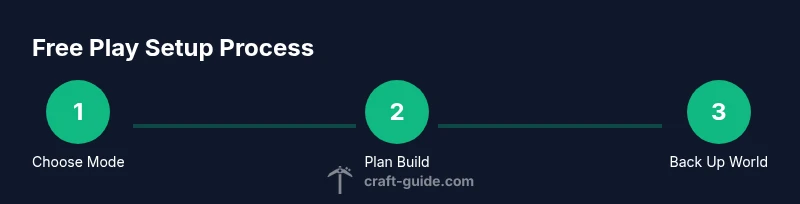
- 1
Set up your world
Open Minecraft and create a new world. Choose your preferred game mode (Creative for unlimited building, Survival for a challenge). Decide on difficulty and whether you want to enable cheats for practice or testing commands. Establish a comfortable spawn area with a simple shelter to start your session.
Tip: Starting small and secure helps you learn mechanics without being overwhelmed. - 2
Choose a game mode
Select Creative to explore freely and prototype builds, or Survival to learn resource management and combat. If you’re unsure, switch modes between sessions to sample both experiences and see what you enjoy most.
Tip: Creative mode can speed up experimentation, while Survival teaches planning and resilience. - 3
Set up basic safety and controls
Turn on essential settings: lights in your spawn area, a clear inventory layout, and keybinds that feel intuitive. Decide if you want to enable cheats for quick testing or disable them for a purer experience.
Tip: Good hook: place a visible sign with your session goals near the spawn point. - 4
Plan your first project
Draft a simple plan for your first build or exploration route. Break it into stages: base design, resource planning, and a milestone build. This keeps momentum even when your play time is limited.
Tip: Document the plan in-game or in a notebook to track progress. - 5
Save, back up, and continue later
Save your world and create a backup before making major changes. If you’re playing with others, agree on a backup schedule to protect everyone’s work and reduce conflicts.
Tip: Regular backups prevent hours of work from being lost to crashes or mistakes.
People Also Ask
What is Minecraft free play?
Free play is a sandbox mode where you set your goals and explore a generated world without a fixed quest. You can build, explore, and experiment at your own pace in Creative or Survival modes.
Free play is a sandbox mode where you set your own goals and explore a world without a fixed quest.
Do I need to own Minecraft to play free play?
Yes. You need access to Minecraft on either Java or Bedrock edition to participate in free play, since the game and its worlds are hosted by your account.
Yes, you need a Minecraft account to access free play on either Java or Bedrock.
Which game mode should I start with for free play?
Starting in Creative is recommended to learn mechanics and layout, then switch to Survival if you want a resource-management challenge. You can also alternate between modes as you learn.
Start with Creative to learn mechanics, then try Survival for a challenge.
Can I play free play with friends?
Yes. Free play works in multiplayer servers or realms. Communicate rules, roles, and backups to ensure a smooth shared experience.
Absolutely, you can play free play with friends on servers or realms with agreed rules.
How do I save progress in free play?
Worlds are saved automatically in most cases, and you can manually save or back up before major changes. For multiplayer, coordinate backups with the host.
Your world saves automatically, and you can back it up before big changes.
Watch Video
The Essentials
- Define your own goals for open-ended play
- Choose Creative for rapid prototyping and Survival for challenge
- Plan projects and document progress
- Back up worlds to safeguard work