Minecraft Cheating: A Practical, Responsible Guide
Explore a practical, ethical approach to minecraft cheating. Learn when to enable cheats, how to use commands safely, and how to respect server rules while exploring your world.


quickAnswer: minecraft cheating is using built-in commands or accepted plugins to alter gameplay, test ideas, or explore mechanics. It’s appropriate only where cheats are allowed, such as single-player worlds or agreed-upon servers. To get started, enable cheats, know a few core commands, and back up your world before experimenting.
What is minecraft cheating?
minecraft cheating refers to using built-in commands, settings, or external tools to alter gameplay in ways not possible under standard play. In practice, this means toggling game modes, spawning items, teleporting across the world, or automating tasks through command blocks or mods. Levers like Creative mode, toggled via /gamemode, or in-world items like spawn eggs are examples. It is important to distinguish between legitimate exploration of mechanics and hacks designed to break protections or gain unfair advantage. In single-player modes or private offline worlds, enabling cheats can be a constructive way to learn how systems respond to changes. On public servers, cheats are usually disallowed unless admins explicitly permit them; even then, there are boundaries to respect. Craft Guide's 2026 analysis emphasizes context, consent, and intention: use cheats to learn, prototype, and test ideas rather than to bypass content or undermine others. If you’re ever uncertain, ask for permission in writing or through server rules, and start with a small, reversible experiment to minimize impact. Understanding minecraft cheating within these boundaries helps players practice safely and responsibly.
Ethical considerations and safety
Ethical play in the world of minecraft cheating means balancing curiosity with respect for others and the game’s rules. Start by clarifying intent: are you learning mechanics, testing a design, or trying to troubleshoot a problem? In contexts where cheats are permitted, document your actions so you can explain decisions to teammates or fellow players. If you play on a server, read the rules and obtain admin approval before making changes that affect others. Never use cheats to disrupt builds, steal items, or undermine a world’s economy or balance. Privacy matters when testing on shared worlds; avoid exposing or altering others' creations without consent. Craft Guide’s approach for 2026 recommends keeping experiment logs, using a dedicated testing environment, and retiring cheats when you transition to normal play. Safety first also means understanding performance implications; mass command spawns or automated loops can cause lag or crashes if run without care. By framing minecraft cheating as a learning tool with clear boundaries, players can pursue curiosity while maintaining a positive, collaborative community.
When cheating makes sense
There are legitimate reasons to explore cheats in Minecraft. For beginners, cheats illuminate how game logic works: what items do, how redstone contraptions behave, and how world generation responds to changes. They also accelerate learning when you want to test a concept without grinding for resources. For world builders and redstone engineers, cheats speed prototyping, letting you experiment with new mechanisms, spawn patterns, or balance ideas without waiting for long cycles. Advanced players use cheats to verify edge cases, reproduce bugs, or explore seed-based scenarios where timing and placement matter. In all cases, the value comes from deliberate practice, controlled experiments, and clear documentation rather than random, untracked tweaks. The key is to separate exploration from progression and to switch back to standard play when you’re ready to test results in a normal context.
Core commands you should know
Basic commands unlock a spectrum of testing possibilities. Core commands include: - /gamemode [mode] to switch between creative and survival; - /give [player] [item] [quantity] to spawn items; - /tp or /teleport [target] to move around; - /setblock [pos] [block] to place blocks directly; - /summon [entity] [pos] to spawn mobs; - /weather [clear/rain/snow] to influence weather. Each command has specific syntax and permission requirements, so start small and verify results in a safe area. Inline documentation and help commands (like /help or /?) can reveal required arguments. As you become comfortable, you can chain commands, build command blocks, and script routine tasks. The goal is to understand how players interact with game rules, not to abuse shortcuts. Always practice reversible experiments first to avoid lasting changes you can’t undo.
Enabling cheats in your world (overview)
Enabling cheats is a prerequisite for most minecraft cheating experiments. In Java Edition, cheats are typically enabled during world creation under More Options; in Bedrock Edition, you can turn cheats on in world settings or use Open to LAN and enable cheats if you’re playing offline. If you’re playing on a server, you must have admin permission. This overview outlines the general process and highlights that exact steps can vary by edition and version. Once cheats are enabled, you can access commands instantly, spawn resources, and test balance within a controlled environment. For learning, pairing cheats with careful observation—what changes when you run a command, how the world responds, and which systems interact—helps you build a mental model of Minecraft’s rules. In the next sections, you’ll find a concrete step-by-step guide to safe testing, plus practical examples you can try in your own world.
Tools and safeguards for safe testing
Before you begin, prepare a controlled space for experimentation. Use a dedicated testing world or a clone of your main world, with backups in place. Keep a log of adjustments and ensure you document the exact commands used. Consider performance implications: massive mob spawns or rapid block changes can stress the game, so limit scope and test incrementally. Also establish a revert plan: if a test breaks your build, a quick restore should bring you back to a known-good state. Another safeguard is to avoid sharing your testing world publicly while cheats are active; this reduces accidental breaches of rules. By combining backups, careful documentation, and incremental testing, you can explore minecraft cheating responsibly without compromising your core gameplay progression.
Using command blocks for automation (minecraft cheating)
Command blocks provide a powerful way to automate tests without manual input. Place a command block, set the correct command, and power it with a redstone signal. This lets you simulate repeated actions, test loops, and build deterministic scenarios. You can also chain command blocks to stage multi-step experiments, so you observe how different elements interact over time. Always test in a contained area to avoid triggering cascading changes across your world. This approach is particularly helpful for prototyping complex systems, such as item spawns across a map or balancing resource flows, without requiring manual repetition. Remember to document the sequence and reset states between trials to ensure repeatability.
Common mistakes and how to avoid them
Common mistakes include failing to back up, testing in the wrong world, and assuming a single command will fix everything. Misunderstanding syntax can lead to errors or lag. Always verify permissions, run simple commands first, and document outcomes. Finally, never assume cheats translate to skill—it’s a learning tool, not a shortcut to mastery. To stay on track, maintain a clear testing plan, track outcomes, and review results with peers or mentors to gain perspective on what actually worked versus what felt convenient. A small, disciplined approach yields deeper understanding than impulse-driven experimentation.
Minecraft cheating and servers: rules vs freedom
Public servers typically prohibit cheating, and violating rules can result in bans or loss of access. When exploring minecraft cheating, prefer private worlds or servers that explicitly allow cheats for learning. If you do join a permitted server, communicate with admins, follow community guidelines, and keep activities within agreed boundaries. The balance between freedom and fairness depends on respect for others and clear consent from those involved. If you’re building with others, discuss your testing plans upfront and document decisions to maintain transparency. The Craft Guide team emphasizes that responsible exploration strengthens your skills while preserving community integrity.
Tools & Materials
- Minecraft game (Java Edition or Bedrock Edition)(Ensure you know whether cheats are allowed in your world.)
- Dedicated testing world (single-player) or local LAN server(Separate from your main world to avoid accidental changes.)
- Basic command knowledge (/gamemode, /give, /tp, /setblock)(Familiarize yourself with syntax and permissions.)
- World backup tool or manual copy(Always back up before testing heavy cheats.)
- Ethical guidelines reference (optional)(Keep a log of decisions to maintain integrity.)
Steps
Estimated time: 15-45 minutes
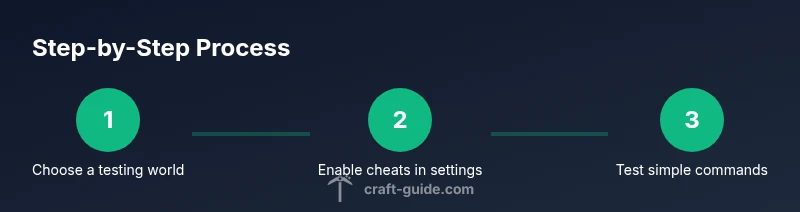
- 1
Choose a testing environment
Decide whether you want to test cheats in a controlled environment or within a secondary world. A dedicated testing world helps isolate variables and reduces risk to your main world.
Tip: Create a separate folder or copy of your world before making changes. - 2
Enable cheats in world settings
In Java Edition, enable cheats during world creation in the More Options area. In Bedrock Edition, toggle Cheats on in world settings or Open to LAN and enable cheats.
Tip: If you’re on a server, skip this step unless admins permit it. - 3
Test a basic command
Open chat and run a simple command like /gamemode creative to verify cheats are active, then switch back to survival to observe behavior.
Tip: Start with safe commands to avoid unintended changes. - 4
Use command blocks for automation
Place a command block to run a sequence of commands automatically, which helps you prototype gameplay systems without manual repetition.
Tip: Always test in a restricted area to avoid lag. - 5
Back up before experimentation
Keep a current backup of the testing world before testing complex sequences, spawns, or mass block changes.
Tip: Note the date and changes in a changelog. - 6
Respect server rules
Cheats in public servers can violate rules; read the server’s policy and obtain admin approval before testing on that world.
Tip: If in doubt, ask a staff member to confirm. - 7
Troubleshoot common issues
If commands don’t work, check syntax, permissions, and whether cheats are actually enabled in that world. Reconnect if necessary.
Tip: Double-check command spelling and ensure you’re in the correct game mode.
People Also Ask
What counts as cheating in Minecraft?
Cheating means using unauthorized commands or exploits to gain an advantage in ways the game normally prohibits. In single-player, you have more freedom; on servers, rules vary and consent matters.
Cheating means using commands or exploits to gain an advantage, and it depends on the play context.
Is it allowed to cheat in Minecraft?
In single-player, cheats are allowed if you’ve enabled them. On public servers, permission from admins is required, or cheating is typically against the rules.
Cheats are allowed in some contexts but not on most public servers.
How do I enable cheats in Minecraft?
Enable cheats through world settings when creating a world, or by opening the world to LAN and turning on cheats if you’re playing offline. Server worlds require admin permission.
Enable cheats via world settings, or LAN options if offline; servers require admin OK.
What are safe alternatives to cheating?
Use Creative mode for experimentation, practice redstone in a sandbox area, and rely on legitimate mods approved by server policies where allowed.
Creative mode and approved mods provide safe, structured ways to experiment.
Can I cheat on public servers?
Most public servers prohibit cheating. If allowed, it’s under strict permissions and rules; always check the server’s policy first.
Public servers usually disallow cheating; check rules first.
What beginner commands should I learn?
Start with /gamemode, /give, /tp, and /setblock to understand how commands affect gameplay. Read the command syntax to minimize mistakes.
Learn a few core commands like gamemode, give, and teleport.
Watch Video
The Essentials
- Decide when to enable cheats and stick to approved environments
- Learn core commands and safe testing practices
- Always back up your world before experimenting
- Respect server rules and obtain permission when needed
- Practice responsible, documented testing