Hack in Minecraft: Safe Modding and Build Hacks
Discover what it means to hack in Minecraft, differentiate safe modding from illicit exploits, and learn ethical, server-friendly ways to enhance gameplay with mods, datapacks, and commands.


Hack in Minecraft usually means using mods, datapacks, or command blocks to change gameplay. It can range from harmless build hacks to more intrusive exploits. This guide focuses on safe, legitimate routes—installing trusted mod loaders, learning Minecraft commands, and testing on single-player worlds before applying any changes to public servers.
What does hacking mean in Minecraft?
According to Craft Guide, hacking in Minecraft typically refers to altering the game's behavior using approved tools like mods, datapacks, and command blocks, or through illicit exploits. The distinction matters: legitimate power-user techniques are designed to enhance creativity, automation, or quality of life, while cheating undermines fairness. In practice, a 'hack' can be a clever build trick, an efficient redstone system, or a curated set of modifications that expand what's possible without breaking the game's rules. For players, the most productive approach is to frame hacking as a skill—an advanced way to bend the game's systems in transparent, trackable ways. The Craft Guide team believes that learning how these tools work helps you design better worlds and avoid unintended consequences. As you explore, keep your goals explicit, document your changes, and always respect others' play experiences.
Safe and ethical hacking: learning vs cheating
Safe hacking centers on learning, experimentation, and respect for other players. The Craft Guide Team emphasizes that modifications should improve your experience without giving you or your group an unfair advantage. Start in a private world or a server where you have explicit permission, so you can test ideas without affecting others. Use only trusted sources for mods and datapacks, and always back up your worlds before making changes. Document your steps, note the exact tools you used, and be prepared to revert if something goes wrong. By keeping your experiments transparent and revertible, you build skills that translate to legitimate, server-friendly projects.
Common types of hacks and how they work
Mods and mod loaders (Forge, Fabric) add new items, blocks, and behaviors by hooking into Minecraft's code. They run on the client or server side depending on the mod and can drastically change how the game feels. Datapacks are data-driven files that alter loot tables, weather, and world generation without modifying code; they are safer to share and easier to audit. Command blocks and command chains let you script complex automation and gameplay scenarios using in-game commands. Server-side plugins (Bukkit/Spigot) provide powerful controls for multiplayer worlds but require server admin access. The place to start is understanding that mods and datapacks customize the game experience while preserving the core rules; hacks in the sense of cheating tools often violate server policies and can lead to bans. Craft Guide analysis shows that most players prefer transparent mods and clearly documented datapacks over suspicious clients. When used properly, these tools unlock new creative opportunities, from automated farms to logic puzzles.
How to explore hacks safely: mods, datapacks, and commands
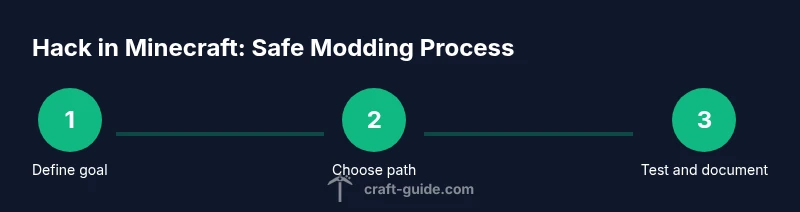
Before you touch the world, define your goal and choose the right path: a mod, a datapack, or in-game commands. If you’re new, start with datapacks or command-based automation, which are easier to audit and share. For mods, pick a reputable mod loader such as Forge or Fabric and download from official sites only. Verify version compatibility with your Minecraft build and the mod library. Always back up your world and keep a clean test environment separate from your main map. Install one tool at a time, test after each change, and document every step so you or others can reproduce the result. When you’re ready to share, provide clear instructions and credit the original authors to respect the community.
How to avoid getting banned: server rules and etiquette
Bans are typically tied to server rules and anti-cheat systems. Always read the server's guidelines before attempting any modification that affects gameplay. Seek permission before testing or deploying automation or mods on shared worlds. Use only mods and datapacks that are allowed by the server, and avoid distributing client-side hacks that alter the experience for others. Keep logs of your changes and be prepared to revert if a disruption occurs. If a conflict arises, contact an administrator with a detailed description and evidence of your safe testing practices. Practicing responsible hacking not only reduces risk of punishment, it also preserves the community's trust and long-term enjoyment.
Practical build hacks you can try today
Here are a few beginner-friendly ideas you can pursue in a safe, personal world: 1) Build a compact automatic farm using redstone and observers to collect items with minimal wiring overhead. 2) Create a modular storage system with color-coded chests and item sorters, easing long-term project management. 3) Use datapacks to adjust loot tables for consistent resource drops, enabling faster progression. 4) Design a blueprint-driven build process with schematic planning tools or simple macros to copy-paste structures. Each hack should be tested in isolation, documented, and rolled back if needed. The goal is to improve quality of life and creativity without compromising other players’ experiences.
Troubleshooting and rollback strategies
When a hack doesn’t behave as expected, isolate the change by disabling or uninstalling the mod, datapack, or command block responsible. Restore from backups and test again with a minimal setup to verify the root cause. Keep a changelog so you can retrace what you did and why. If you’re working on a server, coordinate with admins to avoid conflicts with other plugins or anti-cheat systems. Finally, ensure you have a safe rollback plan for any world changes, including notes on how to revert missed steps or corrupted saves. By practicing a disciplined approach, you can learn faster and prevent data loss.
Tools & Materials
- Minecraft Java Edition(Essential for modding and datapacks; ensure version compatibility with mods.)
- A computer with internet access(Needed to download mod loaders, datapacks, and guides.)
- Fabric or Forge mod loader(Choose based on mod compatibility; do not mix loaders.)
- Trusted sources for mods/datapacks(Always verify authenticity and checksums when available.)
- Backup drive or cloud storage(Back up worlds before applying major changes.)
Steps
Estimated time: 60-120 minutes
- 1
Define your goal
Clarify what you want to achieve with mods, datapacks, or commands. A clear objective helps you pick the right approach and set measurable success criteria.
Tip: Write down the exact outcome you expect and how you’ll know you’ve achieved it. - 2
Choose a safe route
Select the approach that aligns with your goal and server policy. Start in a private world or a permitted server to minimize risk and impact.
Tip: Prefer datapacks or in-game commands for easier auditing and sharing. - 3
Set up a testing environment
Create a separate world or profile for experimentation and back up your main world before making changes.
Tip: Label backups clearly with date and change description. - 4
Install tools from trusted sources
Download Forge or Fabric from official sites. Add mods or datapacks one at a time and confirm compatibility with your Minecraft version.
Tip: Check user reviews and wheel documentation before installation. - 5
Test incrementally + document
Enable changes one by one, test each outcome, and record results in a changelog for reproducibility.
Tip: Use a reproducible checklist to avoid skipping steps. - 6
Apply ethically on servers
Only test on servers with explicit permission. When sharing workflows, credit authors and respect licenses.
Tip: If in doubt, revert and ask server admins for guidance.
People Also Ask
What counts as hacking in Minecraft?
Hacking typically means using third-party tools to modify gameplay or gain unfair advantages. Legitimate modding and datapacks that are allowed by the server aren’t considered hacking. Always align with server rules.
Hacking is using tools to modify gameplay, but legitimate modding that respects server rules isn’t the same as hacking.
How do I start modding safely in Minecraft?
Begin with datapacks or command-based setups in a private world. When moving to mods, use trusted loaders (Forge or Fabric) from official sources and maintain backups. Always test in isolation before sharing.
Start safe in a private world, use trusted sources, and back up before you test or publish.
Can I use mods on a multiplayer server?
Only if the server policy explicitly allows them and you have permission. Some servers ban client-side mods, while others support approved mod packs. Always coordinate with admins.
Only use mods on a server if allowed by the admins; otherwise it can get you banned.
What is the difference between mods and datapacks?
Mods are code changes often requiring a loader like Forge or Fabric; datapacks are data-driven files that modify behavior without changing code. Datapacks are generally safer and easier to audit on multiplayer servers.
Mods change code with a loader, datapacks tweak data; datapacks are usually safer in multiplayer.
What are warning signs of risky hacks?
Untrusted sources, missing version compatibility, or tools that require administrator privileges can indicate risky hacks. Always verify, read reviews, and back up first.
Be wary of unidentified sources and lack of compatibility; back up before trying anything new.
How can I rollback a hack that went wrong?
Restore from the latest backup, disable the change, and re-test in a controlled environment. Keep a changelog to help reproduce and reverse steps.
If something goes wrong, restore from backup and document the fix.
Watch Video
The Essentials
- Choose legitimate modding routes (mods, datapacks) over suspicious clients.
- Back up worlds before trying new hacks or mods.
- Test in private environments with explicit permission before public use.
- Credit authors and respect server rules to stay community-friendly.