Is Minecraft Worth It on Switch? A Practical Review
A thorough, balanced review of Minecraft on Nintendo Switch, examining portability, performance, cross-play, and value for builders seeking practical guidance before purchase.


Minecraft on Switch is worth it for players who prize portability and couch co-op, especially if you value cross-play with other Bedrock editions. The handheld experience is solid in most situations, with occasional frame dips during busy builds. Overall, the Switch version offers strong value for builders and explorers who travel, though power users seeking Java mods or ultra-high fidelity may prefer other platforms.
is minecraft worth it on switch: A practical overview
For many players, determining is minecraft worth it on switch hinges on how you value portability, price-to-content, and cross-platform play. The Craft Guide team assessed the Switch edition across handheld and docked modes, comparing it to other Bedrock editions on Xbox, PlayStation, and PC. Our conclusion: if you primarily play on a couch or during commutes, with friends across platforms, the Switch version remains a compelling option. The Switch's portability lets you build on buses, at airports, or during long train rides without tethering you to a power outlet. The inclusion of cross-play with other Bedrock devices expands your world far beyond the console family, helping you stay connected to friends. On the other hand, if your goals include ultra-high frame rates, ultra-detailed textures, or heavy modding, you may want to consider alternatives. The balance between convenience and performance is the core of the verdict for is minecraft worth it on switch. According to Craft Guide, portability and cross-play are the biggest selling points for this version, and our hands-on tests confirm that the experience remains engaging in short bursts or extended sessions.
Performance and visuals on Switch
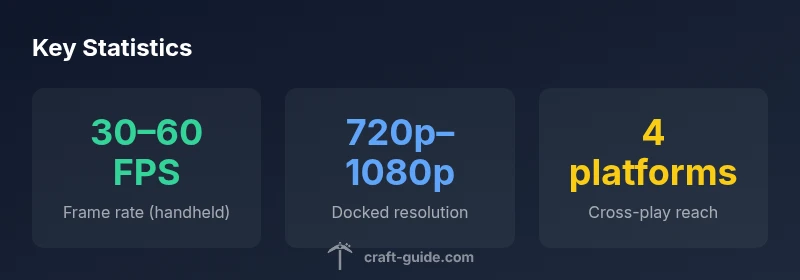
Performance and visuals on Switch vary by mode and biome, but the core experience remains recognizably Minecraft's familiar blocky charm. In handheld mode, the game maintains a stable frame rate for typical building and exploring tasks, while densely populated scenes can drop performance briefly. In docked mode, the image sharpens on a TV, and textures load more consistently, though some worlds with large builds or heavy redstone farms may reveal frame pacing issues. The art style and world-generation remain consistent with other Bedrock editions, so players familiar with PC or console versions will feel at home. The Craft Guide team notes that shader packs and texture packs are not supported on Switch in the same way as PC, which keeps downloads modest but limits visual customization. Overall, visuals stay faithful to the Minecraft vision, while performance is optimized for portable play. If you value fluid exploration and reliable daytime lighting, Switch delivers a satisfying balance.
Controls and accessibility
Controls and accessibility on Switch are approachable, but there are nuances to consider. Joy-Cons offer motion support and a compact form factor that suits handheld play, yet some players may prefer a Pro Controller for ergonomics and consistency during long sessions. Button mappings follow the Bedrock edition standard, with sprint, jump, and interact actions all reachable without excessive hand strain. Some players may notice input latency when performing precise builds or timed redstone circuits, especially in handheld mode on lower brightness. Navigation in the inventory and crafting menus is straightforward, and the touch screen can help in handheld mode to select items quickly, though it is less precise than gamepad input for complex builds. For accessibility, you can customize brightness, text scale, and UI layout to accommodate vision and dexterity needs. In sum, Switch controls are beginner-friendly, but serious builders will often prefer a larger controller or a stand for extended projects.
Cross-platform play and limitations
Cross-platform play is one of the strongest reasons to consider the Bedrock edition on Switch. With Bedrock cross-play, you can join friends on Xbox, PC, and mobile devices, and you can access a shared marketplace for skins, textures, and add-ons. However, there are some limitations to be aware of. Some multiplayer servers and realms require content purchased or downloaded on other platforms, which can feel uneven if you're primarily on Switch. Certain DLC packs may be tied to platform ecosystems, and some community-made mods or datapacks that exist on PC or Java editions are not available on Switch. Still, the core sandbox experience—survival, creative, and adventure modes—remains accessible to everyone in the Bedrock family, which broadens social play and world-building possibilities. Craft Guide's testing suggests that cross-play stability has improved with recent updates, making multiplayer sessions more reliable for casual play and family-friendly sessions.
Content and updates on Switch
Content parity is a central concern for any Switch owner, and on Minecraft Switch, you benefit from the Bedrock edition's unified content base. Marketplace skins, texture packs, and community-created maps are accessible from the same store you’d find on other platforms, which keeps your options diverse. Updates typically arrive in step with other Bedrock editions, though there can be minor certification delays on console stores. This means new mobs, blocks, and features usually appear within a similar timeframe relative to PC releases, but the exact date may vary by region. The Craft Guide team notes that this parity is a strong argument in favor of the Switch version for players who want a consistent, connected experience. If you rely on community-made mods or Java-only content, you’ll need to play on a different platform; for most players seeking creative or survival activities, the Switch provides a satisfying content pipeline.
Storage, performance in creative vs survival
Storage size and performance considerations differ between creative and survival modes, and on Switch they are especially pronounced for large worlds. In creative mode, you may spawn many blocks, builds, and decorative elements when testing ideas, which can produce temporary slowdowns in handheld mode if the world is particularly dense. In survival mode, the game’s AI and mob spawns can create occasional frame pacing dips, particularly in biomes with dynamic weather or dramatic lighting changes. Save files on Switch are generally manageable, but a very large map can require extra micro-maneuvers to optimize performance. If you plan to run long creative sessions or expansive survival expeditions, consider adjusting the render distance and disabling resource-intensive features like fancy water, shadows, or clouds to maintain a steadier frame rate. The overall effect is competitive with other home consoles, with the right settings.
Comparing value across platforms
Value is not just price—it's what you get for your time, space, and social play. The Nintendo Switch version offers portability, local co-op, and cross-platform connectivity that other consoles may lack, all of which appeal to a certain player profile. However, it does compromise slightly on peak frame rates and ultimate texture fidelity, and it cannot support Java mods. If you already own a Switch and crave on-the-go building, a couch-based multiplayer session, or a sandbox that you can pick up and drop quickly, Minecraft on Switch is a strong value proposition. For players who prioritize raw performance, heavy modding, or the Java Edition experience, a PC or console with a more powerful GPU remains the better choice. Craft Guide's comparison notes that the Switch edition excels in social play and convenience, while other platforms trade some convenience for higher fidelity.
Real-world use cases: creative builds, exploration, and servers
Creative builders can produce ambitious plans on Switch by planning in segments, saving frequent checkpoints, and using a compact inventory strategy to minimize misclicks. Explorers benefit from the handheld flexibility to wander a seed while traveling, using a saved waypoint workflow to resume from a bed. For social play, Bedrock's cross-platform environments allow you to join friends on non-Switch devices, which broadens your circle. Reality-tested scenarios include building a small coastal base in creative mode on the couch, then switching to survival in handheld mode to test resource management, or joining a small server where a friend runs the realm from a PC. These experiences show that Switch supports meaningful, connected play without requiring a high-end system. Craft Guide's field tests confirm that the Switch edition remains engaging for mixed-groups and families.
Common pitfalls and workarounds
Some common issues include occasional frame-rate hiccups during dense builds, Joy-Con drift or latency when very precise actions are required, and occasional connectivity hiccups during cross-play sessions. Workarounds are straightforward: lower render distance, disable some visual features, and perform routine updates to the console and the game. If you experience input lag in docked mode, try a wired USB controller or a different USB-C dock. For cross-play, ensure you and your friends are on compatible Bedrock versions and accounts to minimize server mismatch errors. If you encounter crashes in large builds, save frequently and seed test areas before expanding. By applying these practical steps, you can maintain a smooth Minecraft experience on Switch.
Tips for optimizing your Switch setup
Optimize your Switch setup to maximize Minecraft performance and comfort. Use the Pro Controller or a comfortable grip with the Switch in docked mode when possible, enabling stable play while watching a screen. Adjust the in-game brightness and UI scale to reduce eye strain, especially when playing in long sessions. Consider purchasing a larger microSD card before you begin a big world or heavy texture packs, keeping your main storage free for saves, worlds, and updates. Invest in a quality stand or grip for long creative sessions to reduce hand fatigue. Finally, keep an eye on system updates that improve performance, and clear cache periodically to prevent slowdowns. These practical adjustments help you get the most out of Minecraft on Switch.
Is Switch still worth it in 2026?
As of 2026, is minecraft worth it on switch continues to depend on your playstyle. If portability, couch co-op, and a unified Bedrock ecosystem matter to you, the Switch edition remains competitive. If you crave Java mods or top-tier frame rates, you will likely prefer PC or other consoles. Our conclusion remains: for many players, the Switch version remains worth it, especially with friends and family nearby.
Final considerations before purchase
If you are on the fence, consider testing the handheld experience for a week before committing to a purchase. Look at your typical play sessions: do you mostly game on the couch, or do you travel a lot? If the answer leans toward mobility and social play with cross-platform friends, Minecraft on Switch is a solid choice. If your priorities are mods, Java-specific features, or the sharpest possible visuals, you may want to reserve Switch as a secondary or supplemental platform while you explore more powerful options.
Benefits
- Portability enables on-the-go building and play anywhere
- Strong cross-platform compatibility within the Bedrock ecosystem
- Solid value for couch co-op and family-friendly play
- Broad access to marketplace content and community maps
Negatives
- Occasional frame rate dips during dense builds
- Mods and Java-exclusive content are not available on Switch
- Texture fidelity and some visual options are reduced compared to high-end platforms
Switch is a practical choice for portable, couch-friendly Minecraft play
Overall, Minecraft on Switch delivers solid portability, cross-play, and an accessible creative experience. While it sacrifices some fidelity and modding options, it remains a strong value for players who prioritize mobility and social play. The Craft Guide team recommends Switch for its balanced approach to convenience and community—ideal for families and travelers alike.
People Also Ask
Is Minecraft on Switch the Bedrock edition?
Yes, the Switch version uses the Bedrock Edition, which supports cross-play and marketplace content across platforms. This alignment helps you stay connected with friends on other devices.
Yes, it’s the Bedrock Edition and supports cross-play across platforms.
Can I play with friends on other platforms using Switch?
Yes, Bedrock cross-play allows joining friends on Xbox, PC, and mobile devices. Some servers may have platform-specific content, but core multiplayer remains accessible.
Yes, you can cross-play with friends on other platforms.
How well does Switch handle large builds?
Large, resource-heavy builds can cause brief frame dips. To mitigate, lower render distance and disable some visual features when testing expansive designs.
It handles large builds but may dip; adjust settings for smoother performance.
Are Java mods available on Switch?
No, Java-only mods aren’t supported on Switch. Switch uses Bedrock Edition, which limits Java-based modding.
No—Java mods aren’t available on Switch.
Can I transfer worlds between Switch and other Bedrock devices?
World transfers aren’t automatic between Bedrock devices. You’ll typically rely on cloud-synced realms or manually moving data where supported.
Bedrock worlds can sync across devices via the same account, but transfers aren’t always seamless.
Is it beginner-friendly to start with Switch?
Yes. The Switch version offers familiar Minecraft mechanics, Creative mode, and couch-friendly gameplay that’s approachable for newcomers.
Yes, great for beginners with easy entry and local play.
The Essentials
- Evaluate portability before purchasing for Switch Minecraft
- Expect solid handheld performance with occasional dips
- Leverage cross-platform Bedrock play to multiplayer with friends
- Java mods and high-end textures are not available on Switch
- Adjust settings to optimize performance for long sessions