Can You Play Minecraft on Nintendo Switch: A Practical Guide
Explore whether Minecraft on Nintendo Switch supports Bedrock features, cross‑play, performance, and tips for maximizing your Switch experience with Bedrock Minecraft.


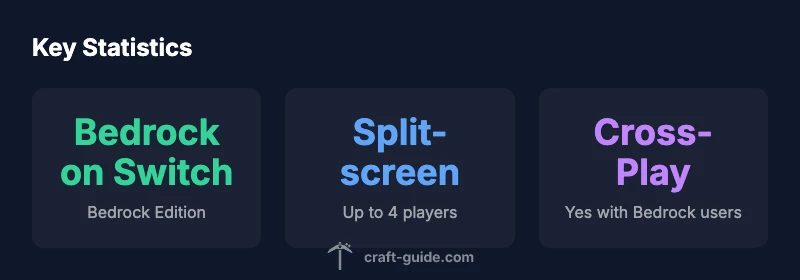
Can you play minecraft on nintendo switch? Yes—the Bedrock Edition is available on Switch, allowing cross‑play with other Bedrock platforms and access to the Marketplace. You can play local splitscreen, join servers, and continue your worlds, though performance varies by mode and docked/handheld play. This guide covers what to expect, how to optimize, and common limitations.
What editions exist and what Switch supports
Minecraft on Nintendo Switch runs the Bedrock Edition. This edition is designed for cross‑platform play with Windows 10,
Local multiplayer and performance nuances
Split‑screen multiplayer is supported on the Switch, which makes couch co‑op feasible without any extra hardware. The experience is generally steady, but large builds, dense biomes, or heavy redstone farms can stress the handheld hardware. On docked mode, you’ll benefit from a larger display and slightly improved stability, but frame pacing can still vary during intense scenes. To keep gameplay smooth, many players adjust settings like render distance and particle effects, and opt for shorter world distances when playing locally. This section helps you balance comfort with performance, so you can enjoy creative builds with friends on the sofa.
Cross‑platform play and Marketplace content
Bedrock on Switch supports cross‑play with other Bedrock editions, so you can play with friends on Windows, mobile, or Xbox. Marketplace access lets you download skins, textures, and community worlds, which can significantly enrich your Switch experience. However, some Marketplace items may require a Microsoft account activation or be region‑locked. Craft Guide notes that staying within Bedrock’s ecosystem avoids compatibility headaches, especially if you’re coordinating with players across different devices. If you love customization, the Marketplace is a key feature to explore on Switch.
Saving, transferring, and world management across devices
Because Switch uses Bedrock’s cross‑save framework, you can access compatible worlds across other Bedrock devices through your Microsoft account. World sharing and cloud saves can streamline your transition between Switch and other platforms, but you’ll want to ensure you’re signed into the same account on all devices. The practical takeaway is to keep backups of important worlds and confirm that your cloud saves are up to date before switching devices. Craft Guide emphasizes testing cross‑device saves with a small world first to confirm the workflow.
Common limitations on Switch and practical workarounds
Several common limitations surface on Switch: occasional performance dips in large builds, limited advanced mods (due to platform restrictions), and occasional issues with online matchmaking when server regions differ. Workarounds include lowering render distance, disabling heavy shader packs via the Marketplace, and configuring your network for more stable online play. If you rely on modded gameplay, remember that Switch is primarily a Bedrock marketplace and official add‑ons, not full third‑party mods. Craft Guide recommends focusing on official content and community maps for the best Switch experience.
Getting started: setup steps to play Minecraft on Switch
- Purchase and install Minecraft from the Nintendo
Switch Bedrock Edition performance snapshot
| Edition | Docked FPS | Handheld FPS | Resolution |
|---|---|---|---|
| Bedrock Edition (Switch) | ≈30 fps | ≈30 fps | Docked up to 1080p; handheld ~720p |
| Java Edition (Not on Switch) | N/A | N/A | N/A |
| Cross‑Platform with Bedrock on Switch | Yes | Yes | N/A |
People Also Ask
Is Minecraft on Nintendo Switch the Bedrock Edition?
Yes. The Switch version is Bedrock Edition, which supports cross‑play with other Bedrock platforms. Java Edition is not available on the Switch.
Yes—Switch runs Bedrock Edition, not Java. Java isn’t available on Nintendo Switch.
Can I play with friends on other platforms if I’m on Switch?
Yes, as long as your friends are on Bedrock Edition. Cross‑play excludes Java players, and you’ll need Microsoft accounts to enable multiplayer.
Yes, you can play with other Bedrock players across platforms. Java players can’t join.
Does Switch support local splitscreen?
Yes, the Switch supports local splitscreen for up to four players on a single console. You’ll need enough controllers and a TV or monitor.
Yes, up to four players can split screen locally.
Are there performance tradeoffs when playing on Switch?
Expect consistent play in normal builds, but large farms or dense biomes can cause frame rate dips. Reducing render distance and effects helps.
Some slowdowns can happen in big builds; try lowering settings for a smoother experience.
Can I install mods on Switch?
Officially, Switch supports Bedrock Marketplace content and official add‑ons, not third‑party mods. You’ll find more options through Marketplace skins and worlds.
Mods aren’t officially supported on Switch; use Marketplace content instead.
How do I transfer a world from another device to Switch?
Use Bedrock cross‑save with your Microsoft account. Sign in on both devices, and leverage cloud saves to access your worlds on Switch.
Sign into the same Microsoft account and use cross‑save to transfer worlds.
“On Nintendo Switch, Minecraft’s Bedrock Edition delivers familiar mechanics with Switch‑specific performance tweaks; players should optimize settings for handheld play to maintain a steady experience.”
The Essentials
- Use Bedrock Edition on Switch for cross‑play.
- Expect ~30fps in both docked and handheld modes.
- Explore Marketplace content for skins and worlds.
- Enable splitscreen locally for co‑op.