What Ports Are Needed for a Minecraft Server: A Practical Guide
Discover what ports are needed for a Minecraft server, covering Java and Bedrock editions, default ports, and secure port forwarding for reliable multiplayer experiences.


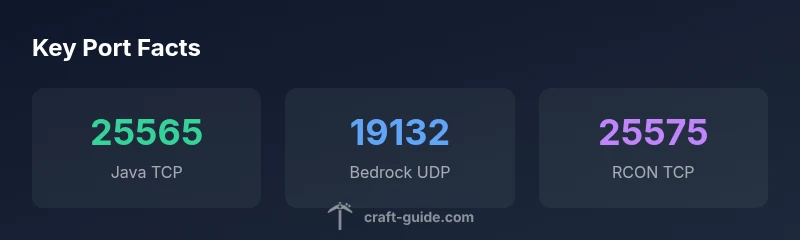
By default, a Minecraft Java Edition server listens on TCP port 25565, and Bedrock Edition uses UDP port 19132. To host both, open those ports on your router. If you enable remote management with RCON, use port 25575. For server list queries, enable the Query protocol on UDP 25565. Always verify with your server.properties and firewall rules.
Understanding Port Requirements for Minecraft Servers
If you're asking what ports are needed for minecraft server, the short answer depends on edition and your goals. In practice, every successful multiplayer setup starts with a clear map of which traffic must reach your machine and which traffic should be blocked. This section covers the core ideas: how ports identify services, why TCP is the default transport for game data, and how a firewall and router work together to permit the right traffic while denying the rest. Craft Guide's analysis, 2026, highlights the value of documenting a small, consistent port set for home servers so you can test connectivity, tune performance, and reduce exposure. Throughout, we’ll emphasize the distinction between Java Edition and Bedrock Edition, since their defaults and recommended configurations diverge in ways that matter for planning and security.
Java Edition vs Bedrock Edition: What This Means for Ports
Java Edition and Bedrock Edition do not share the exact port strategy, which is why you must map ports by edition when designing access rules. Java Edition servers typically listen on a single primary port (TCP) used for gameplay data, world synchronization, and client connections. Bedrock Edition uses the UDP family for its base traffic on a different port, with Bedrock clients connecting through their own default UDP port. If you run both editions on the same machine, you’ll want to maintain separate port profiles to avoid cross-traffic and to simplify firewall rules. The practical upshot is consistency: document both port plans, label them clearly, and implement per-edition checks in your router and firewall so players can connect without exposing unnecessary surface area.
Default Ports to Open for Java and Bedrock
The most common configuration for a standard, publicly reachable Minecraft server starts with the default ports. For Java Edition, the server listens on TCP port 25565 by default, used for all gameplay traffic between client and server. If you enable additional features, such as the remote console (RCON) or server list queries, you’ll need to consider separate ports: RCON on its own TCP port (default 25575) and the Query protocol on UDP port 25565 for server discovery. Bedrock Edition servers, by contrast, operate on UDP port 19132 by default for client traffic, with optional ports for multiplayer services or cross-play setups depending on your host and network. Always confirm on your server’s properties file and testing environment, since administrators can configure alternate port numbers.
Optional Services and Their Ports: RCON, Query, and More
Beyond basic game traffic, many administrators enable optional services that help with management and visibility. RCON (Remote Console) lets you administer the server remotely; its default port is 25575 TCP, but you should change it in production and secure it behind authentication. The Server List Query protocol is an optional feature that helps public directories discover your server; depending on your setup, you may enable UDP 25565 Query or use alternative discovery methods. The “full stack” approach also includes FTP or SFTP only if you need file access; many hosts disable these by default to minimize risk. When you enable these services, document the port assignments, adjust firewall rules accordingly, and ensure strong credentials and encryption for admin interfaces.
How to Configure Port Forwarding on Home Routers
Configuring port forwarding is often the most hands-on part of making a Minecraft server reachable from the internet. Start by choosing fixed internal IP (a reserved DHCP address) for the server machine, then create a port-forward rule that directs TCP 25565 (Java) and UDP 19132 (Bedrock) to that internal IP. If you host multiple editions, set up separate rules or a single rule with multiple port ranges if your router supports it. For RCON and Query, add additional forwarding entries, typically TCP 25575 and UDP 25565 accordingly. Test from a remote network by connecting a client to your public IP:port to confirm behavior. Keep in mind that many consumer routers include a shield or firewall that can block unsolicited traffic; disable or adjust as needed after confirming a stable connection.
Security and Best Practices When Exposing Ports
Opening ports introduces risk, so pair reachability with hardening. Use strong, unique passwords for admin interfaces (RCON), rotate credentials periodically, and enable encryption where possible. Favor the principle of least privilege: only forward ports that you truly need, disable unused services, and apply network segmentation if you have multiple servers. Keep your server software updated to reduce vulnerability exposure, and use a firewall to restrict inbound traffic to known IP ranges when possible. Craft Guide’s guidance emphasizes testing changes in a controlled environment before going live, and documenting every step for future troubleshooting.
Testing and Troubleshooting Common Connectivity Issues
After configuring, test connectivity from multiple networks to validate reachability. Use command-line tools to verify that the expected ports are open and listening on the server. If clients report connection timeouts, re-check port forwarding rules, local firewall settings, and server.properties values. If you cannot connect, verify that your ISP is not blocking the chosen port, and consider temporarily disabling the router firewall to isolate the issue. For Bedrock players, confirm UDP availability; for Java players, ensure TCP 25565 is reachable. Document any changes you make and re-test after each adjustment.
Quick Start Checklist for a Functional Minecraft Server
- Decide edition(s) to host (Java, Bedrock, or both).
- Note default ports: Java TCP 25565, Bedrock UDP 19132, RCON TCP 25575, Query UDP 25565.
- Reserve a static internal IP for the host computer.
- Create forward rules on the router for required ports.
- Enable and secure optional services only if needed and documented.
- Run basic connectivity tests from a remote network.
- Apply security best practices and keep software updated.
- Document the configuration and keep backup copies of server.properties.
Common Pitfalls and Myths Debunked
- Opening ports automatically guarantees players can connect. Actually, you must also ensure the server is running, firewall allows, and the port is forwarded correctly.
- Bedrock and Java can share the same port. Not typically; the protocols differ and require separate handling.
- You only need one port. In practice, you may need multiple ports for admin tools and discovery.
- If you forward ports, you’re instantly secure. Exposure elevates risk; pair with authentication, encryption, and ongoing monitoring.
Common port mappings for Minecraft server setups
| Edition | Port | Protocol | Default? | Purpose |
|---|---|---|---|---|
| Java Edition | 25565 | TCP | Yes | Gameplay traffic |
| Bedrock Edition | 19132 | UDP | Yes | Gameplay traffic |
| RCON (Remote Console) | 25575 | TCP | Configured | Remote admin access |
| Query protocol (server lists) | 25565 | UDP | Optional | Server discovery |
People Also Ask
What ports do I need to open for a Java Edition Minecraft server?
For Java Editions, open TCP port 25565 by default. If you enable RCON, forward 25575. For server discovery, optionally enable UDP 25565 Query. Ensure these are reflected in your firewall rules and server.properties.
Open 25565 TCP for Java; add 25575 for RCON if you use it, and 25565 UDP for Query if you enable discovery.
Do Bedrock Edition servers require different ports?
Yes. Bedrock uses UDP port 19132 by default for client connections. If you enable cross-play or additional services, consider extra ports as needed. Document and test these in your router and firewall.
Bedrock uses UDP 19132 by default; add any extra ports you enable and test connectivity.
Can I run both Java and Bedrock on the same machine?
Yes, but you’ll need separate port profiles and careful firewall rules to avoid conflicts. Assign Java to 25565 and Bedrock to 19132, plus any admin ports you enable.
You can, as long as you use separate ports per edition and secure the admin interfaces.
Is port forwarding required for LAN-only play?
No. Port forwarding is only needed for external connections. Devices on the same local network connect directly without exposing ports to the internet.
No, LAN play doesn’t require port forwarding.
What about security when opening ports?
Open only the ports you truly need, use strong admin passwords (RCON), rotate credentials, and keep software updated. Consider IP-restricted firewall rules where possible.
Open only what’s needed, keep everything updated, and secure admin interfaces.
“Clear port planning reduces exposure while keeping players connected. Start with the core ports—Java 25565 and Bedrock 19132—and add RCON and Query only when needed.”
The Essentials
- Open core ports: 25565 TCP for Java, 19132 UDP for Bedrock.
- Enable RCON and Query only when needed to minimize risk.
- Forward ports on your router with static internal IPs for consistency.
- Test connectivity from multiple networks to verify reachability.
- Prioritize security: strong credentials, updates, and firewall rules.