Minecraft Server Skyblock: A Practical How-To Guide
A comprehensive, beginner-friendly guide to setting up and running a Minecraft server skyblock, from plugin choices and island progression to economy, permissions, and testing.


You're aiming to launch a Minecraft server skyblock by setting up a stable host, installing a compatible server version, and enabling a skyblock plugin or datapack. You’ll create an island-per-player, implement a simple economy, protections, and rules, and configure permissions so players can join, build, and trade without breaking gameplay balance.
What is Minecraft Skyblock and why it’s popular
Minecraft Skyblock is a survival challenge that starts you on a tiny, floating island with almost no resources. The goal is to expand your world upward and outward by farming, crafting, and trading, while managing limited space and gravity-defying limits. On a dedicated server, skyblock becomes a multiplayer experience where many players each receive their own island or a shared progression track, yet all share a common economy, rules, and competition for scarce resources. Implementing minecraft server skyblock in a server environment means you will balance isolation (island per player or per group) with connectivity (shared markets, events, or guilds). The popularity stems from the emphasis on planning, resourcefulness, and social interaction—players learn to optimize automation, build compact bases, and collaborate to reach new milestones. For server operators, the key is creating a stable setup that scales with player activity, enforces fair rules, and minimizes lag while preserving the core challenge that makes skyblock engaging.
Core mechanics of a Skyblock server
At the heart of minecraft server skyblock is an island-per-player or island-per-team model. Each island is a separate world region with its own resources; players must plan resource flows, build farms, and unlock crafting via progression. A robust economy allows trading between islands, using a currency to purchase rare items, seeds, or protection permissions. A central hub or lobby might host quests, auctions, and events; server admins configure protection plugins to prevent griefing, while still allowing island-level expansion. Common mechanics include cobblestone generators, automated farms, and limited tool drops to encourage efficiency. Because resources are scarce by design, players learn to optimize terrain, lighting, and mob spawns to maximize yields. Administrators set rules and boundaries such as island-size limits, starting kits, and milestones to reach for unlocking new items. Skyblock servers rely on careful balancing between accessibility for newcomers and challenge for veteran players, ensuring that progression remains engaging without becoming demoralizing or grindy.
Choosing your server setup: plugins vs datapacks
Deciding between a plugin-based skyblock and a datapack-based approach hinges on your goals and technical comfort. A Paper or Spigot server paired with a dedicated skyblock plugin gives you admin-friendly controls, in-game commands, and active support communities. Plugins handle island creation, permissions, and simple economies; they simplify updates and compatibility with other plugins. Datapacks, by contrast, embed new behaviors directly into the world and can be lighter-weight for small communities, but may require more tweaking and manual updates. If you want a polished experience with robust island management, an active economy, and protection layers, a plugin-based solution is usually best. For a leaner setup, or if you enjoy customizing blocks and recipes at a lower level, a datapack can be attractive. Regardless of choice, ensure compatibility with your server version, back up before major changes, and test with a small group to check for balance, lag, and conflicts.
Essential configs: islands, economy, permissions
Configuring skyblock on a server means tuning three core domains: islands, economy, and permissions. Island configs determine starting items, island size/biomes, and the rate at which players can expand. A well-designed progression tree incentivizes players to complete tasks before spawning new resources, maintaining balance. Economy settings establish the value of items, decay rates, and exchange opportunities; a healthy economy reduces inflation by introducing sinks and limits. Permissions control who can access features such as island creation, modifier tools, and trading hubs. Use a clear permission ladder (guest, member, moderator, admin) and assign sandbox constraints for new players to prevent accidental griefing. Always enable backups and include safe recovery options. For performance, enable chunk loading optimizations, set global anti-cheat rules, and monitor server logs for unusual activity. Finally, create a test sandbox where you can preview island reach and economy changes before rolling them out to the live world.
Starter island design and progression path
Design a starter island that teaches the core loops of skyblock while giving players a sense of achievement early. Begin with a palm-sized platform featuring a tree, a small crop bed, a chest with basic tools, and a cobblestone generator for early resource production. Include a pathway to an automated farm, a small redstone test area, and a clearly marked progression quest to unlock a second chest with seeds or a lucky block. The progression path should scale with player skill: early goals focus on establishing wood, stone, and food; mid-game tasks unlock ore blocks, enchantment basics, and access to a shared market. Encourage community involvement by offering cooperative challenges—group builds, joint farms, or event days. Keep the spawn area clean and intuitive: clear signs, friendly rules, and accessible tips. Finally, establish a governance channel for players to vote on major changes, ensuring transparent decisions and sustained engagement.
Authority sources
Here are reliable references to complement server administration best practices:
- https://www.cisa.gov/ — CISA guidance on securing online systems.
- https://www.nist.gov/ — NIST resources on cybersecurity and risk management.
- https://www.pcgamer.com/ — Practical advice and news on Minecraft and gaming communities.
Tools & Materials
- Stable server hosting (VPS or dedicated hosting)(Choose a provider with low latency to your expected player base.)
- Java Edition 17+ runtime(Ensure the host supports Java 17 or newer and matches your server software.)
- Minecraft server software (Paper or Spigot)(Opt for Paper for better performance and plugin compatibility.)
- Skyblock plugin or datapack(Install a reputable skyblock solution that matches your server version.)
- Backup tool or script(Regular backups are strongly recommended to prevent data loss.)
Steps
Estimated time: 2-4 hours
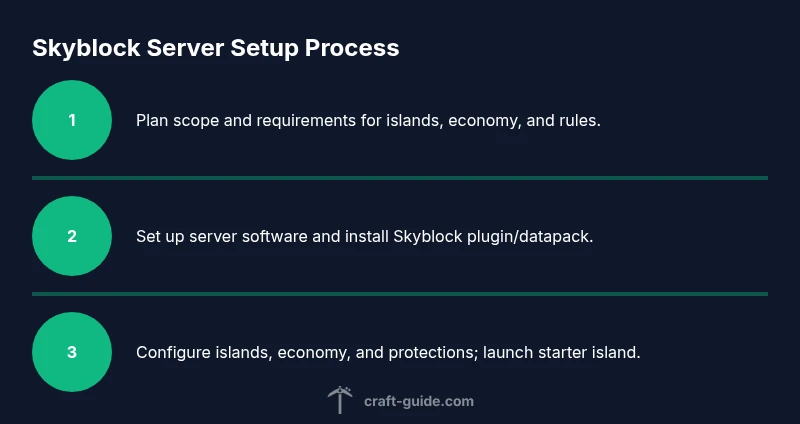
- 1
Plan your skyblock scope
Define player capacity, progression milestones, and economy rules before touching the server. Sketch a rough island progression and decide which features you want (quests, zones, or markets). This helps guide plugin choices and permissions from day one.
Tip: Create a simple one-page ruleset and progression outline to reference during setup. - 2
Set up the server software
Install your chosen server (Paper/Spigot) on your host and verify that the server launches correctly. Configure Java arguments for performance and ensure port access is open for players to join.
Tip: Test locally first, then do a public beta with trusted friends. - 3
Install Skyblock plugin or datapack
Add the skyblock solution that fits your plan. Verify compatibility with your server version and other plugins. Run initial island generation to confirm islands are created as expected.
Tip: Disable conflicting plugins during initial setup to reduce issues. - 4
Configure islands, economy, and permissions
Set island limits, starting kits, and progression gates. Create economy values for common items and set permission groups for players and staff. Enable protections to prevent griefing while allowing island growth.
Tip: Document permission ladders and item shop rules for players. - 5
Create starter island and progression paths
Build a starter island with essential resources and a guided path toward early milestones. Include a designated area for community events and a mini-tutorial to help new players learn the basics.
Tip: Place signs or books that explain how to advance to the next milestone. - 6
Test with friends and optimize
Invite a few testers to play through the early progression and report issues with balance, lag, or unfair advantages. Tweak economy sinks, island costs, and generator rates based on feedback.
Tip: Use a staging world to preview changes before applying to the live server. - 7
Launch and maintain
Open the server to the public with clear rules and a starter kit. Monitor performance, backups, and cheat prevention. Schedule regular updates and community feedback sessions to sustain engagement.
Tip: Set up a lightweight moderation plan and an in-game report system.
People Also Ask
What is Skyblock in Minecraft?
Skyblock is a survival challenge where players start on a tiny floating island with limited resources and must expand their world by farming, crafting, and trading.
Skyblock starts players on a small floating island with few resources, and you grow your world by farming and trading.
Do I need special hardware to run a Skyblock server?
You should choose hosting that can handle your expected player count and plugins. Start small and scale up as your community grows.
Start with a modest host and scale as players join.
Should I use plugins or datapacks for Skyblock?
Plugins (on Paper/Spigot) generally offer easier administration, economy systems, and active support. Datapacks can be lighter but require more manual tweaking.
Plugins make management easier; datapacks are lighter but need more customization.
How can I balance the Skyblock economy?
Introduce item sinks, tiered unlocks, and limits on island expansions to avoid inflation and keep progression meaningful.
Use sinks and progression gates to keep the economy balanced.
What safety measures should I enable?
Enable backups, enable protections to prevent griefing, and monitor logs for unusual activity.
Backups and protections help keep your server safe while you scale.
How can I encourage player engagement long-term?
Provide regular events, cooperative challenges, and transparent governance to sustain interest.
Keep people excited with events and clear rules for growth.
Watch Video
The Essentials
- Plan progression before setup
- Choose reliable hosting and version-compatible plugins
- Test with a small group before launch
- Back up regularly and document rules
- Balance economy and progression for long-term engagement