Minecraft Multiplayer: Setup, Hosting & Play Tips
Learn practical, beginner-friendly methods to play minecraft multiplayer: choose hosting, set up Java/Bedrock servers, invite friends, and manage security with Craft Guide. Practical guidance for realms, dedicated servers, or self-hosted options, plus tips for cross-platform play.


In minecraft multiplayer sessions, players collaborate in a shared world, explore together, survive threats, and build with friends. The experience scales from tiny private realms to large public servers. Understanding the hosting choice, server configuration, and connection basics helps you start quickly and scale responsibly. This guide covers realms, dedicated servers, and cross-platform play.
What is minecraft multiplayer?
In minecraft multiplayer, players collaborate in a shared world, explore together, survive threats, and build with friends. The experience scales from tiny private realms to large public servers. Understanding the core concepts—host, client, and world state—helps you pick the right setup. Craft Guide emphasizes that the choice of hosting affects latency, uptime, and moderation. When you join a server, your client connects to a server process that maintains the world rules, inventory, and progression for all players. This central authority ensures consistency across clients, but it also means you should trust the host and keep software up to date. For beginners, starting with a safe, low-friction environment like a Realm or a controlled server is a good first step. As you gain experience, you can scale to more players or migrate to custom server software.
Choosing your multiplayer hosting option
Choosing how you host a Minecraft multiplayer world determines performance, control, and cost. Realms offer a simple, maintenance-free path with built-in moderation but limited customization. Dedicated or managed servers give you more control, plugins, and scalability, yet require more setup and ongoing management. LAN play is great for local testing with friends, but it isn’t suitable for public access. Craft Guide analysis shows that hosted options generally provide higher uptime and easier maintenance than improvised setups, especially for beginners who want a reliable starting point. Consider your group size, desired features, and how hands-on you want to be with administration. If you anticipate frequent updates or custom plugins, a self-hosted or managed server may be the better long-term choice.
Java Edition vs Bedrock Edition: compatibility and cross-play
Java Edition and Bedrock Edition are designed for different ecosystems. Java is classic on PC with robust modding and plugin ecosystems, while Bedrock is optimized for cross‑platform play across Windows, consoles, and mobile. Cross-play between Java and Bedrock is not natively supported; players must be on the same edition to share a world. If your group spans multiple platforms, Bedrock is typically the easier path to shared play, especially on Realms or Bedrock-compatible servers. For a mixed group, plan a single edition per world and communicate edition requirements clearly to all players.
Realms and official hosting options: pros and cons
Realms are a convenient, low‑maintenance option managed by Mojang that requires a subscription. They’re ideal for newer players, smaller groups, and quick starts without server administration. However, Realms offer fewer customization options, limited control over plugins, and smaller world limits. In contrast, dedicated or self-hosted servers provide full control, support for plugins, larger worlds, and greater scalability, but demand technical know-how, regular updates, and stronger security practices. Craft Guide recommends weighing ease of use against customization needs and long‑term growth when choosing between Realms and self-hosted solutions.
Basic server setup steps (high level) and best practices
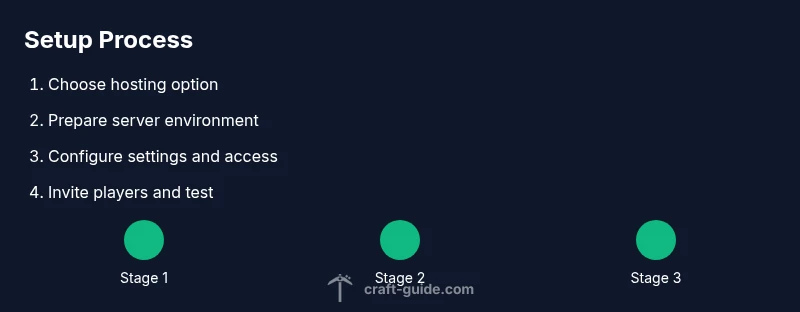
Starting a Minecraft multiplayer world involves seven core areas: choose hosting, prepare the environment, configure settings, set access controls, invite players, monitor performance, and back up regularly. You’ll want to document your rules, establish moderation policies, and set up basic security (whitelists, operators, chat filters). This section outlines a high‑level roadmap so you can plan before diving into hands‑on setup. Remember that the goal is a smooth, enjoyable experience for all players, not just a perfect technical mirror of your single‑player world.
Security, permissions, and moderation
Security starts with limiting access. Use whitelists or allowlists, restrict operators to trusted players, and keep server software up to date. Establish clear rules for chat, build events, and grief protection. Regular backups are essential to recover from accidents or exploits. Moderation should be proactive, with a plan for escalating issues to maintain a welcoming community. Craft Guide highlights the importance of a defined code of conduct and accessible reporting tools for players to use when issues arise.
Performance and connectivity tips
Performance hinges on both hardware and network configuration. Use wired connections for hosting, allocate sufficient RAM to the server, and minimize running background processes. If players report lag, check latency from multiple regions, optimize plugins, and ensure your port forwarding or cloud hosting is correctly configured. Regularly review server logs for signs of errors or crashes and address issues promptly. A well‑tuned server improves the experience for all participants and reduces user frustration.
Tools & Materials
- Dedicated computer or hosting plan(Choose a setup based on expected player count; ensure reliable power and internet connectivity.)
- Stable internet connection(Wired Ethernet is preferred over Wi‑Fi for hosting to minimize latency and jitter.)
- Official server software or game edition(Use the edition compatible with your chosen hosting method (Java or Bedrock).)
- Backup storage(Regular world backups prevent data loss after crashes or griefing.)
- Security basics(Whitelist/allowlist, restricted operator roles, and regular updates.)
Steps
Estimated time: 60-90 minutes
- 1
Decide hosting approach
Choose a hosting path (Realm, managed server, or self-hosted) based on your group size, budget, and how hands-on you want to be with administration. Realms are easiest to start with; self-hosted options offer more customization.
Tip: Write down your target player count and desired features before choosing a hosting method. - 2
Prepare the server environment
Install the appropriate server software for your edition, ensure the host has a reliable power source, and set up a basic directory structure for world saves and mods or plugins if needed.
Tip: Use a clean, dedicated folder for your server to simplify backups and updates. - 3
Configure server settings
Edit server properties to set game mode, difficulty, spawn protections, and access controls. Enable a whitelist or allowlist and assign operator rights only to trusted players.
Tip: Document key settings so teammates understand the shared rules and behavior. - 4
Set up access controls
Add players to the whitelist/allowlist and define operator roles with the minimum necessary permissions. Establish chat rules and anti‑grief protections.
Tip: Keep a running list of trusted players and adjust permissions as the group evolves. - 5
Invite players and test connectivity
Share the server address or Realm code with friends and have them join from their devices. Monitor latency from multiple locations and verify that everyone can join without issues.
Tip: Ask someone on a different network to test joinability to catch regional issues. - 6
Establish backups and moderation
Set up automatic backups for world data and create a simple moderation plan with guidelines for reporting issues. Schedule regular maintenance windows.
Tip: Test a restore from backup periodically to ensure you can recover quickly.
People Also Ask
What is minecraft multiplayer and why is it beneficial?
Minecraft multiplayer lets players share a world and play together, offering collaborative building, PvE/PVP options, and community events. It scales from private realms to public servers, enabling different playstyles and social experiences.
Minecraft multiplayer lets you play with friends in a shared world, from cozy co‑ops to large servers.
Which hosting option is best for beginners?
For beginners, Realms or a managed server are easiest to set up and maintain, with built‑in safety features and straightforward administration.
For beginners, Realms or a managed server are easiest to start with.
Can Java and Bedrock players play together?
Direct cross‑play between Java and Bedrock is not supported. Bedrock editions support cross‑platform play among compatible devices, but Java and Bedrock worlds stay isolated.
Direct cross-play between Java and Bedrock isn’t supported; use Bedrock for cross‑platform play within its ecosystem.
Do I need to pay for Realms?
Realms is a paid service offered by Mojang. Alternatives include self‑hosted or managed servers, which may have different cost structures depending on hosting and resources.
Realms requires a subscription, but there are other hosting options with varying costs.
What about security and moderation?
Use a whitelist, restrict operator roles to trusted players, keep software updated, and establish a clear set of rules and reporting procedures.
Whitelist players, limit admin access, and keep things updated for security.
How can I troubleshoot connectivity problems?
Check your network stability, verify that the server is online, test from different networks, and review server logs for errors or crashes.
Check your network, ensure the server is online, and review logs if issues appear.
Watch Video
The Essentials
- Decide hosting first and tailor to player count
- Java vs Bedrock edition affects cross-play
- Back up worlds regularly and control access
- Test with friends to ensure connectivity
- Stay updated with server software and security