Is Minecraft the Same on Nintendo Switch? A Thorough Comparison
A detailed, analytical side-by-side look at how Minecraft on Nintendo Switch compares to other editions, covering updates, cross-play, controls, performance, and practical tips for Switch players.


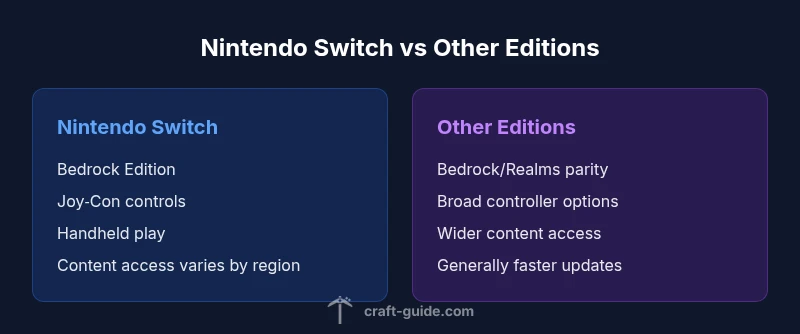
Is Minecraft the same on Nintendo Switch? In short, no—it's the Bedrock Edition on Switch with parity in core mechanics but notable differences in updates, performance, and cross-platform play. The Switch version emphasizes handheld play and Joy-Con controls, and may lag behind other editions in content pacing. This page provides a side-by-side comparison to help you decide.
Baseline: What Changes on Nintendo Switch
If you’re asking is minecraft the same on nintendo switch, the baseline answer is nuanced. The Switch version of Minecraft uses the Bedrock Engine, which means the underlying game logic, world rules, and building systems align with other Bedrock devices. Practically, this means you won’t have to relearn crafting recipes, redstone behavior, or survival mechanics when you switch devices. However, Nintendo’s platform-specific constraints shape the experience in meaningful ways. The Switch edition participates in the same core loop—survive, explore, craft, and build—yet it inherits the Switch’s hardware profile, display characteristics, and control scheme. From a design perspective, this creates a parity of the game’s sandbox backbone, while introducing variations in performance, asset quality, and marketplace access. The Craft Guide Team notes that understanding these boundaries is essential for players who plan to switch between Switch and other Bedrock devices. For example, if you value expansive modding or PC-exclusive world generation options, you should expect a different landscape when you’re playing on Switch.
Control Schemes and User Experience
Control schemes on Nintendo Switch center around portability and the unique motion inputs of Joy-Cons. When docked, you can map controls similarly to a traditional console, but handheld mode demands compact button mapping and a more tactile interface. The user experience benefits from the Switch’s touch screen in handheld, but navigation can feel slower compared to a mouse-and-keyboard setup. UI scaling and menu depth matter more on Switch, especially for inventory management and crafting grids. The Craft Guide Team observes that many players appreciate the ability to pick up and place blocks with precise finger taps, yet larger builds benefit from a second input method like a Pro Controller. Guidance for optimizing this setup includes customizing control presets, enabling auto-sprint and quick-select hotbars, and using split screen or on-screen icons to simplify complex redstone workflows.
Content Parity Across Editions
Content parity is a core concern for players considering whether is minecraft the same on nintendo switch. The Bedrock edition strives for parity across platforms, but the Switch storefront and licensing realities create visible gaps. Core survival, exploration, and building loops remain intact, but access to certain marketplace assets, texture packs, and add-ons can differ from PC and console editions. Some features may be gated behind platform-specific licensing or certification steps, and third-party mods are not officially supported on Switch. Players should expect a solid baseline of content, with occasional delays or differences in marketplace availability. For many players, this means you can enjoy the same worlds and redstone systems, but some worlds will look different due to available resource packs and marketplace content.” ,
Comparison
| Feature | Nintendo Switch (Bedrock) | Other Editions (PC/Console/Mobile) |
|---|---|---|
| Edition | Bedrock Edition on Switch | Bedrock Edition on other platforms |
| Cross-Platform Play | Yes within Bedrock ecosystem, account setup may be required | Yes across Bedrock devices, broader ecosystem |
| Updates & Parity | Often aligned but can lag behind other platforms in release timing | Usually synchronized close to other Bedrock platforms |
| Controls & UX | Joy-Con primary, touchscreen in handheld | Mouse/keyboard or console controllers, broader UI customization |
| Performance & Graphics | Optimized for Switch hardware,可能 lower texture detail in handheld | Typically higher texture options, smoother frame rates on capable devices |
| Marketplace & DLC | Access varies by region and store policy | Full access to marketplace assets and DLC where available |
| Price & Access | Eshop and physical editions, region-based pricing | Standard pricing with platform-specific bundles |
Benefits
- Portable handheld play with Switch in hand or docked for TV play
- Cross-platform play within Bedrock, enabling multiplayer with friends on other devices
- Access to a wide range of marketplace skins and community content through Switch storefronts
- Consistent sandbox core experiences but with platform-specific limitations on updates and assets
Negatives
- Performance and asset quality can be lower than PC/console counterparts
- Update cadence may lag behind other editions due to certification and storefront review processes
- Joy-Con input can complicate precise building and large-scale redstone projects
- Marketplace content availability varies by region and license restrictions
Switch Edition offers solid parity in core gameplay but with platform-specific compromises.
Choose Switch if portability and local couch multiplayer are priorities. For the most up-to-date features and broad content access, consider other Bedrock editions; they generally receive updates faster and offer richer control options.
People Also Ask
Is Minecraft on Switch the same edition as other Bedrock devices?
Yes and no. It uses the Bedrock engine with the same core gameplay, but some assets, updates, and marketplace content differ due to platform constraints. The core survival and building loop remains the same, though.
Yes—it's the Bedrock edition, but content and updates may differ by platform.
Can Switch players cross-play with PC or Xbox players?
Cross-play is supported within the Bedrock ecosystem, but it depends on account setup and the specific platform restrictions. Players should ensure the correct Microsoft/Xbox account configuration is in place for cross-platform multiplayer.
Yes, within Bedrock, but you’ll need the right account setup.
Do I need a Microsoft account to play Minecraft on Switch?
Yes. Playing across Bedrock devices on Switch typically requires a Microsoft account to enable cross-platform multiplayer and Realms access. This account ties your progress and purchases across devices.
You’ll need a Microsoft account to access cross-platform features.
How do Realms work on Switch compared to other editions?
Realms on Switch provides a hosted multiplayer world, but the scheduling, access, and pricing mechanisms may differ from PC/console editions. Settings and invitation processes are generally straightforward, but some options may be limited by platform policies.
Realms are available, but some options may differ by platform.
Are DLCs and marketplace content available on Switch?
Yes, but availability and timing can vary by region and storefront. Some items may launch later on Switch or be restricted by licensing, so expectations should be calibrated accordingly.
Marketplace content is available but may arrive at different times by region.
Will the Switch version receive new features at the same rate as other platforms?
Not always. While Bedrock aims for parity, certification, store approvals, and regional availability can cause delays on Switch.
Parity is the goal, but delays can happen on Switch.
The Essentials
- Assess your priority: portability vs. performance
- Expect Bedrock parity in core mechanics but not always in marketplace content
- Plan for account setup to enable cross-Play on Switch
- Use performance settings to balance visuals and frame rates
- Remember backups: Switch saves can differ from PC/console saves