Minecraft Editions: Java vs Bedrock on Switch
Explore the difference between Minecraft and Minecraft Switch Edition, including platform differences, cross-play, modding, and how to choose the best edition for your setup.


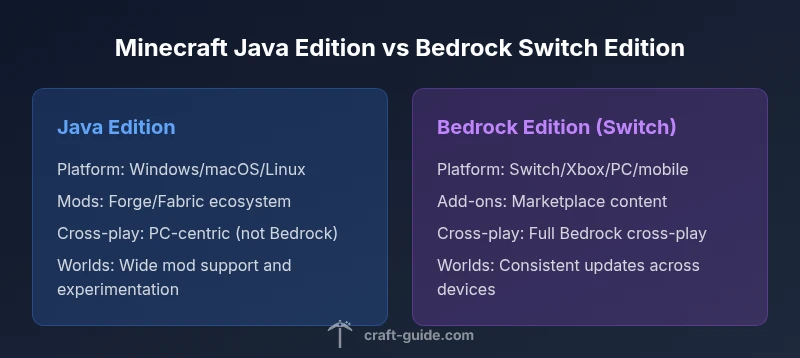
Minecraft Switch Edition is Bedrock-based and cross-platform across Nintendo Switch, Xbox, Windows, and mobile, while Java Edition remains PC-exclusive with deeper modding. For a concise takeaway: choose Bedrock for cross‑play and console play; choose Java for modding and PC‑only features.
Context: Why the difference matters
According to Craft Guide, the difference between Minecraft and Minecraft Switch Edition isn’t merely branding. It reflects underlying software families, platform capabilities, and the ecosystems that surround each version. For players, the choice shapes access to mods, cross‑play, performance expectations, and how you share worlds with friends. In this article, we break down the core distinctions in practical terms, so you can decide which edition fits your setup before investing time or money. The Craft Guide team found that many newcomers underestimate how much platform determines mod availability, server access, and even how seeds generate in the world. By framing the discussion around platforms and goals, we help you compare apples to apples rather than chasing rumors.
Platform ecosystems: where each edition runs
Minecraft Java Edition runs on PC (Windows, macOS, Linux) and is known for wide mod support, custom maps, and a preference for keyboard/mouse input. Minecraft Switch Edition, a Bedrock-based variant, runs on Nintendo Switch and is designed to work smoothly with controllers and mobile connections. The Switch edition emphasizes cross‑play with other Bedrock devices and benefits from consolidated updates across platforms, but it lacks many PC‑specific features and mod ecosystems that Java enjoys. This contrast matters for players who value customization versus portability and shared multiplayer experiences across devices.
Core gameplay differences: controls, performance, and updates
Java Edition’s Java-based engine offers nuanced control schemes, advanced graphics options, and an environment that supports heavy modding. It can feel more demanding on hardware but rewards players who crave performance tuning, precision aiming, and expansive world-building. Bedrock Edition, including Switch, is optimized for a range of devices with consistent performance and streamlined control mappings. Updates tend to be coordinated across Bedrock platforms, ensuring players on Switch, Xbox, and Windows can access new features roughly in parallel, though some platform-specific caveats may apply.
World generation and content: seeds, biomes, and blocks
Java and Bedrock generate worlds with overlapping but not identical rules. Seeds that work the same in Java can yield different landscapes in Bedrock due to divergent world generation algorithms. This distinction matters when you’re sharing seed-based challenges or attempting to recreate a famous map. Additionally, Bedrock’s content sets differ in certain blocks, items, and mechanics compared with Java, which can influence building plans and survival strategies. Practically, you’ll want to choose your edition first and then seek community tutorials targeted to that edition to avoid cross‑edition confusion.
Cross-platform play and multiplayer constraints
Bedrock Edition’s cross‑play capability is a key selling point, enabling multiplayer across Switch, Xbox, Windows 10/11, and mobile devices. Java Edition remains PC‑centric, with no official cross‑play to Bedrock. Server ecosystems, modded servers, and marketplace offerings align with the edition’s underlying tech. If your friend group spans several devices, Bedrock on Switch is the logical choice; if your group is PC‑first and mod‑driven, Java Edition may better match your playstyle.
Modding, add-ons, and customization
Java Edition hosts a rich modding landscape through Forge and Fabric, supporting extensive gameplay changes, new dimensions, and custom tools. This ecosystem is a defining feature for many players looking to tailor every aspect of their world. Bedrock Edition on Switch supports add-ons and behavior packs via the official marketplace, which provides curated content but cannot rival Java’s modding depth. Understanding these constraints helps players gauge long-term investment and creative potential.
Realms, servers, and multiplayer economy
Java Realms exist as a vanilla, cross‑compatible option for PC players, but server ecosystems for Java often rely on third‑party hosting with a wide variety of rules and mods. Bedrock Realms offer a straightforward cross‑platform multiplayer path with a subscription model and curated content through the marketplace. The two ecosystems diverge in server compatibility, world transfer options, and control over modding. If you want a simple, stable multiplayer environment, Bedrock Realms are usually easier to set up across devices.
Price, availability, and updates timeline
Edition pricing varies by platform, store, and regional promotions. Java Edition is typically centered around PC purchases and digital platforms with community-driven update cadences, while Bedrock Edition aligns with console stores and cross‑platform update schedules. In practice, Java often leads with major feature introductions for mods, while Bedrock emphasizes synchronized updates across devices with a focus on stability and cross‑play. Craft Guide Analysis, 2026 provides a framework for evaluating these differences over time.
Import/export worlds and data transfer considerations
Transferring worlds between Java and Bedrock is not supported by Mojang’s official tooling. Creators who want to move maps between editions usually rebuild structures or port assets manually, which can be time-consuming and imperfect. Keeping a backups strategy is essential when deciding to switch editions or when sharing worlds with friends who use different platforms. Non-transferability is a key practical constraint that affects long‑term collaboration.
Practical guidance for choosing your edition
Start by mapping your priorities: cross‑platform play and couch co‑op? Modding depth and PC customization? For social play across multiple devices, Bedrock on Switch is the pragmatic choice. For deep tinkering, custom maps, and frequent experimentation, Java Edition on a capable PC is unbeatable. Plan around your primary device, budget, and the type of multiplayer you value most.
Common misconceptions and quick clarifications
A common misbelief is that all Minecraft Editions offer identical content and features. In reality, Java and Bedrock diverge in mod support, content availability, and cross‑play options. Another misconception is that seed quality is identical across editions; seed behavior varies with the world‑generation algorithms used by Java and Bedrock. By keeping edition-specific expectations in mind, players can avoid frustration and align their build plans with the right edition.
Edition-choosing decision tree and takeaways
In short, the decision boils down to platform and play style. If you prioritize mods, PC performance, and open-ended customization, choose Java Edition. If you want cross‑platform multiplayer, portability, and a unified ecosystem across devices, choose Bedrock Edition (Switch). Craft Guide’s research emphasizes aligning your edition choice with your primary device and your social gaming goals.
Comparison
| Feature | Minecraft Java Edition | Minecraft Switch Edition (Bedrock) |
|---|---|---|
| Platform availability | Windows/macOS/Linux | Nintendo Switch |
| Cross-play capability | Limited/none with Bedrock (not cross with Bedrock) | Full Bedrock cross-play across Switch/Xbox/PC/mobile |
| Modding and customization | Extensive support via Forge/Fabric | Limited to add-ons/behavior packs; no traditional mods |
| World generation consistency | Different seed handling; distinct worldgen rules | Seeds may yield different landscapes between editions |
| Performance and controls | Greater control with PC hardware; customizable settings | Optimized for console/portable play; consistent performance |
| Update cadence | Independent Java update cycle; modding-driven cadence | Bedrock updates coordinated across platforms |
Benefits
- Wide modding ecosystem in Java Edition
- Strong cross‑play support with Bedrock on multiple devices
- Fair performance on capable PCs with Java
- Bedrock on Switch enables couch co‑op and portability
- Unified marketplace and realms options for Bedrock
Negatives
- Java Edition relies on PC hardware and can be demanding
- Bedrock on Switch has limited traditional mods
- Cross‑edition gameplay is not supported (Java vs Bedrock)
- World transfer between editions is not possible
- Bedrock on Switch may have feature gaps compared to Java during some updates
Bedrock Switch Edition is best for cross‑device play and console-friendly gameplay; Java Edition is best for modding and PC-centric flexibility
If your priority is playing with friends across devices and on a couch, Bedrock on Switch is the smarter pick. If you want deep customization, a robust modding scene, and maximum control over settings, Java Edition on PC stands out. Craft Guide’s verdict is to align your choice with your platform and playstyle.
People Also Ask
Can Minecraft Java Edition players play with Minecraft Switch Edition players?
No. Java Edition and Bedrock Edition (Switch) are separate and do not support cross-play. If you want to play together, all players must use Bedrock Edition on their respective devices.
Java and Bedrock editions don’t cross-play.
Is it possible to transfer a world from Java Edition to Bedrock on Switch?
World transfers between Java and Bedrock aren’t supported. You would need to replicate structures or use seeds to recreate worlds manually.
World transfer between editions isn’t supported.
Does the Switch edition support mods in the traditional sense?
No traditional mods. Bedrock on Switch supports add-ons and behavior packs via the official marketplace, but not the full Forge/Fabric mod ecosystems.
Mods aren’t available the same way on Switch.
Which edition is cheaper or better for beginners?
Pricing varies by platform and store; neither edition guarantees long-term savings. For beginners, Bedrock on a current console or PC with a subscription can be cost-effective if cross‑play matters.
Prices vary; consider platform and cross-play needs.
How often do updates arrive on each edition?
Both editions receive major updates from Mojang, but cadence and feature sets can differ by platform; Java often leads with experimental features earlier.
Both get major updates, timing can differ.
Can I access Realms or servers on both editions?
Bedrock Realms enable cross‑platform multiplayer; Java Realms are platform-specific. Servers differ between editions and aren’t interchangeable.
Bedrock Realms exist; Java Realms are separate.
The Essentials
- Choose Bedrock if cross‑platform play matters
- Opt for Java if you want mods and PC customization
- Java and Bedrock generate different worlds; seeds aren’t interchangeable
- Transferring worlds between editions isn’t supported
- Plan around your primary device and multiplayer goals