Minecraft with Guns: A Practical Modding Guide
Learn how to safely add gun-themed combat to Minecraft with mods, loaders, and balance strategies. This comprehensive guide covers setup, compatibility, playstyles, and server considerations for a fun, fair experience.


You will learn how to safely enable gun-themed combat in Minecraft using mods, how to select compatible mod loaders, and how to balance weapons for fair play. This quick guide covers core frameworks, setup prerequisites, and safety practices to protect your world and keep gameplay fun for players of all experience levels.
What does 'Minecraft with Guns' mean?
In Minecraft, 'guns' are game-design tools added through mods, not real weapons. The phrase describes a modded experience where combat includes firearm-like items, reload mechanics, ammo, and tactical choices. According to Craft Guide, for many players this means integrating fictional firearms that enhance play without dethroning vanilla progression. The goal is to expand combat variety while preserving exploration, building, and cooperation.
- Weapon classes: pistols, rifles, shotguns (conceptual, not real-world models)
- Ammunition types: common, rare, and special ammo with trade-offs
- Reload and overheating systems: emphasize timing and resource management
- Sound and visuals: cosmetic effects that feel satisfying without breaking immersion
- Balance considerations: damage pacing, ranges, and crafting depth should complement existing systems
Balancing this content requires testing and community feedback; what works on one server may not on another.
Core Modding Frameworks for Guns
Minecraft gun mods rely on a mod loader (like Forge or Fabric) to run custom code. Forge offers a broad ecosystem of weapons-related addons, while Fabric emphasizes lightweight performance and rapid updates. For players new to modding, Forge tends to be more beginner-friendly because of its mature tooling and large documentation base, but Fabric can be a leaner choice on lower-end systems. Regardless of the loader, ensure the version you pick matches both the Minecraft version you play and the mods you want to install. Always back up your worlds before trying new combinations.
Compatibility is key. Some mods require additional libraries or helper mods that extend game hooks and item registries. Plan a small, testable load order, verify that each mod loads without errors, and keep a clean mod folder to minimize conflicts. Finally, consider running a local test world to gauge performance and balance before introducing changes to a public server.
Design Principles: Balance, Realism, and Safety
The design of gun-themed content should respect the core Minecraft experience. Focus on balance: limit how quickly weapons can be obtained, cap ammo pools, and ensure reload times reward planning. Realism can be stylized rather than literal—players enjoy signals of effort and progression without seeing realistic firearms that clash with the game's visual language. Safety means protecting younger players and avoiding graphic depictions; use abstract or stylized visuals for weapons and implement server-side checks so weapons cannot be used to grief others. Plan for clear rules about weapon use in multiplayer, and provide opt-out options for players who prefer vanilla combat.
Installation and Setup: A Practical Overview
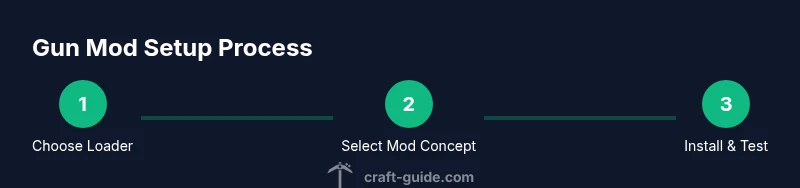
Setting up gun-themed content begins with a clear plan. Decide whether you will use a Forge- or Fabric-based mod loader, and identify a small, testable weapon set to start. Prepare a fresh test world and a dedicated mod folder to prevent conflicts with your main save. Install the loader, then drop the base weapons and core libraries into the mods folder. Start Minecraft in a test profile to verify that the game launches without crashes. If issues arise, revert to a clean backup and re-check mod compatibility notes. Finally, document your load order and balance choices so players on a server can reproduce the setup.
Example Playstyles and Scenarios
A modular gun system enables a few distinct playstyles. Courageous combat squads can engage in controlled arena skirmishes with limited ammo and cooldowns to encourage strategy. Cooperative defense scenarios might task players with fortification and defense planning, using guns as optional tools rather than primary weapons. For exploratory play, weapons can be tied to progression, rewarding exploration and resource gathering while keeping combat challenges fair. Each style benefits from clear rules, balanced loot, and community agreement on weapon use.
Troubleshooting Common Issues
Crashes or crashes on startup usually stem from version mismatches or missing libraries. Start by confirming that every mod and loader version aligns with your Minecraft version, then re-check dependencies. If performance is laggy, test with a small weapons set and reduce render distance to isolate the issue. Conflicts between mods can cause item duplication, inventory glitches, or world corruption; keep a clean mod list and use a dedicated test world to reproduce bugs before applying fixes to a live server. Regularly review logs for error messages and search community forums for targeted solutions.
Safety and Server Etiquette
When introducing gun-themed content, establish clear server rules and a culture of consent. Provide opt-out options for players who prefer vanilla combat, and clearly label weapons to avoid confusion. Consider disabling weapon use in certain zones or during events to prevent griefing or harassment. Regular backups, permission systems, and moderation help maintain a positive community around modded gameplay.
Tools & Materials
- Minecraft Java Edition(Ensure the game version matches loader and mods)
- Mod Loader (Forge or Fabric)(Choose based on mod compatibility; Forge is widely supported)
- Gun-themed Mods Concept Pack(Prefer trusted sources; start with a small weapon set)
- Backup Tool(Back up worlds and configs before modding)
- Minecraft Launcher(Use a launcher with profile management and mod support)
- Test World(Create a separate world to test loads and balance)
Steps
Estimated time: 60-120 minutes
- 1
Choose your mod loader
Decide between Forge or Fabric based on weapon mod compatibility and ecosystem. Verify that your Minecraft version matches the loader and the mod libraries you plan to use.
Tip: Start with Forge for broad support; keep a simple test environment first. - 2
Select a gun concept pack
Pick a small, cohesive weapon set concept that includes basic pistols, rifles, and ammunition mechanics. Review dependencies and ensure there are no known conflicts with other mods you plan to install.
Tip: Limit the initial load to 1–2 weapon classes to test balance calmly. - 3
Install loader and base mods
Install the chosen loader and drop the base weapon mods into the mods folder. Launch Minecraft in a clean profile to confirm it starts without errors.
Tip: Always back up first; use a test world to verify stability. - 4
Configure balance and progression
Adjust weapon stats via config files or in-game settings to ensure ammo, cooldowns, and crafting depth feel fair relative to vanilla content.
Tip: Document decisions so players can reproduce the setup. - 5
Test locally with a small group
Run a private test session in a separate world or server with a few trusted players to observe balance and etiquette.
Tip: Collect feedback and iterate on adjustments before public release. - 6
Deploy to server and monitor
Once balance is satisfactory, add the mod pack to your server, set clear rules, and monitor for issues like conflicts or griefing.
Tip: Keep backups and establish moderation channels for players.
People Also Ask
Is it legal to use gun mods in Minecraft?
Mods are generally allowed in personal play and on private servers, but you should respect server rules and Mojang's EULA. Always verify permissions when playing on public or shared servers.
Yes, for private use and compliant servers. Always check server rules and your launcher terms.
Do gun mods work with vanilla Minecraft?
Gun mods require a mod loader and cannot be fully integrated into the base game without modifications. They change gameplay and rely on the modding framework to function.
They need a mod loader and aren’t part of vanilla Minecraft.
How can I balance guns with swords and bows?
Use cooldowns, limited ammo, and progression-based access to guns. Balance should incentivize strategic play rather than overpowering vanilla combat.
Balance is about cooldowns, ammo limits, and progression.
Can I play on a server with others who don’t use mods?
Typically not unless you run a fully modded server everyone has installed. Consider separate servers or opt-in rules to avoid crashes and unfair advantage.
Usually, all players need the mod pack to join.
What are common installation issues?
Version mismatches and missing dependencies are the primary culprits. Recheck compatibility notes, verify the load order, and consult logs for error messages.
Most issues come from version mismatches; check dependencies and logs.
Are gun mods suitable for younger players?
If content includes firearms as stylized, non-graphic items, it can be appropriate with parental guidance and server rules. Avoid graphic depictions and ensure opt-out options exist.
Use stylized weapons and provide opt-outs for younger players.
Watch Video
The Essentials
- Define weapon scope and balance before installing mods
- Test in a dedicated world to avoid disrupting main gameplay
- Back up regularly and document your load order
- Educate players on rules and server etiquette