Minecraft with and without Shaders: A Thorough Comparison
Explore minecraft with and without shaders, analyzing visuals, performance, and gameplay trade-offs. Learn how shader packs transform lighting, shadows, and atmosphere, and how to optimize for balanced performance.


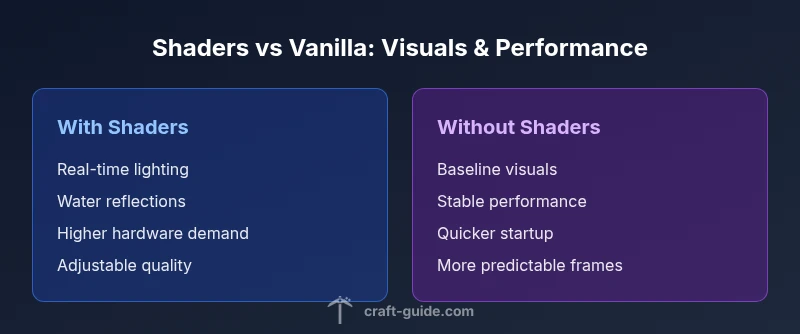
Shaders dramatically alter Minecraft visuals while demanding more GPU power. For a quick takeaway, minecraft with shaders delivers dramatic lighting and shadows at the cost of higher hardware needs; vanilla visuals stay stable on lower-end systems. Use a light shader to balance visuals and performance, or run vanilla for smooth, predictable FPS. See our detailed chart for precise trade-offs.
Understanding the Visual Divide: minecraft with and without shaders
The phrase minecraft with and without shaders captures a broad spectrum of visual quality. Shaders rewrite much of the lighting, shadows, water, and post-processing, transforming scenes from simple blocks to cinematic landscapes. In practice, players who compare minecraft with and without shaders notice almost instant changes to sky color, cloud movement, and water reflections. The decision hinges on how much mood and atmosphere you want in your worlds, and whether your hardware can sustain the enhanced effects without sacrificing gameplay responsiveness.
Performance and hardware considerations
Shaders place greater demands on GPU, VRAM, and memory bandwidth. Even on systems that run vanilla Minecraft smoothly, enabling shaders can cause FPS to fluctuate or dip during complex scenes. The key metrics to monitor are frame rate stability, texture streaming, and load times, all of which influence how consistently you experience minecraft with and without shaders across different biomes and times of day. For many players, a midrange GPU with ample VRAM provides a sweet spot, while older or integrated graphics may struggle when render distance is high and shader complexity is aggressive.
Visual differences: lighting, shadows, and post-processing
Lighting models are the most visible change. Shaders introduce real-time global illumination, soft shadows, ambient occlusion, and color grading that alters the mood of every scene. Water surfaces gain reflective ripples, skies shift through more natural dawn and dusk tones, and fog effects can add depth in distant horizons. Post-processing effects like bloom and motion blur enhances cinematic quality but can feel overbearing if you prefer a crisp, blocky aesthetic. Vanilla lighting remains straightforward and predictable, which some builders prefer for precise texture work.
Gameplay consequences: immersion vs usability
Better visuals can intensify immersion, but they don't always improve gameplay. Shader packs may affect menu clarity, UI brightness, and visibility during night cycles. Additionally, some shader features are tied to frame timing, which means control inputs might feel slightly delayed on lower FPS. This trade-off is important for players who pursue speedrunning, parkour maps, or PvP arenas, where consistent timing is essential. For creative builds and exploration, shaders can unlock new storytelling possibilities without requiring additional tools.
Shader types and how they shape the experience
Shader packs vary in complexity and aesthetic approach. Some focus on realism with accurate lighting angles; others lean toward fantasy color palettes and vibrant skies. The shader ecosystem also includes versions that work with resource packs, creating cohesive textures and lighting. When evaluating shaders, consider the target resolution, shadow quality, bloom strength, and water reflection fidelity. Keep in mind that not all packs are compatible with every Minecraft version or mod setup, so plan to test a couple of candidates to find the right balance for your world.
Modding and compatibility: shader support in a modded Minecraft
OptiFine, Forge, and Fabric are commonly used to enable shader support and customize rendering. In modded environments, compatibility becomes a moving target: some mods overwrite or bypass certain lighting, while others rely on specific rendering hooks. Before adding shaders, review load orders and ensure that shader-related libraries are loaded after core mods. If you experience conflicts, temporary removal of resource packs or a rollback to a lighter shader can help restore stability while preserving your creative vision.
Optimizing for performance: settings, RAM, and load order
A disciplined approach to optimization starts with a clear goal: visualize more detail without tanking performance. Allocate sufficient RAM to the Java process, enable a capped render distance, and choose shader packs with adjustable quality settings. Turn down features such as shadow resolution, ambient occlusion steps, and bloom intensity if you notice stuttering. Note that shader performance is highly map-dependent: dense forests, large oceans, or redstone-heavy builds may tax the pipeline more than open plains or built-in test worlds.
Aesthetics and map design with shaders
When crafting maps intended for shader-enabled play, think about how lighting reveals geometry and color. Subtle height variations and texture choices take on new personality under realistic lighting. Texture packs become more influential because shaders modulate how textures respond to light. Plan your palettes and atmosphere ahead of time; what looks good in vanilla may feel flat under bloom and color grading, while a well-tuned shader setup can make even simple builds feel cinematic.
Common issues and troubleshooting when using shaders
Shader usage is not without pain points. Common problems include flickering textures, black screens on startup, or performance stutter when shaders engage complex lighting. Fixes typically involve updating graphics drivers, selecting a lighter shader, verifying compatibility with the Minecraft version, and ensuring the correct OptiFine or Forge/Fabric version. If you experience poor night visibility, tweak the shadow distance and color grading; if positions lag during transitions, reduce render distance or shader quality temporarily.
How to choose the right setup for your goals
Your goal—whether aesthetic showcases, content creation, or efficient survival play—drives the shader decision. For builders prioritizing mood and screenshot quality, shaders can be indispensable; for competitive play or streaming on modest hardware, vanilla or light shader presets deliver dependable performance. Start with a low-intensity shader, test across biomes, and compare the visuals and FPS against vanilla. The choice is about balancing mood with playability.
Practical testing plan: a step-by-step approach to evaluate both setups
Create a controlled testing scenario by loading a compact world with a mix of biomes, water bodies, and lighting. Enable your chosen shader, record FPS variance, screen tearing, and load times across different times of day. Repeat the test with vanilla visuals and the same world settings. Compare screenshots for lighting accuracy, shadow softness, and color grading while noting any UI readability issues. This disciplined approach yields actionable data for decision-making.
Comparison
| Feature | Minecraft with shaders | Minecraft without shaders |
|---|---|---|
| Visual fidelity | High dynamic lighting, shadows, reflections | Baseline lighting, no post-processing |
| Performance impact | Significant FPS variability; higher GPU demand | Generally smooth and stable on most hardware |
| Resource usage | Increased VRAM and memory bandwidth | Lower memory usage and texture streaming |
| Load times | Longer startup and world loading with shader hotload | Faster load times typical of vanilla |
| Compatibility | Requires shader-compatible mod setup (OptiFine/Forge/Fabric) | Highest compatibility with vanilla or minimal mods |
| Best use case | Creative builds, content creation, immersive exploration | Survival and competitive play on modest hardware |
Benefits
- Enhanced lighting and atmosphere for immersive builds
- Improved water, sky, and reflections for cinematic visuals
- Expansive shader ecosystems with adjustable quality
- Supports creative storytelling and screenshot quality
Negatives
- Higher hardware requirements and potential FPS dips
- Possible mod/texture-pack compatibility issues
- Longer startup times and more tuning needed
- Not all shader packs suit every Minecraft version
Shaders offer superior visuals on capable hardware; vanilla remains the safest choice for consistency.
If your goal is maximum atmosphere, invest in shaders and optimize settings. If you require reliable performance, start with vanilla and consider light shader options when hardware permits.
People Also Ask
What is the main difference between minecraft with shaders and without shaders?
Shaders modify lighting, shadows, water reflections, and color grading, creating a cinematic look. Vanilla, or without shaders, renders simpler lighting and fewer post-processing effects.
Shaders change lighting and atmosphere, while vanilla keeps things basic and stable.
Do shaders require a powerful GPU to run well?
Yes, shaders generally demand a more capable GPU and more VRAM. Performance varies with shader quality and game settings, so testing with lighter packs is recommended.
Yes, most shader packs need a stronger GPU; start with a lighter pack to test.
Can shaders work with Bedrock Edition or only Java?
Shaders are primarily used in the Java Edition through mods like OptiFine. Bedrock Edition supports different rendering options and does not use the same shader mod workflow.
Shaders mostly work with Java; Bedrock uses different options.
What starting settings should I adjust to optimize shader performance?
Begin with a low shader quality, reduce render distance, and limit shadow resolution. Allocate enough RAM and enable V-Sync to stabilize performance while you test.
Start with low shader quality, small render distance, and enough RAM.
Will shaders affect mod compatibility?
Some mods rely on specific lighting or rendering behavior, so shader use can cause conflicts. Check load order and ensure you test with and without shader-related mods.
Shaders can clash with some mods; test before committing.
Are there shader packs suitable for low-end PCs?
Yes, there are lighter shader packs designed for modest hardware. Pair them with conservative settings to maintain smooth gameplay.
There are lighter shader options for lower-end machines.
The Essentials
- Assess hardware before enabling shaders
- Test multiple shader packs to find balance
- Tune settings for map-specific performance
- Check mod compatibility before adding shaders
- Use shader-friendly texture packs for cohesion