Minecraft PC Price Guide 2026: Budget to High-End
Explore the costs of running Minecraft on PC, from entry-level builds to high-end rigs, with practical budgeting advice and realistic price ranges for 2026.


Why Minecraft Computer Price Matters
Understanding minecraft computer price helps players budget realistically for a PC that can run both Java and Bedrock smoothly. The price landscape shifts with component availability, regional market differences, and the demand for higher frame rates or shader packs. Craft Guide's analysis shows that small price gaps can unlock substantial performance gains when you optimize the right parts. This section lays the foundation for a price-aware approach to selecting components, planning upgrades, and avoiding overpaying for features you won't use. By pairing workloads with budget bands, players move from guesswork to a structured buying plan.
What Drives the Price: Core Components
Several core components determine the minecraft computer price, and the effect of each part varies by intended play style. The CPU and memory are pivotal for Java Edition and large mod lists, while the GPU becomes more critical when shader packs or real-time ray tracing are involved. Storage size and drive speed influence load times and world streaming, yet price differences between SSDs and HDDs are typically less dramatic than GPU deltas. A balanced build generally prioritizes a capable processor and ample RAM first, then allocates budgets to graphics and storage. Finally, a solid power supply and reliable case help protect the investment over time.
Budget Tiers and Expected Performance
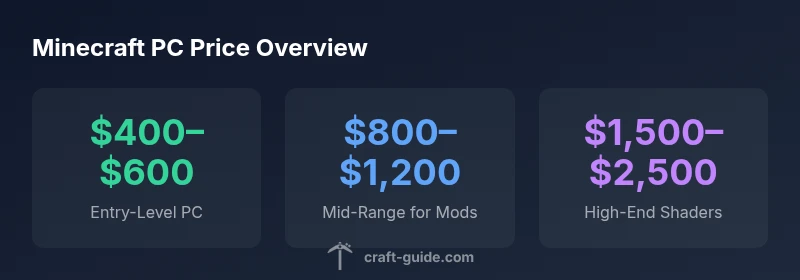
- Entry-level: Basic play at 1080p, modest settings, solid 60fps on most maps. Expect system costs around the lower end of the price spectrum. This tier favors CPU and RAM over frills.
- Mid-range: Comfortable performance for mods and lightweight shaders, stable 60fps, and smoother world loads. This tier often falls in the $800–$1,200 range and balances CPU, RAM, and a mid-tier GPU.
- High-end: Shader-heavy experiences, large mod lists, and higher resolutions with more stable frame rates. These builds typically push toward $1,500–$2,500 and focus on GPU power and fast storage, with careful power and cooling planning.
Java Edition vs Bedrock Edition: Price Implications
The hardware needs of Java Edition can be more demanding than Bedrock when mods and larger world generation are involved, which affects the minecraft computer price indirectly. Bedrock tends to run well on lower specs on some platforms, but overall the cost difference comes from target performance rather than edition labeling. In practice, you should budget for modest RAM upgrades and a decent CPU for Java if you plan to mod or use resource packs.
Prebuilt vs Custom Build: Pros, Cons, and Costs
Prebuilt systems offer convenience and warranty coverage, often without the need to source every component yourself. They can be cost-effective during sales, but may include bloatware and non-ideal layouts for future upgrades. Custom builds let you tailor parts to your budget, maximize performance per dollar, and upgrade selectively. While a DIY build can save money, it requires time and research. In either case, compare total cost of ownership, including cooling, PSU efficiency, and potential warranty coverage when evaluating minecraft computer price.
Peripherals and Set-Up Costs
A realistic minecraft computer price includes peripherals and setup. Monitor quality affects your perceived performance; a 1080p, 60–144 Hz display pairs well with mid-range rigs. Budget keyboards, mice, and headsets can suffice, but a reliable SSD and a clean Windows license or alternative OS can noticeably improve load times and smoothing. Don’t overlook a suitable power supply, case cooling, and cable management, since poor thermals can throttle performance and shorten component life.
Shopping Tips to Optimize minecraft computer price
- Plan around a core component cycle: upgrade CPU/RAM first, add a GPU later if needed.
- Look for bundles and sales, and consider refurbishments or gently used parts from trusted sources.
- Compare total cost of ownership including warranties, OS licenses, and essential peripherals.
- Prioritize memory and storage speed over marginal GPU gains for stable Minecraft performance.
- Review user benchmarks and real-world tests focused on Minecraft frames per second and load times.
Common Mistakes to Avoid When Budgeting for Minecraft PC
- Failing to set a maximum price before shopping, leading to overpaying for features you won’t use.
- Focusing exclusively on GPU power while neglecting RAM and CPU, which can bottleneck performance.
- Underestimating the importance of reliable cooling and a good power supply, risking thermal throttling and instability.
- Neglecting future upgrade paths, making you locked into components that limit growth.