How to Create a Mod for Minecraft: A Step-by-Step Guide
Learn to create a Minecraft mod from setup to distribution. This educational guide covers Forge vs Fabric, workspace setup, coding a simple mod, testing, and best practices for stable mods.


You can create a Minecraft mod by choosing Forge or Fabric, setting up a Java-based development workspace, and writing a simple mod that adds a new item or block. This guide walks you through setup, coding, testing, and packaging, with practical tips for beginners and troubleshooting guidance for common pitfalls.
What is modding in Minecraft and what you can build
Modding Minecraft means writing code that the game loads to change how things work, look, or interact. With Forge or Fabric, you can add new items, blocks, machines, or gameplay rules without altering the base game. The most common starting projects are simple items or blocks that provide a new function, like a glow-in-the-dark block or a basic tool that crafts differently. Over time, you can expand to new biomes, world generation tweaks, or automation systems. The key is to plan a small, testable feature first, then gradually build on it. Craft Guide emphasizes practical, hands-on practice rather than large, abstract concepts. Before you begin, write down the mod’s goal, a rough feature set, and how you’ll verify each change works in-game. This focus helps you stay organized and avoid feature creep. In this guide, you’ll see how to structure code, register-game content, and run your mod locally, so you can iterate quickly and confidently. By the end, you should have a working mod that you can share with friends or upload to a community platform.
Forge vs Fabric: choosing a modding platform
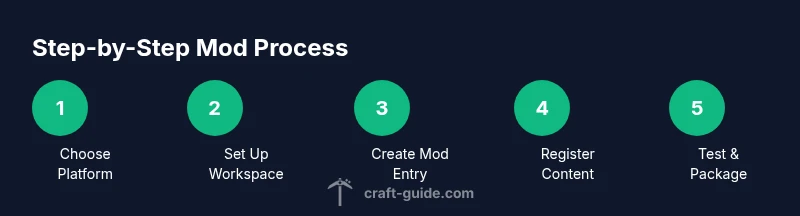
While both Forge and Fabric enable Minecraft modding, they have different ecosystems and workflows. Forge has historically offered more APIs, well-established documentation, and a broader ecosystem of example mods. If your goal is compatibility with a wide range of existing mods and a mature registry system, Forge is a solid starting point. Fabric is lighter, faster to setup, and often quicker to port to newer Minecraft versions. Your decision should reflect the Minecraft version you want to target, the APIs you plan to rely on, and how you plan to distribute your mod. Craft Guide’s analysis suggests that beginners pick one route and commit to it for their first project to minimize confusion and keep dependencies aligned. Regardless of platform, the same high-level steps—set up the workspace, register content, test, and package—still apply. If you’re unsure, try small proof-of-concept projects on both platforms to feel the differences in project setup, build tooling, and hot-reload behavior, then choose the one that aligns with your learning style and targets.
Prerequisites: Java, programming basics, and assets
A solid mod requires a grasp of Java basics—classes, methods, registries, and basic object-oriented concepts. You should also be comfortable reading error messages and navigating a project structure. In addition, gather assets such as textures and a permission-friendly license for your mod. Having Git or another version-control system set up is highly recommended so you can track changes and revert when something breaks. If you’re new to programming, spend a little time reviewing core concepts like data types, loops, and event-driven design, since patterns you learn in mods transfer to many other projects in the Craft Guide ecosystem.
Setting up your development workspace (Forge or Fabric MDK)
Download the modding MDK for your chosen platform, then import it into your IDE. The setup typically involves configuring Gradle, generating run configurations, and syncing dependencies so the project can build. This step creates a clean workspace where you can run the game directly from your IDE with your mod loaded. Remember to keep your environment consistent across teammates if you collaborate. After setup, verify that you can run the game from the IDE and see a basic log line confirming your mod is loaded. This establishes the foundation for adding features and testing iteratively.
Create a simple Hello World mod
To validate your environment, start with a minimal mod that prints a message when the game starts. In Forge, this usually means creating a main mod class annotated for loading and registering a basic lifecycle event. Here is a compact example to illustrate the idea:
package com.example.hellomod;

import net.minecraftforge.fml.common.Mod;

@Mod("hellomod")
public class HelloMod {
    public HelloMod() {
        System.out.println("Hello from Hellomod!");
    }
}
This basic skeleton confirms your environment is wired correctly and helps you grow from a one-file prototype to a full feature set. Once this runs, you can extend the mod by registering new items or blocks and hooking into game events.
Extending: adding a basic item or block with a simple texture
With a minimal mod running, try adding a new item. Create a registry entry, a simple texture placeholder, and a basic model to load it in-game. You’ll learn how registries connect your code to game content and why textures and models are essential for a coherent visual result. Keep your code modular by separating registration from gameplay logic. As you grow, you can swap the placeholder texture for a finished design and add a texture atlas to optimize loading.
Testing and debugging: runClient, logs, and common errors
Run the client from your IDE to test changes in a controlled environment. Use the game logs to diagnose startup issues, missing assets, or registration errors. Common pitfalls include mismatched registry names, incorrect resource locations, or version mismatches between the mod and the game. Reproduce bugs with repeatable steps and keep a changelog as you iterate. When you see a crash, read the stack trace carefully, locate the failing class, and compare it against your registry names and file paths.
Packaging, distribution, and version compatibility
When your mod is stable, package it as a jar file and align it with the Minecraft version and modding platform you support. Check the ecosystem guidelines for CurseForge or Modrinth if you plan to distribute your work. Maintain version tags clearly and provide README instructions, dependencies, and a license to help other players safely use your mod. Prepare a small compatibility note for each Minecraft version you aim to support and offer a changelog that highlights breaking changes and new features.
Common pitfalls and best practices
- Start small and iterate frequently rather than writing a giant feature from the start.
- Keep your code modular with clean registries and well-documented methods.
- Test on all target Minecraft versions you intend to support, not just the latest. This helps prevent hard-to-trace crashes and incompatible APIs.
- Document dependencies and license terms so others can reuse your work legally and safely.
Next steps and learning resources
Continue exploring the Minecraft modding API, experiment with new features, and join a modding community for feedback. Practice by building progressively more complex mods, such as new blocks with unique behaviors or simple tech integrations. Remember to respect licenses and give credit where it’s due. Set concrete milestones for your learning path, like implementing a custom item, then a block with behavior, and finally a small automation system so you can demonstrate tangible progress.
Tools & Materials
- Java Development Kit (JDK)(Choose a version compatible with your modding platform and Minecraft target.)
- Integrated Development Environment (IDE)(Examples: IntelliJ IDEA Community Edition or Eclipse; configure Java support.)
- Modding MDK (Forge or Fabric) package(Download the official MDK for Forge or Fabric and import into your IDE.)
- Minecraft Launcher(Used for local testing of the mod in a clean environment.)
- Text editor or IDE extensions(Helpful for quick edits and scripting outside the main IDE.)
- Texture assets (placeholders)(Start with simple placeholders for item/block textures.)
- Git client (optional)(Version control helps track changes and collaborate.)
Steps
Estimated time: 2-6 hours
- 1
Choose your modding platform
Decide between Forge and Fabric based on your target Minecraft version and API needs. Forge offers a larger API surface and ecosystem; Fabric is lighter and quicker to set up. This choice guides your project structure and dependency management.
Tip: Be decisive early to avoid conflicting tooling later. - 2
Set up your development workspace
Download the MDK for your chosen platform, extract it, and import into your IDE. Run the Gradle tasks to generate run configurations and download dependencies so you can build and test locally.
Tip: Use a minimal, clean workspace to avoid path or cache issues. - 3
Create the mod entry point
Add the main mod class and annotate it so the game loads your mod on startup. This class will host registrations for items, blocks, and events that follow in later steps.
Tip: Keep the mod ID consistent across code and resources. - 4
Register a simple item
Register a basic item in the mod registry and provide a placeholder texture. Confirm that the registry wiring works before expanding to more complex features.
Tip: Start with a tiny feature to validate the build and run process. - 5
Build and run the client
Launch the client from your IDE to see your mod in a controlled environment. Look for startup logs and registry confirmations to verify success.
Tip: Check logs for missing assets or misnamed registries. - 6
Test interactions
Interact with your new item or block to verify basic behavior and prevent regressions. Note any unexpected interactions and plan small fixes.
Tip: Create a simple test plan to reproduce features. - 7
Debug and iterate
Use IDE breakpoints and logs to diagnose problems, then adjust code and rebuild. Keep notes of fixes for future reference.
Tip: Document fixes in a changelog for clarity. - 8
Package the mod
Assemble a runnable jar and ensure dependencies are correctly declared. Include a README with installation instructions and license terms.
Tip: Provide version metadata and a short usage guide. - 9
Publish and maintain
Choose a distribution platform and provide ongoing support and updates as Minecraft evolves. Plan for versioned releases and user feedback.
Tip: Engage with users; iterate based on real-world usage.
People Also Ask
What is the difference between Forge and Fabric?
Forge provides a large API surface and mature ecosystem, ideal for broad compatibility. Fabric is lighter and faster to set up, often preferred for newer versions. Choose based on your target MC version and API needs.
Forge offers a large API ecosystem, while Fabric is lighter and quicker to set up; select based on your version goals.
Do I need to know Java to mod Minecraft?
Yes. Java is the language most Minecraft mods use. A basic understanding of classes, methods, and registries will help you grasp core concepts quickly.
Yes, Java is essential for most Minecraft mods; you’ll learn as you follow the guide.
Can I mod Minecraft Bedrock Edition with Forge or Fabric?
Bedrock Edition uses a different modding system. This guide focuses on Java Edition with Forge or Fabric. Bedrock mods require separate tooling and APIs.
This guide covers Java Edition mods; Bedrock uses a different modding approach.
How long does it take to learn modding and build a mod?
It varies by complexity and prior programming experience. A simple mod can take a few hours to learn, while more advanced features may take days or weeks.
Time varies; a simple mod might take a few hours, more complex ones longer.
Where should I host and share my mod?
Most creators use GitHub for source hosting and CurseForge or Modrinth for distribution. Follow each platform’s guidelines and license terms.
You can host code on GitHub and publish the mod on CurseForge or Modrinth.
What practices help avoid crashes during mod development?
Test often, keep dependencies aligned with the target Minecraft version, and handle failures gracefully with robust logging.
Test often and align dependencies to prevent crashes.
Watch Video
The Essentials
- Start small, build iteratively to learn the workflow.
- Choose Forge or Fabric and stay consistent throughout the project.
- Test frequently to catch issues early and avoid crashes.
- Package your mod with clear versioning and documentation.
- Join a community to learn, share, and get feedback.