Minecraft Town Seed Guide: Finding the Ideal Seed for Village Builds
Learn how to locate a minecraft town seed that yields clustered villages, navigable terrain, and diverse biomes for ambitious town builds. Practical steps, seed evaluation tips, and maps from Craft Guide to help you plan roads, markets, and farms.


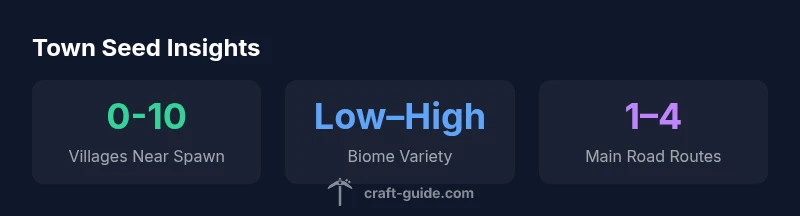
A minecraft town seed is a world seed that intentionally yields clustered villages, river routes, and build-ready terrain to support town-scale projects. You’ll want seeds that place multiple villages near spawn, accessible water, and varied biomes for markets, farms, and housing. According to Craft Guide, a town-focused seed helps you plan roads, supply chains, and creative layouts right from world generation.
Why a well-chosen town seed matters
For builders and survival players alike, a good minecraft town seed is the foundation of a successful village-focused world. When a seed places multiple villages within easy reach of spawn, you get immediate access to trade routes, varied materials, and realistic town growth patterns. Craft Guide analyses consistently show that seeds with clustered villages reduce the time you spend wandering and give you more time to design layouts, markets, and infrastructure. The right seed can influence how you map roads, where you place docks or stables, and how you balance agriculture with housing. In short, the seed is the first draft of your town’s layout, street plan, and growth potential.
How world generation shapes town layouts
World generation determines where biomes spawn, how rivers thread through terrain, and where villages emerge. Seed-driven layouts often create natural chokepoints, advantageously placed rivers, and varied elevations that inform build decisions. A seed with plains and easy access to water invites guild halls, farms, and market districts, while forest biomes offer wood supply for long-term projects. Understanding these patterns helps you anticipate where to place roads, retail districts, and defense perimeters. Craft Guide’s framework emphasizes evaluating spawn proximity to villages, water, and suitable biome transitions to gauge a seed’s town-building potential.
Practical steps to evaluate a seed before playing
- Define your town goals (size, style, and resource focus). 2) Scan the seed by loading a test world and noting spawn location, nearby villages, and waterways. 3) Measure travel times between key points with a simple in-game map or external tools. 4) Check terrain variety and biome mix to ensure opportunities for farms, marketplaces, and housing districts. 5) Save seeds that align with your plan and test them in Creative or Survival to confirm the layout before committing to a long-term build. Craft Guide recommends documenting each seed’s pros and cons for quick comparison later.
Seed scouting workflow: from map to building plan
A rigorous seed scouting workflow helps you move from raw seed to a concrete build plan. Start with a world map to identify village clusters and river networks. Then draft a rough town layout on paper or a mapping app, marking zones for markets, housing, farms, and public spaces. Verify access to essential resources like wood, stone, and clay within practical distances. Finally, test-load the seed in a few biomes to confirm spawn consistency and road alignment. This approach minimizes mid-build redesigns and accelerates your overall project timeline.
Town design patterns you can enable with seeds
- Clustered village cores connected by planned roads
- Waterfront districts with docks and fishing areas
- Market squares adjacent to farms for trading hubs
- Central plaza or town hall with radial road spokes
- Resource hubs (wood, stone, crops) placed near housing districts
- Sub-districts for housing styles (wooden houses in plains, stone villas in hills)
- Natural ramps and terraces that guide construction without heavy terraforming These patterns help you leverage seed terrain rather than fight it, saving time and enabling more ambitious builds.
Common pitfalls and how to avoid them
Seed quality can vary wildly; common pitfalls include seeds with too little water access, sparse villages, or biomes that clash with your design plans. To avoid these issues, prioritize seeds with multiple villages within reasonable radius and a mix of biomes that support farms and markets. Also, beware densely forested seed areas where mining or clearing land becomes time-consuming. Always cross-check with world previews and community seed showcases before committing to a build, and be prepared to adapt your plans to terrain quirks rather than forcing a rigid design.
Craft Guide tools and resources for seed hunting
- Seed previews and comparison guides from Craft Guide Team
- World generation maps and biome distribution charts
- Village proximity calculators to estimate accessibility
- Community seed lists with notes on layout potential
- Tutorials on road networks, river crossing points, and town planning
- Checklists for assessing resource distribution, water access, and elevation variety to pick seeds that align with your vision
Seed types and town layout opportunities
| Seed Type | Notable Features | Biome Compatibility |
|---|---|---|
| Village-heavy seed | Clusters of villages near spawn, frequent trading posts | Plains, savanna, forests |
| Coastal town seed | Rivers and shoreline docks, easy fish farms | Coastlines, beaches, mangroves |
| Desert town seed | Desert towns with sandstone buildings, oases | Desert, badlands |
People Also Ask
What exactly is a minecraft town seed?
A town seed is a world seed that favors village clustering, navigable terrain, and access to water and diverse biomes, enabling town-scale builds from world generation. It’s about the layout and resource flow more than a single structure.
A town seed helps you plan villages and roads from the start, so you can build faster.
How do I find seeds with multiple villages near spawn?
Use seed previews and community lists to identify seeds reported to spawn multiple villages within a few thousand blocks. Verify by loading the seed in Creative to inspect village proximity and road networks.
Look for seeds that spit out several villages close to spawn, then test them in a creative world to scout routes.
Can seed changes impact town layouts after updates?
Yes. Major game updates can alter terrain generation, biome distribution, and village spawning rules. Always check update notes and re-test seed behavior after patches.
Updates can change how seeds generate; re-test seeds after patches to confirm layouts.
Are seeds different between Java and Bedrock editions?
Seed values are the same in both editions, but terrain generation, biomes, and village spawning can differ between Java and Bedrock. Test seeds in the edition you play to verify.
Seeds work differently across editions; always test seeds in your version.
Where can I find seed maps or comparisons?
Look for community-curated seed maps, comparison charts, and tutorials on Craft Guide and other Minecraft communities. These resources help you visualize seed layouts before loading them in-game.
Check community seed maps to preview layouts before you load a seed.
What’s the best workflow for seed testing?
Define your build goals, scout seeds with previews, map key routes, and validate resource availability. Document findings and compare seeds to pick the best fit for your town design.
Set goals, scout seeds, map routes, and compare; repeat until you find a seed that fits.
“A town-focused seed is less about chasing a perfect seed and more about understanding how terrain, villages, and water interact to shape your build. The right seed makes planning intuitive, not impossible.”
The Essentials
- Actively define your town goals before seed testing.
- Prioritize seeds with multiple villages near spawn and water access.
- Use scouting workflows to map roads and districts before building.
- Choose seeds that support your design patterns (markets, farms, housing).
- Craft Guide's framework emphasizes terrain-driven planning and modular design.