Which Minecraft for Mac: Java Edition vs Bedrock Edition
Compare Java Edition and Bedrock on Mac to decide which Minecraft for Mac best fits your setup. Learn about native macOS support, mods, cross‑play, performance, and installation tips for Mac users.


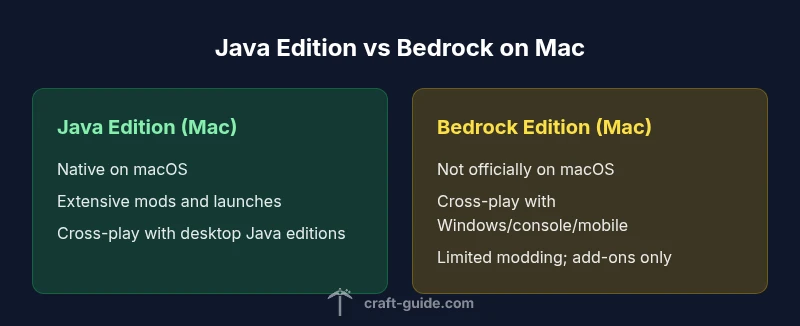
On a Mac, the practical pick is Java Edition, which runs natively on macOS, supports mods, and cross-plays with other Java users. Bedrock Edition is not officially supported on macOS, so cross‑platform play with Windows, consoles, or mobile is limited. If you want Bedrock on a Mac, you would need Windows via virtualization or cloud gaming options.
Mac-specific context: why your choice matters
Mac users face a distinct set of considerations when answering which minecraft for mac is the right pick. macOS provides a stable, Unix-based environment with strong graphics drivers, consistent performance, and a robust ecosystem of launchers and helpers. The two main Minecraft paths—Java Edition and Bedrock Edition—approach the desktop Minecraft experience from different angles. Java Edition delivers a traditional PC-centric experience: extensive modding, custom launchers, and cross‑platform play with other desktop players. Bedrock Edition prioritizes cross‑platform compatibility across Windows, consoles, and mobile, but is not officially available as a Mac-native option. This fundamental split affects mod availability, world-sharing options, and how you manage updates. According to Craft Guide, Mac players tend to start with Java Edition because of its open modding scene and rich customization, then evaluate Bedrock if their social circle relies on Bedrock devices. For most Mac gamers seeking a flexible, open-ended experience, Java Edition remains the safer starting point.
Java Edition on macOS: native support and benefits
Java Edition runs natively on macOS using the official launcher, with broad support for desktop mods, resource packs, and server compatibility. For players who want to tinker with mods, world generation tweaks, and custom launch options, Java Edition is the most straightforward path on a Mac. The edition benefits from a large community and frequent snapshots that let you test new features before release. Performance on a modern Mac often scales with allocated RAM and tuning of JVM parameters. Because Java Edition is desktop-first, it offers straightforward multi-monitor setups and easier integration with external tools like development environments for mapmaking or testing redstone mechanisms. Craft Guide's analysis suggests that Mac users who value long-term play, experimentation, and cross-platform play with other Java users will find Java Edition the most satisfying option, even when Bedrock's cross‑play appeal might tempt them to seek alternatives.
Bedrock Edition on Mac: current status and caveats
Bedrock Edition is marketed as cross‑platform across Windows, consoles, and mobile, but there is no official Mac-native client. On a Mac, this means Bedrock is not an officially supported desktop option. Some players run Bedrock on Mac through Windows emulation or virtualization, but this introduces complexity, licensing considerations, and potential performance penalties. Bedrock on Mac may be attractive for players who already play on Bedrock devices or who rely on cross‑play with friends on consoles or mobile. However, you should weigh the trade-offs: you lose Mac-native features, modding options are limited to add‑ons, and updates may follow a different cadence than Java. Craft Guide notes that the lack of a native Mac Bedrock client creates a natural barrier for those who want seamless desktop play with Bedrock devices. If cross‑platform collaboration with Bedrock devices is essential, you’ll want to install Windows on your Mac via Boot Camp or virtualization to access Bedrock properly.
Performance considerations on Mac hardware
Performance on macOS depends on hardware, driver support, and how you allocate system resources. Java Edition relies on the JVM and can benefit from increasing allocated RAM through the launcher, but this also means less memory for other processes. On Macs with integrated graphics or limited RAM, you may need to cap view distance, disable aggressive resource packs, or optimize render settings to maintain stable framerates during large builds or redstone-heavy sessions. Bedrock Edition’s performance on Mac is not native; if you attempt to run via virtualization, you will face an added layer of overhead that can reduce FPS and responsiveness. The Craft Guide team suggests maintaining a clean startup environment, updating graphics drivers, and choosing a launcher that offers reliable memory management. Overall, the Mac you own largely determines how smoothly either edition runs; newer Macs with sufficient RAM and discrete GPUs will handle either path better, but Java Edition generally remains more forgiving with performance tweaks.
Modding, addons, and customization
One of the most compelling differences between the two editions on Mac is modding support. Java Edition has a thriving modding ecosystem with widely used toolchains, mod loaders, and community packs that alter gameplay, biomes, or even core systems. Modding on Mac is well-supported by popular launchers and mod managers, though it can still be disrupted by game updates or loader compatibility issues. Bedrock Edition, by contrast, relies on official add-ons and marketplace content rather than traditional mods; the range of customization is smaller, and complex gameplay changes require alternative approaches. Craft Guide emphasizes that Mac players who want to push the boundaries of worldbuilding or AM: advanced automation will lean toward Java Edition, while those who prefer a stable, curated content experience with built-in marketplaces may find Bedrock’s add-ons adequate. Remember that unsupported mods can cause crashes, so back up worlds and test changes incrementally.
Cross-play landscape: what you can and cannot do
Cross‑play policy is a central differentiator. Java Edition supports cross‑play with other Java players across Windows and Linux, but it does not natively connect with Bedrock players on Windows, consoles, or mobile. Bedrock Edition enables cross‑play across Windows 10/11, consoles, and mobile devices; however, this cross‑play is not available with Java Edition players on Mac. If your friend group includes players on Bedrock devices, you may need to coordinate using Bedrock on Windows or a device that supports Bedrock, or facilitate cross‑platform play via clouds. Craft Guide notes that the cross‑play landscape for Mac users is uneven: you may get broad desktop cross‑play with Java peers, but Bedrock users on Mac will face a disconnect unless you set up a Windows environment. These realities are a decisive factor in your edition choice.
Graphics settings, resource packs, and performance tweaks
Both editions support high‑quality textures and resource packs, but there are important differences. Java Edition allows you to apply resource packs directly and customize shaders via mods or toolchains; you can push visual quality further by adjusting memory allocation and renderer settings. Bedrock Edition uses its own resource packs and the Marketplace, which streamlines content installation but restricts deeper customization. On a Mac, you’ll want to manage shader packs, optifine alternatives, and performance mods with care to avoid conflicts with updates. Craft Guide suggests starting with moderate render distance, turning off dynamic lighting, and testing several texture packs to balance visuals and FPS. If your Mac is newer with a capable GPU, you can push both editions toward higher frame rates, but Java Edition generally provides more control over the graphics pipeline through third-party shaders and performance mods.
Installation and launcher options on Mac
Installing Minecraft on a Mac is straightforward, but the path differs by edition. Java Edition uses the official launcher that downloads and manages updates automatically; you can tailor memory usage and add parameter flags for specific maps or servers. Bedrock Edition on Mac is not provided as a native macOS client; to access Bedrock you typically rely on Windows via a virtualization layer or other workarounds, which introduces extra steps and potential licensing considerations. The Mac user experience is smoother with Java Edition because you can keep everything in one place, quickly switch profiles, and manage mods. Craft Guide recommends using the official launcher for reliability, and keeping backups of your worlds and settings before applying major updates or trying new mods.
Security, updates, and maintenance
On Mac, maintaining security and staying up to date is crucial, especially when using mods and third‑party launchers. Java Edition with mods can expose you to loader conflicts, corrupted worlds, or security scares if mods come from untrustworthy sources; always download from reputable sources and verify file integrity. Bedrock, when run via Windows on Mac, inherits Windows security updates and the reliability of the Bedrock ecosystem, but you still face cross‑platform considerations. Keeping your Mac OS current, enabling Gatekeeper protections, and using reputable antivirus or anti‑malware software remain important. Craft Guide highlights that a disciplined approach to updates—backing up worlds before upgrading—helps minimize risk and ensures smoother gameplay across both editions.
Cost, licensing, and where to buy
Pricing for Minecraft on Mac follows the same general principle: both Java Edition and Bedrock Edition require a purchase, with pricing variations by platform and region. For Mac users, Java Edition is typically obtained via the official launcher, while Bedrock requires Windows or platform-specific stores if you are running Windows on your Mac. Because explicit numbers can change quickly, the best guidance is to check the official Minecraft site and your device's store page. Craft Guide notes that price parity and seasonal discounts can influence the decision, but the core difference remains the same: Java Edition offers desktop flexibility and modability, whereas Bedrock offers cross‑platform play with non‑desktop devices.
Recommendations by playstyle
For players who value modding, map-making, and desktop-centric play, Java Edition on Mac is the recommended default. If your social circle uses Bedrock devices and you require cross‑play with friends on Windows, consoles, or mobile, then Bedrock—ideally accessed via a Windows environment on your Mac or another device—may be worth pursuing. If you care about a curated content marketplace and straightforward content installation, Bedrock can be appealing. Craft Guide emphasizes tailoring your choice to your primary activities: creative builders will likely prefer Java; those who want consistent cross-play across devices may opt for Bedrock with the right setup.
How to decide: a decision tree
Use the decision tree: Do you want mods and desktop customization? Yes → Java Edition on Mac. Do you need cross‑play with consoles or mobile? Yes → Bedrock Edition, via Windows on Mac or another device. If you want both, consider running Java for desktop play and hosting a Bedrock server on Windows or using cross‑play solutions where possible. Craft Guide recommends mapping your social ecosystem first, then testing both options on a trial basis if feasible, to confirm the best fit for your Mac.
Comparison
| Feature | Java Edition (Mac) | Bedrock Edition (Mac) |
|---|---|---|
| Availability on Mac | Native macOS support | Not officially supported on macOS |
| Cross-play compatibility | Cross-play with desktop Java editions (Windows/Linux/macOS) | Cross-play with Windows, consoles, and mobile via Bedrock (not with Java on Mac) |
| Modding support | Extensive mods and loaders (Java) | Limited add-ons; no full mods (Bedrock) |
| Performance tuning | Extensive RAM allocation and JVM tuning (Java) | Fewer Mac-specific performance controls; virtualization overhead can apply (Bedrock via Windows) |
| Updates and ecosystem | Active Java updates with broad community content | Bedrock updates tied to platform cadence; Marketplace content |
| Best for | Mods, desktop customization, and Java cross-play | Cross-device play with Bedrock devices; simpler content delivery |
Benefits
- Rich modding ecosystem and customization on Java Edition
- Native macOS support and official launcher
- Greater control over performance and RAM allocation
- Strong desktop cross-platform play within the Java Edition family
Negatives
- Bedrock is not officially supported on macOS
- Cross-play between Java and Bedrock is not native on Mac
- Java Edition can be more demanding on older Macs
- Modding can break after updates
Java Edition is the recommended default path for Mac users
For Mac, Java Edition offers modding, desktop-based cross-play with other Java users, and native support. Bedrock on Mac is not official; choose Java unless cross-platform Bedrock is essential.
People Also Ask
Can I play Bedrock Edition on Mac natively?
There is no official Bedrock Edition launcher for macOS. Mac users who want Bedrock must run Windows on Mac (via Boot Camp or virtualization) or use cloud gaming. Java Edition remains the default Mac option.
Bedrock isn’t officially supported on Mac; you’ll need Windows on Mac or cloud options.
Is Java Edition required on Mac for mods?
Yes, Java Edition supports a wide modding ecosystem with loaders; Bedrock has limited modding. If modding is essential, Java Edition on Mac is the clear choice.
Mods work best on Java Edition.
Do Java and Bedrock worlds transfer between editions?
No. Worlds are edition-specific; you cannot directly transfer a Java world to Bedrock or vice versa. You’ll need to recreate or migrate content within its own edition.
Worlds don’t transfer across editions.
How do I install Java Edition on macOS?
Download the official Minecraft launcher from the website, install Java Edition, and adjust RAM and server profiles as needed. This path is straightforward on macOS and well-supported.
Get the official launcher, install Java Edition, and set memory.
Can I play with friends who use Bedrock from a Mac?
Only if you and your friends are on Bedrock on a supported platform. Cross-play with Java friends on Mac isn’t possible. Consider Bedrock on Windows or other devices for mixed groups.
Only Bedrock devices can cross-play with Bedrock friends.
What are the main cost considerations on Mac?
Prices vary by edition and platform; compare the official pages for the latest pricing. In practice, Java Edition and Bedrock typically require separate purchases, with discounts possible from time to time.
Prices vary; check the official site for current pricing.
The Essentials
- Choose Java Edition on Mac for modding and desktop play
- Bedrock on Mac isn’t officially supported
- Cross-play differences matter for groups
- Allocate RAM carefully for Java Edition
- Use the official launcher to stay updated